Freedom251 › AI Screenshot-to-Code Tools

Instant Tools Screenshot to Code
What Instant Tools Screenshot to Code is
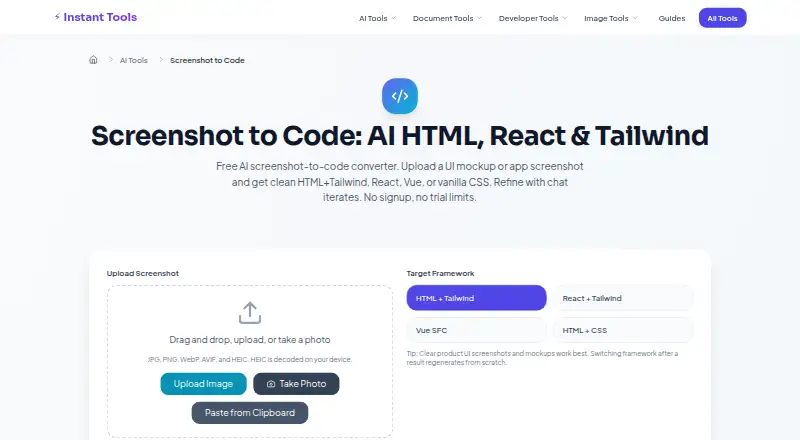
Instant Tools Screenshot to Code turns a UI screenshot or mockup into code for a selected web framework. It accepts JPG, PNG, WebP, AVIF, and HEIC images. Images can be uploaded, dragged and dropped, captured as a photo, or pasted from the clipboard; HEIC decoding happens on the user's device. Landing heroes, app dashboards, and mobile screens are among the screenshot types highlighted for this tool.
Choose HTML with Tailwind, React with Tailwind, Vue Single File Components, or vanilla HTML with CSS for the output. You can refine a generated result in chat for up to 6 turns per image, then copy or download the code. The free plan costs nothing, requires no signup, and includes no watermark and shared free-tier AI capacity. Requests generally use Google Gemini with free-tier fallbacks; Amazon Bedrock with Claude may be used when configured.
Dense data tables, custom icon fonts, and pixel-perfect spacing can require manual adjustments. Before shipping, the maker advises checking semantic HTML and ARIA, inline scripts and styles, and responsive breakpoints. The maker says screenshots are not stored on Instant Tools servers; third-party providers' data-handling terms apply during processing. Shared provider capacity can also lead to a temporary busy or rate-limit message during traffic spikes.
Who it suits
It suits people who want to turn UI screenshots, mockups, app screens, or photos into starter code for a web framework. It is especially suited to landing heroes, dashboards, and mobile screens, with manual review useful for more intricate layouts.
What it does well
- Accepts JPG, PNG, WebP, AVIF, and HEIC images.
- Offers four web framework output options.
- Supports upload, drag and drop, photo capture, and clipboard paste.
- Allows up to 6 chat refinement turns per image.
- Free plan requires no signup and adds no watermark.
What to know first
- Shared free-tier AI capacity can return busy or rate-limit messages.
- Dense tables, custom icon fonts, and pixel-perfect spacing may need manual adjustments.
- Third-party providers' data-handling terms apply during processing.
Limits
The free plan includes up to 6 refinement turns per image and shared free-tier AI capacity. During traffic spikes, a request may briefly receive a busy or rate-limit message.
Plans
| Plan | Billed and limits | Price |
|---|---|---|
| Free | Free; no signup · No watermark · up to 6 refine turns per image · shared free-tier AI capacity | Free |
As instanttools.io lists them, read 8 Oct 2026. The maker's own page has the final word.
Getting started
- Open the Screenshot to Code page on Instant Tools.
- Upload, drag and drop, photograph, or paste a UI image.
- Choose an output framework.
- Refine the generated result in chat for up to 6 turns per image.
- Copy or download the code.
Verdict
Choose Instant Tools Screenshot to Code if you want a no-signup way to turn a screenshot or mockup into code and refine it in chat. Look elsewhere if you need reliable handling of dense tables or exact spacing without manual adjustments, or if shared provider capacity is a concern.
Questions
How much does Screenshot to Code cost?
The Free plan costs nothing and is billed Free.
Do I need to sign up?
No. The Free plan does not require signup.
Which frameworks can it generate code for?
HTML with Tailwind, React with Tailwind, Vue Single File Components, and vanilla HTML with CSS.
Which image formats does it accept?
JPG, PNG, WebP, AVIF, and HEIC. HEIC images are decoded on the user's device.
Are uploaded screenshots stored?
The maker says screenshots are not stored on Instant Tools servers. Third-party providers' data-handling terms apply during processing.
Who makes Instant Tools Screenshot to Code?
The listed website is instanttools.io. The maker invites questions, suggestions, and feedback at [email protected] or through its GitHub issues.
Facts from Instant Tools Screenshot to Code's own pages
- Accuracy limits
- Dense data tables, custom icon fonts, and pixel-perfect spacing are harder cases and may need manual adjustments. · instanttools.io, 8 Oct 2026
- AI providers
- Requests generally use Google Gemini with free-tier fallbacks, and may use Amazon Bedrock with Claude when configured. · instanttools.io, 8 Oct 2026
- Best suited for
- The page highlights landing heroes, app dashboards, and mobile screens as suitable screenshot types. · instanttools.io, 8 Oct 2026
- Capacity limit
- The AI tools share free-tier provider capacity, so a request may briefly return a busy or rate-limit message during traffic spikes. · instanttools.io, 8 Oct 2026
- Code review
- The maker advises checking semantic HTML and ARIA, reviewing inline scripts and styles, and testing responsive breakpoints before shipping. · instanttools.io, 8 Oct 2026
- Founded
- 2026 · instanttools.io, 28 Sept 2026
- Image input
- It accepts JPG, PNG, WebP, AVIF, and HEIC images, and decodes HEIC on the user's device. · instanttools.io, 8 Oct 2026
- Input methods
- Users can upload, drag and drop, take a photo, or paste a screenshot from the clipboard. · instanttools.io, 8 Oct 2026
- Output frameworks
- Output options are HTML with Tailwind, React with Tailwind, Vue Single File Components, and vanilla HTML with CSS. · instanttools.io, 8 Oct 2026
- Refinement and export
- Users can refine a result in chat for up to 6 turns per image, then copy or download the code. · instanttools.io, 8 Oct 2026
- Screenshot handling
- The maker says screenshots are not stored on Instant Tools servers, while third-party providers' data-handling terms apply during processing. · instanttools.io, 8 Oct 2026
- Support
- The maker invites questions, suggestions, and feedback at [email protected] or through its GitHub issues. · instanttools.io, 8 Oct 2026
- What it does
- It converts a UI screenshot or mockup into code in a selected web framework. · instanttools.io, 8 Oct 2026
Where Instant Tools Screenshot to Code stands on Freedom251
- AI Screenshot-to-Code Tools#15 of 24