
IncidentFox
What IncidentFox is
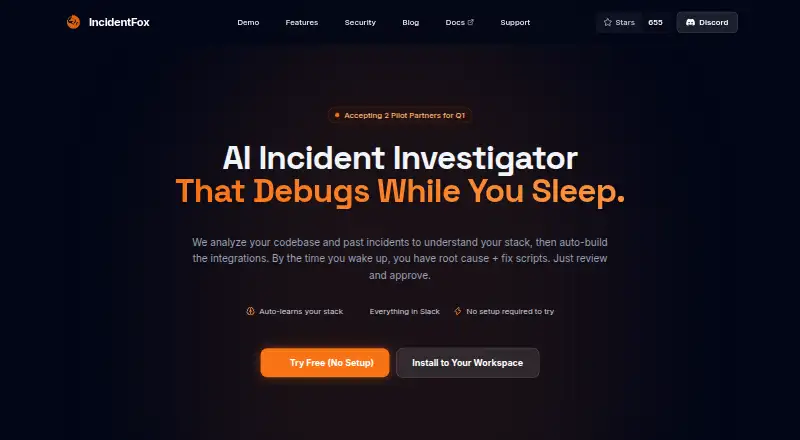
IncidentFox is an incident investigation agent that works through Slack. It examines logs, metrics, and system data from connected observability tools, then searches Slack history for discussions that may help explain an incident. Teams can ask questions or share screenshots and files in Slack threads, where IncidentFox can return charts, scripts, and reports. It also provides investigation recommendations and generates postmortems and documentation.
IncidentFox lists more than 40 integrations, including PagerDuty, AWS, Datadog, Prometheus, Grafana, GitHub, Kubernetes, Elasticsearch, Splunk, Sentry, Jira, Linear, GitLab, New Relic, PostgreSQL, MySQL, and Confluence. Deployment options include hosted SaaS, on-premises or VPC, and self-hosted open core. Investigations use isolated containers with temporary filesystems. API keys pass through a secure proxy, sensitive data is redacted before being sent to the LLM, and all write actions require human approval with audit trails and rollback support. IncidentFox says customer data is not used to train AI models and that it is undergoing a SOC 2 Type II audit. Using it requires a Slack workspace, and installation requires a workspace administrator.
Who it suits
IncidentFox suits teams that investigate incidents using Slack and connected observability systems, especially those that want investigation findings and reports in Slack threads. Its deployment options and approval controls may also suit organizations with specific infrastructure and remediation oversight needs.
What it does well
- Analyzes logs, metrics, and system data from connected tools.
- Searches Slack history for relevant incident context.
- Returns charts, scripts, and reports in Slack threads.
- Lists more than 40 integrations.
- Write actions require approval and support audit trails and rollback.
- Offers hosted, on-premises or VPC, and self-hosted deployment.
What to know first
- Requires a Slack workspace and administrator installation.
- The free trial lasts 7 days.
- The free plan is listed as unavailable.
Limits
The listed Free Trial provides full feature access for 7 days. A free plan is not available.
Plans
| Plan | Billed and limits | Price |
|---|---|---|
| Free Trial | 7 days free with full feature access · full feature access | Free |
As incidentfox.ai lists them, read 1 Oct 2026. The maker's own page has the final word.
Getting started
- Open the IncidentFox website.
- Choose hosted SaaS, on-premises or VPC, or self-hosted open core deployment.
- Arrange access to a Slack workspace and have a workspace administrator install it.
- Connect the observability and other tools your team uses.
- Start the 7-day trial for full feature access.
Verdict
Choose IncidentFox if your team wants Slack-based incident investigation across observability data and conversations, with recommendations and documentation in the same workflow. Look elsewhere if your team cannot use Slack or needs a free plan beyond the 7-day trial.
Questions
Does IncidentFox have a free plan?
No. The listed Free Trial costs nothing for 7 days and includes full feature access.
Which platforms does IncidentFox support?
The listed platforms are self-hosted and web. Deployment options also include hosted SaaS, on-premises, or VPC.
Does IncidentFox require Slack?
Yes. Using IncidentFox requires a Slack workspace, and installation requires a workspace administrator.
Is IncidentFox open source?
Yes. IncidentFox describes itself as open source and offers community support through GitHub and Slack.
Which integrations are listed?
The site lists Slack, PagerDuty, AWS, Datadog, Prometheus, Grafana, GitHub, Coralogix, Kubernetes, Elasticsearch, Splunk, Sentry, Jira, Linear, GitLab, OpsGenie, New Relic, PostgreSQL, MySQL, and Confluence, and says it works with 40+ integrations.
How does IncidentFox handle remediation actions?
Every write action requires human approval. Actions have audit trails and rollback support.
Facts from IncidentFox's own pages
- Access requirement
- Using IncidentFox requires a Slack workspace, and installation requires a Slack workspace administrator. · incidentfox.ai, 1 Oct 2026
- Compliance
- IncidentFox says it is undergoing a SOC 2 Type II audit and provides RBAC and full audit logging. · incidentfox.ai, 1 Oct 2026
- Credential security
- API keys are injected at request time through a secure proxy and the agent never sees raw credentials. · incidentfox.ai, 1 Oct 2026
- Deployment
- Deployment options are hosted SaaS, on-premises or VPC, and self-hosted open core. · incidentfox.ai, 1 Oct 2026
- Incident analysis
- It analyzes logs, metrics, and system data from connected observability tools. · incidentfox.ai, 1 Oct 2026
- Integrations
- The site lists Slack, PagerDuty, AWS, Datadog, Prometheus, Grafana, GitHub, Coralogix, Kubernetes, Elasticsearch, Splunk, Sentry, Jira, Linear, GitLab, OpsGenie, New Relic, PostgreSQL, MySQL, and Confluence, and says it works with 40+ integrations. · incidentfox.ai, 1 Oct 2026
- Open source
- IncidentFox states that it is open source and offers community support through GitHub and Slack. · incidentfox.ai, 1 Oct 2026
- Outputs
- It provides autonomous investigation and recommendations and generates postmortems and documentation. · incidentfox.ai, 1 Oct 2026
- Privacy
- Sensitive data is automatically redacted before being sent to the LLM, and the company says customer data is not used to train AI models. · incidentfox.ai, 1 Oct 2026
- Purpose
- IncidentFox is an AI-powered incident investigation agent that operates via Slack. · incidentfox.ai, 1 Oct 2026
- Remediation control
- All write actions require human approval, and actions have audit trails and rollback support. · incidentfox.ai, 1 Oct 2026
- Sandboxing
- Each investigation runs in an isolated container with a fresh ephemeral filesystem. · incidentfox.ai, 1 Oct 2026
- Slack context
- It searches Slack history for relevant context and past discussions. · incidentfox.ai, 1 Oct 2026
- Slack workflow
- Users can ask questions, share screenshots or files, and receive charts, scripts, and reports in Slack threads. · incidentfox.ai, 1 Oct 2026
- Support
- Email support is available without login with a stated response time of within 2 business days, plus Slack community support. · incidentfox.ai, 1 Oct 2026
Where IncidentFox stands on Freedom251
- AIOps Platforms#11 of 19
- AI DevOps Assistants#19 of 26