Freedom251 › AI Image Expanders
iMini AI Image Expand
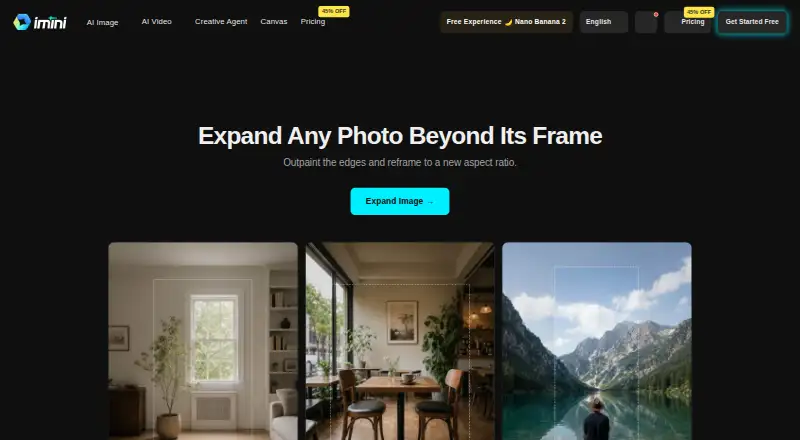
What iMini AI Image Expand is
iMini AI Image Expand extends a photo beyond its original borders so you can change its framing or aspect ratio without cropping the subject. It generates additional scenery beyond the image edges while aiming to match the original light and texture, and the expanded area is designed to blend without visible seams. The tool can turn a square photo into a widescreen banner or a landscape image into a vertical story. iMini is primarily web-based, with Android, iOS, Linux, macOS, and Windows also listed. A free plan is available; Pro costs $10 a month and includes 10,000 credits, up to 200 AI image generations, and 30GB of cloud storage. File-size and quality limits vary by tool and plan, while higher tiers support larger files and batch processing. iMini states that transformed images can be used commercially, data is encrypted in transit and at rest, and personal data is not used to train AI models. Support options include a help center, live chat, email, community forums, and video tutorials.
Who it suits
The tool may suit designers, marketers, print designers, and e-commerce sellers who need to adapt image framing or aspect ratios. Its commercial-use statement may also matter to people preparing transformed images for business use.
What it does well
- Extends image borders without cropping the subject
- Designed to blend added areas without visible seams
- Commercial use is permitted by iMini
- Free plan available
What to know first
- File-size and quality limits vary by tool and plan
- Batch processing is supported on higher tiers
- Pro costs $10 a month
Limits
The free plan has limited features. Pro costs $10 a month and includes 10,000 credits, up to 200 AI image generations and 30 GB of storage. File-size and quality limits vary by tool and plan.
Plans
| Plan | Billed and limits | Price |
|---|---|---|
| Free | limited features · limited daily messages · basic models · basic quality | Free |
| Max | 30,000 credits | On request |
| Pro | 10,000 credits · increased chatbot limits · premium models · high-quality outputs · larger file limits | On request |
| Ultra | 100,000 credits | On request |
As imini.com lists them, read 14 Oct 2026. The maker's own page has the final word.
Getting started
- Visit https://imini.com/tools/image-expand.
- Use the web platform or choose another listed platform.
- Sign in with Google if you want to use Google sign-in and syncing.
- Start with the free plan or choose a paid plan.
- For API access, use an Enterprise plan.
iMini AI Image Expand generates scenery beyond a photo’s borders, making it useful for people who need one image to fit several formats. It is a focused option for designers, marketers, print designers and e-commerce sellers; higher-volume work calls for a close look at its credits and file limits.
Overview
The tool addresses a common layout problem: adapting a photo to a wider or taller frame without cutting into the subject. It creates content outside the original image, with the added scenery intended to match the source’s lighting and texture and blend without visible seams. That makes it relevant when a crop would sacrifice context or composition, though seamless blending is a design goal rather than a guarantee for every image.
Image Expand is part of a broader platform supporting GPT, Claude, Google, DeepSeek, Grok, Mistral and GLM model families. iMini says enhanced or transformed images may be used commercially, a useful permission for business workflows.
Key features
- Outpainting: Extends the scene beyond the existing edges, which can preserve the original subject while making room for a new layout.
- Aspect-ratio adaptation: Square photos can be reframed as widescreen banners and landscape images as vertical stories without cropping the subject. This suits teams repurposing assets across placements.
- Blended extensions: The generated area is designed to continue the image’s light and texture without a visible join. The promise is most pertinent when the new background must read as part of the same photograph.
- Commercial use: iMini says transformed images can be used commercially, which supports professional and product-marketing use.
- Security and account controls: iMini says data is encrypted in transit and at rest and personal data is not used to train AI models. It also states that it does not sell user information, is GDPR compliant, and offers optional two-factor authentication. Google sign-in and syncing are available for users working within Google’s ecosystem.
- API: Enterprise customers can use a REST API with documentation, rate limits and dedicated technical support. That makes the tool more adaptable to integrated workflows, but API access is reserved for that tier.
File-size and quality limits vary by tool and plan. Higher tiers support larger files and batch processing, so occasional users may be fine on a lower tier while production workflows should account for those constraints.
Pricing
The pricing model is freemium, with a free plan and a free trial. The free tier costs nothing and has limited features, making it a low-commitment way to explore the service, but not a clear fit for sustained or high-volume work.
- Pro — $10 a month: Includes 10,000 credits, up to 200 AI image generations, up to 100 AI video generations, up to 100 Agent tasks and 30GB of cloud storage. This is the entry paid plan for users who need more capacity than the limited free tier.
- Max — $30 a month: Includes 30,000 credits, up to 600 AI image generations, up to 300 AI video generations, up to 300 Agent tasks and 100GB of storage. The larger allowances suit heavier use, though the listed capacities cover several AI services rather than Image Expand alone.
- Ultra — $100 a month: Includes 100,000 credits, up to 2,000 AI image generations, up to 1,000 AI video generations, up to 1,000 Agent tasks and 300GB of storage. It is the high-capacity choice for users with substantial generation and storage needs.
Across paid tiers, file limits and quality allowances vary, with larger files and batch processing supported at higher levels. The plan quotas span images, video, agent tasks and storage, so buyers focused only on image expansion should weigh that broader bundle against their actual needs.
Platforms
Web is the primary platform. iMini also supports Android, iOS, Windows, macOS, Linux, extensions and API access; the API is available to Enterprise customers. This wide platform coverage is useful for teams and individuals who switch devices, while the documented API route is aimed at enterprise integration.
Who it's for
Image Expand is best suited to designers and marketers adapting creative assets to different layouts, print designers adjusting framing, and e-commerce sellers who need product imagery in varied placements. It is less compelling for someone seeking only a general image editor or an expansion tool with clearly defined per-tool file allowances before choosing a plan.
Pros and cons
- Pro: Expands the frame instead of forcing a crop, helping preserve the subject when converting between aspect ratios.
- Pro: Commercial-use permission and stated encryption, training-data and privacy controls address practical business concerns.
- Pro: Broad platform support, plus an Enterprise REST API with technical support, accommodates varied working environments.
- Con: File and quality limits depend on tool and plan, so users handling large files or batches may need a higher tier.
- Con: Paid-plan quotas cover image generations, video generations, agent tasks and storage; buyers wanting only image expansion may pay for capacity beyond their use.
Alternatives
AI Image Expanders is the broader directory for comparing tools in this category. Consider Pixelcut if you also want limited background removal and upscaling, alongside free exports without a watermark; it supports Android, iOS, web and API access. insMind AI Image Enlarger is worth considering when enlargement and download quality are the priority: its Pro plan is $6.99 a month and includes premium-quality, watermark-free downloads, while its free version offers low-quality downloads without a watermark.
Bandy AI is another freemium web option with a free trial. Clipdrop is a web and mobile alternative whose free plan sets daily limits for background removal, upscaling, cleanup, relighting and text removal. EZ Expand Image may suit someone looking for a one-time purchase: its free offer includes guest previews and signup credits, and its starter plan costs 2.99 USD once. ImgExpand offers three free credits per day for expansion and a subscription plan at $39.90 a month. Rewind.ai AI GIF Generator is a web alternative for GIF generation, with a free daily token allowance and paid monthly plans. SnowArt is a web-based option with daily free credits, a slow queue for unlimited SnowArt 2.0 generations, and watermarked images limited to personal use on its free plan.
Verdict
Choose iMini AI Image Expand if your main need is extending a photograph to fit new aspect ratios without cropping its subject, especially when commercial use and broad platform access matter. Its focused outpainting and higher-tier batch support are the strongest reasons to consider it. Look elsewhere if you need predictable file allowances for a specific workflow or want to pay only for image expansion rather than a broader bundle of AI quotas and storage.
Verdict
iMini AI Image Expand focuses on extending scenery beyond a photo’s edges for new framing and aspect ratios. Check the varying file limits and plan details if you need larger files or batch processing.
Questions
Is iMini AI Image Expand free?
Yes. A free plan with limited features is available.
How much does Pro cost?
Pro costs $10 a month and includes 10,000 credits, up to 200 AI image generations, up to 100 AI video generations, up to 100 Agent tasks and 30 GB of cloud storage.
What other plans are available?
Max costs $30 a month and Ultra costs $100 a month. Max includes 30,000 credits and 100 GB of storage; Ultra includes 100,000 credits and 300 GB of storage.
Which platforms are listed?
The primary platform is web. Listed platforms also include Android, API, extension, iOS, Linux, macOS and Windows.
Can I use expanded images commercially?
iMini states that enhanced or transformed images can be used commercially.
Who can use the REST API?
REST API access is available to Enterprise customers, with documentation, rate limits and dedicated technical support.
Facts from iMini AI Image Expand's own pages
- API access
- A REST API is documented as available to Enterprise customers, with examples, rate limits, dedicated support, and custom integration options. · help.imini.ai, 14 Oct 2026
- Aspect-ratio reframing
- The tool can turn square images into widescreen banners or landscape images into vertical stories without cropping the subject. · imini.com, 14 Oct 2026
- Aspect ratios
- Users can turn square photos into widescreen banners or landscape photos into vertical stories without cropping the subject. · imini.com, 1 Oct 2026
- Canvas controls
- Users can choose a target aspect ratio or drag the canvas outward in a chosen direction. · imini.com, 14 Oct 2026
- Changelog: agent
- A July 23, 2026 release introduced iMini Agent with creative task workspaces and built-in skills for visuals, writing, slide decks, and viral-content adaptation. · imini.com, 14 Oct 2026
- Changelog: GPT Image 2
- An April 22, 2026 release added GPT Image 2 with editing, compositing, flexible resolutions up to 3840 pixels, and fast or high quality modes. · imini.com, 14 Oct 2026
- Changelog: upload limits
- A September 20, 2026 release unified upload limits across image tools, localized limit messages, and filtered unsupported reference images before submission. · imini.com, 14 Oct 2026
- Commercial use
- The main site says users receive full commercial usage rights for iMini-generated results, subject to applicable law. · imini.com, 14 Oct 2026
- Company description
- Crunchbase describes iMini as software for AI image and video creation. · crunchbase.com, 14 Oct 2026
- Company headquarters
- Crunchbase lists the headquarters as City of Industry, California, United States. · crunchbase.com, 14 Oct 2026
- Company legal name
- Crunchbase lists the legal name as iMini and the operating status as active. · crunchbase.com, 14 Oct 2026
- Company ownership
- Crunchbase classifies iMini as a private, for-profit company. · crunchbase.com, 14 Oct 2026
- Compliance limitation
- The terms state that the services are not designed for regulated uses requiring HIPAA or FISMA compliance. · help.imini.ai, 14 Oct 2026
- Creative tools
- The platform includes text-to-image, text-to-video, image-to-video, image-to-image, PDF chat, presentations, research assistants, and agent workflows. · help.imini.ai, 14 Oct 2026
- Data retention
- The privacy policy states account data and communication data may be retained for 99 years after closure or last communication, while usage analytics are retained for three months. · help.imini.com, 14 Oct 2026
- Documentation depth
- The help center provides feature guides, FAQs, API documentation references, video tutorials, release notes, and system-status resources. · help.imini.ai, 14 Oct 2026
- Edge generation
- The service generates new scenery beyond the source edges while matching lighting, texture, and perspective. · imini.com, 14 Oct 2026
- File limits
- File-size and quality limits vary by tool and plan; higher tiers support larger files and batch processing. · help.imini.com, 1 Oct 2026
- Funding disclosure
- The accessible Crunchbase profile does not display a funding total or named funding round for iMini. · crunchbase.com, 14 Oct 2026
- Google integration
- Users can sign in with Google and sync with their Google ecosystem. · help.imini.com, 1 Oct 2026
- Image expansion
- iMini generates new image content beyond a photo’s original borders so users can reframe it to a new size or aspect ratio. · imini.com, 1 Oct 2026
- Integrations
- The platform offers access to models from OpenAI, Anthropic, Google, DeepSeek, xAI, Mistral, and GLM within its interface. · help.imini.ai, 14 Oct 2026
- Licence
- The terms grant a limited, revocable, non-exclusive service-use licence and prohibit reverse engineering or source-code extraction. · help.imini.ai, 14 Oct 2026
- Limit: distortion
- A G2 reviewer reports that some results distort the source image or look strange. · g2.com, 14 Oct 2026
Where iMini AI Image Expand stands on Freedom251
- AI Image Expanders#4 of 26