Freedom251 › Virtual Desktop Infrastructure Software

Hydra
What Hydra is
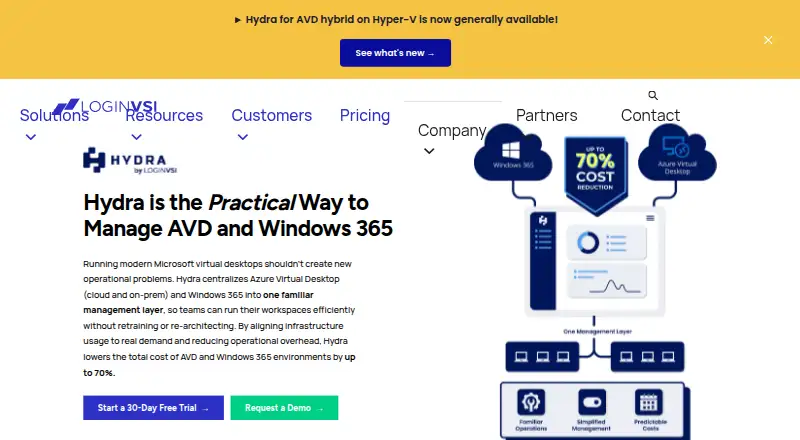
Hydra provides a management layer for Azure Virtual Desktop and Windows 365 environments. Its AVD autoscaling and power management adjust capacity to usage, with the stated aim of reducing idle compute costs. Image lifecycle management includes one-click rollback. An optional Hydra Agent measures session-host performance and displays user processes on a session or host. Documented native integrations include FSLogix, Hybrid Active Directory, Microsoft Entra, and Intune. Hydra can be deployed from the Azure Marketplace into an Azure resource group and accessed through a web portal. Its security model can use a least-privilege Azure service principal, with activity auditable through Azure Activity Logs and Microsoft Graph; tenant separation uses platform enforcement, Azure RBAC boundaries, and tenant-specific service principal credentials. The free Community Edition has one tenant and five hosts per host pool, plus core autoscaling and image management. Hydra for Windows 365 is listed at $1 a month, and Hydra for AVD at $5 a month, both billed month-to-month. Community users get a knowledge base and forum; paid plans add dedicated email support. Login VSI states it is ISO 27001 certified and GDPR compliant.
Who it suits
Hydra suits enterprise IT teams and managed service providers managing Microsoft virtual desktop environments. Its plan choices cover Windows 365, AVD, and a limited free Community Edition.
What it does well
- AVD tools include autoscaling and power management.
- Image lifecycle management includes one-click rollback.
- Native integrations include FSLogix, Microsoft Entra, and Intune.
- Activity can be audited through Azure Activity Logs and Microsoft Graph.
What to know first
- Community Edition is limited to one tenant.
- Community Edition allows five hosts per host pool.
- Hydra for AVD costs $5 a month.
- Paid plans add dedicated email support; Community Edition does not list it.
Limits
The free Community Edition has limited tenants and host pools. Hydra for Windows 365 is listed at $1 a month, while Hydra for AVD is listed at $5 a month; both are billed month-to-month.
Plans
| Plan | Billed and limits | Price |
|---|---|---|
| Hydra Community Edition | free forever · limited tenants and host pools · core autoscaling and image management · community support · 1 tenant in feature comparison | Free |
| Hydra for Windows 365 | per user, billed month-to-month · Cloud PC provisioning acceleration · lifecycle management · custom image control · provisioning policies · Hydra Agent visibility | $1 a month |
| Hydra for AVD | per peak concurrent user, billed month-to-month · autoscaling · power and disk optimization · image lifecycle with rollback · Hydra Agent visibility · multi-tenant management | $5 a month |
| Hydra Annual Enterprise Plan | annual agreement; volume pricing · AVD and Windows 365 unified support · one month burst protection at 2x concurrency · security review · SLA priority access · customer success manager | On request |
As loginvsi.com lists them, read 15 Oct 2026. The maker's own page has the final word.
Getting started
- Open the Hydra website.
- Deploy Hydra from the Azure Marketplace into an Azure resource group.
- Access Hydra through its web portal.
- Choose the Community Edition or a paid AVD or Windows 365 plan.
- Use the knowledge base or support forum; paid plans also include dedicated email support.
Hydra is a management layer for Azure Virtual Desktop (AVD) and Windows 365, best suited to enterprise IT teams and managed service providers already running Microsoft virtual desktops. Its appeal is focused operational control rather than a desktop service of its own.
Overview
Hydra brings cloud-desktop management into a web portal and can be deployed from the Azure Marketplace into an Azure resource group. That keeps it close to the Microsoft environment it manages, but makes it a poor fit for organizations seeking a platform independent of AVD and Windows 365.
Its security approach supports a least-privilege Azure service principal, with activity auditable through Azure Activity Logs and Microsoft Graph. For providers serving multiple customers, tenant separation uses platform enforcement, Azure RBAC boundaries, and tenant-specific service principal credentials. Login VSI states that it is ISO 27001 certified and GDPR compliant.
Key features
- AVD autoscaling and power management: Capacity can follow usage to reduce idle compute costs. This is most useful where AVD demand varies; Windows 365-only teams will get less from this capability.
- Image lifecycle management: AVD teams can manage images and roll back with one click, a useful safeguard when an image change needs to be reversed.
- Session visibility: The optional Hydra Agent measures session-host performance and shows user processes on a session or host. This gives administrators more operational context, though the agent is optional rather than a core requirement.
- Microsoft integrations: Documented native integrations include FSLogix, Hybrid Active Directory, Microsoft Entra, and Intune. These align Hydra with common identity, profile, and management components in Microsoft desktop environments.
Pricing
Hydra has a freemium model, with a 30-day trial and paid plans starting at $1 a month per user. The free Community Edition is billed Free forever and includes knowledge base and support forum access, but its tenant and host-pool limits make it better for a small evaluation than an unrestricted production deployment.
- Hydra for Windows 365 — $1 a month: Billed month-to-month, it includes Cloud PC lifecycle management, custom image control, provisioning policy management, and real-time session and performance visibility. This is the lower-cost fit for Windows 365 operations, but it does not include the AVD autoscaling, image lifecycle management, or multi-tenant management named in the AVD plan.
- Hydra for AVD — $5 a month: Billed month-to-month, it includes autoscaling, image lifecycle management with one-click rollback, real-time session visibility, and multi-tenant management. It fits teams that need those AVD controls, particularly providers managing multiple environments.
- Hydra Annual Enterprise Plan — custom pricing: An annual agreement with volume-based pricing bundles unified AVD and Windows 365 support, one month of burst protection at 2x concurrency, priority response access and an SLA, and a dedicated Customer Success Manager. It is aimed at organizations that need both desktop environments and a formal support arrangement, rather than month-to-month purchasing.
Paid AVD and Windows 365 plans include dedicated email support as well as knowledge base and forum access; the free edition offers the latter two. The free plan's tenant and host-pool caps are the key constraint for growing deployments.
Platforms
Hydra is available through web and Windows platforms. Its deployment model is hybrid, and it supports both desktop types, profile management, application virtualization, identity integration, and GPU support. Its stated management focus remains Microsoft virtual desktop environments, so those broad capabilities should not be mistaken for a general-purpose desktop service.
Who it's for
Hydra makes the most sense for IT teams operating AVD or Windows 365 that want management controls without assembling separate tools for capacity, images, and session visibility. Multi-tenant management and documented tenant boundaries make the AVD plan relevant to managed service providers. Teams outside the Microsoft virtual desktop ecosystem, or those seeking the desktop infrastructure itself, should look elsewhere.
Pros and cons
- Pros: AVD capacity controls, image rollback, and session visibility address distinct operational tasks in one management layer; tenant-specific credentials and Azure RBAC boundaries are useful for multi-customer administration; month-to-month paid plans avoid requiring an annual commitment.
- Cons: The free edition is limited by tenants and host pools; the cheapest paid plan targets Windows 365 and lacks the AVD controls; the optional agent is needed for its session-host performance measurements and process display.
Alternatives
For a wider comparison, see Virtual Desktop Infrastructure Software.
- QVD is a freemium alternative with a free Community Edition for developers and testers and GitHub community support; consider it when that stated audience and support model fit better than Hydra's Microsoft-focused management.
- ThinLinc offers a free plan for 10 concurrent users and a Standard plan billed per user for 12 months; it may suit a team weighing a defined concurrency allowance against Hydra's Microsoft-environment focus.
- Hive Fabric has a free Community Edition with a perpetual license for one physical host and unlimited VMs; choose it when that host-based free allowance is a better match.
- Ravada VDI is a free, self-hosted option for teams seeking Linux-based server administration and KVM support.
- Kasm Workspaces has a free Community plan capped at five concurrent sessions and marked for non-commercial use; that can suit non-commercial evaluation, unlike Hydra's Microsoft management focus.
- Amazon WorkSpaces is a paid alternative with a Windows single-session user fee of $4.19 a month, plus provisioned instance-hour charges; consider it when that per-user and usage-charge model fits better.
- Citrix Workspace is another paid alternative.
- IsardVDI is a free alternative whose maker describes it as open source and links its code and collaborative development to GitLab.
Verdict
Choose Hydra if you manage AVD or Windows 365 and want capacity, image, and session operations gathered in a Microsoft-oriented management layer; the AVD plan is especially compelling for multi-tenant administration. Look elsewhere if you need a general-purpose desktop platform, broad non-Microsoft management, or a free edition without tenant and host-pool limits.
Verdict
Hydra combines AVD capacity controls, image management, and session visibility for Microsoft virtual desktop environments. The free edition has tenant and host-pool limits, while paid AVD and Windows 365 plans are listed with month-to-month billing.
Questions
Is Hydra free?
Yes. Hydra Community Edition is free forever and includes knowledge base and support forum access. It has limited tenants and host pools.
What do the paid plans cost?
Hydra for Windows 365 is listed at $1 a month, and Hydra for AVD at $5 a month. Both are billed month-to-month.
Which platforms does Hydra support?
Hydra is available on web and Windows. It is deployed from the Azure Marketplace into an Azure resource group and accessed through a web portal.
What integrations does Hydra document?
Its documented native integrations include FSLogix, Hybrid Active Directory, Microsoft Entra, and Intune.
Who makes Hydra?
Hydra is a Login VSI product. Login VSI states that it is ISO 27001 certified and GDPR compliant.
What does the annual enterprise plan include?
It uses an annual agreement with volume-based pricing. It includes unified AVD and Windows 365 support, one month of burst protection at 2x concurrency, priority response access and an SLA, and a dedicated Customer Success Manager.
Facts from Hydra's own pages
- Acquisition news
- Login VSI announced its Hydra acquisition on May 28, 2025, retaining creator Marcel Meurer to lead product development. · loginvsi.com, 15 Oct 2026
- API limitation
- The REST API requires a self-defined URL-encoded secret of at least 32 characters and an application-service restart after changes. · docs.loginvsi.com, 15 Oct 2026
- Audience
- Hydra is described as serving enterprise IT teams and managed service providers managing Microsoft virtual desktop environments. · loginvsi.com, 3 Oct 2026
- Autoscaling
- AVD plans include predictive autoscaling, session consolidation, drain-mode-aware scaling and power scheduling, with some capabilities limited in the Community Edition. · loginvsi.com, 15 Oct 2026
- Company certification
- Login VSI states that it is an ISO 27001 certified company and that Hydra includes enterprise RBAC. · loginvsi.com, 15 Oct 2026
- Company compliance
- Login VSI states that it is ISO 27001 certified and GDPR compliant. · loginvsi.com, 3 Oct 2026
- Company facts
- LinkedIn lists Login VSI as privately held, founded in 2012, headquartered in Boston, with 51–200 employees. · linkedin.com, 15 Oct 2026
- Deployment
- Hydra can be deployed from the Azure Marketplace into an Azure resource group and accessed through a web portal. · docs.loginvsi.com, 3 Oct 2026
- Deployment model
- Hydra can be deployed from Azure Marketplace or manually with an Azure custom template and service principals, including Azure Government Cloud. · docs.loginvsi.com, 15 Oct 2026
- Disk cost controls
- The feature matrix lists Premium/HDD disk switching and Azure Files share shrinking or locked-handle release for AVD. · loginvsi.com, 15 Oct 2026
- Founded
- 2012 · loginvsi.com, 28 Sept 2026
- Headquarters
- Boston, Massachusetts, and Amsterdam, Netherlands · loginvsi.com, 28 Sept 2026
- Hydra Agent
- The optional agent runs on VMs or Cloud PCs to expose live session, CPU, memory and disk-queue information and user processes. · docs.loginvsi.com, 15 Oct 2026
- Image management
- Hydra supports scheduled image updates, golden-image preservation, Azure Image Gallery storage, automated Sysprep cleanup and one-click rollback. · loginvsi.com, 15 Oct 2026
- Integrations
- Documented integrations include Azure Virtual Desktop, Windows 365, Microsoft Entra ID, Intune, Azure Monitor and hybrid Hyper-V locations through Azure Arc and Hydra Proxy. · docs.loginvsi.com, 15 Oct 2026
- Legal name and owner
- Crunchbase lists the legal name as Login VSI Holding LP and identifies Wavecrest Growth Partners as the private-equity investor. · crunchbase.com, 15 Oct 2026
- Licence
- The opened official and documentation pages describe Hydra as a commercial Azure-deployed product and do not state an open-source licence. · loginvsi.com, 15 Oct 2026
- Limit: feature coverage
- An independent comparison estimates Hydra at roughly 50–60% of Nerdio's capabilities and says users with moderate VDI experience may find Nerdio easier. · mobile-jon.com, 15 Oct 2026
- Limit: narrower scope
- 9to5Azure characterizes Hydra as an emerging mid-tier modular product with less maturity and a smaller ecosystem than Nerdio. · 9to5azure.com, 15 Oct 2026
- Limit: setup complexity
- A G2 reviewer says setup can be complex for people unfamiliar with virtual environments and that the software uses substantial system resources. · g2.com, 15 Oct 2026
- Multi-tenancy
- Paid editions provide multi-tenant operation with tenant isolation and role-based access scoped by tenant, host pool or user group. · loginvsi.com, 15 Oct 2026
- Praise: affordability
- A Reddit commenter reports choosing Hydra because it performed many Nerdio-like tasks at lower cost. · reddit.com, 15 Oct 2026
- Praise: image management and cost
- Gartner reviewers identify image management, cost reduction, lightweight operation and ease of use as benefits of Login VSI products. · gartner.com, 15 Oct 2026
- Praise: usability
- G2 reviewers praise the user-friendly interface and detailed reports for locating performance issues. · g2.com, 15 Oct 2026