Freedom251 › Pair Programming Software

Hopp
What Hopp is
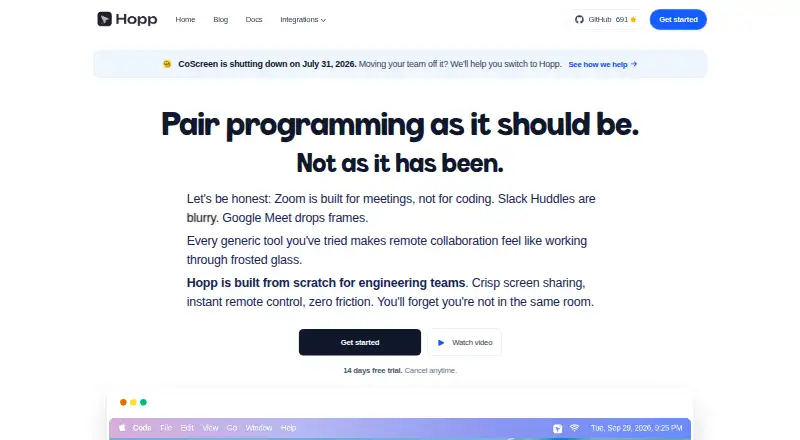
Hopp is an open-source screen-sharing and remote pair-programming app for developers and engineering teams. Participants can share a teammate’s screen and control any application with their own keyboard and mouse. Hopp states that control latency is under 100 ms, and a room can hold up to 10 people. Screen sharing defaults to 4K. Shared cursors, drawing, and screen annotations support collaborative work such as code reviews, debugging, mob programming, and onboarding. Hopp also advertises active noise-cancelling audio and a Slack integration for starting calls faster.
Teams can run Hopp themselves on their own infrastructure using its self-hosting guide and Docker Compose setup. The self-hosted plan is free. Hopp Cloud costs $15 per user per month and includes unlimited calls. Hopp Private Cloud is a dedicated single-tenant deployment with setup, upgrades, backups, monitoring, and direct support managed by Hopp; pricing is available by contacting the company. Hopp lists macOS, Windows, web, and self-hosted use. The pricing section gives a support guarantee of less than one day. Its makers, Costa Alexoglou and Iason Paraskevopoulos, describe themselves as two engineers building the product in the open. The privacy policy says the company uses commercially acceptable safeguards but cannot guarantee absolute security.
Who it suits
Hopp suits developers and engineering teams who want to collaborate on screen-based work, including code reviews, debugging, mob programming, and onboarding. It also suits teams that want a free self-hosted option or a managed cloud plan with unlimited calls.
What it does well
- Rooms support up to 10 people.
- Screen sharing defaults to 4K.
- Participants can control applications with keyboard and mouse.
- Includes shared cursors, drawing, and screen annotations.
- Offers a free self-hosted plan.
What to know first
- Hopp Cloud costs $15 per user per month.
- Hopp Private Cloud pricing requires contacting the company.
- The privacy policy says absolute security cannot be guaranteed.
Limits
The free Self-hosted Hopp plan is for running the software on your own infrastructure. Hopp Cloud costs $15 per user per month and includes unlimited calls. Hopp Private Cloud pricing is available by contacting Hopp.
Plans
| Plan | Billed and limits | Price |
|---|---|---|
| Self-hosted Hopp | run on your own infrastructure · Docker Compose stack · PostgreSQL, Redis, LiveKit and Caddy | Free |
| Hopp Cloud | per user each month · unlimited calls · 14-day trial · Google and GitHub login · support response under one day | $15 a month |
| Hopp Private Cloud | single-tenant deployment · setup, upgrades, backups, monitoring and direct support managed by Hopp | On request |
As gethopp.app lists them, read 15 Oct 2026. The maker's own page has the final word.
Getting started
- Open https://www.gethopp.app/.
- Choose free self-hosting or Hopp Cloud at $15 per user per month.
- For self-hosting, use the repository's self-hosting guide and Docker Compose setup.
- For a dedicated single-tenant deployment, contact Hopp about Private Cloud.
- Use the Slack integration to start calls faster.
Overview
Hopp is an open-source screen-sharing and remote pair-programming app for developers. It is best suited to engineering teams that need to work together on a colleague’s computer rather than merely watch a presentation. Its shared keyboard-and-mouse control is the draw; teams must choose between running it themselves and paying per user for cloud access.
Browse pair programming software for more options.
Key features
Participants can control a teammate’s computer with their own keyboard and mouse, with latency stated as under 100 ms. That makes Hopp relevant to debugging, code reviews, mob programming, and onboarding, where collaborators may need to act on the same desktop. Rooms support up to 10 people: enough for a small working session, but not a large audience.
Screen sharing defaults to 4K and supports sharing and controlling any application on screen. Shared cursors, drawing, and annotations give participants ways to point to interface details; active noise-cancelling audio supports the conversation around them. A Slack integration can speed up call starts.
Hopp can run on a team’s own infrastructure, and its repository includes a self-hosting guide and Docker Compose setup. That avoids a per-user cloud fee, but puts the team on the self-managed path. For managed hosting, Hopp Cloud includes unlimited calls. Private Cloud is a dedicated single-tenant deployment with setup, upgrades, backups, monitoring, and direct support managed by Hopp.
Pricing
Self-hosted Hopp costs nothing and is billed 100% free to run yourself. It is the fit for teams willing to host the software on their own infrastructure; the free price does not make it a managed cloud plan.
Hopp Cloud costs $15 a month, billed at $15 per user each month, with unlimited calls. Per-user billing makes the managed option straightforward to budget by team size, but costs rise with each additional user. A support guarantee of less than one day is listed for the pricing section.
Hopp Private Cloud has custom pricing. Hopp manages a dedicated single-tenant deployment, including setup, upgrades, backups, monitoring, and direct support. It suits teams that want Hopp to operate a dedicated environment rather than self-host or use the standard cloud plan.
The pricing note also advertises a 14-day trial. The privacy policy says the company uses commercially acceptable safeguards but cannot guarantee absolute security, a consideration for teams evaluating sensitive work.
Platforms
Hopp is available on macOS, Windows, and the web, with a self-hosted option. The range covers desktop and browser access as well as teams that prefer to run the service themselves.
Who it's for
Hopp is aimed at engineering teams and developers who need collaborative control during code reviews, debugging, mob programming, or onboarding. A 10-person room cap makes it a better match for focused team sessions than larger group events. Teams that want a managed service can pay per user; teams with the infrastructure and willingness to run it themselves can use the free self-hosted plan.
Pros and cons
- Shared control, not just viewing: participants can use keyboard and mouse input, which fits active debugging and pairing.
- Free self-hosting: teams can run Hopp on their own infrastructure without a plan charge, though they take the self-hosted route.
- Small-room ceiling: the 10-person maximum limits its fit for larger sessions.
- Cloud cost scales by user: Hopp Cloud is $15 per user each month, so larger teams pay more than smaller ones.
- Security caveat: Hopp does not guarantee absolute security, which matters when deciding whether to use it for sensitive collaboration.
Alternatives
Drovio is worth considering if a free plan with unlimited screen sharing and calls matters more than group size: its Basic plan limits remote control to 30 minutes per day and sessions to two participants.
Pop is an option for teams seeking unlimited meetings and no time limit on a free plan while it is in beta.
Zed is a free code editor option for teams looking for editor-focused collaboration rather than Hopp’s shared desktop control.
Saros is a fully open-source, free alternative with no paid plans.
CodeInterview may fit interview workflows better, with two interviews per month on its free plan.
Coterm is a free GPL-3.0-or-later macOS app with an optional self-hosted collaboration backend.
Duckly has a free plan for occasional sessions, with no video calls and two simultaneous participants.
Remote Collab is another free option for real-time collaboration in SublimeText projects.
Verdict
Choose Hopp if your engineering team needs to control a shared desktop together and values the choice of free self-hosting or managed cloud access. Its focused collaboration tools and unlimited-call cloud plan are compelling for small engineering sessions; look elsewhere if you need rooms larger than 10, want cloud use without per-user pricing, or require an absolute security guarantee.
Verdict
Pick Hopp if your engineering team needs shared screen control and pair-programming tools, with a choice of free self-hosting or per-user cloud access. Hopp Cloud is $15 per user per month with unlimited calls. Teams that require a dedicated single-tenant deployment can ask about Private Cloud pricing; the privacy policy says absolute security cannot be guaranteed.
Questions
Is Hopp open source?
Yes. Hopp is described as an open-source app, and its repository provides a self-hosting guide and Docker Compose setup.
Is there a free option?
Yes. Self-hosted Hopp is free to run on your own infrastructure.
How much does Hopp Cloud cost?
Hopp Cloud costs $15 per user per month and includes unlimited calls.
Which platforms are listed?
Hopp lists macOS, Windows, web, and self-hosted use.
How many people can join a room?
A room supports up to 10 people at once.
Who makes Hopp?
The about page identifies Costa Alexoglou and Iason Paraskevopoulos as the two engineers building Hopp.
Facts from Hopp's own pages
- Annotations
- Participants can draw or type over a shared screen to highlight areas. · gethopp.app, 15 Oct 2026
- API and SDKs
- The repository contains a Go backend API server, but the reviewed public documentation does not present a separate public API reference or SDK package. · github.com, 15 Oct 2026
- Architecture
- The repository describes a Tauri and React/TypeScript desktop client, Rust screen-capture and WebRTC core, Go backend, React/Vite web app and Docker self-host stack. · github.com, 15 Oct 2026
- Audio
- Hopp includes audio with active noise cancellation. · gethopp.app, 15 Oct 2026
- Camera
- Users can share camera video and pin or hide their self-view. · docs.gethopp.app, 15 Oct 2026
- Clipboard
- Clipboard synchronization supports text copy and paste between controller and sharer machines, but not images, files or rich content. · docs.gethopp.app, 15 Oct 2026
- Collaboration tools
- Features include shared cursors, drawing, and screen annotations. · gethopp.app, 7 Oct 2026
- Company background
- The makers say they met as university friends and describe the team as two engineers building Hopp in the open. · gethopp.app, 7 Oct 2026
- Company funding
- The founders state that they have raised no venture capital and do not intend to raise it. · gethopp.app, 15 Oct 2026
- Company team
- Hopp says it is built by two engineers, Costa Alexoglou and Iason Paraskevopoulos, who started as university friends. · gethopp.app, 15 Oct 2026
- Developer prerequisites
- Local development requires Task, stable Rust, Go 1.24 or later, Node.js 20 or later, Yarn, Tauri, Docker, LiveKit, psql and mkcert. · docs.gethopp.app, 15 Oct 2026
- Documentation
- Official documentation covers quick start, local development, self-hosting, features, Slack integration and contribution guidance. · docs.gethopp.app, 15 Oct 2026
- Founded
- The founders say they started building Hopp in September 2024. · gethopp.app, 15 Oct 2026
- Integration
- The site identifies a Slack integration for starting calls faster. · gethopp.app, 7 Oct 2026
- Intended users
- Hopp describes itself as built for engineering teams and developers, including for code reviews, debugging, mob programming, and onboarding. · gethopp.app, 7 Oct 2026
- Latency
- The product advertises shared-control latency below 100 milliseconds. · gethopp.app, 15 Oct 2026
- Licence
- The repository is licensed under GNU Affero General Public License version 3.0. · github.com, 15 Oct 2026
- Limit: audio quality
- The maker reported inconsistent audio performance caused by WebKit limitations and said it was moving audio capture and playback into Rust. · gethopp.app, 15 Oct 2026
- Limit: market fit
- In January 2026 the maker said Hopp had not found product-market fit after 15 months of work. · gethopp.app, 15 Oct 2026
- Limit: stability
- The maker acknowledged minor bugs affecting user experience during its January 2026 retrospective. · gethopp.app, 15 Oct 2026
- Limit: user conversion
- The maker reported that about 70% of sign-ups never invited another person and that only 6% of users who made a call converted. · gethopp.app, 15 Oct 2026
- Linux status
- Linux builds are possible but currently do not work properly because of missing WebRTC and Wayland overlay functionality. · docs.gethopp.app, 15 Oct 2026
- Makers
- The about page identifies Costa Alexoglou and Iason Paraskevopoulos as the two engineers building Hopp. · gethopp.app, 7 Oct 2026
- Notable news
- A January 2026 retrospective reported 55 production releases, more than 600 collaborative-session hours and eight external contributors during 2025. · gethopp.app, 15 Oct 2026
Where Hopp stands on Freedom251
- Pair Programming Software#2 of 26