Freedom251 › Pair Programming Software

Coterm
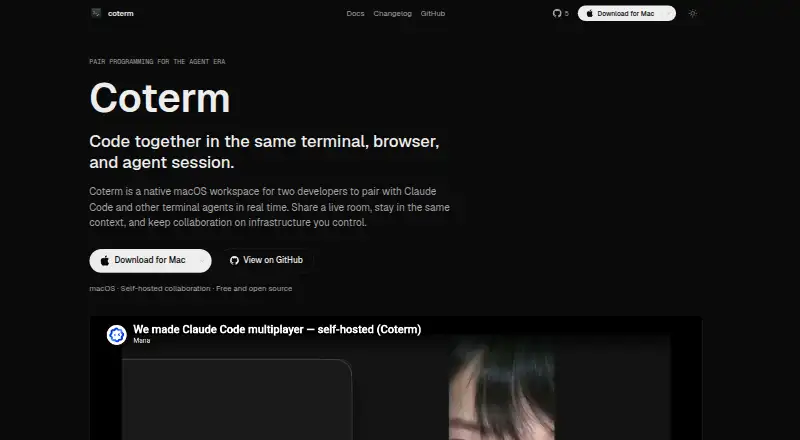
What Coterm is
Coterm is a native macOS workspace for two developers to pair in a shared terminal, browser, and coding-agent session. A live room lets both people follow the terminal, see who is present, and share previews. The shared workflow supports Claude Code, Codex, OpenCode, Gemini CLI, Aider, Amp, Cursor Agent, and other CLI agents. Its Ghostty-based terminal has vertical tabs, a notification panel, and a socket-based control API; a CLI and Unix socket also provide programmatic control.
The app runs locally without a Coterm-hosted account service. Pair programming uses a collaboration relay, control plane, presence, and approval flow hosted in the user's own Cloudflare account. Coterm is free to use under GPL-3.0-or-later. The macOS app requires version 14.0 or later and runs on Apple Silicon or Intel Macs. An iOS companion app is available in beta for attaching to a Mac's terminals. After relaunch, Coterm restores layout and metadata, but it does not checkpoint arbitrary live process state; unsupported apps reopen as regular terminals.
Who it suits
Coterm suits two developers who want to pair in a shared terminal and coding-agent session on macOS. It may also fit users who prefer to self-host the collaboration backend in their own Cloudflare account.
What it does well
- Free to use under GPL-3.0-or-later
- Supports several CLI coding agents
- Pairing includes presence and shared previews
- Runs locally without a Coterm-hosted account service
- Offers CLI and Unix socket control
What to know first
- Requires macOS 14.0 or later
- iOS companion app is in beta
- Does not restore arbitrary live process state
- No screen sharing
Limits
Coterm is free to use. After relaunch it restores layout and metadata, but does not checkpoint arbitrary live process state; unsupported apps reopen as normal terminals.
Plans
| Plan | Billed and limits | Price |
|---|---|---|
| Coterm | Free to use · GPL-3.0-or-later · macOS app · optional self-hosted collaboration backend | Free |
| Free | Free to use · macOS desktop app · self-hosted collaboration backend optional · GPL-3.0-or-later source | Free |
| Founders Edition | Not stated · Includes early access to the beta iOS companion and other early features | On request |
As coterm.cc lists them, read 4 Oct 2026. The maker's own page has the final word.
Getting started
- Install the Mac app from a DMG or with Homebrew.
- Use a Mac running macOS 14.0 or later on Apple Silicon or Intel.
- Set up the collaboration backend in your Cloudflare account if you want pairing.
- Open a live room and invite the second developer to join.
- Optionally attach to the Mac’s terminals using the iOS companion app in beta.
Coterm is a native macOS workspace for two developers collaborating in one terminal, browser and coding-agent session. It is best suited to pairs who already work with command-line agents and can operate a self-hosted backend. The focused workflow is compelling at no cost, but its Mac-only desktop app and limited session restoration rule out some teams.
Overview
A live room lets two developers follow the same terminal, see the other participant and share previews while working together. Coterm does not provide screen sharing, so it is designed for shared development context rather than remote control of an entire desktop. That makes it more precise for terminal-centric pairing and less suitable when visual desktop access is the main requirement.
The Mac application runs without a Coterm-hosted account service. Its relay, control plane, presence and approval flow run in the users' own Cloudflare account. This arrangement keeps the collaboration service under the team's control, while making backend setup and maintenance part of the practical commitment.
Key features
Terminal and coding-agent pairing
The shared workflow supports Claude Code, Codex, OpenCode, Gemini CLI, Aider, Amp, Cursor Agent and other CLI agents. Pairs can therefore stay in one agent-assisted terminal session instead of switching to a separate code-review or interview tool. It is a strong fit for two-person agent workflows, but the product's stated pairing model is specifically two developers rather than a larger group.
Native terminal workspace
Coterm uses a Ghostty-based terminal with vertical tabs and a notification panel. A socket-based control API, plus a CLI, exposes programmatic commands through both interfaces. Configurable hooks cover Claude Code, Amp, Cursor, Gemini and Kiro CLI, giving automation-minded users ways to connect their existing tools.
Restore and data boundaries
After relaunch, Coterm restores layout and metadata, not arbitrary live process state. Unsupported applications reopen as ordinary terminals, so long-running work that depends on a process remaining alive needs its own recovery approach. The terms say user code, files and content stay off Coterm's servers during normal use. Crash diagnostics, operating-system and app versions, and anonymous usage patterns may be collected, while personal information is not sold for marketing.
The beta iOS companion attaches to a Mac's terminals. Terminal traffic goes directly between phone and Mac over the user's network; forwarded notification text can pass through Coterm servers and Apple's push service. That is useful for monitoring from a phone, with a narrower privacy boundary for notifications.
Pricing
| Plan | Price | Includes |
|---|---|---|
| Coterm | free | Free to use, GPL-3.0-or-later, macOS app and optional self-hosted collaboration backend |
There is no free trial because the product is free to use, and no paid tier or seat quota is given. The plan suits pairs wanting a zero-cost, open-source Mac workspace and willing to run collaboration infrastructure themselves. Teams wanting a vendor-managed service, broader desktop coverage or commercial plan guarantees should evaluate alternatives instead.
Platforms
The desktop app requires macOS 14.0 or later and runs on both Apple Silicon and Intel Macs. Installation is available through a DMG or Homebrew. An iOS companion is in beta, while API and self-hosted components support the wider workflow. There is no stated Windows or Linux desktop application, making Coterm a poor choice for mixed-OS pairs.
Who it's for
Choose Coterm for two developers who want to pair directly inside terminal and coding-agent sessions, especially when Cloudflare-based self-hosting is acceptable. It is less appropriate for larger collaboration groups, teams centered on full-desktop screen sharing, or anyone who needs live processes to survive a relaunch automatically.
Pros and cons
- Pros: Free, GPL-3.0-or-later software avoids subscription cost.
- Pros: Shared support for major CLI agents keeps pairing in one working session.
- Pros: Self-hosted relay, presence and approval flow give teams control of the collaboration backend.
- Pros: CLI and Unix-socket control suit scripted workflows.
- Cons: macOS 14 or later is required, excluding Windows and Linux desktop users.
- Cons: No screen sharing means it cannot replace whole-desktop remote collaboration.
- Cons: Relaunch restores layout and metadata but not arbitrary live process state.
- Cons: Self-hosting shifts operational responsibility to the user.
Alternatives
For a broader shortlist, see Pair Programming Software.
Drovio is the better pick for cross-platform screen sharing, with a free two-person tier and remote control capped at 30 minutes per day.
Choose Pop when browser-based meetings with unlimited hosting and no time limit during its beta fit better than terminal pairing.
Zed suits users seeking a cross-platform code editor with a free personal plan and 2,000 accepted edit predictions.
Pick Hopp for a self-hosted option or a $15 a month cloud plan.
Saros is another free, open-source collaboration choice.
CodeInterview is aimed at structured interviews, with two free interviews per month.
Duckly fits occasional web sessions, offering two simultaneous participants on its free tier.
Remote Collab is a free, open-source SublimeText collaboration plugin.
Verdict
Coterm is a strong choice for two Mac-based developers who want free, agent-aware terminal pairing and control of their own collaboration backend. Look elsewhere if you need Windows or Linux desktops, full screen sharing, larger groups or reliable preservation of running processes after relaunch.
Verdict
Coterm brings shared terminal and coding-agent sessions to a two-developer pairing workflow, with a self-hosted collaboration option. Its macOS requirement and session-restore limit are important considerations for teams choosing a pairing setup.
Questions
How much does Coterm cost?
Coterm is free to use under GPL-3.0-or-later. There is no free trial.
Which platforms does Coterm support?
The desktop app is native to macOS and requires macOS 14.0 or later on Apple Silicon or Intel Macs. An iOS companion app is available in beta for attaching to a Mac’s terminals.
Does Coterm support self-hosting?
Yes. The collaboration relay, control plane, presence, and approval flow run in the user’s Cloudflare account.
Does Coterm need a hosted account?
The Mac app works locally without a Coterm-hosted account service, and pair programming is self-hosted.
Which coding agents are supported?
The shared workflow supports Claude Code, Codex, OpenCode, Gemini CLI, Aider, Amp, Cursor Agent, and other CLI agents.
What happens to sessions after relaunch?
Coterm restores layout and metadata, but not arbitrary live process state. Unsupported apps reopen as normal terminals.
Facts from Coterm's own pages
- Account requirement
- The Mac app works locally without a Coterm-hosted account service, and pair programming is self-hosted. · coterm.cc, 4 Oct 2026
- Agent hibernation
- An opt-in setting can suspend idle off-screen coding-agent processes and restore them when their tab is revisited. · coterm.cc, 15 Oct 2026
- Agent support
- The site lists Claude Code, Codex, OpenCode, Gemini CLI, Aider, Amp, Cursor Agent, and other CLI agents as supported in the shared workflow. · coterm.cc, 4 Oct 2026
- Build from source
- The repository instructions require cloning with submodules, running setup scripts and using Xcode for a macOS build. · github.com, 15 Oct 2026
- CLI and socket API
- Coterm exposes a CLI and newline-delimited JSON Unix-socket interface for workspace, pane, notification and sidebar control. · coterm.cc, 15 Oct 2026
- Company
- The site's legal pages identify the company as emergent.inc. · coterm.cc, 4 Oct 2026
- Company identity
- The public GitHub organization behind the repository is named Mana, lists the United States and links to mana.am; no legal company name or founding year is stated there. · github.com, 15 Oct 2026
- Company size
- No Coterm-specific employee count, headquarters address, funding record or Crunchbase profile was stated on the opened official and company pages. · github.com, 15 Oct 2026
- Configuration format
- Settings use commented JSON with a published schema and support global and project-local coterm.json files. · coterm.cc, 15 Oct 2026
- Core app features
- The docs describe a Ghostty-based terminal with vertical tabs, a notification panel, and a socket-based control API. · coterm.cc, 4 Oct 2026
- Data handling
- The iOS documentation says interactive terminal content and keystrokes flow directly between the phone and Mac rather than through Coterm servers. · coterm.cc, 15 Oct 2026
- Distribution
- Homebrew lists a coterm cask, but its description identifies a different Datadog terminal-recording utility rather than the coterm.cc product. · formulae.brew.sh, 15 Oct 2026
- Documentation depth
- The documentation covers configuration keys, keyboard shortcuts, skills, browser automation, diagnostics, customization and API commands. · coterm.cc, 15 Oct 2026
- Embedded browser
- Coterm includes browser panes with configurable search engines, URL routing, download behavior and developer tools. · coterm.cc, 15 Oct 2026
- File previews
- The app can preview text, code, PDFs, images, audio, video and Quick Look files inside Coterm. · coterm.cc, 15 Oct 2026
- Independent discussion
- A Reddit post describes Coterm as free, open source and self-hosted, while warning that early builds were rough, macOS-only and initially not notarized. · reddit.com, 15 Oct 2026
- Independent recommendation
- A software-comparison page presents Coterm as an option for pairing around Claude Code, Codex and other CLI agents, emphasizing self-hosting. · parse.gl, 15 Oct 2026
- Installation and requirements
- The app can be installed from a DMG or Homebrew and requires macOS 14.0 or later on Apple Silicon or Intel Macs. · coterm.cc, 4 Oct 2026
- Integrations
- Automation hooks are documented for Claude Code, Amp, Cursor, Gemini CLI and Kiro CLI. · coterm.cc, 15 Oct 2026
- iOS companion
- An iOS beta app is distributed through TestFlight and requires a Mac running Coterm plus a network path to that Mac. · coterm.cc, 15 Oct 2026
- iOS networking limit
- Coterm does not provide networking for the iOS companion; users must provide connectivity such as Tailscale or WireGuard. · coterm.cc, 15 Oct 2026
- License
- Coterm’s source is published under the GPL-3.0-or-later license. · coterm.cc, 15 Oct 2026
- Limit: early maturity
- The independent Reddit discussion characterizes early Coterm builds as rough and initially lacking notarization. · reddit.com, 15 Oct 2026
- Limit: hosted service dependency
- Pair programming requires deploying and operating the collaboration backend in the customer’s Cloudflare account. · coterm.cc, 15 Oct 2026
Where Coterm stands on Freedom251
- Pair Programming Software#1 of 26