Freedom251 › Phone Transfer Software

HONOR Device Clone
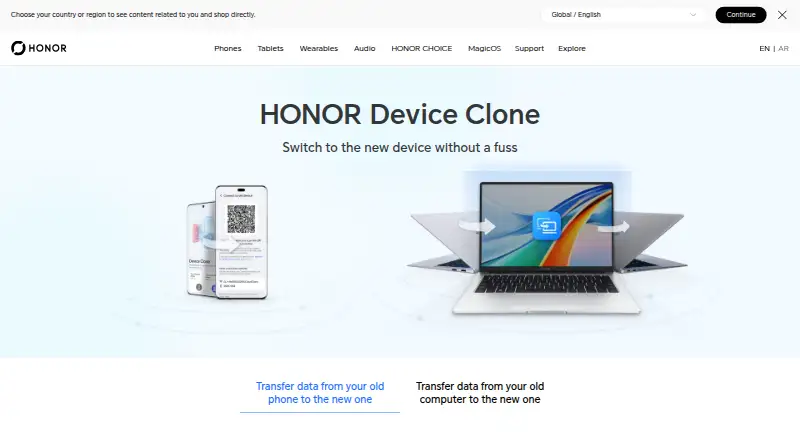
What HONOR Device Clone is
HONOR Device Clone moves data from an old phone or computer to a new HONOR device. For phone transfers, the guide describes pairing by scanning a QR code, without cables, mobile data, or sign-up. HONOR reports speeds of up to 8 GB per minute in optimal lab conditions, while noting that device differences may affect speed; it also says the phone connection and file transfer are encrypted. Supported phone sources include HONOR, HarmonyOS, other Android brands, and Apple devices, running Android 7.0 or iOS 8.0 and later. For PC migration, it transfers pictures, videos, documents, some Windows settings, and bookmarks and browsing history from Edge, Chrome, or Firefox. HONOR reports wireless PC transfer speeds up to 90 MB/s in its lab, with actual results depending on environment and model. Windows system files, hidden files, shortcut files, and applications or files in application directories are excluded. Interrupted or failed PC file transfers can be resumed. The PC process uses HONOR PC Manager on the new PC and requires Device Clone on the old PC.
Who it suits
Device Clone suits people moving data to a new HONOR phone or PC. Phone migration covers Android and iOS source devices; PC migration requires HONOR PC Manager on the new computer and Device Clone on the old one.
What it does well
- Phone pairing uses a QR code without cables or sign-up.
- Phone transfers are described as encrypted.
- PC transfers can resume after interruption or failure.
- Supports bookmarks and history from three listed browsers.
What to know first
- Phone migration requires Android 7.0 or iOS 8.0 and later.
- PC migration excludes Windows system and hidden files.
- Applications and files in application directories are unsupported.
Limits
Phone transfers require Android 7.0 or iOS 8.0 and later. PC migration does not support Windows system files, hidden files, shortcut files, or applications and files in application directories.
Plans
| Plan | Billed and limits | Price |
|---|---|---|
| Free | No charge stated | Free |
| HONOR Device Clone | Free app · Requires an HONOR phone as destination · Windows PC transfer requires Windows 7/10/11 64-bit | Free |
As honor.com lists them, read 10 Oct 2026. The maker's own page has the final word.
Getting started
- Open the HONOR Device Clone website for migration guidance.
- For phone migration, use devices running Android 7.0 or iOS 8.0 and later.
- Connect the phones by scanning the QR code.
- For PC migration, use HONOR PC Manager on the new PC.
- Install Device Clone on the old PC.
HONOR Device Clone is a no-cost migration utility for moving data from an older phone or computer to a new HONOR device. It is most useful to people changing to HONOR who need a straightforward phone move plus a selective PC transfer. The trade-off is a focused scope: common personal content is covered, while older phones and several categories of Windows files are not.
Overview
Phone migration pairs the two devices by scanning a QR code, with no cable, mobile data connection, or account sign-up required. HONOR says both the connection and the transferred files are encrypted, which is a sensible protection for a move containing personal data. The maker reports phone speeds of up to 8 GB per minute in optimal laboratory conditions; device differences mean that figure should be treated as a best-case ceiling.
The PC route is wireless as well. HONOR reports speeds of up to 90 MB/s in its lab, but the actual rate depends on the environment and computer model. A failed or interrupted file transfer can be resumed, reducing the risk of having to restart a large migration from the beginning.
Key features
Phone-to-phone migration
The phone guide supports source devices from HONOR, HarmonyOS, other Android brands, and Apple. Phone-to-phone transfer and app transfer are included, giving a switcher more than a basic photo-copy operation. Compatibility starts at Android 7.0 and iOS 8.0, so owners of older source phones should not plan around Device Clone.
PC migration
On computers, Device Clone transfers pictures, videos, documents, some Windows settings, and bookmarks and browsing history from Edge, Chrome, or Firefox. Browser integration is useful when the goal is to make a new HONOR PC feel familiar quickly. The scope is deliberately narrower than a complete system image: Windows system files, hidden files, shortcut files, applications, and files inside application directories are excluded. Use it for personal data and selected settings, not for reproducing an installed Windows environment.
Setup and support
The new PC uses Device Clone through HONOR PC Manager, while the old PC must have Device Clone installed. HONOR's Google Play support contact is [email protected] if a migration issue needs escalation.
Pricing
Device Clone is free: the Free plan costs nothing, with no charge stated. There is no free trial because the product is already offered without payment. The free plan includes phone-to-phone transfer, app transfer, and the described PC migration, so there is no paid tier to unlock larger quotas, extra seats, or additional features. That makes it a practical choice for a one-time move to HONOR, while users needing a broader backup or system-imaging product will need another category of tool.
Platforms
The product supports Android, iOS, and Windows. Android and iOS coverage applies to the phone migration requirements above; Windows is used for the PC transfer workflow. A new HONOR device is the destination in the product's stated use case.
Who it's for
Choose Device Clone if you are moving from an HONOR, HarmonyOS, Android, or Apple phone to a new HONOR phone and want cable-free QR pairing, encrypted transfer, and app migration at no cost. It also fits an HONOR PC switch when your priorities are personal files, browser data, and some settings rather than a full software rebuild.
Look elsewhere if the source phone is below Android 7.0 or iOS 8.0, if you need to migrate Windows applications or system files, or if your destination is not an HONOR device. The PC workflow also requires the old computer to have Device Clone installed.
Pros and cons
Pros
- Free for the stated features: the 0.00 USD plan covers both phone and PC migration without a paid upgrade.
- Broad phone-source coverage: HONOR, HarmonyOS, other Android brands, and Apple are supported as source phones.
- Low-friction phone setup: QR pairing avoids cables, mobile data, and sign-up.
- Encrypted phone migration: HONOR says the connection and transferred files are encrypted.
- Resume support on PC: interrupted or failed file transfers can continue rather than necessarily starting over.
Cons
- HONOR-centered destination: the stated purpose is migration to a new HONOR phone or PC, limiting its usefulness for other destinations.
- PC exclusions are substantial: system, hidden, shortcut, application, and application-directory files do not migrate.
- Older phones are unsupported: the published minimums are Android 7.0 and iOS 8.0.
- Speed claims are conditional: 8 GB per minute and 90 MB/s are laboratory maxima, not promised real-world performance.
Alternatives
vivo EasyShare is the better fit when you want free-data file transfer and phone cloning across Android, iOS, macOS, and Windows rather than an HONOR-focused destination.
AirMore suits users seeking a freemium Android, iOS, and web option, with paid VIP plans also offered.
Android Switch is another free Android and iOS choice for switching phones.
Huawei HiSuite is preferable for Huawei-oriented Windows and Mac transfers, including picture, video, file, and backup/restore functions on Mac.
Syncios Manager offers a free version on macOS and Windows plus a 1 Year Subscription priced at $34.95 a year with auto-renewal.
Xiaomi Home is a free Android and iOS alternative, with device support varying by region.
CopyTrans Manager is free Windows software for iPhone, iPad, and iPod devices.
Move to iOS is the focused option for transferring Android content to a new iPhone or iPad, including some free apps when supported on both stores.
For a broader category comparison, see Phone Transfer Software.
Verdict
HONOR Device Clone is a strong choice for anyone moving to a new HONOR device who wants a free, encrypted phone transfer with app support and a useful, resumable PC file move. Its main reason to look elsewhere is the destination and scope: it does not replace a full Windows migration, and its phone support depends on the stated Android and iOS minimums.
Verdict
HONOR Device Clone covers phone-to-phone and selected PC-to-PC migration to a new HONOR device. Check its supported phone versions and excluded PC file types before moving data.
Questions
How much does HONOR Device Clone cost?
It is free. The Free plan costs nothing, with no charge stated.
Is there a free trial?
No. The product has a free plan, and no free trial.
Which platforms are supported?
Android, iOS, and Windows are listed. Phone migration requires Android 7.0 or iOS 8.0 and later.
What can it move from a PC?
It can transfer pictures, videos, documents, some Windows settings, and bookmarks and browsing history from Edge, Chrome, or Firefox.
What is needed for PC migration?
Use HONOR PC Manager on the new PC and install Device Clone on the old PC.
How can I contact support?
HONOR's Google Play listing provides the support email [email protected].
Facts from HONOR Device Clone's own pages
- API and SDK policy
- HONOR's developer agreements describe revocable, rate-limited APIs and SDKs with audit, suspension, anti-reverse-engineering and credential-protection rules; the Device Clone product pages provide user guides and downloads rather than a public Device Clone API. · apig-fr.heds.hihonor.com, 15 Oct 2026
- Apple feature scope
- The iPhone listing advertises one-click transfer of contacts, calendars, photos, videos and third-party app data without internet, mobile data, a computer, cable or SIM. · apps.apple.com, 15 Oct 2026
- Company size and headquarters
- LinkedIn lists HONOR as a 5,001–10,000-employee partnership headquartered in Shenzhen, China. · linkedin.com, 15 Oct 2026
- Cross-platform transfer
- The phone workflow accepts old HONOR, other Android and Apple devices, while the PC workflow accepts old HONOR or non-HONOR Windows PCs. · honor.com, 15 Oct 2026
- Encryption
- HONOR says device connection and transferred data are encrypted during cloning. · honor.com, 15 Oct 2026
- Google Play adoption
- The Android listing reports 5M+ downloads and says the developer collects no data or shares it with third parties. · play.google.com, 15 Oct 2026
- Integrations
- The PC migration feature supports bookmarks and browsing history from Edge, Chrome, and Firefox. · honor.com, 10 Oct 2026
- Intended user
- The product page presents Device Clone as a way to move data when switching to a new HONOR phone or PC. · honor.com, 10 Oct 2026
- Legal name and founding
- Crunchbase identifies the maker as Honor Device Co., Ltd., established in 2013 and headquartered in Shenzhen, Guangdong. · crunchbase.com, 15 Oct 2026
- Licence
- HONOR's EULA grants a limited, non-exclusive licence for its proprietary software on one HONOR device or computer and prohibits redistribution and reverse engineering; separately identified open-source components retain their own licences. · honor.com, 15 Oct 2026
- Limit: app and account migration
- Reddit users report missing email, Wi-Fi and other accounts, unrecognized transfer cables, stalled app restores and many apps failing to transfer. · reddit.com, 15 Oct 2026
- Limit: Google Play complaints
- Recent Play reviewers report the hotspot turning off, restores remaining stuck and a 97 MB transfer taking about two hours. · play.google.com, 15 Oct 2026
- Limit: metadata loss
- A Reddit report says migration from Huawei EMUI changed file timestamps and lost photo GPS information and notes. · reddit.com, 15 Oct 2026
- Limit: one-way destination
- MobiKin characterizes the product as a one-way transfer into HONOR devices, with more limited iOS coverage and incomplete third-party app data. · mobikin.com, 15 Oct 2026
- Limit: overheating
- HONOR support attributes heat during cloning to intensive compression, transmission and decompression and advises avoiding charging or heavy use while transferring. · honor.com, 15 Oct 2026
- Limit: setup and pairing failures
- Chrome-Stats review aggregation reports installations showing only the old-device role, device mis-detection, broken QR pairing and transfers stuck at a progress stage. · chrome-stats.com, 15 Oct 2026
- Limit: WhatsApp and protected data
- Wondershare says WhatsApp, social-media content and protected documents may not transfer completely. · mobiletrans.wondershare.com, 15 Oct 2026
- Open-source status
- HONOR provides an Open Source Release Center for legally required component source code, but its Device Clone pages do not identify Device Clone itself as open source. · honor.com, 15 Oct 2026
- Operating conditions
- HONOR advises keeping devices charged, leaving airplane mode off and avoiding other device use during cloning. · honor.com, 15 Oct 2026
- Ownership change
- Huawei announced on November 17, 2020 that it sold all HONOR business assets to Shenzhen Zhixin New Information Technology and retained no shares or management role. · huawei.com, 15 Oct 2026
- Password-vault security
- MagicOS documentation says password-vault data cloning is limited to HONOR devices with the required PKI certificate and uses AES-256-CBC with keys exchanged in each phone's trusted execution environment. · honor.com, 15 Oct 2026
- PC data coverage
- PC cloning includes photos, videos, documents, some Windows settings, and Edge, Chrome and Firefox bookmarks and history. · honor.com, 15 Oct 2026
- PC installation
- A new HONOR PC uses PC Manager, while the old computer installs Device Clone from HONOR's download site. · honor.com, 15 Oct 2026
- PC limits
- Windows system files, hidden files, shortcut files, and applications or files in application directories are not supported for migration. · honor.com, 10 Oct 2026
Where HONOR Device Clone stands on Freedom251
- Phone Transfer Software#9 of 44