Freedom251 › Phone Transfer Software

Droid Transfer
What Droid Transfer is
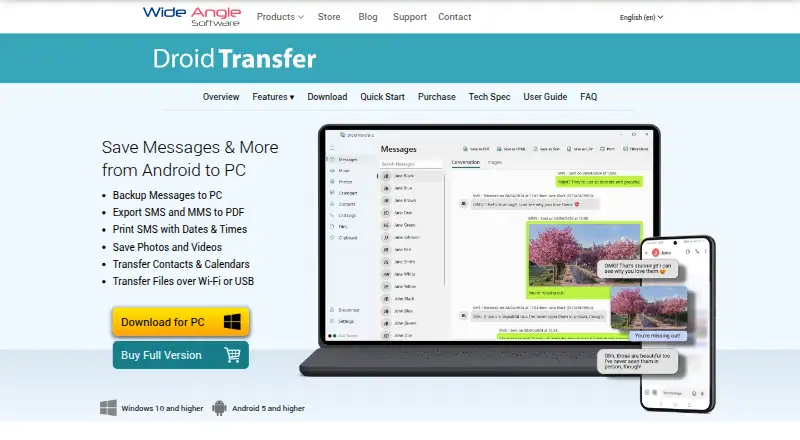
Droid Transfer is a Windows application for managing Android phone content from a PC. It transfers messages, call history, photos, music, and other media over a USB cable or a local Wi-Fi network. Users can save SMS and MMS conversations as PDF, HTML, CSV, or text, with photos, emojis, videos, and timestamps included, and print messages from the computer. The application also supports managing photos, videos, music, contacts, files, calendars, and call logs. For music, it can sync an iTunes library with an Android device and transfer tracks between the phone and PC. Droid Transfer works with the free Transfer Companion Android app from Google Play. The maker says files and data are accessed locally on the computer, not sent to Wide Angle Software or another party. A free trial is available, with limits on some transfers and backups; paid licenses provide unrestricted access on one or two PCs and unlimited Android devices. The product page states support for Windows 10 and higher and Android 5 and higher. Wide Angle Software says the product receives monthly updates and includes AI-powered support chat.
Who it suits
Droid Transfer suits Android users who want to manage phone content or copy messages and media to a Windows PC using USB or local Wi-Fi. It may also suit teams or enterprises that need licensing with shared activation and seat management.
What it does well
- Transfers content over USB or local Wi-Fi.
- Exports messages in PDF, HTML, CSV, or text.
- Can print SMS, MMS, and text messages from a PC.
- Manages contacts, files, calendars, and call logs.
- Supports iTunes library syncing with Android devices.
- Maker says data stays local on the computer.
What to know first
- The free trial limits music and photo transfers to 100 items.
- Trial call-history exports include only the first two calls per contact.
- Trial message saves include the first five per conversation.
- Contact and file backup and restore require a full license.
Limits
The free trial transfers up to 100 music and photo items, exports only the first two call-history entries per contact, and saves the first five messages per conversation. It allows full calendar access and viewing contacts and files, but contact and file backup and restore require a full license.
Plans
| Plan | Billed and limits | Price |
|---|---|---|
| Lifetime License | Buy once - use forever. · Full, unrestricted access on 2 PCs · unlimited Android devices | On request |
| 6 Month License | 6 months; no subscriptions or auto-renewals. · Full, unrestricted access on 1 PC · unlimited Android devices | On request |
| 12 Month License | 12 months; no subscriptions or auto-renewals. · Full, unrestricted access on 1 PC · unlimited Android devices | On request |
As wideanglesoftware.com lists them, read 9 Oct 2026. The maker's own page has the final word.
Getting started
- Install Droid Transfer on a Windows 10 or higher PC.
- Install the free Transfer Companion app from Google Play on the Android phone.
- Connect the phone and PC over USB or a local Wi-Fi network.
- Use the free trial or choose a full license for unrestricted access.
Verdict
Choose Droid Transfer if you need to manage or move Android phone content on a Windows PC, especially messages that you want to export or print. Look elsewhere if you need phone-to-phone transfer, which the listed capabilities do not support.
Questions
Is Droid Transfer free?
A free trial is available. Full unrestricted access requires a license.
What does a full license cost?
Prices are not provided here. The listed options are a Lifetime License, a 6 Month License, and a 12 Month License.
Which platforms does it support?
The product page states Windows 10 and higher and Android 5 and higher.
Can Droid Transfer save and print messages?
Yes. SMS and MMS conversations can be saved as PDF, HTML, CSV, or text, and messages can be printed from the PC.
Who makes Droid Transfer?
It is made by Wide Angle Software, which says it was founded in 2006 and gives its address in Stafford, United Kingdom.
Does it send phone data to the maker?
The maker says the software accesses files and data locally on the computer and does not transfer them to Wide Angle Software or a third party.
Facts from Droid Transfer's own pages
- Android companion app
- Droid Transfer works with the free Transfer Companion Android app, available from Google Play. · wideanglesoftware.com, 9 Oct 2026
- Business licensing
- The maker offers team and enterprise licensing, with enterprise packages including a shared activation code and a portal to manage and reassign seats. · wideanglesoftware.com, 9 Oct 2026
- Company
- Wide Angle Software says it was founded in 2006 and gives its address as St. John's House, Weston Road, Stafford, UK. · wideanglesoftware.com, 9 Oct 2026
- Connection methods
- It transfers content over a USB cable or a local Wi-Fi network. · wideanglesoftware.com, 9 Oct 2026
- Founded
- 2006 · wideanglesoftware.com, 28 Sept 2026
- Headquarters
- Stafford, United Kingdom · wideanglesoftware.com, 28 Sept 2026
- Local privacy
- The maker says the software accesses files and data locally on the computer and does not transfer them to Wide Angle Software or a third party. · wideanglesoftware.com, 9 Oct 2026
- Media and device content
- The product supports managing photos, videos, music, contacts, files, calendars, and call logs from a PC. · wideanglesoftware.com, 9 Oct 2026
- Messages
- It can save SMS and MMS conversations as PDF, HTML, CSV, or text, including photos, emojis, videos, and timestamps. · wideanglesoftware.com, 9 Oct 2026
- More trial limits
- The trial provides full calendar access and lets users view contacts and files, while contact and file backup and restore require a full license. · wideanglesoftware.com, 9 Oct 2026
- Music integration
- Droid Transfer can sync an iTunes library with an Android device and transfer music between the PC and phone. · wideanglesoftware.com, 9 Oct 2026
- Printing
- Users can print SMS, MMS, and text messages from Droid Transfer on their PC. · wideanglesoftware.com, 9 Oct 2026
- Purpose
- Droid Transfer is a Windows application for managing and transferring messages, call history, photos, music, and other media from an Android phone to a PC. · wideanglesoftware.com, 9 Oct 2026
- Support and updates
- The maker says Droid Transfer receives monthly updates and includes an AI-powered support chat. · wideanglesoftware.com, 9 Oct 2026
- Supported versions
- The product page states Windows 10 and higher and Android 5 and higher. · wideanglesoftware.com, 9 Oct 2026
- Trial limits
- The free trial allows transfer of up to 100 music and photo items, limits call history exports to the first 2 calls per contact, and saves the first 5 messages per conversation. · wideanglesoftware.com, 9 Oct 2026
Where Droid Transfer stands on Freedom251
- Phone Transfer Software#10 of 44