Freedom251 › Mood Board Software
HomeBoard
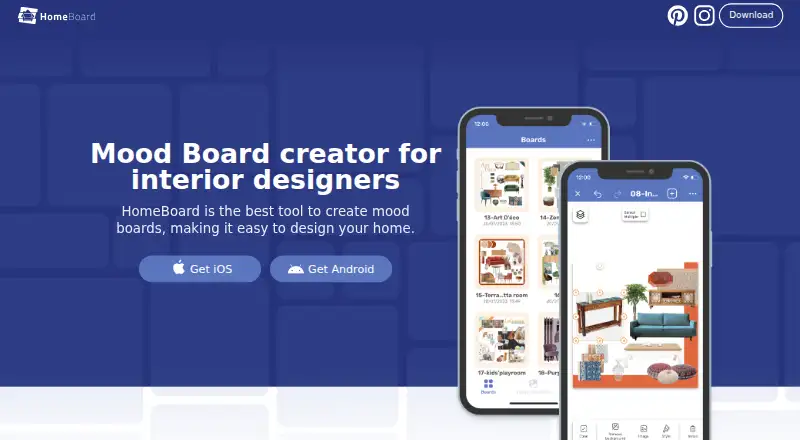
What HomeBoard is
HomeBoard is a mood-board and interior design app for planning and visualizing home ideas. Build boards by bringing together furniture, décor, and colors, then turn a board into an AI-generated room render. Paint palettes from Behr, Sherwin-Williams, and Benjamin Moore give you named color collections to explore. A background remover can separate objects from image backgrounds, while folders and item notes help keep projects organized.
Bring images into a project from Pinterest, Unsplash, a browser, or your camera roll. HomeBoard can also make cut sheets to use as shopping lists. Boards sync across devices, and comments and presentation mode support sharing and showing a design. The app is available for iOS, Android, and macOS. The maker describes it as useful for homeowners, amateur designers, and Airbnb hosts. The App Store lists HomeBoard as free with in-app purchases and says it can be used without signing in. Pro features are offered through HomeBoard Pro Monthly for $7.99 a month or HomeBoard Pro Yearly for $39.99 a year; the yearly plan has a 7-day free trial. Its privacy notice says AI providers including Photoroom and OpenAI may process user inputs, outputs, and personal information.
Who it suits
Homeowners, amateur designers, and Airbnb hosts can use HomeBoard to collect visual references and turn design boards into room renders. It also suits people who want to organize inspiration into projects, make shopping lists, or present concepts across supported devices.
What it does well
- Combines furniture, décor, and colors in mood boards.
- Creates AI room renders from boards.
- Includes palettes from three named paint brands.
- Imports images from Pinterest, Unsplash, browsers, and camera rolls.
- Creates cut sheets for shopping lists.
- Works across iOS, Android, and macOS.
What to know first
- Pro features require a paid plan.
- AI providers may process inputs, outputs, and personal information.
- Internet transmission and storage are not guaranteed completely secure.
Plans
| Plan | Billed and limits | Price |
|---|---|---|
| HomeBoard Pro Yearly | Pro features · 7-day free trial | $39.99 a year |
| HomeBoard Pro Monthly | Pro features | $7.99 a month |
As homeboardapp.com lists them, read 8 Oct 2026. The maker's own page has the final word.
Getting started
- Visit https://www.homeboardapp.com/.
- Get HomeBoard on iOS, Android, or macOS.
- Use the app without signing in, as described by the App Store listing.
- Start with the free app, listed with in-app purchases.
- Choose HomeBoard Pro Monthly for $7.99 a month or HomeBoard Pro Yearly for $39.99 a year; the yearly plan includes a 7-day free trial.
Verdict
Choose HomeBoard if you want to collect home-design references, visualize them as AI room renders, and organize selections into shopping lists. Its free access and no-sign-in option make it straightforward to start, while Pro features require a monthly or yearly purchase. Consider the privacy notice if you plan to send personal information or design inputs through AI features.
Questions
Is HomeBoard free?
The App Store lists HomeBoard as free with in-app purchases. Pro features are available through paid monthly or yearly plans.
How much does HomeBoard Pro cost?
HomeBoard Pro Monthly costs $7.99 a month. HomeBoard Pro Yearly costs $39.99 a year and includes a 7-day free trial.
Which platforms does HomeBoard support?
HomeBoard is available for iOS, Android, and macOS.
Do I need an account to use HomeBoard?
The App Store description says users can use the app without signing in.
Which AI providers does HomeBoard use?
Its privacy notice names Photoroom and OpenAI among its third-party AI providers. It says these providers may process user inputs, outputs, and personal information.
What does HomeBoard do with images and boards?
Users can create mood boards, turn them into AI-generated room renders, organize projects in folders, and create cut sheets as shopping lists. Boards can sync across devices.
Facts from HomeBoard's own pages
- Account requirement
- The App Store description says users can use the app without signing in. · apps.apple.com, 8 Oct 2026
- AI providers
- The privacy notice says AI products use third-party providers including Photoroom and OpenAI, and that user inputs, outputs, and personal information may be processed by them. · homeboardapp.com, 8 Oct 2026
- AI renders
- The app can transform mood boards into AI-generated room renders. · apps.apple.com, 8 Oct 2026
- Color catalogs
- The app includes paint palettes from Behr, Sherwin-Williams, and Benjamin Moore. · apps.apple.com, 8 Oct 2026
- Free access
- The App Store lists HomeBoard as free with in-app purchases. · apps.apple.com, 8 Oct 2026
- Headquarters
- Rácalmás, Fejér, Hungary · homeboardapp.com, 28 Sept 2026
- Image editing
- HomeBoard offers a background remover for cutting out objects from images. · homeboardapp.com, 8 Oct 2026
- Inputs and exports
- Users can add images from Pinterest, Unsplash, a browser, or their camera roll, and create cut sheets as shopping lists. · apps.apple.com, 8 Oct 2026
- Intended users
- The maker describes HomeBoard as useful for homeowners, amateur designers, and Airbnb hosts. · apps.apple.com, 8 Oct 2026
- Mood boards
- Users can combine furniture, décor, and colors into mood boards. · apps.apple.com, 8 Oct 2026
- Organization
- Projects can be organized into folders, and users can add notes to items. · homeboardapp.com, 8 Oct 2026
- Privacy and security
- The privacy notice says the maker uses technical and organizational safeguards, while noting that internet transmission and storage cannot be guaranteed completely secure. · homeboardapp.com, 8 Oct 2026
- Purpose
- HomeBoard is a mood-board and interior design app for visualizing home design ideas. · homeboardapp.com, 8 Oct 2026
- Support
- The App Store listing gives [email protected] for feedback and improvement suggestions. · apps.apple.com, 8 Oct 2026
- Sync
- The app supports syncing boards across devices. · apps.apple.com, 8 Oct 2026
Where HomeBoard stands on Freedom251
- Mood Board Software#2 of 24