Freedom251 › Photo Viewer Software

HawkView
What HawkView is
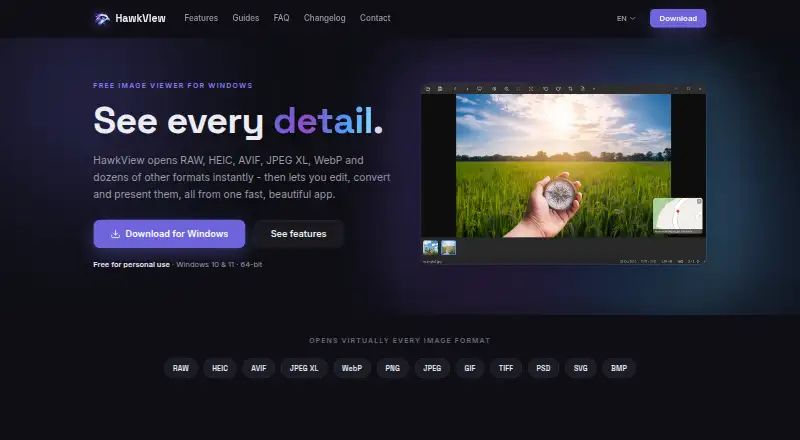
HawkView is a Windows image app for viewing, editing, converting and presenting pictures. It handles around 40 formats, including HEIC, AVIF, JPEG XL, camera RAW, PSD, SVG and animated images. Its GPU-accelerated viewer can display images up to 64 megapixels by streaming visible areas in 512-pixel tiles. Editing tools cover cropping, straightening, flipping and lossless 90-degree JPEG rotation; changes remain in memory until saved or discarded. For presentations, slideshows offer 36 transitions, background music and MP4 export in 720p, 1080p or 4K. HawkView can read and edit more than 40 EXIF, IPTC and XMP fields, and place geotagged photos on an interactive OpenStreetMap. A location can also be opened in Google Maps, and OpenStreetMap can be used in slideshows. Images, edits and settings stay on the computer, with no account, sign-up, advertising or tracking. Optional network activity is limited to update checks and anonymous technical crash reports. The app is free for personal use; professional or commercial use requires a paid license. It supports 64-bit x64 Windows 10 and 11 and is available through the Microsoft Store, a direct installer or a portable ZIP.
Who it suits
HawkView suits Windows users who want to view, edit and present many image formats, including RAW files, while keeping images and settings on their computer. It is also relevant to photographers who need metadata tools or a map view for geotagged photos; professional and commercial use requires a paid license.
What it does well
- Supports around 40 formats, including camera RAW, PSD, SVG and animated images.
- GPU viewer handles images up to 64 megapixels with 512-pixel tiling.
- Includes cropping, straightening, flipping and lossless JPEG rotation.
- Slideshow exports MP4 in 720p, 1080p or 4K.
- Reads and edits over 40 metadata fields and maps geotagged photos.
- No account, ads or tracking; optional network uses can be disabled.
What to know first
- Current build supports only 64-bit x64 Windows 10 and 11.
- Professional or commercial use requires a paid license.
- Pricing for the paid license is available on request.
Limits
Personal use is free. Professional or commercial use requires a paid license, with pricing on request.
Plans
| Plan | Billed and limits | Price |
|---|---|---|
| Personal use | Free for personal use · Windows 10 or 11 (64-bit) | Free |
| Professional or commercial license | Paid license required for professional or commercial use | On request |
As hawkview.co lists them, read 9 Oct 2026. The maker's own page has the final word.
Getting started
- Visit https://www.hawkview.co/.
- Choose the Microsoft Store, direct installer or portable ZIP distribution.
- Install for the current user without administrator rights, or use the portable ZIP.
- Use the free plan for personal use; contact HawkView for professional or commercial licensing.
Verdict
Choose HawkView for personal Windows use if broad format support, metadata editing and slideshow export matter. Look elsewhere if you need a current macOS or Linux build, or if you need a stated professional license price before deciding.
Questions
Is HawkView free?
It is free for personal use. Professional or commercial use requires a paid license, with pricing on request.
Which platforms does HawkView support?
The current build supports Windows 10 and 11 on 64-bit x64 processors.
Can HawkView open camera RAW images?
Yes. Camera RAW is among the image formats it supports.
Does HawkView include metadata tools?
Yes. It can read and edit more than 40 EXIF, IPTC and XMP fields.
How can I get HawkView?
It is offered through the Microsoft Store, as a direct installer and as a portable ZIP.
Does HawkView send images online?
Images, edits and settings stay on the computer. Update checks and anonymous technical crash reports are optional network uses; crash reports do not contain image contents, file names or paths.
Facts from HawkView's own pages
- Compatibility
- The current build supports Windows 10 and 11 on 64-bit x64 processors; macOS and Linux builds are described as planned. · hawkview.co, 9 Oct 2026
- Crash reports
- Optional crash reports contain technical details such as file type and size, app version and operating system version, but not image contents, file names or paths. · hawkview.co, 9 Oct 2026
- Distribution
- HawkView is offered through the Microsoft Store and as a direct installer or portable ZIP; the installer runs for the current user without admin rights. · hawkview.co, 9 Oct 2026
- Editing
- It offers cropping, straightening, flipping and lossless 90-degree JPEG rotation, with edits held in memory until saved or discarded. · hawkview.co, 9 Oct 2026
- Formats
- It supports around 40 image formats, including HEIC, AVIF, JPEG XL, camera RAW, PSD, SVG and animated formats. · hawkview.co, 9 Oct 2026
- Integrations
- The GPS map can open a photo's location in Google Maps, and slideshows can use OpenStreetMap. · hawkview.co, 9 Oct 2026
- Metadata and maps
- It can read and edit more than 40 EXIF, IPTC and XMP fields and show geotagged photos on an interactive OpenStreetMap. · hawkview.co, 9 Oct 2026
- Performance
- Its GPU-accelerated viewer supports 64-megapixel images using 512-pixel tiling to stream visible image areas. · hawkview.co, 9 Oct 2026
- Privacy
- The app keeps images, edits and settings on the computer and has no accounts, sign-up, ads or tracking; update checks and anonymous crash reports are optional network uses. · hawkview.co, 9 Oct 2026
- Product
- HawkView is a Windows image viewer for viewing, editing, converting and presenting images. · hawkview.co, 9 Oct 2026
- Slideshows
- Slideshow features include 36 transitions, background music and MP4 export at 720p, 1080p or 4K. · hawkview.co, 9 Oct 2026
- Support
- Users can contact HawkView through its contact form or the listed support email. · hawkview.co, 9 Oct 2026
- Use cases
- The maker describes HawkView as free for personal use and says professional or commercial use requires a paid license. · hawkview.co, 9 Oct 2026
Where HawkView stands on Freedom251
- Photo Viewer Software#10 of 34