Freedom251 › AI Vector Generators
GoToVector
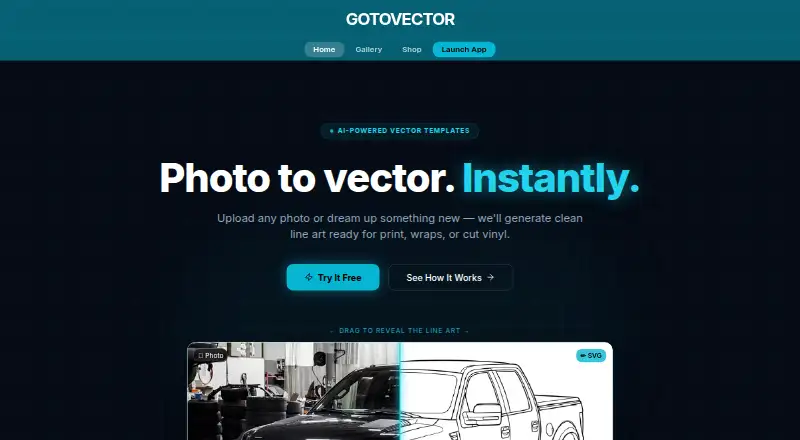
What GoToVector is
GoToVector turns uploaded photos into vector-ready line art templates for print, laser engraving, and craft projects. The web app accepts JPG, PNG, and WebP files, and can arrange up to five views of a subject on one print-ready sheet. Listed vehicle views include left, right, front, back, and top or above. Users can generate and preview designs for free, with up to five regenerations per session and no signup. The free plan provides one watermarked SVG sheet; paid downloads provide clean SVG sheets without a watermark. One credit covers one sheet and is used only when the final SVG is downloaded. Purchased credits do not expire and are tied to the buyer's email address. The one-time options are $4.99, paid once for one sheet, $19.99, paid once for five sheets, and $25, paid once for 25 sheets. The maker says results are stylized AI line art, not pixel-perfect traces, and fine proportions may differ from the source photo. It describes the output as suitable for decals, wraps, and templates.
Who it suits
GoToVector may suit people creating decal, wrap, or craft templates who want to turn photos into SVG line art. Its multi-view sheet option includes listed vehicle viewpoints.
What it does well
- Accepts JPG, PNG, and WebP images.
- Supports up to five subject views per sheet.
- Free previews and up to five regenerations per session.
- Credits are used only for final SVG downloads.
- Purchased credits do not expire.
What to know first
- Free plan provides a watermarked SVG sheet.
- Results may differ from source photos in fine proportions.
- Paid downloads are required for clean SVG sheets.
Limits
The free plan provides one watermarked SVG sheet and allows up to five regenerations per session. Paid options provide one, five, or 25 clean SVG sheets; credits are used on final download and do not expire.
Plans
| Plan | Billed and limits | Price |
|---|---|---|
| Free | 1 watermarked SVG sheet · multiple designs per sheet · 5 free regenerations · no signup required | Free |
| 5-Pack | one-time · 5 clean SVG sheets · multiple designs per sheet · no watermark · no expiry | $19.99, paid once |
| 25 Downloads | one-time · 25 clean SVG sheets · multiple designs per sheet · no watermark · no expiry · Best value — $1/sheet | $25, paid once |
| Single | one-time · 1 clean SVG sheet · multiple designs per sheet · no watermark · no expiry | $4.99, paid once |
As gotovector.com lists them, read 7 Oct 2026. The maker's own page has the final word.
Getting started
- Open https://gotovector.com/ in a web browser.
- Upload a JPG, PNG, or WebP image.
- Add up to five views of the subject for one sheet.
- Generate and preview the design, using up to five free regenerations per session.
- Download the watermarked free SVG sheet, or choose a paid option for clean downloads. Purchased credits are tied to your email address.
GoToVector converts uploaded images into stylized vector line-art sheets for print, laser engraving, and craft work. It is best suited to makers who need several coordinated views of a subject on one sheet, especially for decals, wraps, or templates. Its pay-per-download model keeps experimentation inexpensive, but exact photographic fidelity is not its strength.
Overview
The web app accepts JPG, PNG, and WebP uploads and turns them into vector-ready artwork. You can submit as many as five views of one subject and have them arranged together on a print-ready sheet. That workflow is more useful for a vehicle wrap or a multi-angle template set than for producing one meticulously traced illustration.
Generation and preview are free, and the free option does not require an account. A purchased credit is consumed only when you download the final SVG, so you can refine a result before paying. Credits are attached to your email address and do not expire.
Key features
Multi-view sheets support left, right, front, back, and top-or-above vehicle views. Combining those angles in one document can save layout work when a project needs consistent reference drawings across surfaces. The app also provides image-to-vector conversion and text-to-vector generation, with SVG as the export format.
Each free session permits up to five regenerations, making the preview stage practical for trying alternate interpretations. The free SVG carries a watermark; paid downloads are clean, production-ready SVG sheets. One credit represents one sheet, regardless of how many designs are placed on that sheet.
GoToVector’s central limitation is stated plainly: its output is stylized AI line art, not a pixel-perfect trace. Fine proportions can differ from the source photo. That is acceptable for illustrative craft patterns and concept templates, but risky where a contour must match a real object precisely.
Pricing
GoToVector uses one-time purchases rather than a recurring subscription.
| Plan | Price | Includes |
|---|---|---|
| Free | free | One watermarked SVG sheet, multiple designs per sheet, five free regenerations, and no signup requirement |
| Single | $4.99, paid once | One clean SVG sheet, multiple designs per sheet, no watermark, and no expiry |
| 5-Pack | $19.99, paid once | Five clean SVG sheets, multiple designs per sheet, no watermark, and no expiry |
| 25 Downloads | $25, paid once | Twenty-five clean SVG sheets, multiple designs per sheet, no watermark, no expiry, and a stated $1 per-sheet value |
The Free plan is for evaluating the generated style or making a watermarked draft. Single fits an occasional finished project. The 5-Pack lowers the effective sheet cost for a small batch, while 25 Downloads is the sensible choice for regular production. All paid options remove the watermark; unused credits remain available rather than expiring. Purchased credits require an email-linked account, unlike the no-signup free option.
Platforms
GoToVector runs on the web. That makes it accessible from a browser, but the published platform offering does not include a separate desktop or mobile application.
Who it's for
Choose GoToVector for decals, vehicle wraps, laser-engraving layouts, and craft templates where a stylized set of views is more valuable than a mathematically exact trace. It also suits users who want to test several generations before spending money and who prefer non-expiring, one-time credits.
Look elsewhere for engineering, restoration, or other work that depends on exact source proportions. The AI treatment can alter fine contours, and the free output is watermarked, so it is not a final-delivery option without a purchase.
Pros and cons
Pros
- Five-view sheets: Up to five subject angles can be combined in one print-ready layout, reducing preparation for multi-surface projects.
- Risk-free preview: Generation, preview, and five regenerations per session are free, with no signup required.
- Non-expiring credits: One-time purchases remain usable until needed, which suits irregular project schedules.
- Clean SVG downloads: Paid sheets remove the watermark and are intended for production use.
Cons
- Not an exact trace: Stylized AI output may change fine proportions, ruling it out for precision-critical outlines.
- SVG-only export: The published export format is limited to SVG.
- Watermark on free output: The no-cost sheet is useful for evaluation but not polished delivery.
- Web-only access: There is no separately listed desktop or mobile platform.
Alternatives
For a broader directory of comparable tools, see AI Vector Generators. AnnoMotion is a better fit if you need API, web, or Windows access and a credit system with free email-verified and daily allowances. Clearly Logo Maker suits logo-focused work on macOS or the web. Pick OmniSVG when Linux, macOS, self-hosting, or five free daily generations matter. Wix Logo Maker is the stronger choice for logo creation on Android or iOS with monthly AI credits. Amnt is worth considering for API/web workflows offering 20 free generations a day and downloadable SVGs. CleanVector favors recurring monthly credits, permanent SVG access, and browser editing tools. LOGO.com is a web option centered on logos and PNG output. logotype.ai provides credit-based logo generation with watermarked SVG export and web comparison previews.
Verdict
GoToVector is a good choice for makers who need several stylized subject views arranged as a clean SVG and want to pay only for downloads they keep. Its free, no-signup preview and non-expiring one-time credits are compelling for occasional craft and decal work. Look elsewhere when faithful proportions, broader export formats, or a native app are more important than rapid multi-view line-art generation.
Verdict
GoToVector offers free generation and preview, with paid downloads for clean SVG sheets. Its stated accuracy limitation matters when close fidelity to a source photo is important.
Questions
Is GoToVector free?
Yes. The free plan costs nothing and provides one watermarked SVG sheet, with up to five regenerations per session.
What do the paid options cost?
Single costs $4.99, paid once for one clean sheet. 5-Pack costs $19.99, paid once for five sheets, and 25 Downloads costs $25, paid once for 25 sheets.
Which image formats does it accept?
It accepts JPG, PNG, and WebP images.
What file format does it export?
The listed export format is SVG. Paid downloads provide clean SVG sheets without a watermark.
Do I need an account?
No signup is required to use the free option. Purchased credits are tied to the user's email address.
Are the results exact traces of the photo?
No. The maker describes them as stylized AI line art, and fine proportions may differ from the source photo.
Facts from GoToVector's own pages
- Account requirement
- The free option requires no signup, while purchased credits are tied to the user's email address. · gotovector.com, 7 Oct 2026
- Accuracy limitation
- The maker says results are stylized AI line art rather than pixel-perfect traces and may differ from the source photo in fine proportions. · gotovector.com, 7 Oct 2026
- Best-fit uses
- The maker describes results as suited to decals, wraps, and templates. · gotovector.com, 7 Oct 2026
- Credit expiry
- Purchased credits do not expire. · gotovector.com, 7 Oct 2026
- Credit use
- One credit equals one SVG sheet, and a credit is used only when the user downloads the final SVG. · gotovector.com, 7 Oct 2026
- Free generation
- Users can generate and preview for free, with up to five regenerations per session. · gotovector.com, 7 Oct 2026
- Inputs
- The app accepts JPG, PNG, and WebP images. · gotovector.com, 7 Oct 2026
- Multi-view sheets
- Users can upload up to five views of a subject and receive them arranged on one print-ready sheet. · gotovector.com, 7 Oct 2026
- Multi-view subjects
- The page lists vehicle views including left, right, front, back, and top or above. · gotovector.com, 7 Oct 2026
- Output
- Paid downloads provide a clean, production-ready SVG sheet. · gotovector.com, 7 Oct 2026
- Purpose
- GoToVector turns uploaded photos into vector-ready line art templates for print, laser engraving, and craft projects. · gotovector.com, 7 Oct 2026
- Support
- The maker lists [email protected] for questions. · gotovector.com, 7 Oct 2026
Where GoToVector stands on Freedom251
- AI Vector Generators#9 of 26