Freedom251 › Push Notification Software
Gotify
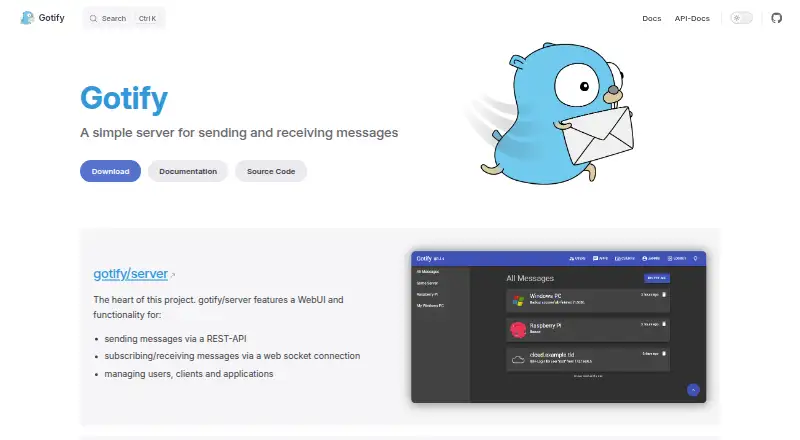
What Gotify is
Gotify is a free, open-source server for sending and receiving messages, with an Android client that displays push notifications. Its WebUI lets administrators manage users, clients, and applications. Messages can be sent through a REST API and received over a WebSocket connection; each includes content, a title, creation date, application ID, and priority. Priority can affect how a client presents a message, such as whether the Android app plays a notification sound. The server can run in a Docker container or from a platform-specific binary, and its Docker images support amd64, i386, arm64, armv7, and riscv64. Optional plugins can add webhook reception, feed polling, WebUI extensions, or alarm notifications, but are currently supported only on Linux and macOS due to a Go limitation. Gotify supports OpenID Connect single sign-on when the identity provider supports PKCE. Security features include TLS configuration, secure session cookies, and bcrypt password hashing. Sensitive actions require session elevation. An optional command-line client can push messages, though any HTTP client can send them.
Who it suits
Gotify suits people or organizations looking to run their own message server and receive notifications on Android. It may also suit teams that need a WebUI, API-based message delivery, or optional plugins, provided their plugin needs fit the supported platforms.
What it does well
- Free and open source
- WebUI manages users, clients, and applications
- REST API sending and WebSocket receiving
- Android client displays push notifications
- Supports TLS, secure cookies, and bcrypt password hashing
What to know first
- Plugins are supported only on Linux and macOS
- OpenID Connect identity provider must support PKCE
- Sensitive actions require session elevation
Plans
| Plan | Billed and limits | Price |
|---|---|---|
| Gotify Server | Self-hosted server · Docker or binary downloads · Android client available | Free |
As gotify.net lists them, read 9 Oct 2026. The maker's own page has the final word.
Getting started
- Open the Gotify website.
- Choose Docker or a platform-specific binary to run the server.
- Use the WebUI to manage users, clients, and applications.
- Send messages through the REST API or optional command-line client.
- Connect the Android app to the server to receive push notifications.
Gotify is a self-hosted message server for individuals and teams that want direct control over application notifications. It fits developers, system administrators, and technically confident users who can run a server and connect HTTP-capable tools. Its open-source, no-cost model is attractive, but platform limits and the PKCE requirement for single sign-on can rule it out in some environments.
The service is deliberately focused on transporting messages rather than running marketing campaigns or a hosted notification operation. You provide the infrastructure, then use its API, web interface, and Android client to move alerts from applications to people.
Overview
Gotify accepts messages through a REST API and passes them to connected clients over WebSocket. The server’s WebUI manages users, clients, and applications, giving an administrator a central place to control who can send and receive messages. This architecture suits internal alerts, automation, and personal infrastructure where the sender can make ordinary HTTP requests.
Each message includes content, a title, creation date, application ID, and priority. Priority is operationally useful: clients can present urgent and routine messages differently, and the Android app can use it to determine whether a notification sound plays. That gives senders meaningful control without turning Gotify into a full campaign or audience-engagement platform.
Key features
Delivery and administration
The REST API keeps integration straightforward, while WebSocket delivery provides a live stream to subscribed clients. Gotify’s Android app listens to that stream and displays push notifications as new messages arrive. An optional command-line client can send messages, but it adds little necessity because any HTTP client can call the API.
Extensibility
Plugins can receive webhooks, poll feeds, extend the WebUI, and deliver alarm notifications. This makes the core server adaptable to varied alert sources, particularly on compatible Unix-like systems. The important constraint is that plugins currently run only on Linux and macOS because of a Go limitation; users deploying elsewhere should not assume plugin functionality will be portable.
Identity and security
OpenID Connect support enables single sign-on when the chosen identity provider supports PKCE. That prerequisite is significant for organizations whose provider cannot meet it. Gotify also supports TLS configuration, secure session cookies, and bcrypt password hashing. Sensitive operations—including changing a password, deleting a client or application, and managing users—require session elevation, adding protection around high-impact administration.
Deployment
You can run the server as a Docker container or install a platform-specific binary. Docker images cover amd64, i386, arm64, armv7, and riscv64, which gives self-hosters broad hardware choices. Self-hosting remains the central trade-off: you gain control and avoid service fees, but server operation is your responsibility.
Pricing
Gotify Server — free (self-hosted server; Docker or binary downloads; Android client available). Gotify is open source, has no paid tier, and offers no free trial because the product itself is free. There are no published seat, message, or subscriber quotas in this plan. The price advantage is strongest for users comfortable supplying their own hosting; it does not remove the operational work of deploying and maintaining that host.
Platforms
Gotify supports Android, API access, Linux, self-hosted deployment, web access, and Windows clients or environments. Plugin support is narrower than the overall platform list: plugins are limited to Linux and macOS. Android is the dedicated mobile push client, while the web interface and API serve administration and integrations across supported systems.
Who it's for
Choose Gotify for personal servers, development and operations alerts, and teams that need an internally controlled message path. It is especially suitable when existing tools can issue HTTP requests and when Android push delivery is useful. It is less suitable for organizations seeking a hosted service, broad iOS coverage, subscriber-oriented campaign tooling, or plugins on platforms outside Linux and macOS.
Pros and cons
Pros
- Free and open source: there is no subscription charge or published usage cap, making long-running self-hosted deployments economical.
- Clear integration path: REST sending and WebSocket delivery connect ordinary HTTP-capable applications to live clients.
- Useful message controls: titles, application IDs, timestamps, and priority support practical alert handling, including Android sound behavior.
- Broad container architecture support: Docker images include amd64, i386, arm64, armv7, and riscv64.
- Security-conscious administration: TLS, secure cookies, bcrypt hashing, and session elevation protect core account actions.
Cons
- Self-hosting is required: users must provide and operate the server rather than signing up for a managed endpoint.
- Plugin portability is limited: plugins currently work only on Linux and macOS.
- OIDC depends on PKCE: identity providers without PKCE support cannot be used for the supported single sign-on flow.
- Focused rather than campaign-oriented: it delivers application messages but is not positioned as a broad marketing notification suite.
Alternatives
For a directory-wide comparison, see Push Notification Software.
- PushAlert is a freemium, multi-platform option with a lifetime-free plan for 3,000 subscribers and a paid Basic tier at $12 a month; choose it when subscriber limits and hosted service matter more than self-hosting.
- OneSignal offers a free monthly plan aimed at individuals and organizations starting out, including 10,000 email sends per month and 1,000 monthly active users; pick it for a managed, multi-platform notification service.
- Pushwoosh provides a freemium pay-as-you-go plan with 1,000 MAU, five AI requests per day, and 20,000 email sends per month; choose it when those hosted engagement allowances fit your needs.
- Firepush has a free plan capped at 500 push notifications per month and a $13.00 USD monthly Basic plan for 10,000 pushes; select it when a defined hosted push quota is preferable.
- PushEngage includes a free plan for one website or app, up to 200 subscribers, and 30 campaigns; it suits small campaign programs.
- Firebase Cloud Messaging is a no-cost, multi-platform messaging service; choose it when you want that ecosystem rather than a self-hosted server.
- PushBots offers freemium plans, including a free tier for 1,000 monthly active users; consider it when a hosted subscriber service is the priority.
- iZooto has a free Basic plan for up to 2,500 subscribers with unlimited notifications and a $25.00 USD monthly Essential tier; choose it for hosted web or API notifications at that scale.
Verdict
Gotify is the right choice for technically capable users who want a free, open-source notification server they can run themselves, with a practical API, WebUI, and Android push client. Look elsewhere if you need managed hosting, wider plugin portability, an identity provider without PKCE, or a full subscriber and campaign platform.
Verdict
Gotify combines a self-hosted message server, WebUI, API access, and an Android push client. Check the plugin platform restriction and PKCE requirement if either affects your setup.
Questions
Is Gotify free?
Yes. The Gotify Server plan is free, and the software is open source.
Which platforms are supported?
The listed platforms are Android, API, Linux, self-hosted, web, and Windows. The Docker images support amd64, i386, arm64, armv7, and riscv64.
How are messages sent and received?
Messages can be sent through a REST API and received through a WebSocket connection. The optional CLI can push messages, but any HTTP client can send them.
Does Gotify support plugins?
Plugins can add webhook reception, feed polling, WebUI extensions, and alarm notifications. Plugin support is currently limited to Linux and macOS.
What security features does Gotify provide?
It supports TLS configuration, secure session cookies, bcrypt password hashing, and OpenID Connect single sign-on when the identity provider supports PKCE.
Facts from Gotify's own pages
- Android client
- The Android app subscribes to the server's message stream and displays push notifications for new messages. · gotify.net, 9 Oct 2026
- API access
- Yes · gotify.net, 20 Sept 2026
- Authentication
- Gotify supports OpenID Connect single sign-on, and the identity provider must support PKCE. · gotify.net, 9 Oct 2026
- CLI
- The command-line client can push messages, but it is optional because any HTTP client can send them. · gotify.net, 9 Oct 2026
- Docker architectures
- The Docker images support amd64, i386, arm64, armv7, and riscv64. · gotify.net, 9 Oct 2026
- Integrations
- Plugins can add functionality such as receiving webhooks, polling feeds, extending the WebUI, and delivering alarm notifications. · gotify.net, 9 Oct 2026
- Message delivery
- Messages can be sent through a REST API and received through a WebSocket connection. · gotify.net, 9 Oct 2026
- Message fields
- Messages include content, title, creation date, application ID, and priority. · gotify.net, 9 Oct 2026
- Message presentation
- Message priority controls how clients present messages, such as whether the Android app plays a notification sound. · gotify.net, 9 Oct 2026
- Mobile push
- Yes · gotify.net, 20 Sept 2026
- Plugin limitation
- Plugins are currently supported only on Linux and macOS due to a Go limitation. · gotify.net, 9 Oct 2026
- Purpose
- Gotify is a simple server for sending and receiving messages. · gotify.net, 9 Oct 2026
- Security
- Gotify supports TLS configuration, secure session cookies, and bcrypt password hashing. · gotify.net, 9 Oct 2026
- Self-hosting
- The server can be run as a Docker container or installed from a platform-specific binary. · gotify.net, 9 Oct 2026
- Sensitive actions
- Changing a password, deleting a client or application, and managing users require session elevation. · gotify.net, 9 Oct 2026
- Web interface
- The server includes a WebUI for managing users, clients, and applications. · gotify.net, 9 Oct 2026
Where Gotify stands on Freedom251
- Push Notification Software#3 of 30
- Push notification services#13 of 31