Freedom251 › Push notification services

PushEngage
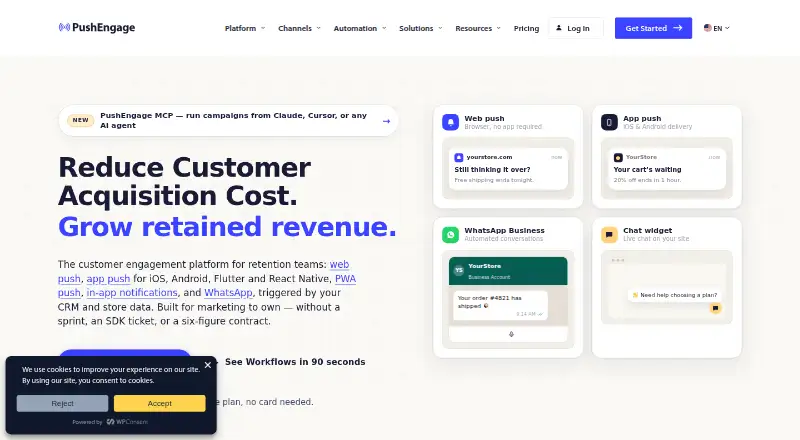
What PushEngage is
PushEngage is a messaging platform for websites and apps, with web push, app push, PWA push, desktop push, and in-app messaging. It also supports WhatsApp and chat widgets. Web push works with Chrome, Edge, Safari, and Firefox without an app install, while native mobile push is available for iOS, Android, Flutter, and React Native. Audience segmentation, automation workflows, and API access are among its listed capabilities. Native integrations include HubSpot, Shopify Plus, WooCommerce, WordPress, Magento, PrestaShop, Wix, and Zapier; it also provides a REST API and SDKs for web and mobile environments. Plans include team features such as sub-accounts, permissions, and user access controls. The free plan supports one website or app, 200 subscribers, and 30 lifetime campaigns. Paid plans charge based on active subscribers, and unsubscribed users are removed automatically. Business costs $9 a month for up to 50,000 subscribers; Premium costs $15 a month for up to 100,000; Growth costs $24 a month for up to 250,000. A full refund can be requested within 14 days if the service is not a fit.
Who it suits
PushEngage suits website and app operators who want to send messages across web and mobile channels. Its segmentation, workflows, integrations, and team controls also cater to organizations managing campaigns and subscribers.
What it does well
- Supports web, app, PWA, and in-app messaging.
- Web push works without an app install.
- Offers audience segmentation and automation workflows.
- Unsubscribed users are removed before billing.
What to know first
- Free plan is limited to 200 subscribers.
- Free plan supports one website or app.
- Free plan includes 30 lifetime campaigns.
Limits
The Free plan supports one website or app, up to 200 subscribers, 30 mobile and browser push campaigns, and one active workflow. Paid plans have their own subscriber and property limits: Business allows up to 50,000 subscribers on one website or app, Premium up to 100,000 across two, and Growth up to 250,000 across three.
Plans
| Plan | Billed and limits | Price |
|---|---|---|
| Free | billed monthly · 200 subscribers · 30 campaigns · 1 website or app · 1 active workflow | Free |
| Business | billed monthly · Up to 50,000 subscribers · 1 website or app · 5 active workflows · 10 steps per workflow | $9 a month |
| Premium | billed monthly · Up to 100,000 subscribers · 2 websites or apps · 20 active workflows · 25 steps per workflow · 2 sub-accounts | $15 a month |
| Growth | billed monthly · Up to 250,000 subscribers · 3 websites or apps · Unlimited active workflows · 100 steps per workflow · 4 sub-accounts | $24 a month |
| Enterprise | Contact sales for a custom quote · Unlimited scalability · Unlimited sub-accounts | On request |
As pushengage.com lists them, read 28 Sept 2026. The maker's own page has the final word.
Getting started
- Visit the PushEngage website.
- Choose the Free plan or a paid plan based on your website or app, subscriber, and workflow needs.
- Set up web push for a supported browser or use the relevant mobile platform SDK.
- Connect a listed native integration or use the REST API where appropriate.
- Create campaigns and workflows within your plan's limits.
PushEngage is a multi-channel messaging platform for businesses sending push notifications and coordinating customer communications. It is best suited to teams that need web and app reach, automation, and integrations; single-channel senders may find its broader toolkit unnecessary. The free tier is a constrained way to start, while paid plans scale subscriber capacity and workflow depth.
Overview
PushEngage combines web, desktop, mobile, and PWA push with in-app messaging, WhatsApp, and chat widgets. Web push works in Chrome, Edge, Safari, and Firefox without an app install, while native mobile push supports iOS, Android, Flutter, and React Native. That coverage is useful for businesses with both browser and app audiences, but it is more than a basic notification sender needs.
Audience segmentation, workflow automation, and API access support more targeted campaigns than simple broadcasts. PushEngage states that it is GDPR and CCPA compliant, and app push supports Apple Push Notification service and Firebase Cloud Messaging certification. The company says it serves more than 75,000 businesses across over 150 countries.
Key features
- Workflow automation: More than 60 templates span nine verticals. The plan limits determine how far teams can take them: Business has five active workflows with 10 steps each, Premium has 20 with 25 steps, and Growth allows unlimited workflows with up to 100 steps. Business is suitable for straightforward sequences; more elaborate automation points toward Growth.
- Integrations and development: Native integrations include HubSpot, Shopify Plus, WooCommerce, WordPress, Magento, PrestaShop, Wix, and Zapier. A REST API and SDKs for iOS, Android, React Native, Flutter, and web give product teams routes to connect their own applications. This breadth helps teams already using those tools, though it may not matter to a business running standalone campaigns.
- Team controls: Plans include sub-accounts, advanced permissions, user access controls, agents, and agency support. Premium includes two sub-accounts and Growth four; Enterprise offers unlimited sub-accounts. Support ranges from limited or email support to priority support, chat, live chat, onboarding, and walkthroughs.
- Subscriber billing: Paid plans charge by active subscribers, and unsubscribed users are removed automatically. Plans can be changed or canceled at any time, and customers can request a full refund within 14 days if the service is not a fit.
Pricing
PushEngage uses freemium pricing. The free tier supports one website or app, 200 subscribers, 30 lifetime campaigns, and one active workflow. That is enough to begin with a small audience, but the lifetime campaign cap makes it a poor fit for sustained use.
- Business — $9 a month: One website or app, up to 50,000 subscribers, unlimited multi-channel campaigns, and five active workflows with 10 steps each. It is the lowest-cost paid option for a single property and relatively simple automation.
- Premium — $15 a month: Two websites or apps, up to 100,000 subscribers, unlimited multi-channel campaigns, 20 workflows with 25 steps each, and two sub-accounts. It fits teams adding another property or needing substantially more automation and account separation.
- Growth — $24 a month: Three websites or apps, up to 250,000 subscribers, unlimited multi-channel campaigns and active workflows, 100 steps per workflow, and four sub-accounts. This is the tier for larger audiences and complex, high-volume workflow needs.
- Enterprise — custom pricing: Custom solutions, integrations, unlimited scalability, and unlimited sub-accounts. It is aimed at organizations whose scale or integration needs exceed Growth.
Paid subscriber ceilings range from 50,000 on Business to 250,000 on Growth. Since billing is tied to active subscribers, automatically removing unsubscribed users can help keep the billed audience aligned with the current subscriber base.
Platforms
PushEngage supports Android, iOS, web, and API. Web push spans Chrome, Edge, Safari, and Firefox; native mobile push is available for iOS, Android, Flutter, and React Native. Its mix of browser, app, PWA, and in-app messaging suits businesses with audiences across devices.
Who it's for
PushEngage is a good fit for businesses that need to coordinate browser and mobile push, segment audiences, and automate campaigns across multiple sites or apps. E-commerce and web teams may benefit from its integrations with platforms including Shopify Plus, WooCommerce, and WordPress. A small project with few campaigns can start on Free, while teams that need higher subscriber limits, more sites, or deeper workflows should compare the paid tiers. It is less compelling for organizations that only need a basic push sender.
Pros and cons
- Pro: A broad mix of web, app, PWA, in-app, WhatsApp, and chat-widget channels can support communication across several customer touchpoints.
- Pro: Workflow capacity scales from five active workflows on Business to unlimited on Growth, with increasingly generous step limits.
- Pro: Subscriber-based billing, automatic removal of unsubscribed users, flexible plan changes, and a 14-day refund request window offer useful billing flexibility.
- Con: Free is tightly capped at 200 subscribers and 30 lifetime campaigns, so it is not a durable option for an active program.
- Con: The lower paid tiers limit the number of sites or apps and workflow complexity; teams managing multiple properties or sophisticated automation must move up the price ladder.
Alternatives
Consider PushAlert if a freemium push tool with a lifetime-free tier capped at 3,000 subscribers better matches your starting audience. OneSignal is another freemium option; its Free plan is described for individuals and organizations just starting out and includes 10,000 email sends per month.
Pushwoosh offers a free pay-as-you-go tier with 1,000 MAU, five AI requests per day, and 20,000 email sends per month, which may suit readers comparing those allowances. Firepush has a free plan with 500 push notifications per month and a $13 a month plan for 10,000 pushes, offering a different quota-based basis for comparison.
Firebase Cloud Messaging is a no-cost option for readers seeking a free messaging service. PushBots provides a free tier with 1,000 monthly active users. iZooto has a free Basic plan for up to 2,500 subscribers, while PushOwl offers plans measured in monthly email allowances, including 500 free emails and a 5,000-email plan at $19 a month.
For a broader comparison, browse Push Notification Software.
Verdict
PushEngage is a strong choice for teams that need push across browser and mobile alongside audience segmentation, workflow automation, and integrations. Its clearest advantage is that this breadth scales across plans, while the main reason to look elsewhere is the strict Free cap or a need for a simpler, single-purpose sender.
Verdict
PushEngage covers multiple messaging channels and offers subscriber-based plans, integrations, and workflow tools. Its free plan is limited to one site or app, 200 subscribers, and 30 campaigns.
Questions
Is there a free plan?
Yes. The Free plan costs nothing and includes one website or app, up to 200 subscribers, and up to 30 campaigns.
What do paid plans cost?
Business is $9 a month, Premium is $15 a month, and Growth is $24 a month. Enterprise pricing is available by custom quote.
Which platforms and channels does PushEngage support?
It supports web, Android, iOS, and API platforms. Channels include web push, app push, PWA push, in-app messaging, WhatsApp, and chat widgets.
What integrations are available?
Native integrations include HubSpot, Shopify Plus, WooCommerce, WordPress, Magento, PrestaShop, Wix, and Zapier.
How is paid billing calculated?
Paid plans charge based on active subscribers. Unsubscribed users are removed automatically, and the maker says customers are billed only for active subscribers.
Can customers request a refund?
Customers can request a full refund within 14 days if PushEngage is not a fit.
Facts from PushEngage's own pages
- API access
- Yes · pushengage.com, 20 Sept 2026
- API and SDKs
- It provides a REST API and native SDKs for iOS, Android, React Native, Flutter, and web. · pushengage.com, 28 Sept 2026
- Audience segmentation
- Yes · pushengage.com, 20 Sept 2026
- Automation workflows
- Yes · pushengage.com, 20 Sept 2026
- Billing basis
- Paid plans charge based on active subscribers, and plans can be changed or canceled at any time. · pushengage.com, 28 Sept 2026
- Browser support
- Web push works with Chrome, Edge, Safari, and Firefox without an app install. · pushengage.com, 28 Sept 2026
- Company reach
- PushEngage says it serves more than 75,000 businesses in over 150 countries. · pushengage.com, 28 Sept 2026
- Desktop push
- Yes · pushengage.com, 20 Sept 2026
- Free plan
- Yes · pushengage.com, 20 Sept 2026
- Free tier limits
- The free plan supports one website or app, 200 subscribers, and 30 lifetime campaigns. · pushengage.com, 28 Sept 2026
- Native integrations
- Native integrations include HubSpot, Shopify Plus, WooCommerce, WordPress, Magento, PrestaShop, Wix, and Zapier. · pushengage.com, 28 Sept 2026
- Mobile platforms
- Native mobile push is available for iOS, Android, Flutter, and React Native. · pushengage.com, 28 Sept 2026
- Mobile push
- Yes · pushengage.com, 20 Sept 2026
- Supported channels
- It supports web push, app push, PWA push, in-app messaging, WhatsApp, and chat widgets. · pushengage.com, 28 Sept 2026
- Push certifications
- Its app push supports Apple Push Notification service and Firebase Cloud Messaging certification. · pushengage.com, 28 Sept 2026
- Refund policy
- Customers can request a full refund within 14 days if PushEngage is not a fit. · pushengage.com, 28 Sept 2026
- Security compliance
- The platform states that it is GDPR and CCPA compliant. · pushengage.com, 28 Sept 2026
- Paid from
- 14 · pushengage.com, 20 Sept 2026
- Subscriber limit
- 50000 · pushengage.com, 20 Sept 2026
- Support options
- Support ranges from limited and email support to priority support, chat, live chat, onboarding, and walkthroughs. · pushengage.com, 28 Sept 2026
- Team access
- Plans offer sub-accounts, advanced permissions, user access controls, agents, and agency support. · pushengage.com, 28 Sept 2026
- Unsubscribed billing
- Unsubscribed users are removed automatically, and customers are billed only for active subscribers. · pushengage.com, 28 Sept 2026
- Web push
- Yes · pushengage.com, 20 Sept 2026
- Workflow limits
- Business supports five workflows with 10 steps, Premium supports 20 with 25 steps, and Growth has unlimited workflows with 100 steps. · pushengage.com, 28 Sept 2026
Where PushEngage stands on Freedom251
- Push notification services#3 of 31
- Proactive Notification Software#7 of 21
- Push Notification Software#12 of 30