Freedom251 › Face Swap Software
GoEnhance AI Face Swap
What GoEnhance AI Face Swap is
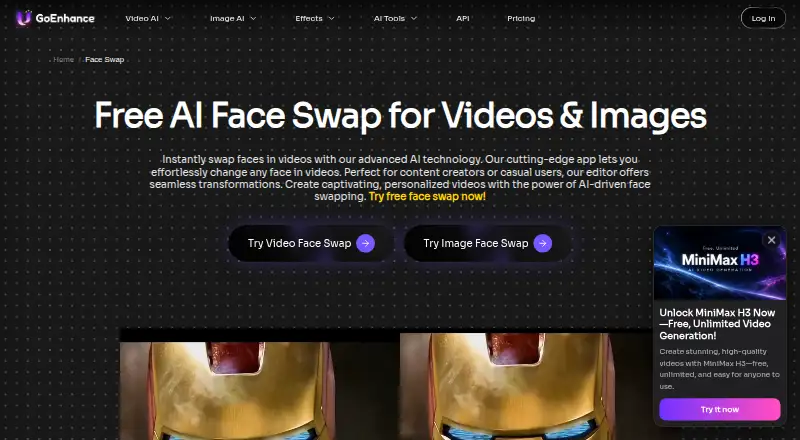
GoEnhance AI Face Swap replaces faces in images and videos through a workflow that starts with a source face image and a target image or video. Users upload both, then generate the result. The current tool applies one face swap to all faces in a video; it does not support separate swaps for multiple faces. GoEnhance also advertises an Open API for integrating face-swap technology into applications. The API offers asynchronous REST access to 35 models from 11 providers and uses bearer-token authentication. The free plan provides 30 tokens for personal use. Basic costs $10 per month; commercial use is permitted for Standard at $25 per month, Pro at $50 per month, and Mega at $100 per month. GoEnhance says processing takes place on its servers, uploaded files are not shared with third parties, and it does not create biometric templates or faceprints. However, content may be sent to third-party providers depending on the selected feature or model. Users can remove account content or contact support to request erasure. The listed access options are web, iOS, and API.
Who it suits
The tool is presented for content creators, casual users, and professional projects. Its API may suit developers seeking face-swap integration; commercial use is limited to Standard, Pro, and Mega subscribers.
What it does well
- Works with images and videos.
- Offers 30 free tokens.
- Advertises API access across 35 models.
- Users can request erasure of content.
What to know first
- One swap applies to all faces in a video.
- Multiple separate face swaps are not supported.
- Free use is limited to personal purposes.
- Submitted content may reach third-party providers.
Limits
The Free plan provides 30 tokens and permits personal use. Basic costs $10 a month and permits personal use; commercial use is permitted on Standard at $25 a month, Pro at $50 a month, and Mega at $100 a month.
Plans
| Plan | Billed and limits | Price |
|---|---|---|
| Free | 30 free tokens · personal use | Free |
| Basic | monthly · 600 tokens/month · no watermark · private generation · 3 concurrent fast jobs · 5 waiting jobs · 60-day storage | $10 a month |
| Mega | monthly · 8,000 tokens/month · 12 concurrent fast jobs · 15 waiting jobs · unlimited Relaxed generations for supported features | $100 a month |
| Standard | monthly · 1,600 tokens/month · 3 concurrent fast jobs · 5 waiting jobs · unlimited Relaxed generations for supported features | $25 a month |
| Pro | monthly · 3,500 tokens/month · 6 concurrent fast jobs · 10 waiting jobs · unlimited Relaxed generations for supported features | $50 a month |
As goenhance.ai lists them, read 1 Oct 2026. The maker's own page has the final word.
Getting started
- Open https://www.goenhance.ai/face-swap.
- Choose the web or iOS option, or use API access.
- Upload a source face image.
- Upload a target image or video.
- Select Generate.
GoEnhance AI Face Swap is a photo- and video-face replacement service with a web workflow and an Open API. It suits creators, casual users, and developers who need both media types; scenes requiring different replacement faces for different people should look elsewhere.
The service is most useful when a single source face can be applied consistently, and when API integration or batch work matters. Its free tokens make a low-risk starting point, but commercial use and higher-volume work require careful plan selection.
Overview
Upload a source face image, add a target image or video, and click Generate. The same workflow covers stills and clips, while batch processing supports repeated jobs. In video, however, one face swap is applied across all faces; GoEnhance does not support assigning separate source faces to multiple people.
GoEnhance says processing runs on its servers, uploaded files are not shared with third parties, and face data is not turned into biometric templates or faceprints. Depending on the feature or model, submitted content may be transmitted to providers including Google, OpenAI, ByteDance, Kuaishou, Alibaba Cloud, Runway, MiniMax, Replicate, or fal.ai. You can remove content from your account or request erasure through support, but teams with strict data-routing requirements should assess those conditions before uploading sensitive material.
Key features
Photo and video replacement
Handling both images and video in one tool is practical for creators who move between formats. The single-face rule keeps the workflow suited to a uniform replacement, not ensemble scenes where each subject needs a distinct identity.
Open API
The Open API is one asynchronous REST API covering 35 models from 11 providers, with bearer-token authentication. That gives developers a single integration surface for building face-swap features into applications, rather than limiting use to the web interface.
Free allowance and processing controls
The free allowance provides 30 tokens for trying face-swap images and videos. Server processing, deletion controls, and the stated absence of faceprints address common privacy concerns, although possible transmission to named third-party providers remains an important operational consideration.
Pricing
GoEnhance uses monthly plans alongside a free tier. Stripe handles payments, with major cards such as Mastercard and Visa plus Alipay accepted.
| Plan | Price and allowance | What it means |
|---|---|---|
| Free | free; 30 free tokens | Personal use only. It is suitable for trying the workflow, not commercial delivery. |
| Basic | $10 a month, billed monthly; 600 tokens/month | Adds no watermark, private generation, three concurrent fast jobs, five waiting jobs, and 60-day storage. Commercial use is not permitted, so it fits personal projects needing more control than Free. |
| Standard | $25 a month, billed monthly; 1,600 tokens/month | Permits commercial use, retains three concurrent fast jobs and five waiting jobs, and adds unlimited Relaxed generations for supported features. It is the practical entry point for paid client or business work. |
| Pro | $50 a month, billed monthly; 3,500 tokens/month | Commercial rights, six concurrent fast jobs, ten waiting jobs, and unlimited Relaxed generations for supported features suit busier production queues. |
| Mega | $100 a month, billed monthly; 8,000 tokens/month | Commercial rights plus 12 concurrent fast jobs and 15 waiting jobs target high-volume teams. |
Free and Basic users are restricted to personal use; Standard, Pro, and Mega subscribers may use outputs commercially. Token quotas apply to the paid plans, while unlimited Relaxed generations cover only supported features.
Platforms
GoEnhance is offered on the web and iOS, with API access for application integration. Supported media are photos and video.
Who it's for
Content creators can use one workflow for stills and clips, while casual users have 30 free tokens to evaluate it. Professional users and developers benefit from commercial rights on Standard and above, batch processing, and the asynchronous API. It is not a good match for multi-person videos needing individually assigned faces, or for users unwilling to accept model-dependent third-party processing.
Pros and cons
Pros
- One workflow handles image and video face swaps, with batch processing for repeated jobs.
- Thirty free tokens allow meaningful initial trials without payment.
- The asynchronous REST API spans 35 models from 11 providers and uses bearer-token authentication.
- Standard and higher plans include commercial rights, while paid tiers add concurrency and queue capacity.
- GoEnhance says it does not share uploads with third parties or create biometric faceprints, and supports deletion requests.
Cons
- Only one face swap can be applied across all faces in a video; distinct replacements are unsupported.
- Free and Basic plans are personal-use only, limiting commercial adoption at the lower end.
- Depending on the selected model, content may be transmitted to multiple external providers.
- Token quotas and plan-specific concurrency make high-volume use progressively more expensive.
Alternatives
Choose Face Swap Software to compare a broader directory of face-swap tools.
- FazeSwap is a better fit if you need broad platform coverage, including Android, desktop systems, browser extensions, and web, with three free videos per month.
- LumarLabs Face Studio offers real renders on its free plan and supports a similarly wide range of platforms, but has no free trial.
- Remaker AI suits buyers who prefer one-time credit purchases, with credits that do not expire.
- AKOOL is an alternative for users wanting API, macOS, Windows, and web access with a free trial.
- Faceswap is the choice for a free, open-source desktop application on Linux, macOS, and Windows.
- FaceSwap AI - Photo Editor provides a free web tool for two-image swaps with uploads up to 6 MB each.
- VidMage is worth considering for explicit daily image, video, and GIF swap allowances on web and macOS.
- FaceAI fits iOS and web users seeking unlimited swaps, full-length HD video, and no watermark on its Premium plan.
Verdict
Choose GoEnhance AI Face Swap if you want image and video replacement in one service, a usable free allowance, and an API for integrating multiple models. Start at Standard for commercial work; Free or Basic are personal-use options. Look elsewhere when a video needs different faces assigned to different people, or when the service's model-dependent data transmission does not meet your privacy requirements.
Verdict
GoEnhance offers a straightforward upload-and-generate face-swap workflow alongside an API. Note the single-swap limitation and review the plan’s usage rights and content-processing conditions before choosing it.
Questions
Is there a free plan?
Yes. The Free plan costs nothing and includes 30 tokens for personal use.
What do the paid plans cost?
Basic is $10 a month, Standard is $25 a month, Pro is $50 a month, and Mega is $100 a month.
Which platforms are supported?
The listed platforms are web, iOS, and API.
Can it swap faces in video?
Yes. It works with images and videos, but currently applies one face swap to all faces in a video and does not support separate swaps for multiple faces.
Can I use it commercially?
Commercial use is permitted for subscribers to Standard, Pro, and Mega. Free and Basic users are limited to personal use.
Does it offer an API?
Yes. The Open API is an asynchronous REST API covering 35 models from 11 providers and uses bearer-token authentication.
Facts from GoEnhance AI Face Swap's own pages
- API integration
- The GoEnhance Open API provides one asynchronous REST API covering 35 models from 11 providers and uses bearer-token authentication. · platform.goenhance.ai, 1 Oct 2026
- Commercial rights
- Commercial use is permitted for subscribers to the Standard, Pro, and Mega plans; free and Basic users are limited to personal use. · goenhance.ai, 1 Oct 2026
- Company headquarters
- The maker is listed as MEWX LLC at 30 N Gould St Ste R, Sheridan, Wyoming 82801. · goenhance.ai, 1 Oct 2026
- Data deletion
- Users may remove content from their account or request erasure by contacting GoEnhance support. · goenhance.ai, 1 Oct 2026
- Face-data handling
- GoEnhance says it does not create biometric templates or faceprints from face data. · goenhance.ai, 1 Oct 2026
- Face swap media
- The Face Swap tool replaces faces in images and videos. · goenhance.ai, 1 Oct 2026
- Face swap workflow
- Users upload a source face image, upload a target video or image, and click Generate. · goenhance.ai, 1 Oct 2026
- Free allowance
- The Face Swap FAQ says users receive 30 free tokens for trying face-swap videos and images. · goenhance.ai, 1 Oct 2026
- Open API
- GoEnhance advertises Open API access for integrating face-swap technology into applications. · goenhance.ai, 1 Oct 2026
- Payment support
- GoEnhance uses Stripe and accepts major cards such as Mastercard and Visa plus Alipay. · goenhance.ai, 1 Oct 2026
- Processing security
- GoEnhance says Face Swap processing is handled on its servers and uploaded files are not shared with third parties. · goenhance.ai, 1 Oct 2026
- Single-face limit
- Face Swap currently allows one face swap for all faces in the video and does not support multiple-face swaps. · goenhance.ai, 1 Oct 2026
- Target users
- The Face Swap page describes the tool as suitable for content creators, casual users, and professional projects. · goenhance.ai, 1 Oct 2026
- Third-party processing
- Depending on the selected feature or model, submitted content may be transmitted to providers including Google, OpenAI, ByteDance, Kuaishou, Alibaba Cloud, Runway, MiniMax, Replicate, or fal.ai. · goenhance.ai, 1 Oct 2026
Where GoEnhance AI Face Swap stands on Freedom251
- Face Swap Software#13 of 30