Freedom251 › Face Swap Software

FaceSwap AI - Photo Editor
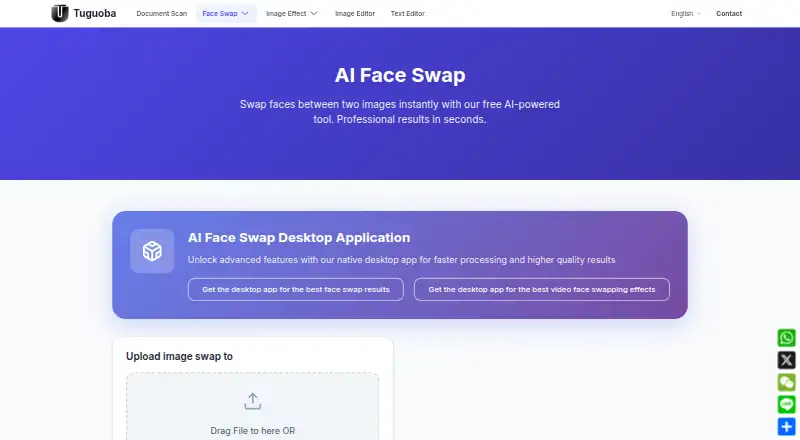
What FaceSwap AI - Photo Editor is
FaceSwap AI - Photo Editor provides browser and desktop tools for swapping faces in photos, alongside a desktop app for video. In a browser, its free tool swaps faces between two photos using deep learning, with uploads up to 6 MB each and no software installation. A separate browser tool lets you choose source and target faces within one photo. The desktop image app adds batch and folder-wide processing, GPU acceleration, and exports without watermarks. It supports PNG, JPG, JPEG, JPE, TIFF, BMP, and WebP. The desktop video app swaps selected faces in video files and supports batch processing; its listed formats include MP4, MOV, AVI, MKV, WMV, FLV, GIF, WebP, RMVB, PNG, JPG, JPEG, and BMP. The desktop app page says it collects no data and works without an internet connection, and the website privacy policy says photos and information are not stored on its server. The free browser tool is available at tuguoba.com. Desktop apps are one-time purchases, with pricing listed from $69.99. Their license includes minor and patch updates within the same major version; a new major version requires an upgrade fee.
Who it suits
It suits people who want a browser-based face swap for two photos, or a separate tool for choosing faces within one image. Those needing batch photo or video processing can consider the desktop apps, provided their computer meets the listed requirements.
What it does well
- Free browser tool swaps faces between two photos.
- Browser tools require no software installation.
- Desktop image app supports batch and folder-wide swapping.
- Desktop image exports have no watermark.
- Desktop app supports offline processing.
- Separate desktop app supports batch video swapping.
What to know first
- Browser uploads are limited to 6 MB per photo.
- Windows requires an Intel Core i7 or AMD Ryzen 7 and 8 GB RAM.
- Mac requires macOS 12 or later on Apple M1 or newer.
- Major-version upgrades require a fee.
Limits
The free browser tool accepts uploads up to 6 MB each. The desktop license covers minor and patch updates within the same major version; a new major version requires an upgrade fee.
Plans
| Plan | Billed and limits | Price |
|---|---|---|
| AI Face Swap web tool | Two-image face swap · uploads up to 6 MB each · no watermark | Free |
| AI Faceswap desktop app | One-time payment; amount not stated · Windows and Mac · bulk image swapping · paid major-version upgrades | On request |
| AI Video Faceswap desktop app | One-time payment; amount not stated · Windows and Mac · batch video face swapping · paid major-version upgrades | On request |
As tuguoba.com lists them, read 8 Oct 2026. The maker's own page has the final word.
Getting started
- Open https://tuguoba.com/ to use the browser tools.
- Choose the free two-photo browser tool and upload two images of up to 6 MB each.
- Use the separate browser tool to select source and target faces within one image.
- For desktop use, choose the Windows or Mac image app or video app.
- Check your computer against the listed Windows or Mac requirements before using a desktop app.
- On Mac, install FFmpeg for the video app to encode and decode video formats.
FaceSwap AI - Photo Editor pairs free browser face swaps with paid desktop software for larger image and video jobs. It suits casual users who need a quick two-photo edit as well as creators handling folders or batches locally. The trade-off is a clear gap between the free web tool and desktop capabilities, with desktop pricing not published and major-version upgrades charged separately.
Overview
The free browser tool uses deep learning to swap faces between two uploaded photos without an installation. A separate browser mode lets you choose source and target faces within a single image, which is useful when a two-photo workflow does not fit the edit. The website says photos and information are not stored on its server, although web use still involves uploading images.
Desktop applications move processing to the computer. The desktop app page says they collect no data and work without an internet connection, making them a better fit for sensitive projects or unreliable connections. Windows users need version 10.0 or later, an Intel Core i7 or AMD Ryzen 7, 8 GB of RAM and a 512 GB hard drive. Mac users need macOS 12 or later with an Apple M1 or newer. Those requirements favor reasonably recent hardware rather than entry-level machines.
Key features
The desktop image app supports batch swapping and folder-wide swapping, so it is designed for repeated work rather than one-off edits. GPU acceleration can shorten processing on suitable hardware, and exports are watermark-free. Its supported formats—PNG, JPG, JPEG, JPE, TIFF, BMP and WebP—cover common camera, web and archive files, reducing conversion work when a folder contains mixed media.
The video app swaps selected faces in video files and supports batch video swapping. It accepts MP4, MOV, AVI, MKV, WMV, FLV, GIF, WebP, RMVB, PNG, JPG, JPEG and BMP. Mac users must have FFmpeg for encoding and decoding video formats, an extra setup requirement that matters if the aim is a ready-to-run workflow.
In practice, the web tools are best for occasional photo swaps, while the desktop apps justify themselves through local processing, batch queues and watermark-free output. The product therefore works less like one unified editor and more like a set of focused tools.
Pricing
The AI Face Swap web tool is free plan. It handles two-image face swaps, accepts uploads up to 6 MB each and adds no watermark. That is a useful no-cost option for small images, but the upload cap and two-image scope make it unsuitable for large files or sustained batch work.
The AI Faceswap desktop app is sold as a one-time payment for Windows and Mac, with bulk image swapping. Its amount is custom pricing rather than a published figure. The AI Video Faceswap desktop app is also a one-time Windows and Mac purchase for batch video face swapping, with custom pricing. Both desktop licenses include free minor and patch updates within the same major version; upgrading to a new major version requires an additional fee. Buyers planning long-term use should include that upgrade cost in their ownership budget.
Platforms
FaceSwap AI runs on the web and offers desktop software for Windows and macOS. The browser option requires no installation, while desktop image and video tools provide offline processing. Mac video work additionally depends on FFmpeg.
Who it's for
Choose the web tool for an occasional, watermark-free two-photo swap when 6 MB uploads are sufficient. Choose the desktop image app if you regularly process folders, need GPU acceleration or want local, watermark-free exports across varied photo formats. The video app is the more relevant choice for batch face replacement in supported video and animated formats. Users on older computers, anyone needing a published desktop price before purchase, or people unwilling to pay for major-version upgrades should look elsewhere.
Pros and cons
- Pros: Free two-photo web swaps with no watermark; a separate single-image face-selection tool; offline desktop processing that the maker says collects no data; folder-wide and batch image workflows; watermark-free desktop exports; broad photo and video format support.
- Cons: Web uploads are limited to 6 MB per image; desktop prices are custom rather than stated; major-version upgrades cost extra; Windows hardware requirements are substantial; Mac video users must install FFmpeg.
Alternatives
For a wider directory of options, see Face Swap Software.
FazeSwap is the better pick if you want mobile, browser, extension and API coverage, with a free allowance of three face-swap videos per month and paid monthly tiers from $6.19.
LumarLabs Face Studio suits users seeking a free plan with real renders across mobile, web, desktop and API platforms.
Remaker AI is preferable when credit packs that do not expire fit your usage, starting at $5.99 for 200 credits.
AKOOL offers a freemium service with a free Starter listing and API access.
Faceswap is the straightforward choice for free, open-source software on Linux, macOS or Windows.
GoEnhance AI Face Swap fits web, iOS and API users who want a free 30-token allowance or a $10 monthly Basic plan with 600 tokens.
VidMage is an alternative for web and Mac users who can work within daily image, video and GIF limits on its free plan.
FaceAI targets iOS and web users who want unlimited swaps and HD, full-length video on its Premium tier.
Verdict
FaceSwap AI - Photo Editor is a strong fit for users who want a free, private-minded browser swap or need offline batch tools for photos and video. Its decisive advantages are watermark-free desktop exports, broad format support and folder-level processing. Look elsewhere if you need transparent desktop pricing, a lightweight system requirement or upgrades included beyond the current major version.
Verdict
Choose FaceSwap AI if you want a free browser-based two-photo swap or desktop batch tools for photos and video. The desktop apps add offline processing and watermark-free image exports, with pricing listed from $69.99. Check the stated hardware requirements and account for a fee when upgrading to a new major version.
Questions
Is there a free plan?
Yes. The free browser tool swaps faces between two photos, with uploads up to 6 MB each and no watermark.
What does it cost?
The pricing note says from $69.99. The desktop image and video plans are one-time purchases.
Which platforms are supported?
The listed platforms are macOS, web, and Windows. Desktop requirements specify Windows 10.0 or later, or macOS 12 or later on Apple M1 or newer.
Can it swap faces in video?
Yes. A desktop video app swaps selected faces in video files and supports batch swapping.
Does it work offline?
The desktop app page says it requires no internet connection and collects no data. The website privacy policy says photos and information are not stored on its server.
What happens when a new major version is released?
Minor and patch updates within the same major version are included. A new major version requires an upgrade fee.
Facts from FaceSwap AI - Photo Editor's own pages
- Desktop features
- The desktop image app offers batch swapping, folder-wide swapping, GPU acceleration, and exports without watermarks. · tuguoba.com, 8 Oct 2026
- Hardware requirements
- Windows requirements list version 10.0 or later, an Intel Core i7 or AMD Ryzen 7, 8 GB RAM, and 512 GB HDD; Mac requires macOS 12 or later on an Apple M1 or newer. · tuguoba.com, 8 Oct 2026
- Image formats
- The desktop image app lists PNG, JPG, JPEG, JPE, TIFF, BMP, and WebP support. · tuguoba.com, 8 Oct 2026
- Major updates
- The desktop app license includes free minor and patch updates within the same major version, while a new major version requires an upgrade fee. · tuguoba.com, 8 Oct 2026
- Offline processing
- The desktop app page says it collects no data and requires no internet connection. · tuguoba.com, 8 Oct 2026
- Single-image swapping
- A separate browser tool lets users select source and target faces within one image. · tuguoba.com, 8 Oct 2026
- Usage responsibility
- The maker asks users to comply with local legal requirements when using the desktop apps. · tuguoba.com, 8 Oct 2026
- Video app
- The desktop video app swaps selected faces in video files and supports batch swapping. · tuguoba.com, 8 Oct 2026
- Video dependency
- The video app says FFmpeg is required on Mac to encode and decode video formats. · tuguoba.com, 8 Oct 2026
- Video formats
- The video app lists MP4, MOV, AVI, MKV, WMV, FLV, GIF, WebP, RMVB, PNG, JPG, JPEG, and BMP support. · tuguoba.com, 8 Oct 2026
- Web privacy
- The website privacy policy says photos and information are not stored on its server. · tuguoba.com, 8 Oct 2026
- Web tool
- The free browser tool swaps faces between two photos using deep learning and requires no software installation. · tuguoba.com, 8 Oct 2026
Where FaceSwap AI - Photo Editor stands on Freedom251
- Face Swap Software#9 of 30