Freedom251 › AI Face Swap Tools

Facing AI
What Facing AI is
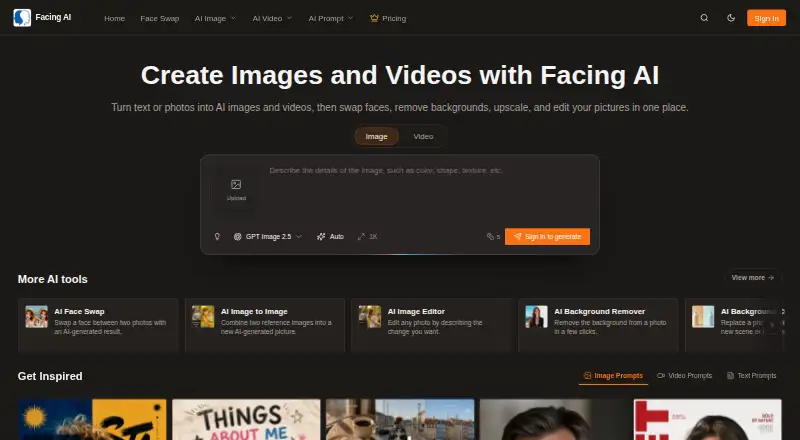
Facing AI is a web and API service for generating and editing images and videos from text or photos. Its image tools include image-to-image generation, prompt-based editing, background removal or replacement, enhancement, and upscaling. For face compositions, users can choose Face Swap, Face Morph, or Head Swap and upload two images. Video face swaps and multiple faces are also supported. Free image and video creation options and free credits are available; additional generations use credits. The Basic Pack supports JPG, PNG, and WebP and includes 1,000 credits, HD output, and exports without watermarks. Standard adds priority processing, batch processing, and high-resolution downloads. Premium includes 10,000 credits, 4K output, API access, a dedicated account manager, and 24/7 priority support. Packs are one-time purchases: Basic costs $19.90, paid once, Standard $49.90, paid once, and Premium $99.90, paid once. Credit validity ranges from 30 to 90 days. Uploaded images are processed in real time and automatically deleted after processing, according to Facing AI.
Who it suits
Facing AI may suit people creating or editing images and videos from text or photos, including those making face-based compositions. It also offers API access in the Premium Pack for integrations.
What it does well
- Includes image and video creation options and free credits.
- Face tools include Face Swap, Face Morph, and Head Swap.
- Basic supports JPG, PNG, and WebP.
- Premium includes 4K output and API access.
- Uploaded images are automatically deleted after processing.
What to know first
- Users must be at least 18 years old.
- Additional generations use credits.
- Pack credits expire after 30 to 90 days.
- Features, quotas, and plan benefits may change.
Limits
Free creation uses credits, and additional generations consume more credits. Basic credits are valid for 30 days, Standard credits for 60 days and Premium credits for 90 days.
Plans
| Plan | Billed and limits | Price |
|---|---|---|
| Basic Pack | One-time payment · 1000 credits (200 face swaps) · Valid for 30 days · HD output · No watermarks | $19.90, paid once |
| Standard Pack | One-time payment · 5000 credits (1000 face swaps) · Valid for 60 days · Priority processing · Batch processing · High-resolution downloads | $49.90, paid once |
| Premium Pack | One-time payment · 10000 credits (2000 face swaps) · Valid for 90 days · 4K output · API access · Dedicated account manager · 24/7 priority support | $99.90, paid once |
As facing.app lists them, read 4 Oct 2026. The maker's own page has the final word.
Getting started
- Open https://facing.app/ on the web or use its API
- Create images or videos from text or photos
- Choose Face Swap, Face Morph or Head Swap and upload two images
- Use available free credits or purchase a paid pack
- Select Premium for API access
Verdict
Facing AI combines image and video creation with editing and face-composition tools, with free options and paid one-time credit packs. Pack benefits and credit validity vary, and the terms note that features and quotas may change.
Questions
Is Facing AI free?
Yes. A free plan offers image and video creation options and free credits. Additional generations use credits.
What do the paid packs cost?
Basic Pack costs $19.90, paid once, Standard Pack $49.90, paid once and Premium Pack $99.90, paid once.
Which platforms are supported?
Facing AI is available through its web service and API.
Does Premium include API access?
Yes. API access is included in the Premium Pack.
Are exports watermark-free?
Yes. The Basic Pack includes exports without watermarks.
Who can use Facing AI?
The terms require users to be at least 18 years old and legally able to enter the terms.
Facts from Facing AI's own pages
- Age requirement
- The terms say users must be at least 18 years old and legally able to enter the terms. · facing.app, 4 Oct 2026
- API
- The Premium Pack includes API access for integration. · facing.app, 4 Oct 2026
- Face tools
- The home page says users can choose Face Swap, Face Morph, or Head Swap and upload two images to create a new composition. · facing.app, 4 Oct 2026
- Formats
- The Basic Pack includes JPG, PNG, and WebP support. · facing.app, 4 Oct 2026
- Free access
- The home page says free image and video creation options and free credits are available, with additional generations using credits. · facing.app, 4 Oct 2026
- Image and video creation
- Facing AI turns text or photos into AI images and videos and includes face swapping, background removal, upscaling, and image editing. · facing.app, 4 Oct 2026
- Image data handling
- The privacy policy says uploaded images are processed in real time and automatically deleted from the servers after processing. · facing.app, 4 Oct 2026
- Image editing tools
- Its listed tools include image-to-image generation, prompt-based editing, background removal and changing, enhancement, and upscaling. · facing.app, 4 Oct 2026
- Plan variability
- The terms say features, supported models, free quotas, credit costs, plan benefits, and availability may change. · facing.app, 4 Oct 2026
- Security
- The privacy policy describes TLS encryption in transit, AES encryption at rest, role-based access controls, and hosting on cloud providers it says are SOC 2 compliant. · facing.app, 4 Oct 2026
- Support
- The Basic Pack includes email support, Standard includes priority email support, and Premium includes 24/7 priority support. · facing.app, 4 Oct 2026
- Third-party processing
- The terms say the service may use third parties for hosting, storage, payments, and AI model processing, whose terms and availability are outside Facing AI’s control. · facing.app, 4 Oct 2026
Where Facing AI stands on Freedom251
- AI Face Swap Tools#25 of 57
- Face Swap Software#14 of 30