Freedom251 › AI Face Swap Tools
Ravana
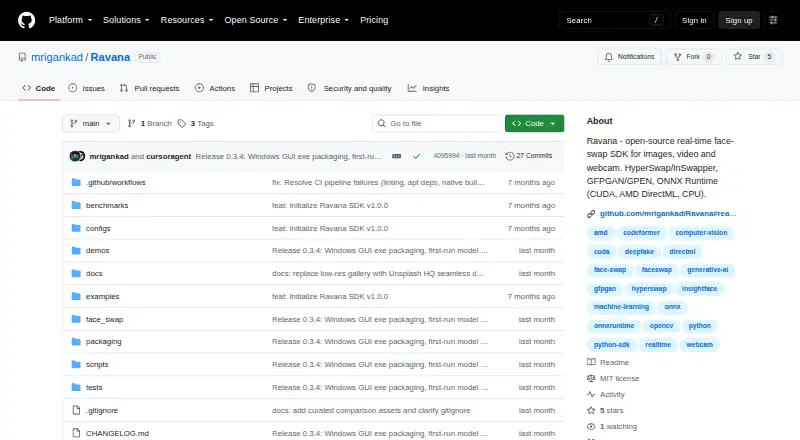
What Ravana is
Ravana is an open-source Python SDK for swapping faces in images, video, and webcam feeds. It supports the HyperSwap and InSwapper models, with restoration options including GFPGAN, GPEN, CodeFormer, RestoreFormer++, and OpenCV. Its real-time mode can check faces at a chosen frame interval, track a region of interest, skip heavy restoration, and show a webcam FPS HUD. Face selection options include all faces, the largest or first face, a selected index, or pose; the project also lists ArcFace identity and sharpness metrics.
ONNX Runtime can use CUDA, AMD DirectML, or CPU, with an automatic device option. Developers can use the package or the optional PySide6 desktop app, which supports drag-and-drop, batch processing, webcam use, scoring, video playback, and saving results. The README describes Python installation and a one-folder Windows executable build. Ravana is free and MIT-licensed, but downloaded model weights may have separate third-party licenses to review before commercial use. Optional invisible DCT watermarking supports provenance. The project recommends consent-based creative uses and warns against non-consensual deepfakes, impersonation, and fraud.
Who it suits
Ravana is intended for developers who need face-swapping tools for images, video, or webcam use. Its documented consent guidance is relevant to anyone using it for creative work.
What it does well
- Supports two face-swap models.
- Offers several restoration options.
- Can run with CUDA, AMD DirectML, or CPU.
- Optional desktop app supports batch processing and webcam use.
- Optional invisible watermarking supports provenance.
What to know first
- Downloaded model weights may have separate licenses.
- Commercial use requires reviewing third-party weight licenses.
- Python installation or a Windows build is documented.
Limits
The Open-source plan is free. Third-party model licenses apply to downloaded weights and should be reviewed before commercial use.
Plans
| Plan | Billed and limits | Price |
|---|---|---|
| Open-source | MIT-licensed software; third-party model licenses apply to downloaded weights | Free |
As github.com lists them, read 4 Oct 2026. The maker's own page has the final word.
Getting started
- Visit the Ravana GitHub repository.
- Install the Python package using the documented installation route.
- Choose HyperSwap or InSwapper and select any restoration options.
- Select a device, or use the automatic device setting for ONNX Runtime.
- Optionally use the PySide6 desktop GUI or build the documented Windows one-folder executable.
- Use the GitHub Issues link to report or discuss issues.
Verdict
Ravana offers a configurable face-swap SDK and optional desktop app, with CPU and GPU runtime options. The software is MIT-licensed, but downloaded weights may carry separate terms, and the project advises consent-based use.
Questions
Is Ravana free?
Yes. The Open-source plan is free, and the software is MIT-licensed.
Which platforms are listed?
Ravana is listed for Linux, macOS, Windows, and self-hosted use. The README documents Python installation and a one-folder Windows executable build.
Can it swap faces in video and webcam feeds?
Yes. Video face swapping and multiple faces are listed, and the product supports images, video, and webcam use.
Which face-swap and restoration models does it support?
It supports HyperSwap and InSwapper. Listed restoration options are GFPGAN, GPEN, CodeFormer, RestoreFormer++, and OpenCV.
Is Ravana open source?
Yes. The software is MIT-licensed. Downloaded model weights may have separate third-party licenses.
What is the recommended use?
The project recommends consent-based entertainment, VFX, privacy, and creative work. It says not to use Ravana for non-consensual deepfakes, impersonation, or fraud.
Facts from Ravana's own pages
- Desktop app
- An optional PySide6 desktop GUI supports drag-and-drop, batch processing, webcam, scoring, video playback, and saving results. · github.com, 4 Oct 2026
- Distribution
- The README documents Python installation and a Windows one-folder executable build. · github.com, 4 Oct 2026
- Enhancement
- Listed restoration options include GFPGAN, GPEN, CodeFormer, RestoreFormer++, and OpenCV. · github.com, 4 Oct 2026
- Ethical use
- The README recommends use for entertainment, VFX, privacy, and creative work with consent, and says not to use it for non-consensual deepfakes, impersonation, or fraud. · github.com, 4 Oct 2026
- Face selection and metrics
- Face selection includes all, largest, first, index, and pose, and the project lists ArcFace identity and sharpness metrics. · github.com, 4 Oct 2026
- Face-swap models
- It supports HyperSwap and InSwapper face-swap models. · github.com, 4 Oct 2026
- Hardware support
- ONNX Runtime can use CUDA, AMD DirectML, or CPU, and the automatic device setting selects among them. · github.com, 4 Oct 2026
- Intended users
- The package metadata lists developers as its intended audience. · github.com, 4 Oct 2026
- Product
- Ravana is an open-source Python face-swap SDK for images, video, and webcam. · github.com, 4 Oct 2026
- Provenance
- Optional invisible DCT watermarking is available for provenance. · github.com, 4 Oct 2026
- Real-time features
- Its real-time mode supports detection every N frames, ROI tracking, skipping heavy restoration, and a webcam FPS HUD. · github.com, 4 Oct 2026
- Support channel
- The repository links to GitHub Issues for reporting or discussing issues. · github.com, 4 Oct 2026
- Third-party licensing
- The README says third-party model licenses apply to downloaded weights and should be reviewed before commercial use. · github.com, 4 Oct 2026
Where Ravana stands on Freedom251
- AI Face Swap Tools#22 of 57