Freedom251 › AI Face Swap Tools
iSamurai
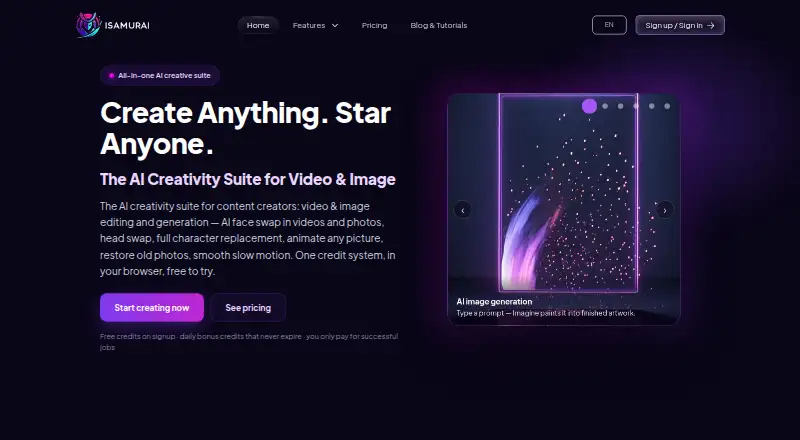
What iSamurai is
iSamurai is a browser-based creative suite for making and editing images and transforming photos, GIFs, and videos. Its face-swap tool works across those media types, and Multiple Faces Mode can swap several people in one image or clip. Paid plans add video face swap and head swap, which replaces the whole head, including hair and head shape. Character Swap replaces a person while keeping the scene’s motion, while Animate transfers movement from a video to a still character. Imagine creates and edits images from text prompts, supports region inpainting, and combines multiple images. The suite also includes photo restoration and AI slow motion. Samurai offers slow-motion options up to 8×; other plan limits vary. Free signup provides 10 monthly credits and 10 more for each daily login, with no credit card needed to start, according to the maker. Monthly plan credits reset each billing cycle; daily login bonuses and booster credits do not expire, and failed jobs are refunded automatically. Paid monthly plans start at $9.90/mo, and paid subscribers can buy one-time credit top-ups. iSamurai is available on the web, Android, and iOS, and offers a REST API with API-key authentication for processing tasks.
Who it suits
iSamurai suits content creators, meme and entertainment users, marketing teams, family archivists, and filmmakers who want image or video editing and generation tools. Developers can use its REST API for processing tasks.
What it does well
- Face swap works on photos, GIFs, and videos.
- Multiple Faces Mode can swap several people at once.
- Image tools include prompts, inpainting, and multi-image composition.
- Failed jobs are automatically refunded.
- Available on web, Android, and iOS.
What to know first
- Video face swap and head swap require a paid plan.
- Free plan gives 10 monthly credits plus daily-login credits.
- Monthly plan credits reset each billing cycle.
- One-time credit top-ups are available only to paid subscribers.
Limits
The Free plan provides 10 credits per month and 10 additional credits per daily login. It excludes video face swap and head swap; its character swap and Animate access is a 1-second test clip at 480p. Paid plan credits reset each billing cycle, while daily login bonuses and booster credits do not expire. Failed jobs are automatically refunded.
Plans
| Plan | Billed and limits | Price |
|---|---|---|
| Free | $0/month; forever free · 10 credits/month · +10 credits per daily login · photo face swap and restore · image generation, editing and photo restore · character swap and animate 1-second test clip at 480p · video face swap and head swap require paid plan | Free |
| Kohai Maxi | $15/mo; $135/yr · 300 credits/month · same limits as Kohai | $15 a month |
| Samurai Maxi | $150/mo; $1,350/yr · 12,000 credits/month · same limits as Samurai | $150 a month |
| Ninja | $29/month; $261/year · 600 credits/month · +60 daily login credits · face-swap video at 480p and 60 fps with no length cap · head swap and character swap up to 15 seconds at 480p · slow motion up to 2× | $29 a month |
| Katana | $39 one-time · 1,000 credit top-up · available to paid subscribers · credits never expire | $39, paid once |
| Ronin | $49/month; $441/year · 1,500 credits/month · +100 daily login credits · face-swap video at 720p with no length cap · head swap and character swap up to 30 seconds at 720p · slow motion up to 4× | $49 a month |
| Shuriken | $59 one-time · 2,500 credit top-up · available to paid subscribers · credits never expire | $59, paid once |
| Samurai | $79/month; $711/year · 4,000 credits/month · +200 daily login credits · face-swap video up to 1080p with no length cap · head swap and character swap up to 60 seconds at 1080p · high-quality mode · up to 3 extra reference photos · 2 videos processing at once · slow motion up to 8× | $79 a month |
The first 8 of 10 plans, as isamur.ai lists them, read 7 Oct 2026. The maker's own page has the final word. Every plan
Getting started
- Open https://isamur.ai/.
- Sign up for the free plan; the maker says no credit card is needed to start.
- Use iSamurai in a browser, or access it on Android or iOS.
- Choose a paid monthly plan for video face swap and head swap.
- If subscribed, buy a one-time credit top-up if needed.
iSamurai is a browser-based suite for creating and editing images and transforming photos and video. It best suits creators and developers who want several media tools in one service. Its free plan can cover occasional image work, while regular video use calls for a paid subscription.
Overview
The appeal is breadth: face and character transformations sit alongside image generation, restoration, and slow motion, with a REST API for developers. That range can simplify a mixed creative workflow. The trade-off is a credit-based system with meaningful video and head-swap access reserved for paid plans, so occasional users may find the free tier more useful for trying image tools than for ongoing video work.
Key features
Face swap works with photos, GIFs, and videos, and Multiple Faces Mode can handle several people in one image or clip. This makes the tool useful for varied creative formats, though the plan determines video resolution and other limits. Head swap replaces the whole head, including hair and hairline, and is paid-only.
Character Swap replaces a person while preserving the scene’s motion; Animate transfers motion from a video to a still character. Free users get only a one-second test clip at 480p for these tools, which is enough to sample the workflow but not to make them a practical free video option. Paid limits rise by tier, reaching 60 seconds at 1080p on Samurai.
Imagine generates and edits images with text prompts, region inpainting, and multi-image composition. Photo restoration adds a useful repair tool, while AI slow motion extends the suite into video finishing. Slow-motion limits depend on plan: Kohai and Ninja reach 2×, Ronin reaches 4×, and Samurai reaches 8×.
Developers can call a REST API using API keys for face swap, slow motion, restoration, and other processing. It gives iSamurai a role in custom workflows as well as browser-based creation, though API-specific pricing is custom pricing.
iSamurai says uploads are not used to train AI models and describes HTTPS/TLS, hashed passwords and API keys, and isolated processing containers. Uploaded media remain until the user deletes them or the account; individual gallery files can be permanently removed from the service upon deletion. The privacy policy says its practices are designed to align with GDPR, CCPA, BIPA, LGPD, PIPEDA, and the UK Data Protection Act 2018. Users must own or have authorization to use uploaded content, and the terms prohibit sexually explicit material, inappropriate content involving minors, and content intended to mislead, defame, or harm.
Pricing
The Free plan costs nothing and remains free, with 10 credits per month plus 10 daily-login credits. It includes photo face swap and restoration, image generation and editing, and the limited one-second character-tool test clip at 480p. Video face swap and head swap require a paid plan. The daily credits make occasional use possible, but this tier is not a substitute for ongoing video processing.
Kohai costs $9.90 a month, or $89.91/year, and provides 150 monthly credits plus 50 daily-login credits. It unlocks face-swap video at 480p with no length cap, head and character swap up to 10 seconds, and slow motion up to 2×. This is the entry point for users who need recurring video face swaps, though its resolution and short character clips constrain more polished or longer projects.
Kohai Maxi costs $15/mo or $135/yr for 300 monthly credits, with the same feature limits as Kohai. It suits users who need more monthly processing capacity without higher video specifications. Ninja costs $29/month or $261/year for 600 monthly credits and 60 daily-login credits; it adds 60 fps face-swap video at 480p and head or character swaps up to 15 seconds at 480p, while slow motion remains 2×. It is a moderate step up for users who need more credits and smoother face-swap output, but not higher resolution.
Ronin costs $49/month or $441/year. Its 1,500 monthly credits and 100 daily-login credits accompany 720p face-swap video with no length cap, head and character swaps up to 30 seconds at 720p, and slow motion up to 4×. This is the more capable middle tier for users whose projects need better resolution and longer character clips.
Samurai costs $79/month or $711/year, with 4,000 monthly credits, 200 daily-login credits, face-swap video up to 1080p with no length cap, and head or character swaps up to 60 seconds at 1080p. It also includes high-quality mode, up to three extra reference photos, two videos processing at once, and slow motion up to 8×. Those limits target heavier creative workloads; Samurai Maxi costs $150/mo or $1,350/yr for 12,000 monthly credits with the same feature limits, making it relevant when processing volume is the main constraint.
Monthly plan credits reset each billing cycle; daily-login bonuses and booster credits never expire. Failed jobs are automatically refunded. One-time credit packs are available only to paid subscribers: Kunai costs $9.90 one-time for 200 credits, Katana costs $39.00 one-time for 1,000, and Shuriken costs $59.00 one-time for 2,500. Since these credits do not expire, packs can add capacity without changing the subscription tier. A free trial is offered, and signup does not require a credit card. In-app support tickets and [email protected] are provided for support inquiries.
Platforms
iSamurai supports web, iOS, Android, and API access. Its browser-based suite and mobile apps offer several ways to reach the tools, while the API supports developer integrations.
Who it's for
Content creators, meme and entertainment users, marketing teams, family archivists, and filmmakers can use its mix of image and video tools for different creative tasks. Developers may value the processing API. It is less suitable for someone who needs only a simple free video face-swap workflow, since video face swap requires a paid plan.
Pros and cons
- Broad tool range: face and character swaps, image generation and editing, restoration, and slow motion share one suite.
- Useful free image access: the free plan includes image generation, editing, photo face swap, and restoration, with daily login credits to replenish use.
- Scalable video limits: paid tiers extend from 480p face swaps to 1080p, and raise character clips to 60 seconds on Samurai.
- Practical developer access: the REST API covers several processing tasks, not just face swapping.
- Free tier stops short for video: video face swap and head swap require payment, and free character tools are limited to a one-second 480p test.
- Plan distinctions require care: Kohai Maxi adds credits but keeps Kohai’s processing limits, while several tiers differ mainly in monthly capacity.
- Uploaded media persist: files remain until users delete them or the account, so users must manage retention themselves.
Alternatives
For a broader directory of options, see AI Face Swap Tools.
Remaker AI is another freemium option, with Android, iOS, macOS, web, Windows, and API support; its credit packs can suit buyers who prefer one-time purchases.
AI Ease offers free basic features across Android, iOS, and web, with a yearly membership for broader image-related use. It may fit users focused on image tools rather than iSamurai’s combination of image and video processing.
YouInMeme offers two free creations per day and a $0.99 one-time Day Boost for three additional creations for the current day. It is a straightforward alternative for occasional meme creation.
Avatarify is a free mobile app for Android and iOS with a $3.99 monthly premium plan. Consider it when a mobile-focused face app better fits the workflow.
Faceswap is free and open source for Linux, macOS, and Windows, making it an option for users who want desktop software.
FaceSwapper.ai offers free website functions and supports macOS, web, and Windows.
Facy AI offers unlimited image processing at medium quality with slower processing on its free plan, and Android and web access. Its image-focused free option may suit users who prioritize volume over speed and quality.
Picsi.Ai gives free users 10 daily credits for single-face image swaps, with watermarks and GIF/video locked; its $9.99 per month Basic plan is an option for users who want a focused face-swap tool.
Verdict
Choose iSamurai if you want one service for image creation and restoration, face and character transformations, slow motion, and API-based processing. Its free plan is useful for trying image work, and Samurai offers substantial video capacity for demanding projects. Look elsewhere if you need free video face swapping or a narrow, low-cost tool: iSamurai’s broader workflow comes with paid video access and plan limits that matter.
Verdict
Choose iSamurai if you want a creative suite combining face and character tools, image generation and editing, restoration, and slow motion. The free plan covers some image tools, while video face swap and head swap require a paid plan; monthly plans start at $9.90/mo.
Questions
Is iSamurai free?
Yes. Its Free plan is billed at $0/month and includes 10 monthly credits plus 10 credits per daily login.
What do paid plans cost?
Monthly plans start at $9.90/mo. The listed one-time credit top-ups are $9.90, $39, and $59, and are available to paid subscribers.
Which platforms does iSamurai support?
It is available on Android, iOS, and the web. The service also documents an API.
Can I use video face swap on the Free plan?
No. Video face swap and head swap require a paid plan.
Does iSamurai have an API?
Yes. It documents a REST API with API-key authentication for face swap, slow motion, image restoration, and other processing tasks.
Facts from iSamurai's own pages
- Acceptable use
- Terms require users to own or be authorized to use uploaded content and prohibit sexually explicit material, inappropriate content involving minors, and content intended to mislead, defame, or harm. · isamur.ai, 7 Oct 2026
- API
- The service documents a REST API with API-key authentication for face swap, slow motion, image restoration, and other processing tasks. · isamur.ai, 7 Oct 2026
- Billing behavior
- Monthly plan credits reset each billing cycle, while daily login bonuses and booster credits never expire; failed jobs are automatically refunded. · isamur.ai, 7 Oct 2026
- Character tools
- Character Swap replaces an entire person while preserving the scene motion, and Animate transfers motion from a video to a still character. · isamur.ai, 7 Oct 2026
- Compliance claims
- The privacy policy says its practices are designed to align with GDPR, CCPA, BIPA, LGPD, PIPEDA, and the UK Data Protection Act 2018. · isamur.ai, 7 Oct 2026
- Face swap
- Face swap works on photos, GIFs, and videos, and Multiple Faces Mode can swap several people in one image or clip. · isamur.ai, 7 Oct 2026
- Free access
- Free signup includes 10 monthly credits and 10 more credits per daily login; the maker says no credit card is needed to start. · isamur.ai, 7 Oct 2026
- Head swap
- Head swap replaces the whole head, including hair, hairline, and head shape, and is available on paid plans. · isamur.ai, 7 Oct 2026
- Image tools
- Imagine generates and edits images using text prompts, region inpainting, and multi-image composition. · isamur.ai, 7 Oct 2026
- Integrations
- The privacy policy names Stripe for payment processing, Google OAuth for optional sign-in, and RevenueCat for mobile in-app purchases. · isamur.ai, 7 Oct 2026
- Intended users
- The maker identifies content creators, meme and entertainment users, marketing teams, family archivists, filmmakers, and developers as audiences for the suite. · isamur.ai, 7 Oct 2026
- Media retention
- Uploaded media is retained until the user deletes it or the account, and the policy says individual gallery files can be permanently removed from its servers upon deletion. · isamur.ai, 7 Oct 2026
- Other creative tools
- The suite includes photo restoration and AI slow motion, with slow-motion options up to 8× on Samurai. · isamur.ai, 7 Oct 2026
- Product
- iSamurai is a browser-based AI creative suite for video and image editing and generation. · isamur.ai, 7 Oct 2026
- Security and privacy
- The maker says it uses HTTPS/TLS, hashed passwords and API keys, isolated processing containers, and says uploads are not used to train AI models. · isamur.ai, 7 Oct 2026
- Support
- The maker offers in-app support tickets and lists [email protected] for support inquiries. · isamur.ai, 7 Oct 2026
Where iSamurai stands on Freedom251
- AI Face Swap Tools#18 of 57