Freedom251 › Version Control Software
GitStudio
What GitStudio is
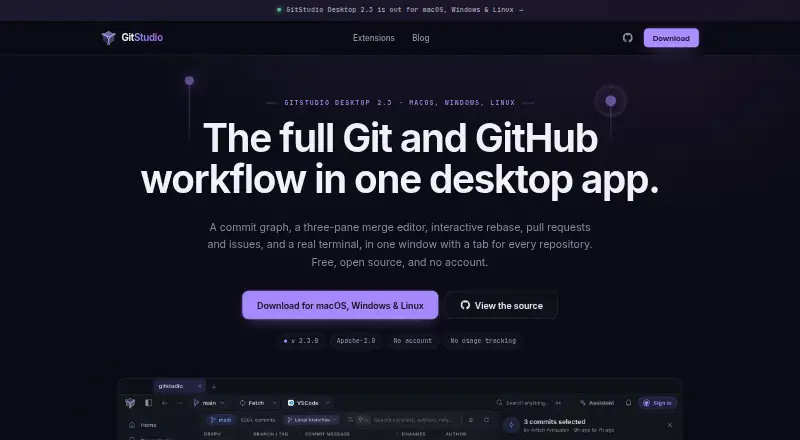
GitStudio is a free desktop application that brings Git and GitHub work into one workspace. It includes a virtualized commit graph, interactive rebase, pull requests, issues, a terminal, and tools for reviewing repository history. Its merge workflow combines a conflict dashboard with a three-pane editor showing your version, the resulting file, and the other branch, while allowing non-conflicting changes to be handled together. Git safeguards include undo for Git operations, a merge-or-rebase choice when pulling a diverged branch, and leased force pushes. GitHub features cover issues, pull requests, reviews, inbox, Actions, releases, projects, organizations, and gists. Extensions run in VS Code, Cursor, VSCodium, Windsurf, and code-server. An optional assistant supports supported cloud providers and local tools such as Ollama and LM Studio, asking before it writes. Git runs locally, while GitHub calls go directly to GitHub. GitStudio Desktop and its extensions use Apache-2.0 licensing, and Merge Studio uses MIT. The free plan works with public and private repositories without an account or paid tier.
Who it suits
GitStudio suits developers who want Git and GitHub workflows together in a desktop app. It is also useful for people working in the listed code editors or needing merge safeguards, local Git operation, and optional AI assistance.
What it does well
- Free for public and private repositories
- Virtualized graph handles very large histories
- Three-pane merge editor and conflict dashboard
- GitHub issues, pull requests, and Actions included
- Extensions support five listed coding environments
- No account required and no paid tier
What to know first
- Windows ARM64 builds are unavailable
- Linux arm64 builds are unavailable
- macOS requires version 12 or later
- Windows builds require x64 Windows 10 or 11
Limits
The free plan covers public and private repositories and has no paid tier. Supported builds are limited to macOS 12 or later, Windows 10 or 11 x64, and Linux x86-64 with glibc 2.35 or later.
Plans
| Plan | Billed and limits | Price |
|---|---|---|
| GitStudio Desktop and editor extensions | Free on public and private repositories · no account · no paid tier | Free |
As gitstudio.dev lists them, read 11 Oct 2026. The maker's own page has the final word.
Getting started
- Open the GitStudio website
- Choose the installer for macOS, Windows, or Linux
- Install the desktop application
- Add the GitStudio extension to VS Code, Cursor, VSCodium, Windsurf, or code-server if needed
- Open a public or private repository and use the GitHub features without creating an account
Verdict
Pick GitStudio if you want a no-cost desktop Git and GitHub workspace with extensive repository, merge, and collaboration tools. Look elsewhere if you need ARM64 builds on Windows or Linux, or a platform outside its listed desktop systems.
Questions
How much does GitStudio cost?
GitStudio Desktop and editor extensions cost nothing. The plan covers public and private repositories and has no paid tier.
Which platforms does GitStudio support?
Desktop builds are available for macOS, Windows, and Linux. The listed requirements are macOS 12 or later, Windows 10 or 11 x64, and Linux x86-64 with glibc 2.35 or later.
Does GitStudio require an account?
Its free plan works without an account.
Is GitStudio open source?
GitStudio Desktop and the GitStudio extension use the Apache-2.0 license. Merge Studio uses the MIT license.
Which editors can use the extensions?
The extensions run in VS Code, Cursor, VSCodium, Windsurf, and code-server.
What AI tools can the assistant use?
The optional assistant supports supported cloud providers, OpenAI-compatible servers, Claude Code, Codex, Gemini CLI, Ollama, and LM Studio.
Facts from GitStudio's own pages
- AI assistant
- The optional assistant works with supported cloud providers, OpenAI-compatible servers, Claude Code, Codex, Gemini CLI, Ollama, and LM Studio, and asks before writes. · gitstudio.dev, 11 Oct 2026
- API key storage
- AI keys are stored on the user's machine in an encrypted GitStudio store, rather than the operating system keychain. · gitstudio.dev, 11 Oct 2026
- Commit graph
- The virtualized commit graph is designed to stay responsive on repositories with tens of thousands of commits. · gitstudio.dev, 11 Oct 2026
- Editor support
- The extensions run in VS Code, Cursor, VSCodium, Windsurf, and code-server. · gitstudio.dev, 11 Oct 2026
- GitHub integration
- The app includes GitHub issues, pull requests, reviews, inbox, Actions, releases, projects, organizations, and gists. · gitstudio.dev, 11 Oct 2026
- Git safeguards
- GitStudio offers undo for Git operations, asks whether to merge or rebase when pulling a diverged branch, and uses leased force pushes. · gitstudio.dev, 11 Oct 2026
- Install verification
- Installers are built by CI from the public repository and distributed with SHA256SUMS.txt, which the one-line installers verify. · gitstudio.dev, 11 Oct 2026
- Merge tools
- The conflict dashboard and three-pane editor show yours, the result, and theirs, and support resolving non-conflicting changes together. · gitstudio.dev, 11 Oct 2026
- Open source
- GitStudio Desktop and the GitStudio extension use the Apache-2.0 license; Merge Studio uses MIT. · gitstudio.dev, 11 Oct 2026
- Platform limits
- The listed builds support macOS 12 or later, Windows 10 or 11 x64, and Linux x86-64 with glibc 2.35 or later; Windows ARM64 and Linux arm64 builds are not available. · gitstudio.dev, 11 Oct 2026
- Privacy
- The maker says Git runs locally, GitHub calls go directly to GitHub, and the app has no usage tracking or analytics; it also describes version checks, avatar lookups, and optional-to-disable crash reports. · gitstudio.dev, 11 Oct 2026
- Product
- GitStudio combines Git and GitHub workflows in a desktop app, including a commit graph, merge editor, interactive rebase, pull requests, issues, and a terminal. · gitstudio.dev, 11 Oct 2026
- Support
- The maker invites users to support development through GitHub sponsorship or Buy Me a Coffee. · gitstudio.dev, 11 Oct 2026
Where GitStudio stands on Freedom251
- Version Control Software#15 of 62