GeneralCAD
What GeneralCAD is
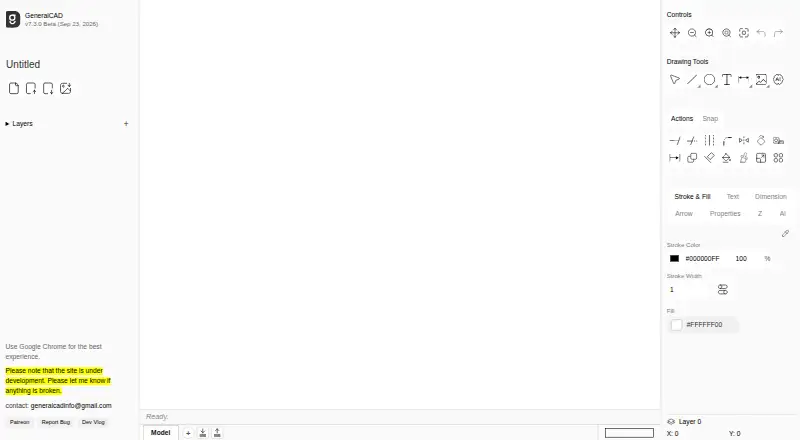
GeneralCAD is a free browser-based 2D CAD application for creating precise technical drawings and drafts. It runs on desktop and mobile devices without installation or sign-up. Drawing tools include lines, arcs, circles, rectangles, polygons, stars, paths, freehand marks, and arrows, along with editing operations such as chamfer, offset, mirror, rotate, move, copy, trim, extend, and fill. Users can add text, tables, dimensions, angles, and rulers. Object snapping, construction guides, distance and angle measurement, and paper-size layouts provide ways to position and check drawing elements. The interface also includes layers and groups, tools for inserting images and SVG files, and an AI tool. Finished drawings can be exported as SVG, printed, or generated as PDF files. The site recommends Google Chrome for the best experience. Its maker says the application is under development and invites users to report problems. Support options listed include email, Discord, tutorials, a feedback form, and a bug report form.
Who it suits
GeneralCAD suits people who need a no-installation way to create 2D technical drawings in a browser. Its listed tools cover both drawing and annotation, with SVG and PDF output options.
What it does well
- Free to use with no installation or sign-up.
- Works on desktop and mobile devices.
- Includes precision aids such as object snapping and measurement.
- Exports SVG and can generate PDFs.
- Offers layers, groups, and image insertion tools.
What to know first
- The maker says the site is under development.
- Google Chrome is recommended for the best experience.
Plans
| Plan | Billed and limits | Price |
|---|---|---|
| GeneralCAD | Free browser based 2D CAD drawing; no installation or sign-up required | Free |
As generalcad.com lists them, read 4 Oct 2026. The maker's own page has the final word.
Getting started
- Open the GeneralCAD website in a browser; Google Chrome is recommended.
- Start drawing without installing software or signing up.
- Use the drawing and editing tools to create or modify the draft.
- Add annotations and use snapping, guides or measurement tools as needed.
- Export the drawing to SVG, print it or generate a PDF.
- Use the homepage tutorials, email, Discord, feedback form or bug report form for help.
Verdict
GeneralCAD provides a broad set of 2D drafting and editing tools in a browser, with no account or installation required. The maker describes it as under development and recommends Chrome.
Questions
How much does GeneralCAD cost?
The GeneralCAD plan is listed as free.
Do I need to install GeneralCAD or create an account?
No. The application runs in the browser and requires no installation or sign-up.
Which devices can run GeneralCAD?
The site says it works on desktop and mobile devices. It recommends Google Chrome for the best experience.
What can I export from GeneralCAD?
Drawings can be exported to SVG, printed or generated as PDF files.
Is GeneralCAD open source?
The listed facts do not establish whether GeneralCAD is open source.
Is GeneralCAD still in development?
Yes. The maker says the site is under development and asks users to report anything broken.
Facts from GeneralCAD's own pages
- Annotations
- Users can add text, tables, dimensions, angles and rulers to drawings. · generalcad.com, 4 Oct 2026
- Browser based
- The application runs entirely in the browser and requires no installation or sign up. · generalcad.com, 4 Oct 2026
- Browser recommendation
- The site recommends Google Chrome for the best experience. · generalcad.com, 4 Oct 2026
- Development status
- The maker says the site is under development and asks users to report anything broken. · generalcad.com, 4 Oct 2026
- Devices
- The site says GeneralCAD works on desktop and mobile devices. · generalcad.com, 4 Oct 2026
- Drawing tools
- Drawing tools include lines, arcs, circles, rectangles, polygons, stars, paths, freehand, arrows, chamfer, offset, mirror, rotate, move, copy, trim, extend and fill. · generalcad.com, 4 Oct 2026
- Export
- Drawings can be exported to SVG or printed or generated as PDF files. · generalcad.com, 4 Oct 2026
- Notable interface features
- The drawing interface includes image and SVG insertion tools, an AI tool, layers and groups. · generalcad.com, 4 Oct 2026
- Precision tools
- The product offers object snapping, construction guides, distance and angle measurement, and paper size layouts. · generalcad.com, 4 Oct 2026
- Purpose
- GeneralCAD is a browser based 2D CAD application for creating precise technical drawings and drafts. · generalcad.com, 4 Oct 2026
- Support
- The homepage lists an email contact, Discord, a feedback form, tutorials and a bug report form. · generalcad.com, 4 Oct 2026
Where GeneralCAD stands on Freedom251
- 2D CAD Software#8 of 41