Freedom251 › Game Overlay Software
GameOverlay
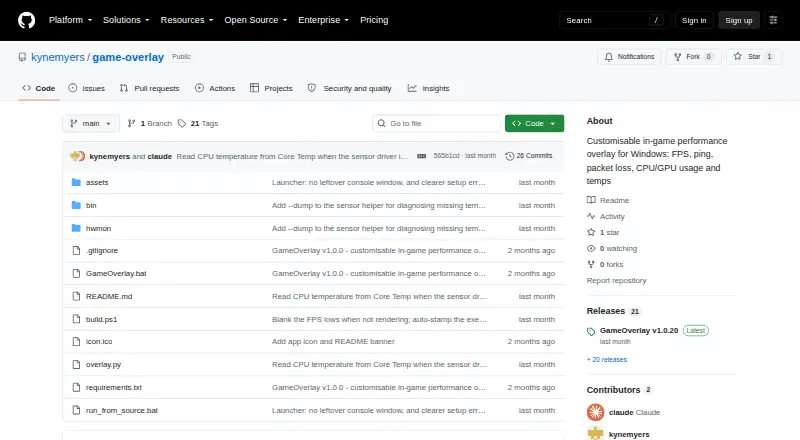
What GameOverlay is
GameOverlay is a free Windows app that displays performance statistics over games. It can show FPS, 1% and 0.1% low FPS, ping, packet loss, and CPU and GPU usage and temperatures. FPS capture uses bundled Intel PresentMon, with low-FPS readings calculated from frame times. In Auto mode, network monitoring identifies a game server from network traffic and pings the address exchanging the most packets with the game. Users can toggle each metric and set its color, then adjust the overlay position, font, size, opacity, and background box. The overlay stays on top, allows clicks to pass through, and saves changes to a configuration file. Downloads include a standalone executable and a folder ZIP; source can also be run with Python 3.10 or later on Windows. Administrator access is required for CPU temperature readings, FPS capture, and ping detection; declining can leave those metrics unavailable. The overlay cannot draw over exclusive-fullscreen games, so the maker recommends Borderless or Windowed Fullscreen mode. The maker says the single-file executable is unsigned and may trigger antivirus heuristics.
Who it suits
GameOverlay suits Windows players who want configurable performance readings over games. It is less suited to exclusive-fullscreen play, and administrator access is needed for several readings.
What it does well
- Displays FPS, low FPS, ping, and packet loss
- Shows CPU and GPU usage and temperatures
- Per-metric visibility and color controls
- Overlay changes save to a configuration file
What to know first
- Cannot draw over exclusive-fullscreen games
- Administrator access is needed for key readings
- Unsigned single-file executable may trigger antivirus heuristics
Limits
Without administrator access, CPU temperature readings, FPS capture, and ping detection may be unavailable. The overlay cannot draw over exclusive-fullscreen games; the maker recommends Borderless or Windowed Fullscreen mode.
Plans
| Plan | Billed and limits | Price |
|---|---|---|
| GameOverlay | Windows performance overlay · MIT licensed | Free |
As github.com lists them, read 4 Oct 2026. The maker's own page has the final word.
Getting started
- Open the GameOverlay project page on GitHub.
- Download the standalone GameOverlay.exe or GameOverlay-folder.zip.
- Run the app on Windows and grant administrator access for CPU temperature, FPS capture, and ping detection.
- Choose visible metrics and adjust the overlay's appearance.
- Use Borderless or Windowed Fullscreen mode for the overlay to draw over a game.
Verdict
GameOverlay provides a configurable set of gaming and hardware statistics at no cost. Before using it, consider its fullscreen limitation, administrator requirement, and the maker's warning about the unsigned executable.
Questions
How much does GameOverlay cost?
GameOverlay is free and is offered under the MIT license.
What platform does it support?
The app supports Windows. Running from source requires Python 3.10 or later on Windows.
What does the overlay display?
It can show FPS, 1% and 0.1% low FPS, ping, packet loss, CPU usage and temperature, and GPU usage and temperature.
Does GameOverlay work in exclusive-fullscreen games?
No. It cannot draw over exclusive-fullscreen games; the maker recommends Borderless or Windowed Fullscreen mode.
Why does it request administrator access?
Administrator access is needed for CPU temperature readings, FPS capture, and ping detection. Declining can leave those metrics unavailable.
Is the standalone executable signed?
No. The maker says the single-file executable is unsigned and may trigger antivirus heuristics; a folder ZIP and running from source are alternatives.
Facts from GameOverlay's own pages
- Appearance controls
- Each metric has its own visibility toggle and color picker, and users can change position, font, font size, opacity, and background box. · github.com, 4 Oct 2026
- CPU sensor fallback
- When Windows blocks the bundled sensor driver's CPU temperature access, the app can read temperature from Core Temp while it is running. · github.com, 4 Oct 2026
- Customization
- Each metric has its own visibility toggle and color picker, and users can change the overlay position, font, size, opacity, and background box. · github.com, 3 Oct 2026
- Display limitation
- The overlay cannot draw over exclusive-fullscreen games, so the README recommends Borderless or Windowed Fullscreen mode. · github.com, 3 Oct 2026
- Distribution
- The latest release offers a standalone GameOverlay.exe and a GameOverlay-folder.zip, and the source can also be run with Python 3.10 or later on Windows. · github.com, 4 Oct 2026
- Downloads
- The project offers a standalone GameOverlay.exe and a GameOverlay-folder.zip, and also documents running from source with Python 3.10 or later on Windows. · github.com, 3 Oct 2026
- FPS integration
- FPS data comes from bundled Intel PresentMon, which supplies frame times used to calculate average FPS and the 1% and 0.1% lows. · github.com, 4 Oct 2026
- Fullscreen limit
- The overlay cannot draw over exclusive-fullscreen games, so the maker recommends borderless or windowed fullscreen mode. · github.com, 4 Oct 2026
- Hardware monitoring
- CPU and GPU sensors use LibreHardwareMonitor, with Windows GPU counters as a fallback when GPU sensors are unavailable. · github.com, 4 Oct 2026
- License
- The project is MIT licensed and bundles LibreHardwareMonitorLib under MPL 2.0 and Intel PresentMon under MIT. · github.com, 4 Oct 2026
- Maker
- The repository identifies kynemyers as its owner and the release author. · github.com, 3 Oct 2026
- Network monitoring
- Automatic ping mode identifies a game server from network traffic, while custom mode pings a user-entered host; packet loss is calculated after at least 10 pings. · github.com, 4 Oct 2026
- Overlay behavior
- The overlay is always on top and click through, and changes apply instantly and are saved to a configuration file. · github.com, 4 Oct 2026
- Performance metrics
- It displays FPS, 1% and 0.1% low FPS, ping, packet loss, CPU usage and temperature, and GPU usage and temperature. · github.com, 4 Oct 2026
- Permissions
- The app requests administrator access for CPU temperature sensors, FPS capture, and ping detection; declining can leave those metrics unavailable. · github.com, 3 Oct 2026
- Purpose
- GameOverlay is a lightweight, customizable in-game performance overlay for Windows. · github.com, 4 Oct 2026
- Security
- The README says the single-file executable is unsigned and may trigger antivirus heuristics; it suggests the folder ZIP or running from source as alternatives. · github.com, 3 Oct 2026
- Security notes
- The maker says the single-file executable is unsigned and may trigger heuristic antivirus warnings, and provides a folder ZIP build that is flagged less often. · github.com, 4 Oct 2026
- Supported games
- The README says FPS, ping, and packet loss show as unavailable when no game is active, and notes that Counter-Strike 2 can report an exact ping while some games require an approximate reading. · github.com, 3 Oct 2026
- Windows requirement
- The app requires administrator access for CPU temperature readings, FPS capture, and ping detection. · github.com, 4 Oct 2026
Where GameOverlay stands on Freedom251
- Game Overlay Software#4 of 25