Freedom251 › Game Overlay Software

Crosshair V2
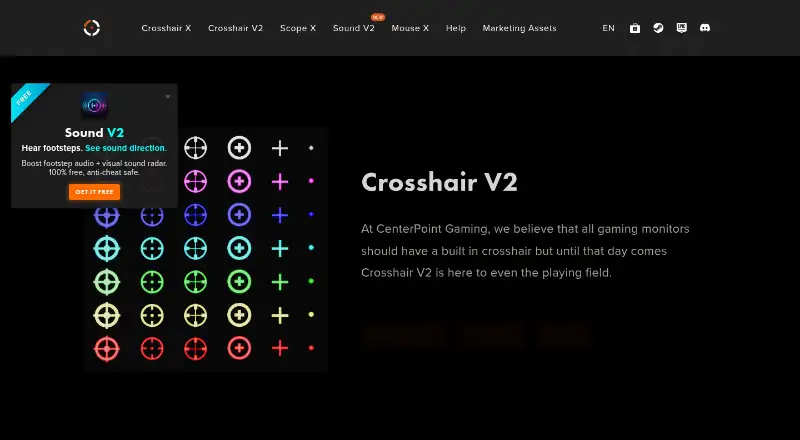
What Crosshair V2 is
Crosshair V2 is a free Windows overlay that adds a precision reticle to games, with presets aimed at FPS, tactical shooter, and battle royale players. The presets come in 3 sizes, 6 shapes, and 7 high-visibility neon colors, so players can select a reticle without designing one. The setup is described as lightweight and zero-configuration. Its monitor overlay runs independently of games, and CenterPoint advises using borderless or windowed fullscreen mode for it to appear. There is a limitation for games running in exclusive fullscreen with DirectX 10 or 11: CenterPoint recommends Crosshair X for full compatibility, while its V2 help page suggests DirectX 12 or DirectX 9 instead. CenterPoint says its crosshair products do not intercept or manipulate game rendering and are certified by Microsoft and Steam, but players are responsible for checking fair use in their games. Windows 7 is the minimum operating system; Windows 10 or 11 is recommended.
Who it suits
Crosshair V2 suits Windows players who want a preset reticle overlay for FPS, tactical shooter, or battle royale games. It is most relevant to players using borderless or windowed fullscreen modes.
What it does well
- Free to use on Windows
- Presets span 3 sizes, 6 shapes, and 7 colors
- No configuration or design skills required
- Overlay runs independently of games
What to know first
- Overlay appearance requires borderless or windowed fullscreen mode
- Exclusive fullscreen with DirectX 10 or 11 has a rendering limitation
- Players must check fair use in their games
Limits
The product is free to use, with no trial. Windows 7 is the minimum; Windows 10 or 11 is recommended, along with an Intel i5-equivalent 1.66 GHz processor, 1 GB RAM, and HD Graphics 4000 or above. Exclusive fullscreen games using DirectX 10 or 11 have a rendering limitation.
Plans
| Plan | Billed and limits | Price |
|---|---|---|
| Crosshair V2 | Free to use · Windows · borderless or windowed fullscreen support | Free |
As centerpointgaming.com lists them, read 4 Oct 2026. The maker's own page has the final word.
Getting started
- Open the Crosshair V2 website.
- Use a Windows device that meets the stated requirements.
- Choose a reticle preset.
- Run the game in borderless or windowed fullscreen mode for the overlay to appear.
Verdict
Crosshair V2 offers preset reticles without a setup process or charge. Its display-mode guidance and DirectX limitation are important to consider for games played in exclusive fullscreen.
Questions
How much does Crosshair V2 cost?
The listed plan is free, and the product is free to use.
Is there a free trial?
No. Crosshair V2 is free to use, and no free trial is offered.
Which platforms does it support?
Windows is the listed platform.
Which game display modes are supported?
Crosshair V2 supports borderless and windowed fullscreen modes. CenterPoint advises using one of these modes for the overlay to appear.
What are the minimum requirements?
Windows 7, an Intel i5-equivalent 1.66 GHz processor, 1 GB RAM, and HD Graphics 4000 or above. Windows 10 or 11 is recommended.
What does CenterPoint say about anti-cheat?
CenterPoint says its crosshair products operate independently of games and do not intercept or manipulate rendering, and says they are certified by Microsoft and Steam. Players are responsible for checking fair use in their games.
Facts from Crosshair V2's own pages
- Anti-cheat
- CenterPoint says its crosshair products run independently of games rather than intercepting or manipulating their rendering, and says they are certified by Microsoft and Steam; it also says players are responsible for checking fair use in their games. · centerpointgaming.com, 4 Oct 2026
- Display modes
- Crosshair V2 supports borderless and windowed fullscreen modes; CenterPoint advises using one of these modes for the overlay to appear. · centerpointgaming.com, 4 Oct 2026
- Overlay behavior
- The Steam listing says the monitor overlay runs independently of games. · store.steampowered.com, 4 Oct 2026
- Presets
- It offers pro eSports presets in 3 sizes, 6 shapes, and 7 high-visibility neon colors. · store.steampowered.com, 4 Oct 2026
- Privacy
- The site privacy policy says it collects device and order information, uses Google Analytics, and may share information with third parties for stated purposes. · centerpointgaming.com, 4 Oct 2026
- Purpose
- Crosshair V2 overlays a precision reticle on games for FPS, tactical shooter, and battle royale players. · store.steampowered.com, 4 Oct 2026
- Rendering limitation
- For games in exclusive fullscreen using DirectX 10 or 11, CenterPoint recommends Crosshair X for full compatibility; its Crosshair V2 help page suggests DirectX 12 or DirectX 9 instead. · centerpointgaming.com, 4 Oct 2026
- Requirements
- The Steam listing specifies Windows 7 minimum and Windows 10/11 recommended, with minimum requirements of an Intel i5-equivalent 1.66 GHz processor, 1 GB RAM, and HD Graphics 4000 or above. · store.steampowered.com, 4 Oct 2026
- Setup
- The product is described as lightweight and zero-configuration, so users can choose a preset and play without design skills. · store.steampowered.com, 4 Oct 2026
- Support
- CenterPoint’s support FAQ directs Crosshair V2 users to contact the company if troubleshooting does not resolve the overlay issue. · centerpointgaming.com, 4 Oct 2026
Where Crosshair V2 stands on Freedom251
- Game Overlay Software#2 of 25