Freedom251 › Minecraft Launchers
FTB App
What FTB App is
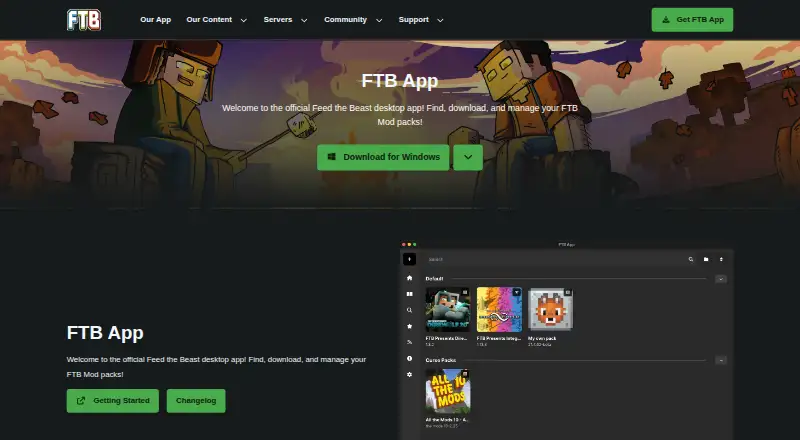
The FTB App is Feed The Beast’s desktop launcher for finding, downloading, managing, and playing FTB modpacks. It runs on Windows, macOS, and Linux, and is the only officially supported place to get Feed The Beast modpacks. The app also connects to CurseForge for discovering, installing, and managing modpacks from that service. Users can create, customize, and share packs, as well as add, remove, or update mods; CurseForge provides mod searching. Supported modloaders are NeoForge, Fabric, and Forge. Modpacks run in separate instances, each with controls for Java version, Java arguments, and custom RAM settings, and the app supports automatic updates. It can also install and configure FTB modpack servers through the app or a Linux command line. Authentication is required to use the app, and a Minecraft account is required to play Minecraft. Windows uses the Overwolf platform; macOS and Linux use Electron without requiring another background application. The app is free and contains ads that support Feed The Beast.
Who it suits
It suits Minecraft players who want to find and manage FTB or CurseForge modpacks, or create and share their own. Server setup tools may also suit people setting up FTB modpack servers.
What it does well
- Runs on Windows, macOS, and Linux.
- Supports NeoForge, Fabric, and Forge.
- Keeps modpacks in separate instances.
- Offers Java version and RAM settings per instance.
- Can install and configure FTB modpack servers.
What to know first
- Authentication is required to use the app.
- Playing Minecraft requires a Minecraft account.
- The app contains in-app ads.
- Windows uses the Overwolf platform.
Limits
The free plan costs nothing and contains ads. Authentication is required to use the app; a Minecraft account is also required to play Minecraft.
Plans
| Plan | Billed and limits | Price |
|---|---|---|
| FTB App | Free · contains ads | Free |
As feed-the-beast.com lists them, read 1 Oct 2026. The maker's own page has the final word.
Getting started
- Open the FTB App website.
- Choose the version for Windows, macOS or Linux.
- Authenticate to use the app.
- Find an FTB or CurseForge pack in the catalog, or create a pack.
- Use a Minecraft account to play Minecraft.
Overview
FTB App is a desktop launcher for players who want to find and manage modpacks from Feed The Beast and CurseForge. It is strongest for people who want FTB’s officially supported catalog alongside per-pack configuration and server tools. Required authentication and in-app advertising are the main compromises.
Key features
The built-in catalog and CurseForge integration bring two modpack sources into one launcher. FTB App is the only officially supported place to get FTB modpacks, while CurseForge packs can also be discovered, installed and managed through its API. That combination is useful for players who move between both catalogs, though mod searching is provided by CurseForge.
Separate instances keep pack setups distinct, and users can create, customize and share their own modpacks. The app supports Forge, Fabric and NeoForge, with controls to add, remove and update mods. These options give pack tinkerers room to maintain their installs without treating every pack as a fixed bundle.
Each instance can use a selected Java version, Java arguments and custom RAM settings. Automatic updates and the built-in catalog help with routine upkeep, while the server installer can set up FTB modpack servers through a graphical flow or a Linux command line. The server tools are a particular advantage for users who want to host FTB packs, rather than merely launch them.
Authentication is required to use the app, and a Minecraft account is required to play Minecraft. In-app ads support Feed The Beast. Those conditions are worth weighing if you prefer not to sign in or want an ad-free launcher.
Pricing
FTB App is free: its plan costs nothing and includes access to FTB and CurseForge mod and pack sources, server tools, and use on Windows, macOS and Linux. The trade-off is in-app advertising; no paid plan is offered in the stated pricing model. This suits players who want its catalog and management features without a subscription, but not readers seeking an ad-free tier.
Platforms
The app runs on Windows, macOS and Linux. Windows uses the Overwolf platform, while the macOS and Linux versions use Electron and do not require another background application. Linux users also have the option of setting up FTB servers through a command line.
Who it's for
FTB App is a good fit for players focused on FTB modpacks, people who also use CurseForge packs, and modpack creators who want to customize and share their work. Its per-instance Java and RAM settings also suit users managing packs with different runtime needs. Look elsewhere if required authentication, ads or the Windows Overwolf dependency do not suit your preferences.
Pros and cons
- Pros: FTB’s officially supported catalog and CurseForge pack management are available in the same launcher.
- Pros: Separate instances, mod controls and per-pack Java and RAM settings support tailored setups.
- Pros: FTB server installation is available through clicks or a Linux command line.
- Cons: Authentication is required to use the app, and Minecraft play requires a Minecraft account.
- Cons: In-app ads support the project, and Windows relies on Overwolf.
Alternatives
Prism Launcher is a free, open-source option for Windows, macOS and Linux if open-source distribution is a priority. ATLauncher is another free, open-source cross-platform launcher; it also requires a paid Minecraft account to use and play modpacks.
GDLauncher is free across the same desktop platforms and has no premium tier or overlay. For web-based CurseForge catalog access, CurseForge offers a free option for Minecraft mods and modpacks, with a paid monthly tier also described.
Technic Launcher is a free, open-source desktop alternative. Modrinth App is a free, open-source cross-platform choice. MultiMC is free, with a price on request Patreon support option. For a Windows-only open-source tool, packwiz is another alternative.
For more options, browse Minecraft Modpack Builders or Minecraft Launchers.
Verdict
Choose FTB App if you want the officially supported route to FTB packs, plus CurseForge management, instance-level controls and FTB server setup in one place. Its free price makes that package straightforward to try, but the required authentication, ads and Overwolf on Windows make a different launcher the better fit for readers who want fewer dependencies or a more private, ad-free experience.
Verdict
The FTB App brings FTB and CurseForge pack management, mod controls, and server setup into one launcher. Account authentication is required, and the Windows version uses Overwolf.
Questions
How much does FTB App cost?
The FTB App plan is free. It is free to use and contains ads.
Which platforms does FTB App support?
It runs on Windows, macOS and Linux. Windows uses Overwolf; macOS and Linux use Electron without requiring another background application.
Can it manage CurseForge packs?
Yes. It supports discovering, installing and managing CurseForge modpacks through the CurseForge API.
Which modloaders does it support?
It supports NeoForge, Fabric and Forge.
Is FTB App open source?
Its source code is available through the project’s GitHub repository.
Is an account required?
Authentication is required to use the app. A Minecraft account is required to play Minecraft.
Facts from FTB App's own pages
- Advertising
- The app contains in-app ads that directly support Feed The Beast. · feed-the-beast.com, 1 Oct 2026
- Authentication limit
- Authentication is required to use the app, and a Minecraft account is required to play Minecraft. · docs.feed-the-beast.com, 1 Oct 2026
- Automatic updates
- Yes · feed-the-beast.com, 19 Sept 2026
- Built-in modpack catalog
- Yes · feed-the-beast.com, 19 Sept 2026
- CurseForge integration
- The app supports discovering, installing and managing CurseForge modpacks through the CurseForge API. · docs.feed-the-beast.com, 1 Oct 2026
- Data protection contact
- Feed The Beast identifies Kevin Moloney as its data protection officer and gives a London postal address. · feed-the-beast.com, 1 Oct 2026
- Free plan
- Yes · feed-the-beast.com, 19 Sept 2026
- FTB catalog
- The app is the only officially supported place to get Feed The Beast modpacks. · feed-the-beast.com, 1 Oct 2026
- Java controls
- Each modpack instance can use a selected Java version, Java arguments and custom RAM settings. · docs.feed-the-beast.com, 1 Oct 2026
- Java runtime management
- Yes · feed-the-beast.com, 19 Sept 2026
- Modloaders
- The app supports NeoForge, Fabric and Forge modloaders. · feed-the-beast.com, 1 Oct 2026
- Mod loader support
- multiple · feed-the-beast.com, 19 Sept 2026
- Mod management
- Users can add, remove and update mods, with mod searching provided by CurseForge. · docs.feed-the-beast.com, 1 Oct 2026
- Modpack creation
- Users can create, customize and share their own modpacks. · docs.feed-the-beast.com, 1 Oct 2026
- Modpack import
- both · feed-the-beast.com, 19 Sept 2026
- Open source
- The FTB App source code is available through the project’s GitHub repository. · overwolf.com, 1 Oct 2026
- Platform technology
- Windows uses the Overwolf platform, while macOS and Linux use Electron without requiring another background application. · docs.feed-the-beast.com, 1 Oct 2026
- Privacy security
- Feed The Beast says it uses appropriate security measures, limits personal-data access by business need and has breach procedures. · feed-the-beast.com, 1 Oct 2026
- Purpose
- The FTB App is Feed The Beast’s desktop launcher for finding, downloading, managing and playing FTB modpacks. · feed-the-beast.com, 1 Oct 2026
- Separate instances
- Yes · feed-the-beast.com, 19 Sept 2026
- Server installer
- The app can install and set up FTB modpack servers through clicks or a Linux command line. · feed-the-beast.com, 1 Oct 2026
- Support
- FTB directs users to its community-run Discord, where staff are typically available during UK time. · docs.feed-the-beast.com, 1 Oct 2026
Where FTB App stands on Freedom251
- Minecraft Launchers#15 of 76
- Minecraft Modpack Builders#3 of 11