Freedom251 › Minecraft Launchers
PolyMC
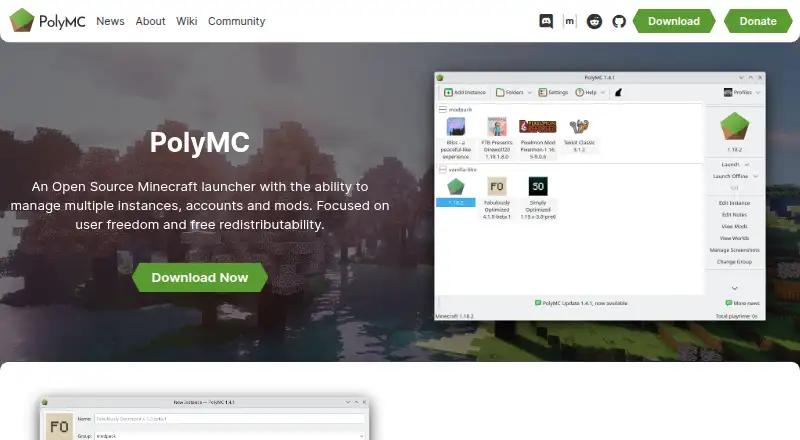
What PolyMC is
PolyMC is an open source Minecraft launcher for keeping game instances, accounts, and mods organized. Each instance uses its own folder for mods, resource packs, settings, and other files, so you can maintain separate configurations. The launcher supports Forge, Fabric, LiteLoader, and Quilt, and its built-in catalog includes modpacks from CurseForge, Technic, FTB, FTB Legacy, and Modrinth. You can also install individual mods from CurseForge and Modrinth that match the selected loader and game version. PolyMC manages worlds, resource packs, and shader packs, and gives access to logs and a control for stopping Minecraft if it crashes or freezes. It includes Java runtime management, but you need to choose the Java version for each instance yourself. The instance window and theme can be customized. PolyMC is free on Linux, macOS, and Windows. Its code is licensed under GPL-3; its logo and related assets use CC BY-SA 4.0. The current macOS build supports Apple Silicon, while Intel Mac users are directed to a legacy universal build. For help, the project points users to its issue tracker or Discord server.
Who it suits
PolyMC suits Minecraft players who want separate configurations for different mods, loaders, worlds, and resource packs. It is also a fit for players who want to find modpacks in a built-in catalog or manage instances across Linux, macOS, and Windows.
What it does well
- Keeps each instance's mods, settings, and files in its own folder.
- Supports Forge, Fabric, LiteLoader, and Quilt.
- Catalogs modpacks from CurseForge, Technic, FTB, FTB Legacy, and Modrinth.
- Installs individual mods from CurseForge and Modrinth.
- Manages worlds, resource packs, and shader packs.
- Free and open source under GPL-3.
What to know first
- Java version selection for each instance is manual.
- The current macOS build supports Apple Silicon; Intel users need the legacy universal build.
Limits
PolyMC does not automatically select the correct Java version for an instance; users must choose it manually. The current macOS build is Apple Silicon only, with Intel Mac users directed to the legacy universal build.
Plans
| Plan | Billed and limits | Price |
|---|---|---|
| PolyMC | Open source Minecraft launcher · no paid tiers stated | Free |
As polymc.org lists them, read 11 Oct 2026. The maker's own page has the final word.
Getting started
- Visit the PolyMC website.
- Download the build for Linux, macOS, or Windows; Intel Mac users are directed to the legacy universal build.
- Create a Minecraft instance and select a supported mod loader.
- Choose the Java version for the instance manually.
- Install modpacks from the built-in catalog or add individual mods from CurseForge or Modrinth.
Verdict
Choose PolyMC if you want a free launcher for managing separate Minecraft setups and modpacks from several catalogs. Look elsewhere if you need the launcher to choose the right Java version automatically or use the current macOS build on an Intel Mac.
Questions
Is PolyMC free?
Yes. The listed plan is free, and no paid tiers are stated.
Which platforms does PolyMC support?
Linux, macOS, and Windows. The current macOS build is for Apple Silicon; Intel Mac users are directed to a legacy universal build.
Which mod loaders does it support?
Forge, Fabric, LiteLoader, and Quilt.
Can it install modpacks and individual mods?
Yes. Its catalog includes modpacks from CurseForge, Technic, FTB, FTB Legacy, and Modrinth. Individual mods can be installed from CurseForge and Modrinth for the selected loader and game version.
Is PolyMC open source?
Yes. The launcher code uses the GPL-3 license, while the logo and related assets use CC BY-SA 4.0.
How do I get help?
The project directs users to create an issue or ask in its Discord server.
Facts from PolyMC's own pages
- Built-in modpack catalog
- Yes · polymc.org, 22 Sept 2026
- Customization
- The home page says users can customize the instance window and theme. · polymc.org, 11 Oct 2026
- Diagnostics
- PolyMC provides access to logs and a way to stop Minecraft if it crashes or freezes. · polymc.org, 11 Oct 2026
- Free plan
- Yes · polymc.org, 22 Sept 2026
- Individual mods
- It can install individual mods from CurseForge and Modrinth, tailored to the selected loader and game version. · polymc.org, 11 Oct 2026
- Instances
- Each Minecraft instance has its own folder for separate mods, resource packs, settings, and other files. · polymc.org, 11 Oct 2026
- Java runtime management
- Yes · polymc.org, 22 Sept 2026
- Java setup
- PolyMC does not yet automatically select the right Java version for an instance, so users must select it manually. · polymc.org, 11 Oct 2026
- License
- The launcher code is available under GPL-3 and the logo and related assets use CC BY-SA 4.0. · polymc.org, 11 Oct 2026
- Mod loaders
- The launcher supports installing Forge, Fabric, LiteLoader, and Quilt. · polymc.org, 11 Oct 2026
- Mod loader support
- multiple · polymc.org, 22 Sept 2026
- Modpack import
- both · polymc.org, 22 Sept 2026
- Modpacks
- PolyMC lists modpack installation from CurseForge, Technic, FTB, FTB Legacy, and Modrinth. · polymc.org, 11 Oct 2026
- Notable limit
- The current macOS build is Apple Silicon only; the site directs Intel Mac users to the legacy universal build. · polymc.org, 11 Oct 2026
- Performance
- PolyMC is built with Qt technologies, which its site says keeps the launcher performant and light on system resources. · polymc.org, 11 Oct 2026
- Product
- PolyMC is an open source Minecraft launcher for managing multiple instances, accounts, and mods. · polymc.org, 11 Oct 2026
- Separate instances
- Yes · polymc.org, 22 Sept 2026
- Support
- The project directs users to create an issue or ask in its Discord server for help. · github.com, 11 Oct 2026
- Worlds and resources
- The launcher can manage worlds, resource packs, and shader packs. · polymc.org, 11 Oct 2026
Where PolyMC stands on Freedom251
- Minecraft Launchers#13 of 76