Freedom251 › Minecraft Modpack Builders

ATLauncher
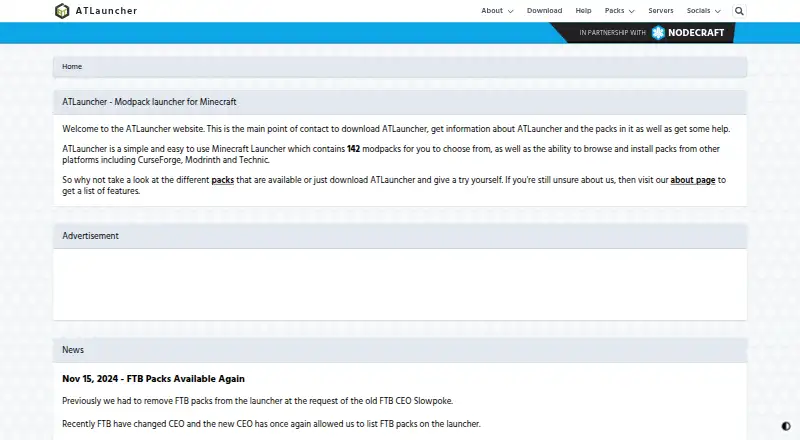
What ATLauncher is
ATLauncher is a free Minecraft launcher for finding, downloading, and installing modpacks. Its built-in catalog supports packs from ATLauncher, CurseForge, Modrinth, and Technic, and users can import packs and choose among multiple mod loaders. Separate instances let users maintain different installs without changing earlier ones, while Java management selects the version a pack needs. The launcher supports multiple accounts, including Mojang and Microsoft accounts and Xbox Game Pass subscribers. Users can make one-click backups of saves, manage mods, maps, and resource packs from CurseForge and Modrinth, and create and run servers for ATLauncher modpacks. It runs on Windows, macOS, and Linux, with a Jar download also listed. The download page also lists Windows, OSX, and Linux options. Playing modpacks through the launcher requires a purchased Minecraft account. ATLauncher no longer takes new submissions for its own pack platform and points pack makers to Modrinth or CurseForge.
Who it suits
ATLauncher suits Minecraft players who want to browse and manage modpacks across separate instances, or run servers for ATLauncher packs. It is available for Windows, macOS, and Linux.
What it does well
- Free launcher with a built-in modpack catalog.
- Java version is selected for each pack.
- One-click backups for saves.
- Can create and run ATLauncher modpack servers.
- Supports separate instances and multiple accounts.
What to know first
- Playing modpacks requires a purchased Minecraft account.
- New pack submissions to ATLauncher are no longer accepted.
Limits
ATLauncher is free, but playing modpacks requires a purchased Minecraft account. New pack submissions to ATLauncher’s own platform are no longer accepted.
Plans
| Plan | Billed and limits | Price |
|---|---|---|
| ATLauncher | Requires a paid Minecraft account to use the launcher and play modpacks | Free |
As atlauncher.com lists them, read 30 Sept 2026. The maker's own page has the final word.
Getting started
- Visit https://atlauncher.com/.
- Download the launcher for Windows, macOS, or Linux, or use the listed Jar download.
- Sign in with a supported Mojang or Microsoft account; Xbox Game Pass subscribers are supported.
- Browse the catalog or import a modpack from a supported source.
- Use a purchased Minecraft account to play modpacks.
ATLauncher is a free, open-source desktop launcher for browsing and installing Minecraft modpacks. It suits players who want separate pack setups plus Java, mod, backup, and server tools in one place. Playing still requires a purchased Minecraft account.
Overview
Founded in 2013, ATLauncher combines pack discovery with instance management. It draws packs from ATLauncher, CurseForge, Modrinth, Technic, and FTB, and exports to CurseForge .zip and Modrinth .mrpack. That breadth makes it useful for players moving among pack ecosystems; it is less compelling for creators seeking a new home for a pack, since ATLauncher no longer accepts submissions to its own platform and points authors to Modrinth or CurseForge.
Key features
- Separate instances: Install multiple instances of a pack without altering earlier installs. This helps keep distinct configurations apart, though users will need to manage those copies separately.
- Pack catalog and import: Browse its built-in catalog or bring in packs, with support for multiple mod loaders. The range of sources is a practical advantage for players who do not want to be tied to one catalog.
- Java and accounts: The launcher selects the Java version a pack needs and supports multiple Mojang and Microsoft accounts, plus Xbox Game Pass subscribers. Automatic runtime selection removes a compatibility chore, while account support accommodates players with more than one login.
- Mod management: Instance tools can automatically download and install mods, maps, and resource packs from CurseForge and Modrinth, reducing manual setup for content from those services.
- Backups and servers: One-click save backups offer a straightforward safeguard for worlds. Users can also create and run servers for ATLauncher modpacks from within the launcher, a useful addition for groups playing those packs.
- Support and privacy: The site directs users to Discord for help and says contact-form requests needing a response receive a reply within 24 hours. Its privacy policy says launcher usage data excludes IP addresses, fine-grained location, and instance, server, and account names.
Pricing
ATLauncher costs nothing. The free plan includes the launcher without a launcher fee, but it does not provide Minecraft access: playing modpacks requires a purchased Minecraft account. There is no free trial because the plan is free, and no paid tier is presented. This suits players who already own Minecraft and want modpack tools without another subscription; it is not a way to play without buying the game.
Platforms
ATLauncher runs on Windows, macOS, and Linux. Its download page also offers a Jar download, giving users an additional distribution option beyond the named desktop platforms.
Who it's for
ATLauncher is a strong fit for Minecraft players who move between modpack sources, maintain several pack configurations, or want backups and server creation alongside installation. Pack authors looking to submit new releases to ATLauncher itself should choose another sharing platform; the launcher directs them to Modrinth or CurseForge. Players without a purchased Minecraft account should also look elsewhere for access to the game.
Pros and cons
- Pros: Free and open source, with packs from five sources and export support for two common pack formats.
- Pros: Separate instances, automatic Java selection, and mod management help keep setup work contained.
- Pros: One-click save backups and in-launcher server tools add useful support for ongoing play.
- Cons: A purchased Minecraft account remains necessary to play; the free launcher is not a substitute for the game.
- Cons: New pack submissions to ATLauncher are closed, limiting its value as a publishing destination for creators.
Alternatives
Prism Launcher is another free, open-source option for Windows, macOS, and Linux; choose it if its redistributability terms are a priority. FTB App is a free, ad-supported alternative for the same desktop platforms. GDLauncher is free across Windows, macOS, and Linux, with no premium tier or overlay.
CurseForge offers a free web catalog for Minecraft mods and modpacks; choose it for browser-based catalog access rather than a desktop launcher. Technic Launcher is a free, open-source launcher for Windows, macOS, and Linux. Modrinth App is a freemium, open-source desktop alternative for those platforms.
MultiMC is another free launcher, with a price on request Patreon support option. packwiz is a free, open-source option for Windows.
For more choices, browse Minecraft Launchers or Minecraft Modpack Builders.
Verdict
Choose ATLauncher if you already own Minecraft and want a free, open-source way to organize packs from several sources, automate Java selection, and keep backups and server tools close at hand. Look elsewhere if your priority is submitting a new pack to ATLauncher’s catalog or playing without a purchased Minecraft account.
Verdict
ATLauncher brings pack discovery, instance management, backups, and server tools together in a free launcher. Players need a purchased Minecraft account to play, and pack makers must use another listed sharing platform for new submissions.
Questions
Does ATLauncher cost anything?
ATLauncher is free to use. Playing its modpacks requires a purchased Minecraft account.
Which operating systems does it support?
Downloads are listed for Windows, macOS, and Linux, along with a Jar download.
Which pack sources does it support?
The listed sources are ATLauncher, CurseForge, Modrinth, Technic, and FTB. The launcher also supports imports.
Can I use separate installations of a pack?
Yes. You can install multiple instances of a pack without affecting earlier installations.
Can I submit a new pack to ATLauncher?
No. ATLauncher no longer accepts new pack submissions to its own platform and recommends Modrinth or CurseForge for sharing packs.
How can I get help?
The site directs users to Discord. It says contact form requests that need a response will receive a reply within 24 hours.
Facts from ATLauncher's own pages
- Accounts
- The launcher supports Mojang and Microsoft accounts, including Xbox Game Pass subscribers, and lets users use multiple accounts from one installation. · atlauncher.com, 30 Sept 2026
- Backups
- The launcher offers one-click backups of saves. · atlauncher.com, 29 Sept 2026
- Backups and servers
- It offers one-click save backups and lets users create and run servers for ATLauncher modpacks from within the launcher. · atlauncher.com, 30 Sept 2026
- Built-in modpack catalog
- Yes · atlauncher.com, 19 Sept 2026
- Downloads
- The download page lists Windows, OSX, and Linux downloads, plus a Jar download. · atlauncher.com, 29 Sept 2026
- Founded
- 2013 · atlauncher.com, 28 Sept 2026
- Free plan
- Yes · atlauncher.com, 19 Sept 2026
- Instances
- Users can install multiple instances of a pack without affecting previous installs. · atlauncher.com, 30 Sept 2026
- Java
- The launcher automatically uses the correct Java version for a pack. · atlauncher.com, 30 Sept 2026
- Java runtime management
- Yes · atlauncher.com, 19 Sept 2026
- Minecraft requirement
- Using the launcher to play its modpacks requires a purchased copy of Minecraft and a paid account. · atlauncher.com, 30 Sept 2026
- Mod loader support
- multiple · atlauncher.com, 19 Sept 2026
- Mod management
- Users can manage instance mods and automatically download and install mods, maps, and resource packs from CurseForge and Modrinth. · atlauncher.com, 30 Sept 2026
- Modpack import
- both · atlauncher.com, 19 Sept 2026
- Pack sources
- The launcher supports packs from ATLauncher, CurseForge, Modrinth, and Technic. · atlauncher.com, 30 Sept 2026
- Pack submissions
- ATLauncher says it no longer accepts new pack submissions to its own platform and directs creators to Modrinth or CurseForge. · atlauncher.com, 30 Sept 2026
- Platforms
- Downloads are listed for Windows, OSX, and Linux, with Windows setup and portable options and Linux package options. · atlauncher.com, 30 Sept 2026
- Privacy
- The privacy policy says launcher usage data excludes personal information such as IP addresses and fine-grained location, and does not collect instance, server, or account names. · atlauncher.com, 30 Sept 2026
- Product
- ATLauncher is a Minecraft launcher for downloading and installing modpacks. · atlauncher.com, 30 Sept 2026
- Security
- The website cookie policy identifies an XSRF-TOKEN cookie used to help prevent cross-site request forgery attacks. · atlauncher.com, 30 Sept 2026
- Separate instances
- Yes · atlauncher.com, 19 Sept 2026
- Servers
- Users can create and run servers for ATLauncher modpacks from within the launcher. · atlauncher.com, 29 Sept 2026
- Support
- Users can seek help through Discord support channels or the website contact form, which says ATLauncher will respond within 24 hours when a response is deemed necessary. · atlauncher.com, 30 Sept 2026
Where ATLauncher stands on Freedom251
- Minecraft Modpack Builders#1 of 11
- Minecraft Launchers#9 of 76