Freedom251 › Audio Analysis Software
Friture
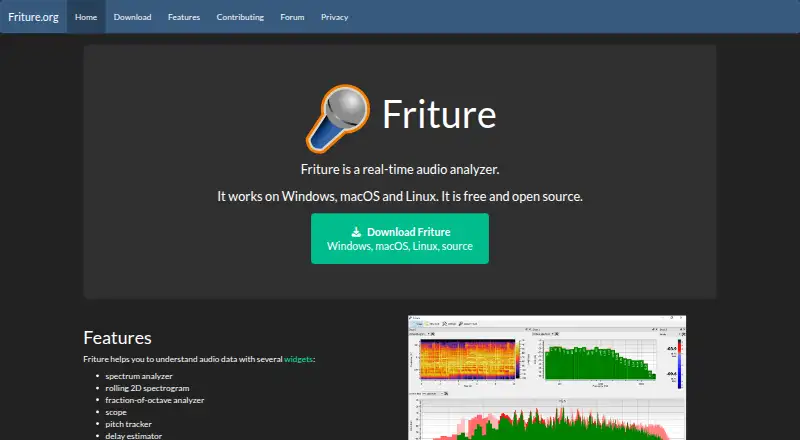
What Friture is
Friture is a free, open-source application for analyzing audio signals in real time and examining room or receiver behavior. Its views include a spectrum analyzer, rolling 2D spectrogram, fraction-of-octave analyzer, scope, pitch tracker, delay estimator, and level display. The spectrum view shows frequency components, recent peaks, and the frequency of the global maximum, with configurable response time. The delay estimator uses cross-correlation to measure delay between two input channels and works only in two-channel mode. The level display reports peak and RMS power in dBFS, with response times of 25 ms and 300 ms respectively. Friture also generates sine, pink noise, white noise, sweep, and burst signals. Downloads are available for Windows, macOS, and Linux, including a Windows Microsoft Store option and a Linux AppImage. The project recommends checking distribution packages or using its PyPI package for other platforms, though some dependencies may need manual installation. Friture is licensed under GPLv3+.
Who it suits
Friture may suit people who need real-time audio measurements, signal generation, or room and receiver analysis. It is available for Windows, macOS, and Linux.
What it does well
- Free and open source under GPLv3+.
- Includes seven listed analysis views.
- Generates five types of test signals.
- Application does not collect microphone or personal data.
What to know first
- Delay estimation requires two-channel mode.
- Some dependencies may need manual installation.
- Windows installer is unsigned.
- macOS app is not notarized.
Limits
The delay estimator requires two-channel mode. Some distribution packages or the PyPI route may require manual installation of dependencies.
Plans
| Plan | Billed and limits | Price |
|---|---|---|
| Friture | Free and open source; Windows, macOS, and Linux | Free |
As friture.org lists them, read 11 Oct 2026. The maker's own page has the final word.
Getting started
- Visit the Friture website and open its download page.
- Choose the Windows, macOS or Linux version.
- For Windows, use the installer or Microsoft Store option; for Linux, use the AppImage.
- For other platforms, check distribution packages or the PyPI package and install any required dependencies.
- Report installation or runtime problems through GitHub Issues.
Friture is desktop software for examining live audio and how a room or receiver responds to it. It best suits people who want several measurement views in one free, open-source application. Its breadth is useful, but platform-specific installation hurdles and limited documentation make it less straightforward than a narrowly focused tool.
Overview
Friture combines real-time analysis with a signal generator, so users can inspect incoming audio while producing controlled test signals. The generator offers sine, pink-noise, white-noise, sweep, and burst signals, making the application practical for basic troubleshooting, room checks, and receiver experiments rather than only passive monitoring.
It is free and open source under GPLv3+, with no paid tier separating core capabilities. Friture captures audio through PortAudio via sounddevice and processes it with NumPy and SciPy. The project states that it collects no microphone or other personal data; its website uses no cookies and does not store or analyze user activity.
Key features
The spectrum analyzer displays frequency components, recent peaks, and the frequency of the global maximum. Its configurable response time lets users choose a display that favors quicker movement or steadier observation. A rolling two-dimensional spectrogram adds a time-based view, while the fraction-of-octave analyzer, scope, and pitch tracker provide alternate ways to understand changing audio. This variety is the main reason to choose Friture over a single-purpose spectrum display.
The delay estimator applies cross-correlation to measure the delay between two input channels. That makes it useful for comparing stereo paths or other two-channel setups, but it is unsuitable for single-channel measurements. The level widget reports peak power with a 25-millisecond response and RMS power with a 300-millisecond response, both in dBFS. The separate time responses help distinguish brief transients from sustained loudness.
Because analysis and signal generation sit in one program, users can create a test tone or noise source and watch several responses at once. The project’s documentation is currently limited, however, with contributors directed to a Sphinx manual and wiki. New users may need to work out procedures without extensive guided explanation.
Pricing
Friture costs nothing. The single “Friture” plan includes the free, open-source application for Windows, macOS, and Linux. There is no free trial because the software is already free, and no seat, usage quota, renewal, or time limit is attached to the plan. It fits students, hobbyists, audio practitioners, and small teams that need desktop analysis without a software budget; there is no cheaper paid-down option that trades away features.
Platforms
Official downloads cover Windows, macOS, and Linux. Windows users can choose a Microsoft Store package, while Linux users can use an AppImage. The project also recommends checking distribution packages or using its PyPI package for other platforms, with a warning that some dependencies may require manual installation.
Installation is less polished on two major desktop systems: the Windows installer is unsigned, and the macOS application is not notarized, so each may trigger security prompts or require manual whitelisting. Users comfortable with those steps will still have broad cross-platform coverage; people who need a frictionless, centrally signed deployment should look elsewhere.
Who it's for
Choose Friture when you need live views of frequency, time, level, pitch, scope, and channel delay in one desktop tool, especially when a built-in test-signal generator matters. It is a strong fit for investigating room or receiver behavior and for technically minded users who value open-source software.
It is less suitable for single-channel delay work, users seeking extensive built-in guidance, or organizations that cannot accept unsigned or non-notarized installers. Its focus is live audio measurement, not general media-file inspection.
Pros and cons
Pros
- Broad live-analysis set: spectrum, spectrogram, fraction-of-octave, scope, pitch, delay, and level views cover many measurement tasks.
- Integrated test source: sine, noise, sweep, and burst signals let users stimulate a system without a separate generator.
- No software cost: the GPLv3+ application has no paid tier, trial expiry, or usage cap.
- Privacy-conscious design: the project says it collects no microphone or personal data, and the site uses no cookies.
Cons
- Delay estimator requires two channels: it cannot serve single-channel measurement workflows.
- Installation warnings: unsigned Windows and non-notarized macOS packages can require security intervention.
- Light documentation: users may need to rely on the manual, wiki, and their own troubleshooting.
- Additional-platform setup may be manual: distribution or PyPI installations can require dependency work.
Alternatives
Browse Audio Analysis Software for a wider shortlist. MediaInfo is the better choice for open-source media analysis across desktop, mobile, web, and self-hosted environments rather than live acoustic measurement. Open Audio Analyzer is another free cross-platform option when you want a broadly distributed analyzer.
Pick Open Sound Meter if a freemium tool with a free desktop community edition suits your workflow. Blue Cat's FreqAnalyst is preferable when a focused real-time spectrum-analyzer plug-in for macOS or Windows is enough. Dusk Audio Spectrum Analyzer offers another free Windows, macOS, and Linux spectrum-focused option.
MeldaProduction MAnalyzer fits users who want a free macOS or Windows effect included in the MFreeFXBundle. Choose MiniMeters when waveform and loudness monitoring are the priority and a paid upgrade is acceptable. Praat is an alternative free, GPL-licensed choice for users whose work calls for its own analysis environment.
Verdict
Friture is the right pick for technically minded users who want a no-cost, open-source desktop analyzer with many real-time views and an integrated signal generator. Its main advantage is the breadth of live measurement tools in one application. Look elsewhere if you need single-channel delay estimation, extensive onboarding, or installers that avoid platform security prompts.
Verdict
Friture combines several real-time audio views with a signal generator and is available at no cost. Users should note the delay estimator’s two-channel requirement and possible platform security prompts.
Questions
How much does Friture cost?
Friture is free and open source. The listed plan is free.
Which operating systems does it support?
Downloads are offered for Windows, macOS and Linux. The project also recommends checking distribution packages or PyPI for other platforms.
Is Friture open source?
Yes. It is licensed under GPLv3+.
What can it analyze?
Its views cover spectrum, spectrogram, fraction-of-octave analysis, scope, pitch, delay and audio levels. It also includes a generator for sine, pink noise, white noise, sweep and burst signals.
Does the delay estimator work with any input setup?
It measures delay between two input channels using cross-correlation and works only in two-channel mode.
Does Friture collect microphone data?
The application does not collect microphone data or other personal data. The website says it uses no cookies and does not store or analyze user activity.
Facts from Friture's own pages
- Analysis widgets
- It provides a spectrum analyzer, rolling 2D spectrogram, fraction-of-octave analyzer, scope, pitch tracker, and delay estimator. · friture.org, 11 Oct 2026
- Audio generator
- It includes a generator for sine, pink noise, white noise, sweep, and burst signals. · friture.org, 11 Oct 2026
- Audio levels
- The level widget displays peak power with a 25 ms response time and RMS power with a 300 ms response time, in dBFS. · friture.org, 11 Oct 2026
- Audio technology
- Friture uses PortAudio through sounddevice for cross-platform audio capture, and NumPy and SciPy for audio processing. · friture.org, 11 Oct 2026
- Delay estimation
- The delay estimator uses cross-correlation to measure delay between two input channels and works only in two-channel mode. · friture.org, 11 Oct 2026
- Documentation
- The project says there is not much documentation currently and points contributors to its Sphinx manual and wiki. · friture.org, 11 Oct 2026
- Downloads
- The download page offers Windows, macOS, and Linux versions, with a Windows Microsoft Store option and a Linux AppImage. · friture.org, 11 Oct 2026
- License
- Friture is free and open source under GPLv3+. · friture.org, 11 Oct 2026
- Other distribution
- The site recommends checking distribution packages or using the PyPI package for other platforms, and notes some dependencies may need manual installation. · friture.org, 11 Oct 2026
- Privacy
- The application does not collect microphone data or other personal data; the website says it uses no cookies and does not store or analyze user activity. · friture.org, 11 Oct 2026
- Purpose
- Friture is a real-time audio analyzer for understanding audio signals and room or receiver behavior. · friture.org, 11 Oct 2026
- Security limitation
- The Windows installer is unsigned, and the macOS app is not notarized and may need to be manually whitelisted in macOS Security settings. · friture.org, 11 Oct 2026
- Spectrum
- The spectrum widget shows frequency components, recent peaks, and the frequency of the global maximum; its response time is configurable. · friture.org, 11 Oct 2026
- Support
- Users can report installation or runtime problems and submit feature requests through GitHub Issues. · friture.org, 11 Oct 2026
Where Friture stands on Freedom251
- Audio Analysis Software#5 of 43