Freedom251 › Audio Analysis Software
Dusk Audio Spectrum Analyzer
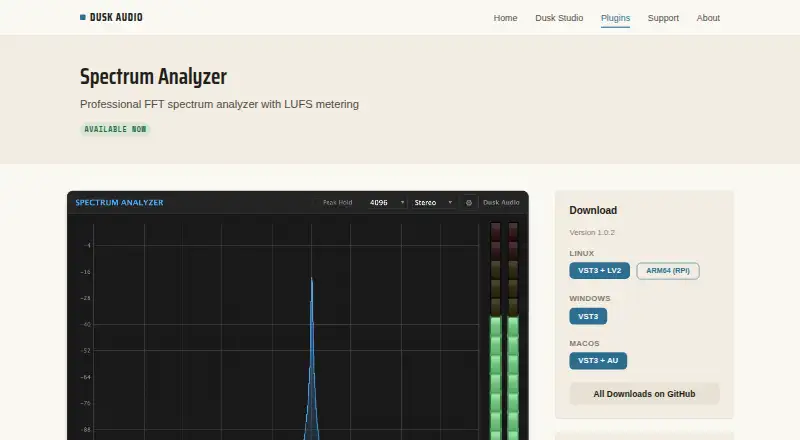
What Dusk Audio Spectrum Analyzer is
Dusk Audio Spectrum Analyzer is a free plugin for real-time measurement of frequency spectrum, loudness, true peak, stereo correlation, and K-System headroom. Its FFT display offers 2048, 4096, and 8192 sample resolutions, adjustable smoothing and slope, and optional peak hold. Loudness readings cover EBU R128 Momentary, Short-term, Integrated, and Loudness Range measurements. True peak detection follows ITU-R BS.1770-4 with 4x oversampling, and the stereo correlation meter ranges from -1 to +1. Channel views include Stereo, Mono, Mid, and Side. The manual describes it as an analyzer that leaves the audio path unchanged, so output equals input regardless of settings. It requires a 64-bit DAW supporting VST3, LV2, or AU. Listed formats are Linux VST3 and LV2, Windows VST3, and macOS VST3 and AU. Minimum systems are Debian 12+, Ubuntu 22.04+, or Fedora 36+ on Linux, Windows 10+, or macOS 10.13+. Dusk Audio says its plugins are free and open source, with source code on GitHub.
Who it suits
It suits musicians, students, hobbyists, and Linux audio users who need real-time measurement in a compatible 64-bit DAW. The listed DAW formats and operating system minimums determine compatibility.
What it does well
- Includes EBU R128 loudness readings
- True peak detection uses 4x oversampling
- Offers Stereo, Mono, Mid, and Side views
- Audio output is unchanged by analyzer settings
What to know first
- Requires a 64-bit DAW supporting VST3, LV2, or AU
- Linux minimums are Debian 12+, Ubuntu 22.04+, or Fedora 36+
Plans
| Plan | Billed and limits | Price |
|---|---|---|
| Free | Free; optional support is available. · No trials · no feature limitations · no nag screens | Free |
As duskaudio.com lists them, read 5 Oct 2026. The maker's own page has the final word.
Getting started
- Open https://duskaudio.com/plugins/spectrum-analyzer/.
- Check that your operating system meets the listed minimum version.
- Use a 64-bit DAW that supports VST3, LV2, or AU.
- Choose the plugin format listed for your operating system.
- Find the source code on GitHub if you want to inspect the open-source project.
Overview
Dusk Audio Spectrum Analyzer is a real-time metering plugin for people who want frequency, loudness and stereo checks inside a DAW. It is especially well suited to Linux users looking for a free, open-source tool; its strongest case is the range of measurements in one plugin, while its main constraint is the need for a compatible 64-bit host.
The plugin analyzes without processing: its output equals its input regardless of settings. That makes it a practical session monitor, not a standalone tool for examining audio files.
Key features
- Flexible FFT display: Choose 2048, 4096 or 8192 sample resolution, adjust smoothing and slope, and enable peak hold. This gives users useful control over the spectrum view without adding a more specialized visualization mode.
- Loudness metering: EBU R128-compliant Momentary, Short-term, Integrated and Loudness Range readings suit users who need more context than a single level value.
- True peak and correlation: True peak detection follows ITU-R BS.1770-4 with 4x oversampling, and the stereo correlation meter spans -1 to +1. These standards and range make the plugin relevant for technical level and stereo checks.
- Channel views: Stereo, Mono, Mid and Side modes let users inspect different channel configurations without changing the plugin's analysis-only role.
- Open-source project: Dusk Audio makes its plugins free and open source, with source code on GitHub. Users can report bugs and suggest features through GitHub Issues; financial support is optional.
Pricing
The Free plan costs nothing. It has no trials, feature limitations or nag screens, so users get the full plugin rather than a restricted evaluation version. Optional financial support is available, but not required. There is no paid tier or renewal term to weigh against the free offering.
Platforms
The plugin supports 64-bit DAWs that host VST3, LV2 or AU. Formats vary by operating system: Linux has VST3 and LV2, Windows has VST3, and macOS has VST3 and AU. Minimum operating systems are Debian 12+, Ubuntu 22.04+ or Fedora 36+ on Linux, Windows 10+, and macOS 10.13+.
Those format and host requirements matter: this is not a general desktop analyzer, and users should confirm both their DAW's plugin support and their operating system version before choosing it.
Who it's for
Dusk Audio identifies hobbyists, students, musicians in the open-source community and Linux audio users among the audiences it aims to serve. The analyzer is a strong fit for those groups when they want multiple real-time measurement views in a DAW at no cost. Someone who needs standalone file analysis, or whose host cannot load the supported formats, should look elsewhere.
Pros and cons
Pros
- Broad real-time coverage: Spectrum, loudness, true peak, stereo correlation and K-System headroom are brought together in one plugin.
- Useful measurement detail: Multiple FFT resolutions and standards-compliant loudness and true-peak readings support more considered monitoring than a basic spectrum view alone.
- No-cost, open-source access: The full feature set is free, with source code available and optional support rather than a paid upgrade requirement.
- Signal-neutral operation: The analyzer's output matches its input, so monitoring does not alter the audio path.
Cons
- Host-dependent: It requires a compatible 64-bit DAW and supported plugin format, excluding users seeking a standalone analyzer.
- Platform formats differ: Linux supports LV2 as well as VST3, while Windows is VST3-only and macOS lists VST3 and AU; the suitable option depends on the host.
Alternatives
Audio Analysis Software is the broader category directory for comparing tools.
- MediaInfo is a free option for users who want media-analysis software across desktop, mobile, web and self-hosted platforms rather than a DAW plugin.
- Open Audio Analyzer is another free choice with Android and iOS support alongside Linux, macOS and Windows.
- Open Sound Meter is worth considering for users who want a free desktop version and an iOS option; its desktop version is open source.
- Blue Cat's FreqAnalyst is a free real-time spectrum analyzer plugin for macOS and Windows if those are the only platforms you need.
- Friture is a free, open-source alternative for users who want software for Linux, macOS or Windows.
- MeldaProduction MAnalyzer is a free effect for macOS and Windows; its bundle's professional upgrade adds sonogram access in analyzers, plugin resizing and styling, and preset management.
- MiniMeters may suit users willing to pay for its full version: its free demo is limited to Waveform and Loudness modules and carries a demo text overlay, while the paid plan costs $20, paid once.
- Praat is free software for Linux, macOS and Windows if you are looking for a general-purpose analysis program rather than a DAW metering plugin.
Verdict
Choose Dusk Audio Spectrum Analyzer if you want a free, open-source DAW plugin that combines spectrum, loudness, true-peak, correlation and K-System monitoring without changing the signal. Its standards-based readings and broad view set are persuasive; look elsewhere if you need standalone analysis or your DAW and operating system do not meet its plugin requirements.
Verdict
The plugin brings several real-time measurement views together without changing the audio path. Check its DAW format and operating system requirements before choosing it.
Questions
How much does Dusk Audio Spectrum Analyzer cost?
It is free. Dusk Audio says its plugins have no feature limitations and no trial period; optional support is available.
Which operating systems are supported?
The listed minimums are Debian 12+, Ubuntu 22.04+, or Fedora 36+ on Linux, Windows 10+, and macOS 10.13+.
Which plugin formats are available?
Linux has VST3 and LV2, Windows has VST3, and macOS has VST3 and AU.
What does the analyzer measure?
It displays frequency spectrum, loudness, true peak, stereo correlation, and K-System headroom.
Is the plugin open source?
Yes. Dusk Audio says its plugins are free and open source, with source code available on GitHub.
Who makes Dusk Audio?
Dusk Audio describes itself as a solo endeavor.
Facts from Dusk Audio Spectrum Analyzer's own pages
- Audio path
- The manual says the plugin is a pure analyzer that does not write to the audio path, so its output equals its input regardless of settings. · duskaudio.com, 5 Oct 2026
- Channel modes
- The channel mode can display Stereo, Mono, Mid, or Side. · duskaudio.com, 5 Oct 2026
- FFT display
- The FFT display offers 2048, 4096, and 8192 sample resolutions, adjustable smoothing and slope, and optional peak hold. · duskaudio.com, 5 Oct 2026
- Free and open source
- Dusk Audio says all its plugins are free and open source, with source code available on GitHub. · duskaudio.com, 5 Oct 2026
- Host requirements
- It requires a 64-bit DAW supporting VST3, LV2, or AU; the listed minimums are Debian 12+, Ubuntu 22.04+, or Fedora 36+ on Linux, Windows 10+, or macOS 10.13+. · duskaudio.com, 5 Oct 2026
- Loudness metering
- It provides EBU R128 compliant Momentary, Short-term, Integrated, and Loudness Range readings. · duskaudio.com, 5 Oct 2026
- Maker
- Dusk Audio describes itself as a solo endeavor; the opened About page does not state headquarters or a founding date. · duskaudio.com, 5 Oct 2026
- Plugin formats
- The product page lists Linux VST3 and LV2, Windows VST3, and macOS VST3 and AU formats. · duskaudio.com, 5 Oct 2026
- Purpose
- Spectrum Analyzer is a real-time measurement plugin for viewing frequency spectrum, loudness, true peak, stereo correlation, and K-System headroom. · duskaudio.com, 5 Oct 2026
- Security and compliance
- The product page states EBU R128 and ITU-R BS.1770-4 metering compliance; it does not state security certifications or a privacy policy. · duskaudio.com, 5 Oct 2026
- Support
- Users can report bugs and suggest features through GitHub Issues; financial support is optional. · duskaudio.com, 5 Oct 2026
- True peak and correlation
- True peak detection is ITU-R BS.1770-4 compliant with 4x oversampling, and a stereo correlation meter ranges from -1 to +1. · duskaudio.com, 5 Oct 2026
- Who it is for
- Dusk Audio says it builds for everyone and identifies hobbyists, students, musicians in the open-source community, and Linux audio users as audiences it aims to serve. · duskaudio.com, 5 Oct 2026
Where Dusk Audio Spectrum Analyzer stands on Freedom251
- Audio Analysis Software#4 of 43