Freedom251 › Audio Analysis Software

Open Audio Analyzer
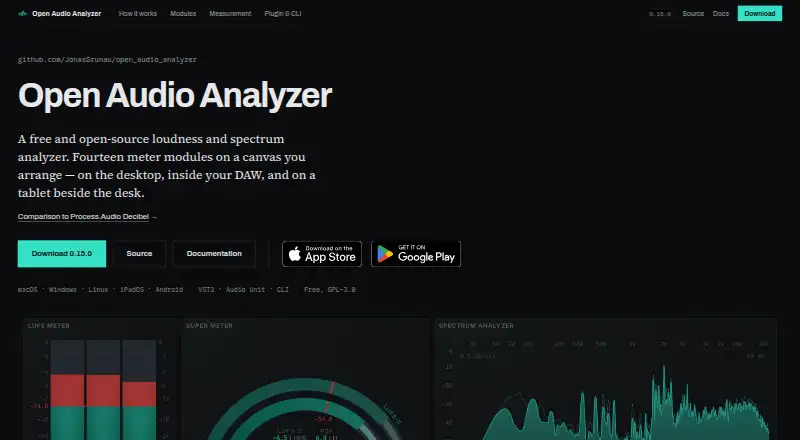
What Open Audio Analyzer is
Open Audio Analyzer is a free, open-source tool for measuring loudness and spectrum in live audio or files. It runs on Android, iOS, Linux, macOS, and Windows, with desktop measurements also viewable on a tablet over Wi-Fi. Fourteen arrangeable meter types cover loudness, true peak, VU, spectrum, spectrogram, oscilloscope, phase scope, histogram and more. Loudness readings follow EBU R 128 and ITU-R BS.1770-4, including momentary, short-term and integrated LUFS, loudness range, and oversampled true peak. Arrange meters across tabs and save layouts as presets, or use streaming and broadcast delivery targets and make custom ones. A command-line tool analyzes single files or album folders and produces readable reports or CSV. VST3 and Audio Unit plugins send measurements and DAW transport position to the app. The maker says audio is measured in memory and neither stored nor transmitted. The remote tablet display has no encryption or authentication, so the maker advises using it only on a trusted network.
Who it suits
It suits audio professionals or enthusiasts who need loudness and spectrum views for live sources or files, including command-line analysis. It may also suit DAW users and those who want to view measurements on a nearby tablet.
What it does well
- Free and open-source across five platforms
- Fourteen arrangeable meter module types
- Supports EBU R 128 and ITU-R BS.1770-4
- CLI reports or CSV for files and folders
- Custom delivery targets and saved layouts
What to know first
- Remote display lacks encryption and authentication
- AAX plugin is not signed for released Pro Tools
Limits
The remote display link has no encryption or authentication, so the maker advises publishing only on a trusted network. The AAX plugin is available in the plugin archive but is not signed for a released Pro Tools version.
Plans
| Plan | Billed and limits | Price |
|---|---|---|
| Free software | Available at no charge · No payment or paid plans stated · GPL-3.0-or-later app and engine; AGPL-3.0-or-later plugin | Free |
| Free | No paid tier · no trial · no account · all downloads include application, plugin and CLI | Free |
As open-audio-analyzer.com lists them, read 29 Sept 2026. The maker's own page has the final word.
Getting started
- Visit https://open-audio-analyzer.com/.
- Choose the app for Android, iOS, Linux, macOS or Windows.
- Arrange meter modules across tabs and save a layout preset if useful.
- For DAW measurements, use the VST3 or Audio Unit plugin.
- For file processing, use the command-line tool with an individual file or album folder.
Overview
Open Audio Analyzer is a free, open-source analyzer for live audio and audio files, best suited to audio professionals and producers who need standards-based loudness checks alongside a configurable set of visual meters. Its measurement and file-analysis breadth is unusually practical at no cost, but its unsecured tablet display calls for care on shared networks.
Published by Jonas Grunau in Kirchheim, Germany, the app computes measurements on the user’s device. The maker says audio is handled in memory and discarded, never recorded, stored, or transmitted; it also says the app has no accounts, analytics, telemetry, crash reporting, or advertising. Technical questions go to its public GitHub issue tracker.
For more options, browse Audio Analysis Software.
Key features
Fourteen arrangeable meter types let users build a workspace around the checks they actually need. Meters can be split across tabs, saved as layout presets, and adjusted with colour skins. That flexibility suits recurring workflows, though it will matter most to users who already know which measurements they want in view.
- Loudness standards: Measurements follow EBU R 128 and ITU-R BS.1770-4, with momentary, short-term, and integrated LUFS, loudness range, and oversampled true peak. This makes the app useful for standards-oriented loudness and peak checks.
- Visual meters: Alongside loudness and true peak, views include VU, spectrum, spectrogram, oscilloscope, phase scope, histogram, loudness distribution, and stereo cloud. The range supports different kinds of inspection without reducing the tool to a single spectrum display.
- Delivery targets: Streaming and broadcast targets are built in, and users can create their own. That helps users check against established delivery needs or a project-specific target.
- File analysis: The command-line tool analyzes single files or album folders and can produce readable reports or CSV output. That is a practical advantage for batch work and workflows that need results in a reusable format.
- DAW plugins: VST3 and Audio Unit plugins send measurements and DAW transport position to the app, connecting its displays to a DAW workflow. An AAX plugin is in the archive, but it is not signed for a released Pro Tools version, so Pro Tools users should not assume it is ready to use.
- Tablet display: A tablet on the same network can show the desktop app’s published measurements and canvas layout over Wi-Fi. The link has no encryption or authentication; follow the maker’s advice to publish only on a trusted network.
Pricing
Free software — free. The plan is available at no charge, with no payment or paid plans stated. It includes the GPL-3.0-or-later app and engine and the AGPL-3.0-or-later plugin. There is no free trial to evaluate before adoption; the software itself is free. The published plan terms do not state seat or usage quotas.
This is a strong fit for individuals and teams seeking loudness measurement, real-time analysis, offline file analysis, and plugin support without a subscription. The trade-off is not a cheaper tier with fewer features, but the need to accept the unsigned AAX plugin caveat and the remote display’s network-security limitation.
Platforms
Open Audio Analyzer supports Android, iOS, Linux, macOS, and Windows. Desktop DAW integration is available through VST3 and Audio Unit plugins; the tablet display extends the desktop canvas over Wi-Fi.
Who it's for
Choose it for standards-based loudness and true-peak checks, flexible meter layouts, delivery-target comparisons, or command-line analysis of audio files and album folders. It is especially useful when several views or repeatable reports belong in one workflow. Look elsewhere if you need a signed AAX plugin for a released Pro Tools version, or if your remote display must be encrypted and authenticated.
Pros and cons
- Pros: Broad measurement toolkit. Fourteen meter types and established loudness standards cover more than spectrum inspection alone.
- Pros: Useful file workflow. Album-folder analysis and CSV reports make the command-line tool relevant beyond live monitoring.
- Pros: No-cost licensing. The app and engine are GPL-3.0-or-later, with the plugin under AGPL-3.0-or-later.
- Cons: Remote display is unsecured. With no encryption or authentication, it should be limited to a trusted network.
- Cons: AAX readiness is limited. The archived plugin is not signed for a released Pro Tools version.
Alternatives
MediaInfo is another free option from an open-source digital media analysis company, with Android, iOS, Linux, macOS, self-hosted, web, and Windows platforms. Choose it if that broader platform mix better matches your setup.
Open Sound Meter has a free Community desktop version, with Linux, macOS, Windows, and iOS support; choose it if you want to consider a desktop tool whose maker describes it as open source and invites GitHub contributions.
MeldaProduction MAnalyzer is a free macOS and Windows option included in MFreeFXBundle; choose it if a free effect from that bundle fits your needs.
Room EQ Wizard offers a free tier for single-channel capture, room and audio measurement, real-time analysis, and EQ tools on Linux, macOS, and Windows. Choose it for that room-measurement and EQ focus; its Pro upgrade has a one-time price.
Voxengo SPAN is a free real-time FFT spectrum analyzer plugin for macOS and Windows; choose it when that narrower plugin role is what you need.
Youlean Loudness Meter has a free plan that never expires, with film, TV, and gaming presets and LU, INT, TP, LRA, PLR, and DR readouts for mono, stereo, and 5.1 channels. Choose it if those channel options and presets suit your loudness workflow; the plan has no command-line tool.
Stoplight Elements is an open-source API documentation tool for web and self-hosted use.
ACRCloud offers a 14-day trial with full API access and no credit card required.
Verdict
Open Audio Analyzer is a strong choice for audio engineers and producers who want free, standards-based loudness measurement, flexible meter views, and command-line file analysis in one tool. Its breadth and no-cost licensing are the main reasons to choose it; users who need a ready-to-use AAX plugin or a secure remote display should look elsewhere.
Verdict
Open Audio Analyzer combines standards-based loudness measurement with flexible meters, file analysis, and DAW plugin support at no charge. Note the unsigned AAX plugin and use the remote display only on a trusted network.
Questions
How much does Open Audio Analyzer cost?
The Free software plan costs nothing. No payment or paid plans are stated.
Is Open Audio Analyzer open source?
Yes. The app and engine are licensed GPL-3.0-or-later, and the plugin is AGPL-3.0-or-later.
Which platforms does it support?
It is available for Android, iOS, Linux, macOS and Windows.
Does it support DAW plugins?
VST3 and Audio Unit plugins send measurements and DAW transport position to the app. An AAX plugin is also in the plugin archive, but is not signed for a released Pro Tools version.
Who publishes Open Audio Analyzer?
The site identifies Jonas Grunau as its publisher and gives Kirchheim, Germany as the address.
Does it store or transmit audio?
The maker says audio is measured in memory, discarded, and never recorded, stored or transmitted by the app.
Facts from Open Audio Analyzer's own pages
- AlternativeTo activity
- AlternativeTo showed six GitHub stars, zero forks and three open issues when updated in September 2026, and had no user comments or reviews. · alternativeto.net, 15 Oct 2026
- AlternativeTo listing
- AlternativeTo lists the product as free, open source under GPL-3.0, and available for Mac, Windows, Linux, Android tablets and iPad. · alternativeto.net, 15 Oct 2026
- API and protocol
- The repository exposes a public C engine ABI and publishes a normative wire-protocol specification for display clients. · github.com, 15 Oct 2026
- Apple App Store compatibility
- The iPad listing requires iPadOS 15 or later and lists macOS 14.2 or later on Apple silicon as compatible. · apps.apple.com, 15 Oct 2026
- Apple privacy label
- Apple's listing shows Data Not Collected, based on the developer's stated privacy practices. · apps.apple.com, 15 Oct 2026
- Audio handling
- The maker says audio is measured in memory, discarded, never recorded or stored, and never transmitted by the app. · open-audio-analyzer.com, 29 Sept 2026
- Build requirements
- Building from source requires Flutter 3.44.5 stable and a native C toolchain such as Xcode tools, MSVC or gcc/clang. · open-audio-analyzer.com, 15 Oct 2026
- Canvas
- Users arrange fourteen resizable meter modules on a 24-column by 16-row grid across multiple tabs and save layouts as presets. · open-audio-analyzer.com, 15 Oct 2026
- Command-line tool
- The oaa CLI analyzes files, emits readable or CSV reports and can return a failing exit code when a delivery target is missed. · open-audio-analyzer.com, 15 Oct 2026
- Company headquarters
- The legal notice gives the provider address as Kirchheim, Germany. · open-audio-analyzer.com, 15 Oct 2026
- Company legal name
- The legal notice identifies Jonas Grunau as the provider and responsible person. · open-audio-analyzer.com, 15 Oct 2026
- Configuration
- Presets, skins, delivery targets and settings are stored as editable JSON in documented platform directories. · open-audio-analyzer.com, 15 Oct 2026
- Custom layouts
- Users can arrange meters across tabs and save layouts as presets, with delivery targets and colour skins. · open-audio-analyzer.com, 29 Sept 2026
- DAW hosts tested
- The maker lists Ableton Live, Logic Pro, Cubase, FL Studio and Studio One as tested hosts. · open-audio-analyzer.com, 15 Oct 2026
- DAW integrations
- Headless VST3, Audio Unit and AAX plugins stream DAW audio and transport data to the application. · github.com, 15 Oct 2026
- DAW plugins
- VST3 and Audio Unit plugins send measurements and DAW transport position to the app; an AAX plugin is available in the plugin archive but is not yet signed for a released Pro Tools version. · open-audio-analyzer.com, 29 Sept 2026
- Delivery checks
- The app includes streaming and broadcast delivery targets and allows users to create their own targets. · open-audio-analyzer.com, 29 Sept 2026
- Delivery validation
- Validator modules judge LUFS-I, true peak, loudness range and configured dynamics floors against delivery targets. · github.com, 15 Oct 2026
- Dynamics
- PSR and PLR compare true peak with loudness over three-second and whole-programme windows, with optional ODR-S and ODR-I labels. · open-audio-analyzer.com, 15 Oct 2026
- File analysis and CLI
- The command-line tool analyzes individual files or album folders and can produce readable reports or CSV output. · open-audio-analyzer.com, 29 Sept 2026
- File formats
- Offline analysis accepts WAV, AIFF, RF64, Wave64, FLAC and MP3 files. · open-audio-analyzer.com, 15 Oct 2026
- Headquarters
- Kirchheim, Germany · open-audio-analyzer.com, 23 Sept 2026
- Licence
- The application, engine, CLI and website use GPL-3.0-or-later; the JUCE-based plugin uses AGPL-3.0-or-later. · open-audio-analyzer.com, 15 Oct 2026
- Limit: LUFS modes
- Only Continuous mode is implemented; Elapsed and Timecode modes are specified but not available on modules. · open-audio-analyzer.com, 15 Oct 2026
Where Open Audio Analyzer stands on Freedom251
- Audio Analysis Software#2 of 43