Freedom251 › Minecraft Shader Packs
Forget-Me-Not Shaders
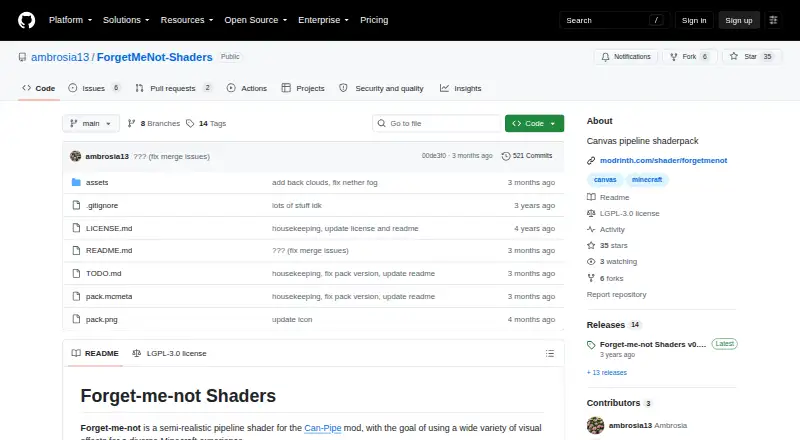
What Forget-Me-Not Shaders is
Forget-Me-Not Shaders is a semi-realistic shader pipeline for the Can-Pipe Minecraft mod, with effects for seasons, atmosphere, water, and materials. Its shaders-only dynamic seasons are joined by dramatic skies and clouds, plus water waves and reflections that can use resource-pack water textures. Camera emulations include internal HDR, tone mapping, bloom, and exposure. The feature list also includes hundreds of built-in default PBR materials, variable-penumbra shadows, temporal anti-aliasing, and ray-traced contact shadows. The shaderpack is free under the LGPL-3.0-only license and runs on Linux, macOS, and Windows. It requires Can-Pipe and will not work with Optifine, Aperture, Iris, or Sodium, whose rendering systems differ. Listed Minecraft Java Edition compatibility covers versions 1.20–1.20.2, 1.19.x, and 1.18.2. Installation calls for Fabric or NeoForge and Can-Pipe, followed by placing the shaderpack ZIP in Minecraft's resourcepacks folder and selecting the pipeline in video settings. GitHub and Modrinth are the maker's official release locations.
Who it suits
This shaderpack suits Minecraft Java players using Can-Pipe who want added atmospheric, water, and material effects. It is not for players relying on Optifine, Aperture, Iris, or Sodium.
What it does well
- Free under LGPL-3.0-only
- Dynamic seasons and atmospheric skies
- Water waves and reflections
- Includes PBR materials and variable-penumbra shadows
- Available for Linux, macOS, and Windows
What to know first
- Requires the Can-Pipe mod
- Incompatible with Optifine, Aperture, Iris, and Sodium
- Listed game support is limited to specified versions
Limits
The shaderpack requires Can-Pipe and does not work with Optifine, Aperture, Iris, or Sodium. Listed Minecraft Java Edition compatibility is 1.20–1.20.2, 1.19.x, and 1.18.2.
Plans
| Plan | Billed and limits | Price |
|---|---|---|
| Forget-me-not Shaders | LGPL-3.0-only · Requires Can-Pipe | Free |
As github.com lists them, read 3 Oct 2026. The maker's own page has the final word.
Getting started
- Install Fabric or NeoForge.
- Add Can-Pipe to Minecraft.
- Download the shaderpack from GitHub or Modrinth.
- Place the shaderpack ZIP in Minecraft’s resourcepacks folder.
- Select the pipeline in video settings.
Forget-Me-Not Shaders is a semi-realistic Minecraft shaderpack built around the Can-Pipe rendering pipeline. It suits Java Edition players who want pronounced environmental changes, cinematic camera treatment, and physically based materials rather than a minimal visual tweak. Its no-cost license is appealing, but choosing it also means accepting Can-Pipe instead of the more common shader mod ecosystems.
Overview
The pack aims for a broad visual range: changing seasons, atmospheric skies, reflective and animated water, detailed materials, and shadowing that responds to contact and light direction. That breadth makes it a strong fit for scenic worlds, screenshots, and players who want the environment to feel substantially different across the year. It is less suitable if your priority is compatibility with OptiFine, Iris, Aperture, or Sodium, because Can-Pipe uses a different rendering system and the pack does not work with those mods.
Installation requires Fabric or NeoForge, the Can-Pipe mod, and the shader ZIP placed in Minecraft's resourcepacks folder. You then select the pipeline in video settings. The project is LGPL-3.0-only, with official releases identified on GitHub and Modrinth; community discussion is available through its Discord.
Key features
Seasonal and atmospheric rendering
Dynamic seasons are implemented entirely in shaders, so the world can present changing seasonal conditions without a separate seasonal content system. Dramatic skies, realistic atmospheric treatment, and clouds provide the largest visual payoff for players who spend time outdoors or build vistas.
Camera emulation and temporal quality
Internal HDR, tone mapping, bloom, exposure, and other camera emulations give scenes a more photographed, cinematic response to light. Advanced temporal anti-aliasing helps stabilize the image over time. These controls favor presentation and mood, though players seeking a restrained, vanilla-like image may find the treatment more conspicuous than necessary.
Water, materials, and shadows
Water waves and reflections support resource-pack water textures, making oceans, rivers, and pools more visually active. Hundreds of built-in default PBR materials add surface definition without requiring every block to be supplied by a separate pack. Contact-hardening variable-penumbra shadows and ray-traced contact shadows are aimed at convincing edges and object grounding, while ray tracing and PBR support mark this out as a technically ambitious option.
Pricing
| Plan | Price | Includes |
|---|---|---|
| Forget-me-not Shaders | free | Shaderpack under LGPL-3.0-only; requires Can-Pipe |
There is one free plan and no free trial because the complete offering costs nothing. The meaningful limitation is technical rather than financial: Can-Pipe is mandatory, so the pack is not a drop-in choice for installations built around incompatible rendering mods.
Platforms
Forget-Me-Not Shaders supports Linux, macOS, and Windows. The Modrinth listing covers Minecraft Java Edition 1.20–1.20.2, 1.19.x, and 1.18.2. Use Fabric or NeoForge with Can-Pipe; OptiFine, Aperture, Iris, and Sodium are not supported by this shaderpack.
Who it's for
Choose it if you play one of the supported Java versions, can use the Can-Pipe setup, and want seasons, sky and cloud drama, reflective water, PBR surfaces, and advanced shadowing in one free pack. Builders, explorers, and screenshot-focused players get the most from its range of visual changes. Look elsewhere if your modpack depends on Iris or OptiFine, or if you want a shader that preserves a quieter vanilla presentation.
Pros and cons
- Pros: shader-only dynamic seasons add variation without a separate seasonal system.
- Pros: HDR, tone mapping, bloom, exposure, and TAA provide a broad cinematic toolkit.
- Pros: PBR materials, ray-traced contact shadows, and variable penumbrae improve surface depth and object grounding.
- Pros: waves and reflections work with resource-pack water textures.
- Cons: Can-Pipe is required, excluding OptiFine, Iris, Aperture, and Sodium setups.
- Cons: compatibility is limited to the Java versions covered by the Modrinth listing.
Alternatives
Minecraft Shader Packs is the broader starting point when you want to compare the category. BSL Shaders is a freemium Windows, macOS, and Linux alternative with a free plan. Complementary Shaders is another free cross-platform shader pack for Minecraft Java Edition.
I Like Vanilla is the better direction for a free, gameplay-oriented Java Edition shader. Bliss Shaders offers another free cross-platform shaderpack with ZIP distribution through GitHub or distribution pages. Bloop Shaders is a free Java Edition option designed for Iris or OptiFine. Candela Shaders is free but requires Iris on Fabric. Miniature Shader is a free MIT-licensed pack for Iris and OptiFine. Sildur's Vibrant Shaders is free and offers Lite through Extreme-Volumetric lighting variants.
Verdict
Forget-Me-Not Shaders is a compelling free choice for Java players who want seasons, cinematic camera effects, reflective water, PBR materials, and advanced contact shadows together. Choose it when Can-Pipe fits your installation and visual range matters most; choose an Iris- or OptiFine-compatible alternative when mod compatibility is the deciding factor.
Verdict
Forget-Me-Not Shaders offers a broad set of visual effects, including seasonal changes, water, camera emulations, and shadows. Its Can-Pipe requirement and listed Minecraft versions are important compatibility constraints.
Questions
How much does Forget-Me-Not Shaders cost?
It is free. The listed plan is free.
Which platforms does it support?
Linux, macOS, and Windows are listed.
Which Minecraft versions are listed?
Minecraft Java Edition 1.20–1.20.2, 1.19.x, and 1.18.2.
Does it work with Optifine, Iris, or Sodium?
No. It requires Can-Pipe and is incompatible with Optifine, Aperture, Iris, and Sodium.
What license does it use?
The project is licensed under LGPL-3.0-only.
Where can I download it?
The maker identifies GitHub and Modrinth as the official release locations.
Facts from Forget-Me-Not Shaders's own pages
- Anti-aliasing
- The feature list includes advanced temporal anti-aliasing (TAA). · github.com, 3 Oct 2026
- Atmosphere
- It features dramatic skies with realistic atmosphere and clouds. · github.com, 3 Oct 2026
- Camera effects
- It includes internal HDR, tone mapping, bloom, exposure, and other camera emulations. · github.com, 3 Oct 2026
- Compatibility
- The maker says Can-Pipe's rendering system differs from Optifine, Aperture, Iris, and Sodium, and the shaderpack will not work with those mods. · github.com, 3 Oct 2026
- Dynamic seasons
- The shaderpack features a shaders-only implementation of dynamic seasons. · github.com, 3 Oct 2026
- Installation
- The instructions say to install Fabric or NeoForge, add Can-Pipe, place the shaderpack ZIP in the Minecraft resourcepacks folder, and select the pipeline in video settings. · github.com, 3 Oct 2026
- License
- The project is licensed under LGPL-3.0-only. · modrinth.com, 3 Oct 2026
- Materials and shadows
- It includes hundreds of built-in default PBR materials and contact-hardening variable penumbra shadows. · github.com, 3 Oct 2026
- Official downloads
- The maker identifies GitHub and Modrinth as the only official release locations and recommends downloading from those pages. · github.com, 3 Oct 2026
- Purpose
- Forget-me-not is a semi-realistic pipeline shader for the Can-Pipe Minecraft mod, intended to provide varied visual effects. · github.com, 3 Oct 2026
- Support
- The project README links to a Discord invite for community discussion. · github.com, 3 Oct 2026
- Supported game editions and versions
- The Modrinth page lists Minecraft Java Edition compatibility for 1.20–1.20.2, 1.19.x, and 1.18.2. · modrinth.com, 3 Oct 2026
- Water
- It supports water waves and reflections, including resource pack water textures. · github.com, 3 Oct 2026
Where Forget-Me-Not Shaders stands on Freedom251
- Minecraft Shader Packs#6 of 38