Freedom251 › Font Management Software
Fontmatrix
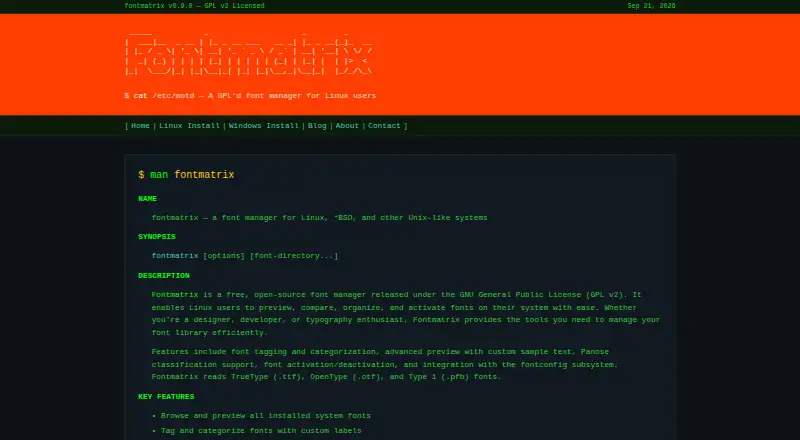
What Fontmatrix is
Fontmatrix is a free, open-source font manager for organizing, comparing, and activating system fonts. Users can arrange fonts with tags and custom categories, inspect metadata, and apply Panose classification. For previews, it supports custom sample text and side-by-side glyph comparisons across multiple fonts. Fonts can be activated or deactivated without installing or removing them, and samples can be exported as PDFs or images. Fontmatrix integrates with fontconfig and reads TrueType (.ttf), OpenType (.otf), and Type 1 (.pfb) fonts. Its manual describes use on Linux, *BSD, and other Unix-like systems, while listed platforms also include macOS and Windows. Installation options include package commands for Debian/Ubuntu, Fedora/RHEL, and Arch Linux, as well as building from source. The software is released under the GNU General Public License version 2. The listed plan is free, and there is no free trial.
Who it suits
Fontmatrix suits designers, developers, and typography enthusiasts who want tools for sorting, inspecting, and comparing font libraries. Its manual describes Linux, *BSD, and other Unix-like systems, with macOS and Windows also listed as platforms.
What it does well
- Organizes fonts with tags and custom categories
- Compares glyphs across fonts using custom sample text
- Activates fonts without installing or removing them
- Exports font samples to PDF or image
What to know first
- No free trial is listed
- Reads only .ttf, .otf, and .pfb formats
Plans
| Plan | Billed and limits | Price |
|---|---|---|
| Fontmatrix | Free, open-source font manager; GPL v2 | Free |
As fontmatrix.net lists them, read 4 Oct 2026. The maker's own page has the final word.
Getting started
- Visit https://fontmatrix.net/.
- Choose a package installation route for Debian/Ubuntu, Fedora/RHEL, or Arch Linux, or build from source.
- Use the font manager to organize and preview supported fonts.
Fontmatrix is a free, open-source font manager built around previewing, comparing, organizing, and selectively activating fonts. It suits Linux-focused designers, developers, and typography enthusiasts who want detailed inspection and cataloging without a paid tier. Its strongest case is controlled font housekeeping; readers who need a broader cloud or mobile ecosystem should consider other tools.
Overview
Fontmatrix treats a font collection as something to classify and curate rather than simply install. Custom tags and categories let you impose your own labels on a library, while metadata inspection and Panose classification add a more structured way to identify typefaces. That combination is useful when a collection has grown beyond what folder names can communicate.
The manager works with TrueType (.ttf), OpenType (.otf), and Type 1 (.pfb) fonts. It integrates with the fontconfig subsystem, an important fit for Unix-style desktop font handling. The project is released under the GNU General Public License version 2, so it is a suitable choice for users who specifically want open-source software rather than a proprietary cataloging utility.
Key features
Preview and comparison
Advanced previews accept custom sample text, allowing you to judge a typeface against the words and characters you actually plan to use. Side-by-side glyph comparison across multiple fonts makes close decisions more practical than opening each family separately, particularly for designers comparing similar faces or checking character coverage.
Organization and activation
Tagging and custom categorization provide a flexible filing system for personal collections. Fontmatrix can activate or deactivate fonts without installing or removing them, which keeps the system font set manageable while allowing temporary access to a project-specific selection. That is a meaningful advantage for users who switch between many families and want to avoid permanent clutter.
Inspection and export
Panose classification and font metadata inspection support more deliberate matching and auditing. Font samples can be exported to PDF or image, giving designers a way to share specimens or preserve comparisons outside the manager.
Pricing
| Plan | Price | What it includes |
|---|---|---|
| Fontmatrix | free | Free, open-source font manager; GPL v2 |
There is one free plan, with no trial period or paid upgrade to weigh against it. That makes Fontmatrix straightforward for individuals and organizations comfortable with its desktop-oriented workflow. The trade-off is not a pricing limit but scope: users seeking subscription libraries, commercial support tiers, or differentiated team plans will need another product.
Platforms
Fontmatrix is offered for Linux, macOS, and Windows. Its manual positions it as a manager for Linux, BSD, and other Unix-like systems, while the site lists package installation commands for Debian/Ubuntu, Fedora/RHEL, and Arch Linux, as well as building from source. Linux users therefore get the clearest installation path and the deepest stated Unix alignment; macOS and Windows users should confirm that the available build and their font workflow meet their needs.
Who it's for
Designers benefit from custom sample text, glyph comparison, specimen export, and selective activation when evaluating or rotating large collections. Developers who need to inspect metadata and keep system fonts organized can use the same controls without adopting a paid service. Typography enthusiasts get classification and labeling tools suited to maintaining a personal library.
It is less compelling for anyone whose priority is discovering and syncing a hosted font catalog, working primarily on phones and tablets, or relying on a polished commercial support model.
Pros and cons
- Pros: Free and GPL v2 licensed, so there is no subscription barrier and the code is open source.
- Pros: Custom tags, categories, metadata inspection, and Panose classification support serious library organization.
- Pros: Custom previews, side-by-side glyph comparison, and PDF or image export make type evaluation and sharing more concrete.
- Pros: Activation and deactivation avoid repeatedly installing and removing fonts.
- Cons: The clearest documentation and package guidance target Linux and Unix-like systems, so other platforms may require more checking.
- Cons: Support is limited to TTF, OTF, and PFB formats, which may not cover every font format in a mixed collection.
Alternatives
Browse Font Management Software for a wider set of choices. Pick Adobe Fonts instead if you want a freemium service spanning Android, iOS, Linux, macOS, web, and Windows, with a free library of about 5,500 fonts.
FontBase is another Linux, macOS, and Windows manager with free features and an optional Awesome Monthly plan at $3 a month for use on up to two personal computers. Choose FontCap if you want a free-forever product promising every feature and every font, or ZFontManager for a GPL-3.0 alternative with no paid tier, trial, or unlock.
Fontist suits users who need open-source font management across Windows, Linux, and macOS through desktop or API environments. Launchpad is a broader open-source project platform rather than a direct font-manager substitute. Choose MainType for Windows-only workflows that need a free tier capped at 2,500 fonts or a perpetual Standard Edition at 49.00 USD once. AMP Font Viewer is a free Windows option with guidance for Windows Vista and 7.
Verdict
Choose Fontmatrix if you want a no-cost, open-source desktop manager with unusually strong tools for tagging, glyph comparison, metadata inspection, and reversible activation. Its main reason to look elsewhere is platform and format fit: Linux and Unix-like users are the natural audience, while broader device coverage, hosted font discovery, or Windows-specific limits and support may favor an alternative.
Verdict
Fontmatrix provides font organization, inspection, and comparison tools at no cost. Check the listed formats and platform details to confirm they fit your setup.
Questions
How much does Fontmatrix cost?
The Fontmatrix plan is free.
Is Fontmatrix open source?
Yes. It is released under the GNU General Public License version 2.
Which platforms does it support?
Listed platforms are Linux, macOS, and Windows. Its manual also describes Linux, *BSD, and other Unix-like systems.
Which font formats can it read?
It reads TrueType (.ttf), OpenType (.otf), and Type 1 (.pfb) fonts.
Is there a free trial?
No. The free plan is available without a free trial.
Facts from Fontmatrix's own pages
- Activation
- Users can activate and deactivate fonts without installing or removing them. · fontmatrix.net, 4 Oct 2026
- Classification
- It supports Panose classification and font metadata inspection. · fontmatrix.net, 4 Oct 2026
- Design audience
- The site describes designers, developers, and typography enthusiasts as users the font library tools are intended for. · fontmatrix.net, 4 Oct 2026
- Export
- Font samples can be exported to PDF or image. · fontmatrix.net, 4 Oct 2026
- Font organization
- It supports font tagging and categorization with custom labels. · fontmatrix.net, 4 Oct 2026
- Install options
- The site lists package installation commands for Debian/Ubuntu, Fedora/RHEL, and Arch Linux, plus building from source. · fontmatrix.net, 4 Oct 2026
- Integration
- Fontmatrix integrates with the fontconfig subsystem. · fontmatrix.net, 4 Oct 2026
- License
- Fontmatrix is released under the GNU General Public License version 2. · fontmatrix.net, 4 Oct 2026
- Preview
- It offers advanced previews with custom sample text and side-by-side glyph comparison across multiple fonts. · fontmatrix.net, 4 Oct 2026
- Purpose
- Fontmatrix is a free, open-source font manager for Linux users to preview, compare, organize, and activate system fonts. · fontmatrix.net, 4 Oct 2026
- Supported formats
- It reads TrueType (.ttf), OpenType (.otf), and Type 1 (.pfb) fonts. · fontmatrix.net, 4 Oct 2026
- Unix support
- The manual describes Fontmatrix as a font manager for Linux, *BSD, and other Unix-like systems. · fontmatrix.net, 4 Oct 2026
Where Fontmatrix stands on Freedom251
- Font Management Software#7 of 27