Freedom251 › Font Management Software
Fontist
What Fontist is
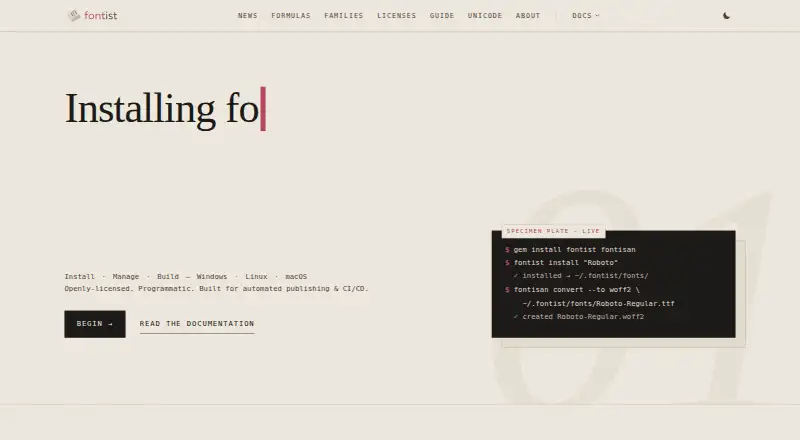
Fontist installs and manages fonts programmatically on Windows, Linux, and macOS. It provides a command-line interface and Ruby API for workflows such as automated publishing, PDF generation, CI/CD, design automation, containerized environments, and visual testing. Its searchable registry lists 2,534 font families and 4,286 formulas, with filters for license and source. YAML manifests can define font requirements for repeatable installations across environments. Fontist can be used with GitHub Actions, GitLab CI, Jenkins, and other runners, and optional fontconfig integration supports font discovery on Linux. It can detect and index fonts already installed on a system to avoid redundant downloads. Fonts can be installed in Fontist-managed storage, user font directories, or system-wide directories; the last requires administrator permissions. Formula entries include download instructions, checksums, and metadata, and Fontist describes automatic license handling during installation. License restrictions prevent installing macOS-specific fonts on other platforms. Supported formats include TTF, OTF, TTC, OTC, dfont, WOFF, WOFF2, PFB, and PFA. Fontist is open source, with a listed price of $0.
Who it suits
Fontist suits developers and teams that need repeatable font installation in publishing, build pipelines, design automation, or testing workflows. It also fits users managing fonts across Windows, Linux, and macOS systems.
What it does well
- Runs on Windows, Linux, and macOS.
- Offers CLI and Ruby API access.
- YAML manifests support repeatable installations.
- Registry has license and source filters.
- Supports multiple font formats.
What to know first
- System-wide installation requires administrator permissions.
- macOS-specific fonts cannot be installed on other platforms.
- Windows Features on Demand installation may require administrator privileges.
Limits
Fontist is free. Installing macOS-specific fonts on non-macOS platforms is prohibited by license restrictions, and system-wide installation requires administrator permissions.
Plans
| Plan | Billed and limits | Price |
|---|---|---|
| Fontist | Open-source font management software · install and manage fonts across Windows, Linux, and macOS | Free |
As fontist.org lists them, read 4 Oct 2026. The maker's own page has the final word.
Getting started
- Open the Fontist website.
- Choose Windows, Linux, or macOS as your environment.
- Use the command-line interface or Ruby API to manage fonts.
- Specify font requirements in a YAML manifest for repeatable installs.
- Choose Fontist-managed storage, a user font directory, or a system-wide directory; the last option requires administrator permissions.
Fontist is an open-source tool for installing and managing fonts through scripts and APIs across Windows, Linux, and macOS. It is best suited to teams building repeatable publishing, PDF, and CI workflows. Its automation options are a strong fit for infrastructure; license boundaries and installation permissions call for care.
Overview
Fontist treats fonts as part of a software environment rather than primarily as a desktop browsing task. A command-line interface and Ruby API let teams manage fonts programmatically, which is useful when builds or automated publishing need consistent font files. The project originated at Ribose in 2020, and the site credits Ribose Ltd.
That focus is also its clearest trade-off: Fontist is a more natural choice for scripts, pipelines, and containerized environments than for people seeking an interactive font-browsing workflow.
Key features
The searchable registry contains 2,534 font families and 4,286 formulas, with filters for license and source. Formula entries include download instructions, checksums, and metadata, and Fontist describes automatic license handling during installation. These tools help make font acquisition more orderly, but they do not eliminate licensing limits: macOS-specific fonts cannot be installed on other platforms.
YAML manifests let teams declare font requirements for repeatable installs across environments. That is valuable when CI jobs or PDF generation depend on consistent typography. Fontist documents a GitHub Action and use with GitHub Actions, GitLab CI, Jenkins, and other runners. Linux users can also enable optional fontconfig integration for font discovery.
Fontist detects and indexes fonts already installed on a system, helping avoid redundant downloads. Installations can go into Fontist-managed storage, user font directories, or system-wide directories. The system-wide option requires administrator permissions, so it may not suit locked-down machines or unattended jobs without suitable access. Installing Windows Features on Demand fonts through PowerShell may also require administrator privileges.
Supported formats include TTF, OTF, TTC, OTC, dfont, WOFF, WOFF2, PFB, and PFA. This range makes Fontist applicable to more than one font-file family, though its value still depends on a workflow that benefits from programmatic management.
Pricing
Fontist is free: its Fontist plan costs nothing and provides open-source font management software for installing and managing fonts across Windows, Linux, and macOS. It is a straightforward fit for teams that want automation without a paid plan. There are no paid tiers or plan-specific quotas stated here; the practical constraints are instead platform licensing and the permissions required for some installation choices.
Platforms
Fontist supports Windows, Linux, and macOS, with API access as a listed platform. Its cross-platform reach supports shared workflows, but it does not make every font portable: macOS-specific fonts are restricted to macOS. Linux users have the additional option of fontconfig integration.
Who it's for
Fontist is aimed at teams automating publishing, PDF generation, design automation, CI/CD pipelines, containerized environments, and visual testing. It is a strong choice when font requirements need to be declared and reproduced across machines. Someone who mainly wants a visual desktop manager may be better served by a tool oriented around that use.
Pros and cons
- Pros: YAML manifests and CI integrations support repeatable font installs across build environments.
- Pros: The registry's license and source filters, checksums, metadata, and automatic license handling aid more controlled font management.
- Pros: Free, open-source software supports Windows, Linux, and macOS and a broad set of font formats.
- Cons: macOS-specific fonts cannot be installed on other platforms, limiting portability for mixed-OS projects.
- Cons: System-wide installs and some Windows font installs may require administrator privileges, complicating restricted or unattended setups.
- Cons: Its CLI/API-centered approach is less suited to users looking for an interactive desktop-first font manager.
Alternatives
Font Management Software is the category directory for comparing font-management options. Choose Adobe Fonts instead if a freemium service with a basic library of about 5,500 fonts and support across mobile, web, and desktop platforms better fits your needs; its free access is tied to trial subscriptions and some free, team, enterprise, and education accounts.
FontBase is another freemium option with a free font-manager plan and a $3 a month plan billed monthly for use on up to two personal computers. Consider FontCap if its free-forever offer of every feature and every font is a better fit. ZFontManager is a free-forever GPL-3.0 option with no paid tier, trial, or unlock, while Fontmatrix is a free, open-source GPL v2 font manager.
Launchpad is a free option for open-source software projects. For Windows-only use, MainType offers a free tier capped at 2,500 fonts for non-commercial use, with core viewing, installing, and uninstalling; its Standard Edition is $49, paid once. AMP Font Viewer is another free Windows option, with version 3.86 and Windows Vista/7 guidance.
Verdict
Choose Fontist if you need free, scriptable font management that can keep publishing, PDF, or CI environments consistent. Its registry, manifests, and runner integrations are the main reasons to pick it. Look elsewhere if interactive desktop management matters more, or if your workflow cannot accommodate platform-specific font licensing and administrator permissions for some installs.
Verdict
Fontist provides programmable font management with registry, manifest, and CI integration options. Platform-specific license restrictions and permissions for system-wide installs may affect setup choices.
Questions
How much does Fontist cost?
The listed Fontist plan is free.
Is Fontist open source?
Yes. Fontist is described as open-source font management software.
Which platforms does it support?
Fontist supports Windows, Linux, and macOS, with API access.
Can Fontist be used in CI pipelines?
Yes. It can be used with GitHub Actions, GitLab CI, Jenkins, and other runners. YAML manifests support repeatable installations.
Which font formats are supported?
Supported formats are TTF, OTF, TTC, OTC, dfont, WOFF, WOFF2, PFB, and PFA.
Who makes Fontist?
The site credits Ribose Ltd. and says the project originated at Ribose in 2020.
Facts from Fontist's own pages
- CLI and API
- Fontist provides a command-line interface and a Ruby API for font management. · fontist.org, 4 Oct 2026
- Company
- The site credits Ribose Ltd. and says Fontist originated at Ribose in 2020. · fontist.org, 4 Oct 2026
- Font registry
- The searchable registry lists 2,534 font families and 4,286 formulas, with filters for license and source. · fontist.org, 4 Oct 2026
- Installation choices
- Fonts can be installed in Fontist-managed storage, user font directories, or system-wide directories; system-wide installation requires administrator permissions. · fontist.org, 4 Oct 2026
- Integrations
- The documentation identifies a GitHub Action and says Fontist can be used with GitHub Actions, GitLab CI, Jenkins, and other runners. · fontist.org, 4 Oct 2026
- Intended users
- The project describes use in automated publishing, PDF generation, CI/CD pipelines, design automation, containerized environments, and visual testing. · fontist.org, 4 Oct 2026
- License handling
- Formula entries contain font download instructions, checksums, and metadata, and the product describes automatic license handling during installation. · fontist.org, 4 Oct 2026
- License limits
- Fontist does not allow installing macOS-specific fonts on non-macOS platforms because of license restrictions. · fontist.org, 4 Oct 2026
- Linux integration
- Fontist offers optional fontconfig integration for font discovery in Linux environments. · fontist.org, 4 Oct 2026
- Purpose
- Fontist installs and manages fonts programmatically across Windows, Linux, and macOS. · fontist.org, 4 Oct 2026
- Reproducible installs
- YAML manifests can specify font requirements for repeatable installations across environments and CI/CD pipelines. · fontist.org, 4 Oct 2026
- Security and compliance
- The opened maker pages describe the software as open source but provide no specific security certification or compliance claim. · fontist.org, 4 Oct 2026
- System font detection
- Fontist detects and indexes fonts already installed on the system to avoid redundant downloads. · fontist.org, 4 Oct 2026
- Windows fonts
- Fontist can install Windows Features on Demand fonts through PowerShell, and the documented process may require administrator privileges. · fontist.org, 4 Oct 2026
Where Fontist stands on Freedom251
- Font Management Software#3 of 27