Freedom251 › Font Design Software

FontCreator
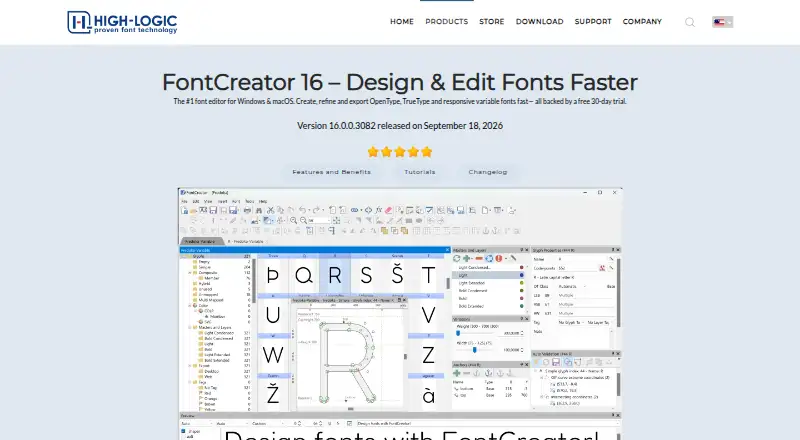
What FontCreator is
FontCreator is a desktop editor for creating, changing, and exporting OpenType, TrueType, variable, and color fonts. Its tools include quadratic and cubic curves, image import, an OpenType Layout Designer, and real-time validation. Existing fonts can be modified while retaining their OpenType layout feature data. For variable fonts, users define axes, masters, and outline layers; scalable color fonts can use COLR and SVG extensions. Supported formats include OpenType, TrueType, WOFF, and WOFF2, while .glyphs, UFO, and designspace support project exchange with other tools and colleagues. FontCreator runs on Windows 7, 8, 10, or 11 (64-bit) and macOS 11 or later on Intel or Apple Silicon. Essentials targets everyday creation and editing, while Professional is for advanced development and production. A fully functional 30-day trial includes all features, after which a license is required. Essentials costs 49.00 USD one-time; Professional costs 199.00 USD one-time.
Who it suits
FontCreator suits beginners and professional type designers. Essentials is aimed at everyday work, while Professional targets advanced development and production.
What it does well
- Creates variable and color fonts
- Preserves OpenType layout data
- Includes real-time font validation
- Supports WOFF and WOFF2
- Runs on Windows and macOS
What to know first
- No free plan
- Trial lasts 30 days
- License required after trial
- Single-user license covers two devices
Limits
The trial runs for 30 days; a license is required afterward. Essentials and Professional are perpetual licenses for Windows and macOS, with free minor updates within version 16.
Plans
| Plan | Billed and limits | Price |
|---|---|---|
| FontCreator 16 Professional | One-time payment · Perpetual license for Windows & macOS · Free minor updates within version 16 | $199, paid once |
| FontCreator 16 Essentials | One-time payment · Perpetual license for Windows & macOS · Free minor updates within version 16 | $49, paid once |
As high-logic.com lists them, read 29 Sept 2026. The maker's own page has the final word.
Getting started
- Open the FontCreator website
- Download the Windows or macOS version matching your system
- Install the application
- Use the fully functional 30-day trial
- Choose Essentials or Professional and activate a license afterward
Verdict
FontCreator covers detailed font production across desktop Windows and macOS, including variable and color workflows. The two paid editions and 30-day trial let users choose between everyday and advanced toolsets.
Questions
What does FontCreator cost?
FontCreator 16 Essentials costs 49.00 USD one-time. FontCreator 16 Professional costs 199.00 USD one-time.
Is there a free trial?
Yes. The fully functional trial includes all features for 30 days.
Which systems are supported?
It supports Windows 7, 8, 10, or 11 (64-bit), and macOS 11 or later on Apple Silicon or Intel.
Can it make webfonts?
Yes. FontCreator supports WOFF and WOFF2 formats and lists webfont export.
How many devices can one license use?
A single-user license can be activated on up to two devices.
Facts from FontCreator's own pages
- Color fonts
- FontCreator supports scalable color fonts with COLR and SVG color extensions. · high-logic.com, 29 Sept 2026
- Editing tools
- Features include quadratic and cubic curves, image import, an OpenType Layout Designer, and real-time font validation. · high-logic.com, 29 Sept 2026
- Edition choice
- The store describes Essentials for everyday font creation and editing and Professional for advanced development and production work. · high-logic.com, 29 Sept 2026
- Integrations and interchange
- The product page says it supports .glyphs, UFO, and designspace formats for exchanging font projects with colleagues and other software platforms. · high-logic.com, 29 Sept 2026
- Intended users
- The product page presents FontCreator as suitable for beginners and professional type designers. · high-logic.com, 29 Sept 2026
- License limit
- A single-user license can be activated on up to two devices and, for an organization, must be assigned to one named user. · high-logic.com, 29 Sept 2026
- OpenType preservation
- The product page says it can modify existing fonts while preserving their OpenType layout feature data. · high-logic.com, 29 Sept 2026
- Payment processing
- High-Logic says its online payments are processed by FastSpring and applicable VAT, GST, or sales tax is calculated at checkout. · high-logic.com, 29 Sept 2026
- Purpose
- FontCreator creates, edits, and exports OpenType, TrueType, variable, and color fonts. · high-logic.com, 29 Sept 2026
- Support
- The download page points users to a community forum, tutorials, a user manual, FAQ, and contact form for help. · high-logic.com, 29 Sept 2026
- Supported font formats
- The product page lists OpenType, TrueType, WOFF, and WOFF2 support. · high-logic.com, 29 Sept 2026
- Supported systems
- The download page lists Windows 7, 8, 10, or 11 (64-bit) and macOS 11 or later, with Apple Silicon and Intel support. · high-logic.com, 29 Sept 2026
- Trial
- The fully functional trial includes all features for 30 days; a license is required afterward. · high-logic.com, 29 Sept 2026
- Variable fonts
- Users can define axes, masters, and outline layers to create variable fonts. · high-logic.com, 29 Sept 2026
Where FontCreator stands on Freedom251
- Font Design Software#22 of 33