Freedom251 › Font Design Software
FontCreator
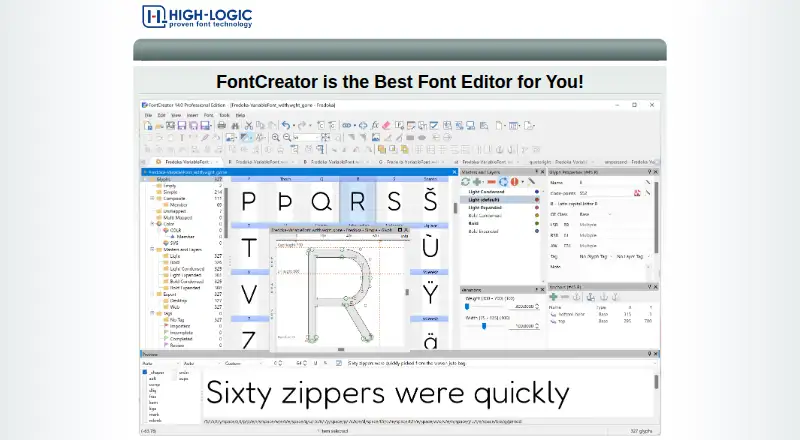
What FontCreator is
FontCreator creates, edits, and exports professional fonts for Windows and macOS. It supports OpenType, TrueType, WOFF, and WOFF2, including variable and color fonts, and can handle up to 65,535 glyphs. Designers can draw glyphs with quadratic or cubic contours and import raster images or vector artwork. The OpenType Layout Designer edits lookups while preserving existing OpenType features; an Adobe fea compiler is included. Live validation helps identify font or outline issues, and the Font Validation wizard is a Professional feature. Projects can be imported and exported in Glyphs, UFO, and Designspace formats, with Microsoft VOLT project support in Professional. Both editions support one-axis variable fonts; two or more axes require Professional. Essentials is positioned for everyday font work, while Professional targets advanced development and production. A free 30-day trial includes all features, but a license is required afterward. Essentials costs $49, paid once, and Professional costs $199, paid once, each as a one-time payment with a perpetual license.
Who it suits
FontCreator suits people creating or editing fonts on Windows or macOS, from everyday users to advanced production teams. Professional is the option for users who need multi-axis variable fonts or Microsoft VOLT project support.
What it does well
- Exports OpenType, TrueType, WOFF, and WOFF2.
- Supports color and variable fonts.
- Imports raster images and vector artwork.
- Includes live validation and OpenType layout tools.
What to know first
- No free plan; trial lasts 30 days.
- Two or more variable-font axes require Professional.
- 32-bit Windows builds are no longer supported.
- Professional costs $199, paid once.
Limits
The full-featured trial ends after 30 days, after which a license is required. Essentials supports one variable-font axis; two or more axes and Microsoft VOLT projects are Professional features.
Plans
| Plan | Billed and limits | Price |
|---|---|---|
| FontCreator 16 Professional | One-time payment · Perpetual license · Windows and macOS · Free minor updates within version 16 | $199, paid once |
| FontCreator 16 Essentials | One-time payment · Perpetual license · Windows and macOS · Free minor updates within version 16 | $49, paid once |
As fontcreator.com lists them, read 7 Oct 2026. The maker's own page has the final word.
Getting started
- Open https://www.fontcreator.com/
- Download the Windows or macOS version
- Install and launch the application
- Use the 30-day trial with all features
- Choose Essentials or Professional and activate a license
Verdict
FontCreator covers font creation, editing, validation, and multiple exchange formats across Windows and macOS. Check edition requirements and the trial period before choosing a license.
Questions
How much does FontCreator cost?
FontCreator 16 Essentials costs $49, paid once. FontCreator 16 Professional costs $199, paid once; both are one-time perpetual licenses.
Which operating systems are supported?
FontCreator runs on 64-bit Windows 7, 8, 10, or 11 and macOS 11 or later on Apple Silicon or Intel.
Is there a free trial?
Yes. The 30-day trial includes all features, then a license is required.
What is different about Professional?
Professional adds the Font Validation wizard, Microsoft VOLT project support, and variable fonts with two or more axes.
How many devices can one license use?
A single-user license may be activated on up to two devices and must be assigned to one named organizational user.
Who makes FontCreator?
High-Logic makes FontCreator; the company was founded in 1997 and is based in Bilthoven, The Netherlands.
Facts from FontCreator's own pages
- Font formats
- It supports OpenType, TrueType, WOFF, and WOFF2 fonts, including variable and color fonts. · high-logic.com, 7 Oct 2026
- Founded
- 1997 · fontcreator.com, 28 Sept 2026
- Glyph design
- It supports both quadratic and cubic glyph contours and can import raster images and vector artwork. · high-logic.com, 7 Oct 2026
- Headquarters
- Bilthoven, The Netherlands · fontcreator.com, 28 Sept 2026
- Integrations and interchange
- Font projects can be imported and exported in Glyphs, UFO, and Designspace formats; Professional also supports Microsoft VOLT projects. · high-logic.com, 7 Oct 2026
- Intended users
- The maker describes Essentials as suited to everyday font creation and editing and Professional as suited to advanced development and production work. · high-logic.com, 7 Oct 2026
- License limit
- A single-user license may be activated on up to two devices and, for an organization, must be assigned to one named user. · high-logic.com, 7 Oct 2026
- Notable platform limit
- The download page says 32-bit Windows builds are no longer supported. · high-logic.com, 7 Oct 2026
- OpenType editing
- Its OpenType Layout Designer can edit lookups and preserve existing OpenType features, and the product page says an Adobe fea compiler is included. · high-logic.com, 7 Oct 2026
- Purpose
- FontCreator creates, edits, and exports professional fonts. · high-logic.com, 7 Oct 2026
- Security and privacy
- The privacy policy says online orders are encrypted and processed by its payment processor, so High-Logic does not receive customers’ credit-card information. · high-logic.com, 7 Oct 2026
- Support
- High-Logic directs users to its support page and customer support, and recommends its forum for technical issues, where it says questions are usually answered within a couple of hours. · high-logic.com, 7 Oct 2026
- Supported systems
- FontCreator runs on 64-bit Windows 7, 8, 10, or 11 and macOS 11 or later on Apple Silicon or Intel. · high-logic.com, 7 Oct 2026
- Trial
- The free 30-day trial includes all features, and a license is required to continue using the product after the trial. · high-logic.com, 7 Oct 2026
- Validation
- Live validation and a Font Validation wizard help identify font or outline issues, with the wizard listed as a Professional feature. · high-logic.com, 7 Oct 2026
- Variable fonts
- Both editions support variable fonts with one axis, while two or more axes are a Professional feature. · high-logic.com, 7 Oct 2026
Where FontCreator stands on Freedom251
- Font Design Software#23 of 33