Freedom251 › Distraction Blocking Software

FocusLock
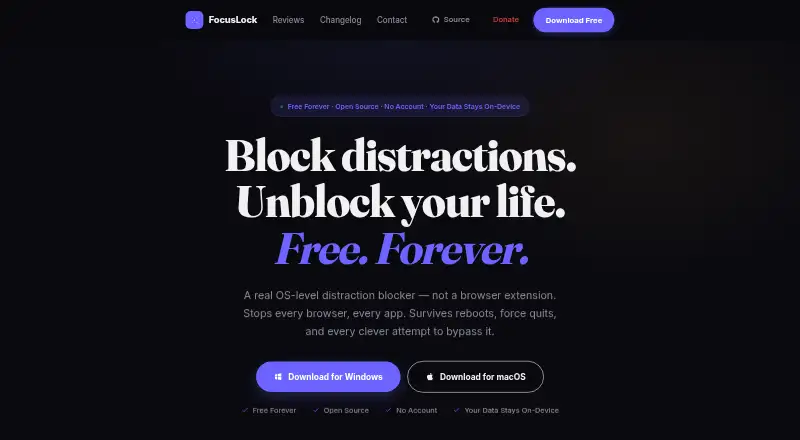
What FocusLock is
FocusLock is a free distraction blocker for macOS and Windows that blocks websites and apps across a computer. Website restrictions use the operating system’s hosts file, so they apply across browsers without a browser extension or separate per-browser setup. Apps can also be blocked by process name, with a process-check loop that runs every two seconds.
Focus sessions can use Hardcore Mode, which cannot be ended early, or Friend Lock, where a trusted person can unlock a session using a token. Scheduling includes a configurable Pomodoro timer and recurring sessions written in cron syntax. Optional per-app usage tracking is off by default; samples are stored in a local SQLite database and removed when tracking is disabled. Profiles, session history, block lists, statistics, and settings are stored locally. FocusLock’s privacy policy says the app has no crash reporting or day-to-day activity tracking. Update checks contact the update server and GitHub API with the operating system, CPU architecture, and app version; the policy says the IP address is not logged or stored. FocusLock is public source software under GPL-3.0. Its terms describe it as a voluntary productivity tool, not a parental control system or the sole way to restrict content.
Who it suits
FocusLock suits people using macOS or Windows who want scheduled website and app blocking across their computer. Its locked-session options, recurring schedules, and local storage may appeal to people who want structured focus sessions and locally kept settings and history.
What it does well
- Blocks websites across browsers through the OS hosts file.
- Can block apps by process name.
- Offers Hardcore Mode and Friend Lock sessions.
- Includes a configurable Pomodoro timer and recurring schedules.
- Public source code is released under GPL-3.0.
What to know first
- Available for macOS and Windows only.
- There are no mobile apps.
- It is not intended as a parental control system or sole content restriction.
Limits
The Free plan costs nothing and includes all features, with no account required. The app is limited to macOS and Windows, and its terms say it is not a parental control system or a sole means of restricting content.
Plans
| Plan | Billed and limits | Price |
|---|---|---|
| Free | All features · No account · GPL-3.0 open source | Free |
As tryfocuslock.com lists them, read 7 Oct 2026. The maker's own page has the final word.
Getting started
- Visit the FocusLock website.
- Choose the macOS or Windows version.
- Set websites to block; restrictions use the OS hosts file across browsers.
- Add apps to block by process name if needed.
- Configure a Pomodoro timer or recurring schedule, and choose a session mode.
Verdict
Pick FocusLock if you want a free, open-source blocker for websites and apps on macOS or Windows, with scheduling and session-lock options. Its blocks work across browsers without extensions, and its settings and history remain local. Look elsewhere if you need mobile support or a parental control system.
Questions
Is FocusLock free?
Yes. The Free plan costs nothing and includes all features. No account is required.
Which platforms does FocusLock support?
FocusLock is available for macOS and Windows. There are no mobile apps.
Does FocusLock need a browser extension?
No. It blocks websites through the OS hosts file, applying restrictions across browsers without an extension or per-browser setup.
Is FocusLock open source?
Yes. Its source code is public and it is released under the GPL-3.0 license.
Does FocusLock include scheduled blocking?
Yes. It supports recurring sessions using cron syntax and a configurable Pomodoro timer. Focus sessions can use Hardcore Mode or Friend Lock.
Who makes FocusLock?
The maker invites users to report issues or contribute through GitHub. Optional donations are available through Ko-fi.
Facts from FocusLock's own pages
- App blocking
- It can block apps by process name, and its process-check loop runs every two seconds. · tryfocuslock.com, 7 Oct 2026
- Focus sessions
- Sessions can use Hardcore Mode, which the site says cannot be ended early, or Friend Lock, which lets a trusted person unlock a session with a token. · tryfocuslock.com, 7 Oct 2026
- Intended use limit
- The terms describe FocusLock as a voluntary productivity tool and say it is not a parental control system or a sole means of restricting content. · tryfocuslock.com, 7 Oct 2026
- Privacy
- Focus profiles, session history, block lists, statistics, and settings are stored locally, and the privacy policy says FocusLock has no crash reporting or day-to-day activity tracking. · tryfocuslock.com, 7 Oct 2026
- Purpose
- FocusLock is an OS-level distraction blocker that blocks websites and apps across the computer. · tryfocuslock.com, 7 Oct 2026
- Scheduling and timers
- Features include a configurable Pomodoro timer and recurring sessions set with cron syntax. · tryfocuslock.com, 7 Oct 2026
- Source and license
- The source code is public and FocusLock is released under the GPL-3.0 license. · tryfocuslock.com, 7 Oct 2026
- Support
- The maker invites users to report issues or contribute through GitHub and offers optional donations through Ko-fi. · tryfocuslock.com, 7 Oct 2026
- Updates
- Update checks contact the update server and GitHub API with the operating system, CPU architecture, and app version; the policy says the IP address is not logged or stored. · tryfocuslock.com, 7 Oct 2026
- Usage analytics
- Optional per-app usage tracking is off by default, stores samples in a local SQLite database, and deletes stored samples when disabled. · tryfocuslock.com, 7 Oct 2026
- Website blocking
- It blocks sites through the OS hosts file, so the blocks apply across browsers without an extension or per-browser setup. · tryfocuslock.com, 7 Oct 2026
Where FocusLock stands on Freedom251
- Distraction Blocking Software#17 of 29