Freedom251 › Distraction Blocking Software
Fokasu
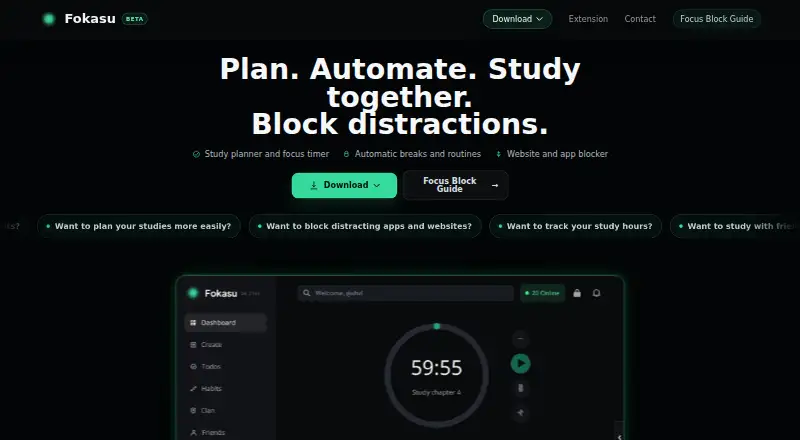
What Fokasu is
Fokasu is a free desktop study planner that combines task scheduling, a focus timer, progress tracking, and tools to block distracting websites and desktop applications. You can create or schedule Focus Blocks that keep selected sites and apps blocked until you meet a focus goal. For a todo with automatic breaks enabled, the blocked targets become available during breaks and are blocked again afterward. Recurring study tasks and routines help organize regular study time, while weekly and monthly tracking shows focused time and completed tasks.
Study clans let members chat, take on quests, compare rankings, and climb a shared leaderboard. A community gives users a place to share study progress and encouragement. Fokasu is labeled BETA and is free to use. Current desktop downloads are for Windows and Fedora; Ubuntu support is marked as coming soon. Website blocking needs both the desktop app and browser extension. The extension checks tab URLs locally against configured block and exception patterns. Fokasu says browsing history, page contents, cookies, credentials, and form data are not sent to its remote services. The browser guide lists Chrome, Brave, other Chromium browsers, and Firefox as supported during Focus Blocks; other browsers are closed while a block is active.
Who it suits
Fokasu suits students who want to schedule study tasks, track focused time, and block selected sites or desktop apps during focus sessions. Its recurring routines, automatic breaks, and study clans also suit people who want structure and shared study activity.
What it does well
- Free plan for the desktop app.
- Blocks selected websites and desktop applications.
- Supports recurring study tasks and routines.
- Tracks focus time and completed tasks by week or month.
- Study clans include chat, quests, rankings, and a leaderboard.
What to know first
- Current desktop downloads are for Windows and Fedora; Ubuntu is coming soon.
- Website blocking requires the browser extension alongside the desktop app.
- Mobile apps are not available.
- Other browsers are closed during an active Focus Block.
Limits
The free desktop app is available for Windows and Fedora, with Ubuntu support marked as coming soon. Website blocking requires the browser extension; other browsers are closed during an active Focus Block.
Plans
| Plan | Billed and limits | Price |
|---|---|---|
| Fokasu desktop app | Windows and Fedora downloads; Ubuntu coming soon · Website blocking requires the browser extension | Free |
As fokasu.app lists them, read 7 Oct 2026. The maker's own page has the final word.
Getting started
- Visit the Fokasu website.
- Download the Windows MSI or Fedora RPM desktop app.
- Install the desktop app.
- Install and enable the browser extension to use website blocking.
- Create or schedule a Focus Block, or set up recurring study tasks and routines.
Verdict
Choose Fokasu if you want a free study planner that combines scheduled blocking with routines, progress tracking, and group study features. It requires the desktop app and browser extension together for website blocking, and its current desktop downloads are limited to Windows and Fedora.
Questions
Is Fokasu free?
Yes. The Fokasu desktop app is listed as free, and the site lists a free plan.
Which desktop platforms are available?
Current downloads are for Windows and Fedora. Ubuntu support is marked as coming soon.
Does website blocking need an extension?
Yes. Website blocking requires the Fokasu browser extension alongside the desktop app.
Which browsers are supported during a Focus Block?
The guide lists Chrome, Brave, other Chromium browsers, and Firefox. Other browsers are closed during an active block.
Does Fokasu offer mobile apps?
No mobile apps are listed.
Facts from Fokasu's own pages
- Automatic breaks
- When automatic breaks are enabled for a todo, blocked websites and applications become available during breaks and are blocked again afterward. · fokasu.app, 7 Oct 2026
- Beta status
- The Fokasu site labels the product BETA and lists Windows MSI and Fedora RPM downloads at version 1.0.2. · fokasu.app, 7 Oct 2026
- Browser extension requirement
- Website blocking requires the Fokasu browser extension alongside the desktop app; if it is missing or disabled during a Focus Block, Fokasu closes the browser after a grace period that is 60 seconds by default. · fokasu.app, 7 Oct 2026
- Browser support
- The Focus Block guide says Chrome, Brave, other Chromium browsers, and Firefox are supported, while other browsers are closed during an active block. · fokasu.app, 7 Oct 2026
- Community
- Fokasu has a community where users can share study progress and encouragement. · fokasu.app, 7 Oct 2026
- Data use
- Fokasu says it does not sell browser-protection data, use it for personalized advertising, or share it with advertising platforms, data brokers, or unrelated third parties. · fokasu.app, 7 Oct 2026
- Focus blocks
- Users can create or schedule Focus Blocks that block selected websites and desktop applications until their focus goal is met. · fokasu.app, 7 Oct 2026
- Platform availability
- The current desktop downloads are for Windows and Fedora, with Ubuntu support marked as coming soon. · fokasu.app, 7 Oct 2026
- Privacy
- The extension checks tab URLs locally against configured block and exception patterns and does not send browsing history, page contents, cookies, credentials, or form data to Fokasu's remote services. · fokasu.app, 7 Oct 2026
- Progress tracking
- Fokasu tracks focused time and completed tasks by week or month. · fokasu.app, 7 Oct 2026
- Purpose
- Fokasu is a desktop study planner, focus timer, and distraction blocker for planning tasks, tracking focused time, scheduling routines, and joining study clans. · fokasu.app, 7 Oct 2026
- Study groups
- Study clans let members chat, complete quests, compare rankings, and climb a clan leaderboard together. · fokasu.app, 7 Oct 2026
- Study routines
- Fokasu supports recurring study tasks and routines. · fokasu.app, 7 Oct 2026
Where Fokasu stands on Freedom251
- Distraction Blocking Software#13 of 29