Freedom251 › Distraction Blocking Software
FocalFilter
What FocalFilter is
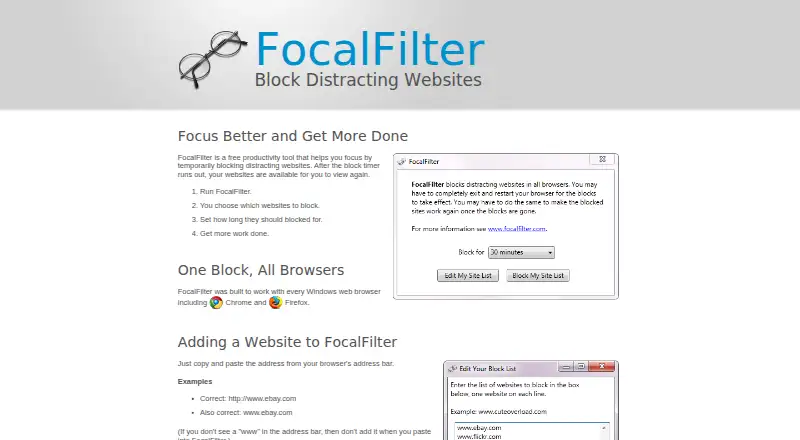
FocalFilter is a free Windows tool for temporarily blocking websites that compete for attention. Choose which sites to block, then set the duration; the tool is designed to work with Windows browsers including Chrome and Firefox. To add a site, copy its address from the browser and paste it into FocalFilter. The blocked-site list is saved for the next time the program runs. Blocks may require a full browser exit and restart before they begin or end. If FocalFilter remains installed, rebooting the computer can remove a block early. Do not uninstall it while sites are blocked: the blocks will remain, and FocalFilter will no longer be able to clear them when the timer expires. Security or antivirus software may stop the program because it changes system settings. On Windows XP, users need administrator privileges or must run FocalFilter as an administrator. The site points users to desktop, laptop, and tablet help guides and offers a contact email link.
Who it suits
FocalFilter suits Windows users who want timer-based blocking for selected websites. It is designed for browser use on Windows, including Chrome and Firefox.
What it does well
- Free plan blocks chosen websites by timer
- Works with Windows browsers including Chrome and Firefox
- Saves the blocked-site list for future runs
What to know first
- Uninstalling during a block leaves sites blocked
- Security software may stop it from running
- Windows XP requires administrator access
Limits
The Free plan costs nothing and temporarily blocks chosen websites on a timer. Uninstalling while a block is active leaves the sites blocked and prevents FocalFilter from clearing them when the timer ends.
Plans
| Plan | Billed and limits | Price |
|---|---|---|
| Free | Temporarily blocks chosen websites · timer-based | Free |
As focalfilter.com lists them, read 9 Oct 2026. The maker's own page has the final word.
Getting started
- Open the FocalFilter website.
- Use the Windows version of FocalFilter.
- Copy website addresses from the browser address bar and add them to the block list.
- Choose how long the websites should be blocked.
- Fully exit and restart the browser if the block does not start or end.
Verdict
FocalFilter offers a simple way to put a timed barrier between you and selected websites. Keep it installed until active blocks end, and be prepared to restart the browser if blocks do not change as expected.
Questions
How much does FocalFilter cost?
Its Free plan costs nothing.
Which platforms does FocalFilter support?
It is listed for Windows. No mobile apps are listed.
Which browsers does it work with?
It is designed for every Windows web browser, including Chrome and Firefox.
How do I add websites to block?
Copy each website address from the browser address bar and paste it into FocalFilter.
Can I end a block early?
If FocalFilter remains installed, rebooting the computer can remove blocks early.
Who makes FocalFilter?
The site says it is brought to users by Deanna Gelbart and Shan Naziripour.
Facts from FocalFilter's own pages
- Browser coverage
- It is designed to work with every Windows web browser, including Chrome and Firefox. · focalfilter.com, 9 Oct 2026
- Browser restart
- Users may need to fully exit and restart their browser for blocks to start or end. · focalfilter.com, 9 Oct 2026
- Early removal
- If FocalFilter remains installed, users can remove blocks early by rebooting the computer. · focalfilter.com, 9 Oct 2026
- How it works
- Users choose websites to block and set how long to block them. · focalfilter.com, 9 Oct 2026
- Makers
- The site says FocalFilter is brought to users by Deanna Gelbart and Shan Naziripour. · focalfilter.com, 9 Oct 2026
- Notable limit
- Uninstalling while sites are blocked will not remove those blocks and prevents FocalFilter from clearing them when the timer ends. · focalfilter.com, 9 Oct 2026
- Purpose
- FocalFilter is a free productivity tool that temporarily blocks distracting websites until a timer runs out. · focalfilter.com, 9 Oct 2026
- Saved list
- The list of blocked sites is saved for the next time FocalFilter runs. · focalfilter.com, 9 Oct 2026
- Support
- The site directs users having trouble to its desktop, laptop, and tablet guides and provides a contact email link on the main page. · focalfilter.com, 9 Oct 2026
- System changes
- Some security or antivirus software may stop FocalFilter because it modifies system settings. · focalfilter.com, 9 Oct 2026
- Website entry
- Users add sites by copying and pasting their address from the browser address bar. · focalfilter.com, 9 Oct 2026
- Windows XP requirement
- On Windows XP, users must be an administrator or run FocalFilter as an administrator. · focalfilter.com, 9 Oct 2026
Where FocalFilter stands on Freedom251
- Distraction Blocking Software#11 of 29