Freedom251 › Startup Manager Software
FireDaemon Fusion
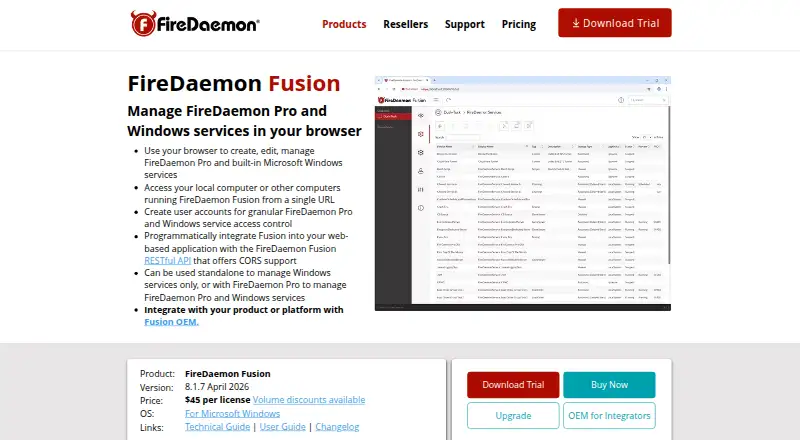
What FireDaemon Fusion is
FireDaemon Fusion is a standalone web application for creating, editing and managing FireDaemon Pro and built-in Windows services through a browser. It can connect to multiple computers running Fusion for centralized service management, and its RESTful API supports programmatic control. Administrators can create accounts and grant permissions to view, edit, start or stop specific services. Fusion runs as a native Windows service with a dedicated web server and on-disk access logs that can be rolled on a recurring basis. Fusion 8 uses OpenSSL 3 and TLS 1.3 by default, and offers passwordless multifactor authentication through Hanko Passkeys. SSL/TLS starts with a self-signed certificate; administrators can install their own. The 64-bit product is for Microsoft Windows on Intel or AMD and is designed to work with FireDaemon Pro 6 only. A standard license costs $45, paid once, with one required for each physical laptop, workstation, server or virtual machine. A 30-day trial is available; there is no free plan.
Who it suits
Fusion suits administrators managing Windows and FireDaemon Pro services across one or more computers. Its OEM option is intended for developers and integrators distributing the product with installers or system images.
What it does well
- Manage services across multiple Fusion computers.
- RESTful API supports programmatic management.
- Service-specific permissions control available actions.
- TLS 1.3 is the default in Fusion 8.
What to know first
- Designed to work with FireDaemon Pro 6 only.
- A license is required per physical machine or VM.
- Runs on 64-bit Windows for Intel or AMD.
- No free plan.
Limits
The 30-day trial is limited to 30 days. A standard license costs $45, paid once and is required for each physical laptop, workstation, server or virtual machine; the product is designed to work with FireDaemon Pro 6 only.
Plans
| Plan | Billed and limits | Price |
|---|---|---|
| FireDaemon Fusion 8 OEM | One year annual maintenance included. · For developers and integrators · royalty-free redistribution · no license keys required | $1,500, paid once |
| FireDaemon Fusion 8 | Per license; perpetual. Volume discounts available. · One license per laptop, workstation, server, or VM · optional 12-month Software Assurance and Priority Technical Support subscription | $45, paid once |
As firedaemon.com lists them, read 7 Oct 2026. The maker's own page has the final word.
Getting started
- Visit https://www.firedaemon.com/firedaemon-fusion.
- Download the 30-day trial of version 8.1.7.
- Install Fusion on a 64-bit Windows system with an Intel or AMD processor.
- Use it with FireDaemon Pro 6 or built-in Windows services.
- Purchase a standard license for each physical laptop, workstation, server or VM, or select the OEM license for redistribution.
Verdict
Fusion combines browser-based administration, service-level permissions and an API for Windows service management. Check the FireDaemon Pro 6 requirement and per-machine license model before choosing it.
Questions
How much does FireDaemon Fusion cost?
FireDaemon Fusion 8 costs $45, paid once for a perpetual standard license. FireDaemon Fusion 8 OEM costs $1,500, paid once, with one year of annual maintenance included.
Is there a free plan or trial?
There is no free plan. The download page lists version 8.1.7 as a 30-day trial.
Which platforms does it support?
Fusion is a 64-bit product for Microsoft Windows on Intel or AMD. It is listed for API, self-hosted, web and Windows.
How does licensing work?
One standard license is required per physical laptop, workstation, server or virtual machine. Volume discounts are available, and a 12-month Software Assurance and Priority Technical Support subscription is optional.
What is the OEM license for?
The OEM plan is for developers and integrators. It permits royalty-free redistribution and does not require license keys.
What security features are included?
Fusion 8 uses OpenSSL 3 with TLS 1.3 as its default protocol and offers passwordless multifactor authentication through Hanko Passkeys. SSL/TLS starts with a self-signed certificate, and administrators can install their own.
Facts from FireDaemon Fusion's own pages
- Access control
- Administrators can create user accounts and grant access to specific services with permissions to view, edit, start, or stop them. · firedaemon.com, 7 Oct 2026
- API
- Fusion provides a RESTful API for programmatically managing FireDaemon Pro and Windows services. · firedaemon.com, 7 Oct 2026
- Certificates
- SSL/TLS is enabled by default with a self-signed certificate, and administrators can install their own server certificate. · kb.firedaemon.com, 7 Oct 2026
- Headquarters
- Spring Hill, Queensland, Australia · firedaemon.com, 28 Sept 2026
- Integrations
- The maker describes reverse-proxy integration with CORS and names Nginx, Varnish, and Caddy as examples. · firedaemon.com, 7 Oct 2026
- License limit
- One standard license is required per physical laptop, workstation, server, or virtual machine. · firedaemon.com, 7 Oct 2026
- OEM deployment
- Fusion OEM is intended for vendors and integrators to bundle in third-party installers or golden OS images, or provision with tools such as Puppet, Ansible, and PDQ Deploy. · firedaemon.com, 7 Oct 2026
- Platform and limit
- Fusion 8 is a 64-bit product for Microsoft Windows on Intel or AMD, and is designed to work with FireDaemon Pro 6 only. · kb.firedaemon.com, 7 Oct 2026
- Purpose
- Fusion is a standalone web application for creating, editing, and managing FireDaemon Pro and built-in Windows services through a browser. · firedaemon.com, 7 Oct 2026
- Remote management
- It can connect to multiple computers running Fusion to centrally manage their Windows and FireDaemon Pro services. · firedaemon.com, 7 Oct 2026
- Security
- Fusion 8 uses OpenSSL 3 with TLS 1.3 as its default protocol and offers passwordless multifactor authentication through Hanko Passkeys. · kb.firedaemon.com, 7 Oct 2026
- Support
- The optional 12-month Software Assurance and Priority Technical Support subscription includes major upgrades and priority support, described as same or next business day depending on time zone. · firedaemon.com, 7 Oct 2026
- Trial
- The download page lists version 8.1.7 as a 30-day trial. · kb.firedaemon.com, 7 Oct 2026
- Web server and logs
- Fusion runs as a native Windows service with a dedicated web server, and logs web access to on-disk files that can be rolled on a recurring basis. · firedaemon.com, 7 Oct 2026
Where FireDaemon Fusion stands on Freedom251
- Startup Manager Software#18 of 30