Freedom251 › Startup Manager Software
Win Startup Manager
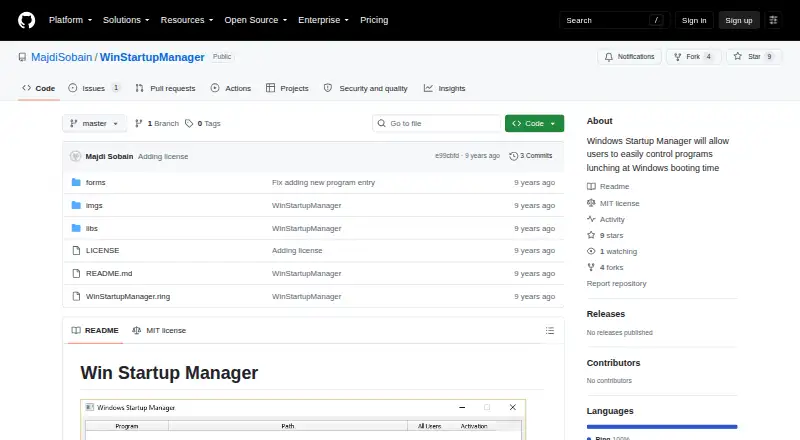
What Win Startup Manager is
Win Startup Manager is a free Windows application for managing programs that launch when the computer boots. It works with startup entries stored in the Windows Registry. Users can show entries, activate or deactivate them, edit or delete them, and add new ones. The interface displays the Registry path for each entry and offers sorting options. Users can also export a backup of startup entries and import a backup they previously created.
For shortcut entries, the application provides a button that opens the Windows Startup folders in Explorer. Users can change shortcuts there, but shortcut editing is not integrated into Win Startup Manager. The application was developed in the Ring programming language, using RingQt and the Ring_WinCReg and Ring_WINAPI extensions. Its public GitHub repository includes an MIT License, which permits use, copying, modification, distribution, sublicensing, and sale subject to the license terms. The license provides the software without warranty. The maker is identified as Majdi Sobain, whose GitHub profile lists Yemen as the location.
Who it suits
Win Startup Manager suits Windows users who want to inspect and manage startup entries stored in the Registry, including adding, editing, sorting, and backing them up. It can also help users locate shortcut entries in the Windows Startup folders, though they must change those shortcuts in Explorer.
What it does well
- Free to use and open source under an MIT License.
- Can add, edit, delete, activate, or deactivate Registry startup entries.
- Shows the Registry path associated with each entry.
- Supports exporting and importing startup-entry backups.
- Includes sorting options for program entries.
What to know first
- Shortcut editing takes place in Windows Explorer, not in the app.
- The repository lists no releases or packages.
- The MIT License provides the software without warranty.
Limits
The free plan covers Windows startup entries stored in the Registry. Shortcut editing opens the Windows Startup folders in Explorer instead of taking place in the application.
Plans
| Plan | Billed and limits | Price |
|---|---|---|
| Free | Windows startup entries stored in Registry · shortcut editing opens Startup folders in Windows Explorer | Free |
As github.com lists them, read 9 Oct 2026. The maker's own page has the final word.
Getting started
- Open the Win Startup Manager GitHub repository.
- Use it on Windows.
- Review the repository's MIT License and terms.
Verdict
Choose Win Startup Manager if you want a free Windows tool for controlling Registry-based startup entries and creating backups. Look elsewhere if you need to edit Startup folder shortcuts inside the same application or want a repository with listed releases or packages.
Questions
Is Win Startup Manager free?
Yes. Its listed Free plan costs nothing, and the application is open source.
Which platform does it support?
Windows.
Can it edit shortcuts?
It opens the Windows Startup folders in Explorer, where shortcuts can be changed. Shortcut editing is not integrated into the application.
Can I back up startup entries?
Yes. You can export a backup and import a backup you previously created.
Who makes Win Startup Manager?
The maker is identified as Majdi Sobain, whose GitHub profile lists Yemen as the location.
What license does it use?
The repository includes an MIT License permitting use, copying, modification, distribution, sublicensing, and sale subject to its terms. It provides the software without warranty.
Facts from Win Startup Manager's own pages
- Backup
- Users can export startup entries to a backup and import a previously created backup. · github.com, 9 Oct 2026
- Backup and restore
- Users can export a backup of startup entries and import a previously created backup. · github.com, 4 Oct 2026
- Downloads
- The repository page shows no releases or packages. · github.com, 4 Oct 2026
- Entry controls
- Users can show, activate or deactivate, edit, delete, and add startup entries. · github.com, 9 Oct 2026
- License
- The repository includes an MIT License granting permission to use, copy, modify, distribute, sublicense, and sell copies subject to its conditions. · github.com, 9 Oct 2026
- Maker
- The maker's GitHub profile identifies Majdi Sobain and lists Yemen as the location. · github.com, 9 Oct 2026
- Purpose
- The application lets users control which programs start when Windows boots. · github.com, 9 Oct 2026
- Registry entries
- It manages startup entries stored in the Windows Registry and offers a quick option for shortcut entries. · github.com, 9 Oct 2026
- Registry paths
- The interface displays the Windows Registry path for an entry. · github.com, 9 Oct 2026
- Registry scope
- It manages startup entries stored in the Windows Registry. · github.com, 4 Oct 2026
- Repository status
- The GitHub repository is public and lists no releases or packages. · github.com, 9 Oct 2026
- Shortcut handling
- A button opens Windows Startup folders so users can change shortcuts there, but shortcut editing is not integrated into the application. · github.com, 4 Oct 2026
- Shortcut limitation
- Shortcut entries are not editable within the app; its Startup Shortcuts button opens the Windows Startup folders in Explorer. · github.com, 9 Oct 2026
- Sorting
- The app provides options to sort program entries. · github.com, 9 Oct 2026
- Startup entries
- Users can show, activate or deactivate, edit, delete, and add startup program entries. · github.com, 4 Oct 2026
- Technology
- The project says it was developed with the Ring programming language, RingQt, and Ring_WinCReg and Ring_WINAPI extensions. · github.com, 9 Oct 2026
- Warranty
- The MIT License states the software is provided as is, without warranty. · github.com, 9 Oct 2026
Where Win Startup Manager stands on Freedom251
- Startup Manager Software#15 of 30