Freedom251 › Startup Manager Software
SterJo Startup Patrol
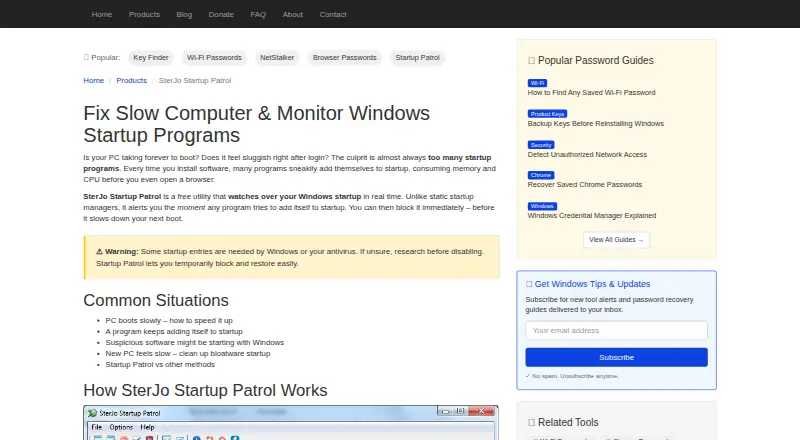
What SterJo Startup Patrol is
SterJo Startup Patrol is a free Windows utility that watches startup registry locations and startup folders for programs trying to add entries. It alerts you with the program name, full file path, and the startup location being changed, then lets you allow, disable, or delete the change. The main window also lists active startup entries so you can disable them manually. Additional features include digital signature checks, a right-click Google search for unknown entries, and a portable edition for USB use. The portable version runs without installation and is described as not modifying system files. The download page lists version 1.6 at 2.2 MB, with an alert sound for new entries. Supported Windows versions are 11, 10, 8, 7, Vista, and XP in 32-bit and 64-bit editions. Scheduled Tasks are outside its core monitoring, and Startup Patrol is not an antivirus, though it can alert users to startup changes that may be suspicious.
Who it suits
Startup Patrol suits home users, IT technicians, and advanced Windows users who want more control over startup entries. Its portable edition may suit people who want to run it without installation.
What it does well
- Alerts show the program, file path, and changed location.
- Changes can be allowed, disabled, or deleted.
- Includes digital signature checks.
- Portable edition runs without installation.
- Supports Windows 11 through XP, 32-bit and 64-bit.
What to know first
- Scheduled Tasks are outside its core monitoring.
- It is not an antivirus.
- Version 1.6 is listed at 2.2 MB.
Plans
| Plan | Billed and limits | Price |
|---|---|---|
| Free | 100% free · no hidden charges · Windows XP–11 (32/64-bit) | Free |
As sterjosoft.com lists them, read 3 Oct 2026. The maker's own page has the final word.
Getting started
- Open the SterJo Startup Patrol website.
- Download the Windows edition for your system.
- Run the standard edition or use the portable version without installation.
- Review alerts and choose whether to allow, disable or delete a change.
- Use the main window to inspect active startup entries.
Verdict
Startup Patrol focuses on detecting and managing changes to Windows startup entries, with alerts that show what is changing. It does not monitor Scheduled Tasks as part of its core scope and is not an antivirus.
Questions
How much does SterJo Startup Patrol cost?
The Free plan costs nothing.
Is there a free plan or trial?
There is a free plan. No free trial is listed.
Which Windows versions does it support?
The page lists Windows 11, 10, 8, 7, Vista and XP, in 32-bit and 64-bit versions.
Can it run without installation?
Yes. The portable edition runs without installation, and the maker says it does not modify system files.
Does it monitor Scheduled Tasks or replace antivirus software?
Scheduled Tasks are outside its core monitoring, and the maker says Startup Patrol is not an antivirus.
Who makes Startup Patrol?
It is made by SterJo Software. The maker says its tools are digitally signed, built with privacy in mind, free from malware or hidden software, and do not sell or track data.
Facts from SterJo Startup Patrol's own pages
- Alert actions
- Alerts show the program name, full file path, and modified startup location, with options to allow, disable, or delete the change. · sterjosoft.com, 3 Oct 2026
- Founded
- 2010 · sterjosoft.com, 28 Sept 2026
- Intended users
- The maker describes it as suitable for home users, IT technicians, and advanced users seeking more control over Windows startup behavior. · sterjosoft.com, 3 Oct 2026
- Maker privacy claims
- SterJo Software says its tools are digitally signed, free from malware or hidden software, built with privacy in mind, and do not sell or track data. · sterjosoft.com, 3 Oct 2026
- Other features
- Features include digital signature checks, right-click Google search for unknown entries, portable USB use, and low resource usage. · sterjosoft.com, 3 Oct 2026
- Portable mode
- The portable version runs without installation and the page says it does not modify system files. · sterjosoft.com, 3 Oct 2026
- Purpose
- SterJo Startup Patrol monitors Windows startup in real time and alerts when a program tries to add a startup entry. · sterjosoft.com, 3 Oct 2026
- Reversibility
- The product page says users can reverse previous decisions or adjust permissions from the program interface. · sterjosoft.com, 3 Oct 2026
- Security scope
- The maker says Startup Patrol is not an antivirus; it can alert users to startup changes that may be suspicious. · sterjosoft.com, 3 Oct 2026
- Startup list
- The main window lists active startup entries and lets users disable them manually. · sterjosoft.com, 3 Oct 2026
- Startup locations
- It monitors startup registry locations and startup folders; Scheduled Tasks are outside its core monitoring. · sterjosoft.com, 3 Oct 2026
- Supported Windows
- The page lists Windows 11, 10, 8, 7, Vista, and XP in 32-bit and 64-bit versions. · sterjosoft.com, 3 Oct 2026
- Version
- The download page lists version 1.6 at 2.2 MB and says it adds an alert sound for new entries. · sterjosoft.com, 3 Oct 2026
Where SterJo Startup Patrol stands on Freedom251
- Startup Manager Software#12 of 30