Freedom251 › Startup Manager Software
StartupManager
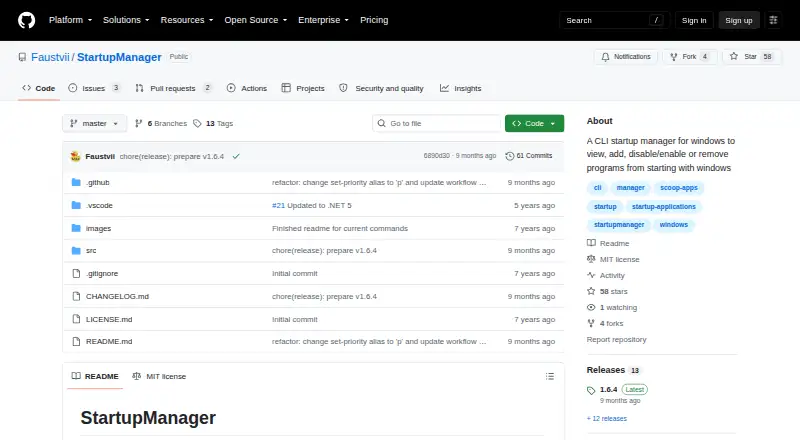
What StartupManager is
StartupManager is a free command-line utility for managing programs that launch with Windows. Its commands cover listing, adding, enabling, disabling, and removing startup items. The list command displays startup applications, while a detailed option also shows their paths and arguments. You can enable or disable an item by its name or its position in the list. The add command guides you through entering a program path and arguments, setting whether it runs with administrator privileges, and choosing whether it applies to all users. Removal can target a startup registry entry, Task Scheduler item, or shortcut, with an option to bypass confirmation. For items launched through Task Scheduler, a priority command offers settings from Idle through Realtime, including BelowNormal, Normal, AboveNormal, and High. StartupManager is for Windows and is available from the maker’s GitHub project. The project README recommends installing it through Scoop using the maker’s bucket. The software is distributed under the MIT License, whose stated terms permit use, modification, distribution, sublicensing, and sale subject to its conditions. The license also provides the software as is, without warranty. The changelog notes an update to .NET 10 in version 1.6.4.
Who it suits
StartupManager suits Windows users who are comfortable using command-line tools to inspect and change startup entries. It can also fit users who need to adjust Task Scheduler startup priorities or manage entries for all users.
What it does well
- Lists startup applications, with paths and arguments available in detailed mode.
- Enables or disables items by name or list index.
- Guided addition includes path, arguments, administrator setting, and all-users choice.
- Removes registry entries, scheduled tasks, and shortcuts.
- Sets Task Scheduler priorities from Idle through Realtime.
- MIT License permits use, modification, distribution, sublicensing, and sale under its conditions.
What to know first
- The listed platform is Windows only.
- It is a command-line tool.
- The MIT License provides the software without warranty.
Getting started
- Open the StartupManager GitHub project.
- Install through Scoop using the maker’s bucket, as recommended in the README.
- Use the list command to view startup applications.
- Use the add command to configure a program, or enable or disable an existing item by name or index.
- Use remove to delete an entry, task, or shortcut; set Task Scheduler priority where needed.
Verdict
Choose StartupManager if you want command-line control over Windows startup entries, including scheduled-task priority settings. Look elsewhere if you need a graphical interface or startup-delay and service-control features, which are outside its described scope.
Questions
How much does StartupManager cost?
It is free, with a free plan.
Which platform does it support?
The listed platform is Windows.
How is it installed?
The README recommends installing through Scoop using the maker’s bucket.
What can it do with startup programs?
It can list, add, enable, disable, and remove programs that start with Windows.
Can it change startup priority?
Yes. For Task Scheduler startup programs, it can set priorities from Idle through Realtime.
What license does it use?
StartupManager uses the MIT License. Its stated terms permit use, modification, distribution, sublicensing, and sale subject to conditions, and provide the software without warranty.
Facts from StartupManager's own pages
- Add programs
- The add command can guide users through adding a program, including its path, arguments, administrator setting, and whether it applies to all users. · github.com, 4 Oct 2026
- Enable and disable
- Users can enable or disable startup programs by name or list index. · github.com, 4 Oct 2026
- Install method
- The README recommends installing through Scoop using the maker’s bucket. · github.com, 4 Oct 2026
- Intended use
- The project describes its purpose as viewing, adding, enabling, disabling, and removing programs that start with Windows. · github.com, 4 Oct 2026
- License
- The project uses the MIT License, which permits use, modification, distribution, sublicensing, and sale subject to its stated conditions. · github.com, 4 Oct 2026
- List startup items
- The list command shows startup applications, and its detailed option adds paths and arguments. · github.com, 4 Oct 2026
- List startup programs
- The list command shows startup applications and can display their paths and arguments in detailed mode. · github.com, 4 Oct 2026
- Purpose
- StartupManager is a command-line tool for managing programs that start with Windows. · github.com, 4 Oct 2026
- Remove programs
- The remove command deletes a startup registry entry, task, or shortcut, and supports skipping confirmation with an option. · github.com, 4 Oct 2026
- Runtime update
- The changelog says version 1.6.4 updated the project to .NET 10. · github.com, 4 Oct 2026
- Task Scheduler
- For Task Scheduler startup programs, users can set a priority from Idle through Realtime. · github.com, 4 Oct 2026
- Task Scheduler priority
- The set-priority command sets a Task Scheduler startup program’s priority to Idle, BelowNormal, Normal, AboveNormal, High, or Realtime. · github.com, 4 Oct 2026
- Warranty
- The MIT license states that the software is provided as is without warranty. · github.com, 4 Oct 2026
Where StartupManager stands on Freedom251
- Startup Manager Software#19 of 30