FireBox
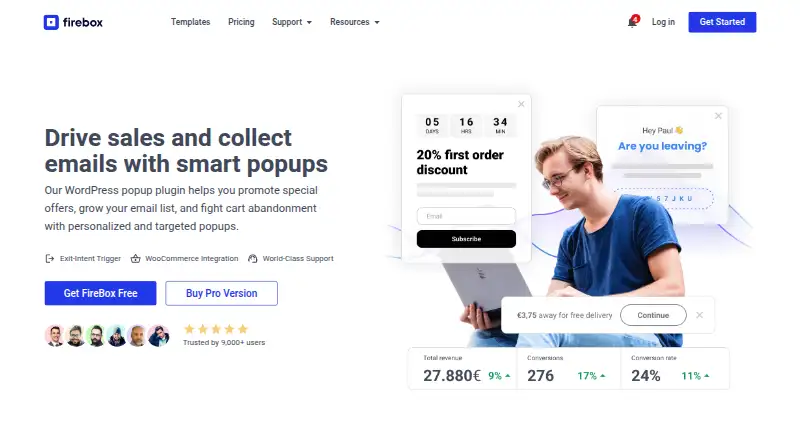
What FireBox is
FireBox is a WordPress popup plugin for promoting offers, growing email lists, and targeting visitors who may abandon a cart. Site owners build campaigns with the WordPress Gutenberg block editor, choosing formats such as lightboxes, sticky bars, slide-ins, full-screen or sidebar popups, page-slides, and embeds. Triggers include page load, click, hover, scroll, exit intent, ad-block detection, and visitor inactivity. Targeting can use pages and URLs, device, geolocation, referrer, cookies, date and time, or WordPress user role. FireBox can use WooCommerce and Easy Digital Downloads purchase data for targeted campaigns and revenue attribution. Built-in analytics tracks campaign performance, while revenue attribution and sales-funnel analysis are paid Pro features. A form builder provides submission management, email notifications, and honeypot anti-spam. Integrations include MailChimp, Brevo, Google Analytics, WooCommerce, Zapier, and several email and commerce services. The free plan includes unlimited websites and campaigns. Listed paid plans are Basic at €50.15 a year for one website, Pro at €67.15 a year for five, and Growth at €109.65 a year with 10, 50, and 100 website options; renewals are at full price.
Who it suits
FireBox suits WordPress site owners and online merchants who want targeted campaigns, list-building forms, or purchase-data-based popups. It is presented for small and medium brands.
What it does well
- Multiple popup and embedded campaign formats.
- Triggers include exit intent and visitor inactivity.
- Targeting can use location, cookies, and user role.
- Free plan allows unlimited websites and campaigns.
- Commerce data can support revenue attribution.
What to know first
- Basic license covers one website.
- Paid renewals are at full price.
- Revenue attribution and funnel analysis are paid Pro features.
Limits
The free plan lists page and URL targeting and MailChimp integration. Basic covers one website; Pro covers five, while Growth offers 10, 50, and 100 website options. Paid plans add features such as advanced triggers and targeting, more integrations, revenue attribution, and click tracking.
Plans
| Plan | Billed and limits | Price |
|---|---|---|
| Free | € 0 / forever · Unlimited websites · unlimited campaigns · MailChimp integration · page and URL targeting | Free |
| Growth | € 109 .65 / year *; renewals at full price · 10 50 100 websites · everything in Pro · Klaviyo and Salesforce Web-To-Lead integrations | €109.65 a year |
| Basic | € 50 .15 / year *; renewals at full price · 1 website · everything in Free · advanced triggers and targeting · AcyMailing, WooCommerce, Easy Digital Downloads, WPML and Zapier integrations | €50.15 a year |
| Pro | € 67 .15 / year *; renewals at full price · 5 websites · everything in Basic · ActiveCampaign, GetResponse and MailerLite integrations · revenue attribution · click tracking | €67.15 a year |
As fireplugins.com lists them, read 30 Sept 2026. The maker's own page has the final word.
Getting started
- Visit the FireBox website.
- Choose the free plan or a paid plan for the required features and website coverage.
- Use the WordPress Gutenberg block editor to create and customize a campaign.
- Select a campaign format, trigger, and targeting rules.
- Connect listed integrations as needed.
FireBox is a WordPress plugin for site owners and online merchants who want to build targeted on-site campaigns. It suits teams that need more than one popup format or audience rule, though advanced targeting and commerce reporting require paid plans.
Overview
FireBox combines campaign creation, forms, and analytics inside WordPress. Its range of display formats and visitor rules gives merchants room to tailor promotions, email capture, and cart-abandonment campaigns. It is less compelling for teams seeking a platform independent of WordPress.
Key features
Campaigns can appear as lightboxes, sticky bars, slide-ins, full-screen or sidebar popups, page-slides, and embeds. This breadth makes it possible to choose a presentation suited to the campaign rather than relying on a single overlay. Creation uses the WordPress Gutenberg block editor, which fits existing WordPress workflows.
Triggers include page load, click, hover, scroll, exit intent, ad-block detection, and visitor inactivity. Targeting can use pages and URLs, device, geolocation, referrer, cookies, date and time, and WordPress user role. These options support more deliberate campaign rules, but advanced triggers and targeting start with Basic rather than Free.
WooCommerce and Easy Digital Downloads shopping and purchase data can inform targeting and revenue attribution, a useful distinction for online merchants. Built-in analytics tracks campaign performance; Pro adds revenue attribution and sales-funnel analysis. The form builder manages submissions, sends email notifications, and includes honeypot anti-spam. Paid plans add multiple notifications and advanced fields.
Integrations span MailChimp, Brevo, Google Analytics, AcyMailing, WooCommerce, Easy Digital Downloads, WPML, Zapier, ActiveCampaign, GetResponse, MailerLite, Klaviyo, and Salesforce Web-To-Lead. Free includes MailChimp; Basic adds AcyMailing, WooCommerce, Easy Digital Downloads, WPML, and Zapier; Pro adds ActiveCampaign, GetResponse, and MailerLite; Growth adds Klaviyo and Salesforce Web-To-Lead. That tiering makes plan choice partly an integration decision.
The maker says custom PHP and CSS/JavaScript permissions are separated, form submissions are rate-limited, and integration credentials are stored more securely. It also says the front-end script loads deferred, animations load only when needed, and replacing PHP sessions with cookies restores full-page caching compatibility. These are relevant safeguards and performance measures for site owners, though they do not replace checking compatibility with a particular WordPress setup.
Pricing
Free costs € 0 / forever and includes unlimited websites and campaigns, MailChimp integration, and page and URL targeting. It is a useful starting point for basic campaigns across multiple sites, but advanced triggers and targeting and most integrations are excluded.
Basic costs € 50 .15 / year, renewing at full price. It covers one website and includes everything in Free, plus advanced triggers and targeting and five integrations: AcyMailing, WooCommerce, Easy Digital Downloads, WPML, and Zapier. This is the practical entry plan for one-site owners who need those controls or commerce connections.
Pro costs € 67 .15 / year, renewing at full price, and covers five websites. It includes everything in Basic, adds ActiveCampaign, GetResponse, and MailerLite integrations, and unlocks revenue attribution and click tracking. Its additional site capacity and reporting suit operators managing several properties or measuring sales outcomes.
Growth costs € 109 .65 / year, renewing at full price. It includes everything in Pro and adds Klaviyo and Salesforce Web-To-Lead integrations; the pricing page shows 10, 50, and 100 website options. That makes it the fit for larger site portfolios or teams that need those integrations. Support response targets improve by tier: within 36 hours for Free, 16 hours for Basic, and 10 hours for Pro and Growth.
Platforms
FireBox is self-hosted and web-based, with its campaign editor built for WordPress.
Who it's for
FireBox is best suited to WordPress site owners and online merchants who want a mix of campaign formats, audience targeting, and integrations in the same plugin. Smaller sites can begin with Free, while merchants needing advanced rules or purchase-based reporting will need a paid plan. It is not the right fit for teams that do not use WordPress.
Pros and cons
- Pros: Multiple campaign formats and a wide set of triggers and targeting rules allow more tailored campaigns than a single-format popup tool.
- Pros: WooCommerce and Easy Digital Downloads data can support targeting and revenue attribution, making the feature set relevant to merchants.
- Pros: Free allows unlimited websites and campaigns, so basic use is not restricted to one site.
- Cons: Advanced triggers and targeting require Basic or higher, while revenue attribution and click tracking require Pro.
- Cons: Paid plans renew at full price, and Basic is limited to one website; expanding beyond that requires Pro or Growth.
Alternatives
Popup Software is a broader category directory for comparing popup tools.
PopupForge is an alternative with a Free plan limited to one website, one modal, and 50 submissions per month, alongside basic analytics and three total AI generations.
BDOW! may suit readers who want a free web and browser-extension option with 100 conversions, 500 emails per month, visitor targeting, and analytics.
ConvertFlow offers a free allowance of five funnel campaigns, with integrations requiring a paid plan; consider it when funnel campaigns are the priority.
Getsitecontrol has a free plan with 10 000 monthly widget views and unlimited contacts, which may suit readers focused on view-based limits and contact collection.
Hello Bar offers a free Starter plan with 5,000 views, unlimited popups, and basic support, for readers whose needs fit those bounds.
Lucky Lottery is another freemium option for readers comparing campaign tools.
OptiMonk has a free plan with 10,000 pageviews per month, 1,000 AI credits per month, and one domain, useful when those allowances match a site's scale.
Picreel offers a free plan for up to 5,000 pageviews per month with unlimited campaigns, domains, and popups.
Verdict
Choose FireBox if you run a WordPress site and want varied campaign formats, detailed targeting, and commerce-aware reporting in one plugin. Its free tier makes basic multi-site campaigns accessible, but the strongest merchant features sit in paid plans with full-price renewals. Look elsewhere if you need a non-WordPress platform or want advanced capabilities without upgrading.
Verdict
FireBox offers varied campaign formats and targeting rules, with a free tier and paid options for additional features. Check the license limits and renewal terms when choosing a paid plan.
Questions
Is FireBox free?
Yes. Its free plan costs €0 forever and includes unlimited websites, unlimited campaigns, MailChimp integration, and page and URL targeting.
How much do paid plans cost?
Basic is €50.15 per year, Pro is €67.15 per year, and Growth is €109.65 per year. Renewals are at full price.
Which platforms does FireBox support?
FireBox is listed for self-hosted use and the web. It is a WordPress popup plugin that uses the Gutenberg block editor.
What integrations are listed?
They include MailChimp, Brevo, Google Analytics, AcyMailing, WooCommerce, Easy Digital Downloads, WPML, Zapier, ActiveCampaign, GetResponse, MailerLite, Klaviyo, and Salesforce Web-To-Lead.
What website limits apply to paid licenses?
Basic covers one website and Pro covers five. Growth is shown with 10, 50, and 100 website options.
What analytics does FireBox include?
Built-in analytics tracks campaign performance. Revenue attribution and sales-funnel analysis are paid Pro features.
Facts from FireBox's own pages
- Analytics
- Built-in analytics tracks campaign performance, and paid Pro features include revenue attribution and sales-funnel analysis. · fireplugins.com, 30 Sept 2026
- Campaign formats
- It supports lightbox popups, sticky bars, slide-ins, full-screen popups, sidebar popups, page-slides, and embeds. · fireplugins.com, 30 Sept 2026
- Commerce
- FireBox can use WooCommerce and Easy Digital Downloads shopping and purchase data for targeted popups and revenue attribution. · fireplugins.com, 30 Sept 2026
- Editor
- The plugin uses the WordPress Gutenberg block editor to create and customize campaigns. · fireplugins.com, 30 Sept 2026
- Forms
- The form builder supports submissions management, email notifications, and honeypot anti-spam; paid plans add multiple notifications and advanced fields. · fireplugins.com, 30 Sept 2026
- Founded
- 2021 · fireplugins.com, 28 Sept 2026
- Headquarters
- Kos, Greece · fireplugins.com, 28 Sept 2026
- Integrations
- Listed integrations include MailChimp, Brevo, Google Analytics, AcyMailing, WooCommerce, Easy Digital Downloads, WPML, Zapier, ActiveCampaign, GetResponse, MailerLite, Klaviyo, and Salesforce Web-To-Lead. · fireplugins.com, 30 Sept 2026
- Intended users
- The maker describes its team as supporting small and medium brands and presents FireBox for WordPress site owners and online merchants. · fireplugins.com, 30 Sept 2026
- Notable limit
- Basic licenses cover one website, Pro covers five, and Growth is shown with 10, 50, and 100 website options on the pricing page. · fireplugins.com, 30 Sept 2026
- Performance
- The maker says the front-end script loads deferred, animations load only when needed, and replacing PHP sessions with cookies restores full-page caching compatibility. · fireplugins.com, 30 Sept 2026
- Product
- FireBox is a WordPress popup plugin for promoting offers, growing email lists, and fighting cart abandonment with targeted campaigns. · fireplugins.com, 30 Sept 2026
- Security
- The maker says custom PHP and CSS/JavaScript use dedicated permissions, form submissions are rate-limited, and integration credentials are stored more securely. · fireplugins.com, 30 Sept 2026
- Support
- The pricing comparison lists support response times of within 36 hours for Free, 16 hours for Basic, and 10 hours for Pro and Growth. · fireplugins.com, 30 Sept 2026
- Targeting
- Targeting options include pages and URLs, visitor device, geolocation, referrer, cookies, date and time, and WordPress user role. · fireplugins.com, 30 Sept 2026
- Triggers
- Triggers include page load, click, hover, scroll, exit intent, ad-block detection, and visitor inactivity. · fireplugins.com, 30 Sept 2026
Where FireBox stands on Freedom251
- Popup Software#6 of 28