Freedom251 › Text-to-Speech Software

FineVoice AI Voice Changer
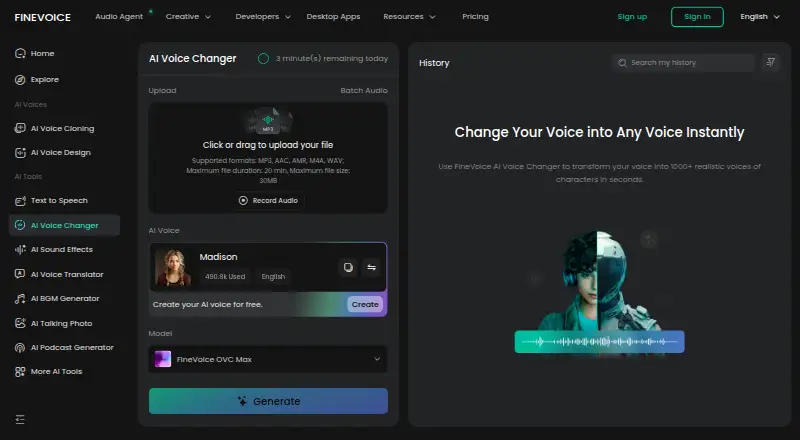
What FineVoice AI Voice Changer is
FineVoice AI Voice Changer transforms uploaded or recorded audio with AI voice models. The online tool accepts MP3, AAC, AMR, M4A, and WAV files up to 20 minutes and 30 MB, and exports MP3 or WAV. Users can select a voice, adjust pitch, convert multiple files in a batch, create or clone custom voices, and upload RVC voice models. FineVoice describes a library of more than 1,000 voices and over 154 regional accents. It presents the tool for content creation, education, entertainment, and business, including videos, podcasts, and gaming. An API is available for adding voice transformation to apps, games, content platforms, and workflows. The product page says recordings are not stored or used for AI training, and that scams and impersonation are prohibited. Desktop downloads are available for Windows and macOS, alongside web and API access. A free plan is available; paid plans start at $5.99/mo (annual).
Who it suits
It may suit creators, educators, businesses, and others working with audio for videos, podcasts, gaming, or entertainment. Teams adding voice transformation to apps or workflows can also consider its API.
What it does well
- Accepts five audio formats up to 20 minutes and 30 MB
- Offers batch conversion for multiple files
- Library lists over 1,000 voices and 154 regional accents
- Supports custom voices and RVC model uploads
- Free plan includes 15 minutes of daily voice changing
What to know first
- Online input is limited to 20 minutes and 30 MB
- Free voice changing is limited to 15 minutes per day
- Paid plans start at $5.99/mo (annual)
Limits
The free plan allows 15 minutes of AI voice changing per day. Basic, listed at $5.99 per month billed annually, includes 24 hours of AI voice change per month; the online changer accepts files up to 20 minutes and 30 MB.
Plans
| Plan | Billed and limits | Price |
|---|---|---|
| Basic | monthly · 100,000 TTS characters/month · 24 voice-change hours/month · 5 professional clones · 50 instant clones · 100 sound effects · 40 enhancer minutes · 120 speech-to-text minutes | $8.99 a month |
| Pro | monthly (first month 28% off shown) · 300,000 TTS characters/month · unlimited voice-change duration · 10 professional clones · 100 instant clones · 250 sound effects · 60 enhancer minutes · 240 speech-to-text minutes | $12.99 a month |
| Business | monthly · 1,000,000 TTS characters/month · unlimited voice-change duration · 20 professional clones · 500 instant clones · 500 sound effects · 120 enhancer minutes · 600 speech-to-text minutes | $47.99 a month |
| Free | 5,000 TTS characters per day · 15 voice-change minutes per day · 5 AI voice designs · 5 instant clones · 30 sound-effect credits per day | Free |
| Ultra Plan | $129.99 every year · Unlimited AI voice changer · unlimited TTS · unlimited voice cloning | $129.99 a year |
| Basic Plan | $71.99 every year · AI voice changer: 24 hours · TTS: 100,000 characters · voice cloning: 50 credits | $71.99 a year |
| Pro Plan | $99.99 every year · AI voice changer: unlimited · TTS: 300,000 characters · voice cloning: 100 credits | $99.99 a year |
As finevoice.ai lists them, read 15 Oct 2026. The maker's own page has the final word.
Getting started
- Open the FineVoice AI Voice Changer website.
- Choose the web tool, or download the Windows or macOS desktop app.
- Upload an MP3, AAC, AMR, M4A, or WAV file, or record audio.
- Select an AI voice and adjust pitch, then export as MP3 or WAV.
- Use the free plan or choose a paid plan for higher listed usage limits.
FineVoice AI Voice Changer converts uploaded or recorded audio with AI voices through a web service, desktop apps, and an API. It fits creators, educators, entertainers, and businesses that need many voice styles, batch work, or custom models. Its strongest case is flexible voice production across platforms; short online-file limits and usage caps make it less suitable for demanding long-form work.
Overview
FineVoice combines recorded-audio conversion with character voices, downloadable audio, batch processing, voice cloning, and developer access. The service supports Windows and macOS downloads as well as web and API use, so a creator can work in a browser, a desktop workflow, or an integrated application. The product is more than a live effect: it is aimed at producing transformed files for videos, podcasts, games, education, and business content.
Key features
The online changer accepts MP3, AAC, AMR, M4A, and WAV files up to 20 minutes and 30 MB each. That is workable for clips, episodes broken into sections, and routine social content, but restrictive for long interviews, full-length recordings, or large source files. Batch conversion can process multiple files together, reducing repetitive file-by-file work.
A library of more than 1,000 voices and over 154 regional accents gives users substantial choice across character and regional styles. Pitch adjustment, selectable AI voices, and MP3 or WAV export provide useful control over the finished file. Users can create or clone custom voices and upload RVC voice models, which is more relevant to recurring characters, branded narration, and specialized production than to occasional novelty effects.
The API supports adding voice transformation to apps, games, content platforms, and other workflows. FineVoice says recordings are not stored and vocal timbre is not used for AI training. It also prohibits scams and impersonation. Those safeguards are important for sensitive audio and legitimate voice work, while responsible consent remains essential when creating or cloning a voice.
Pricing
The Free plan costs $0.00 per free and allows 15 minutes of AI voice changing per day, 5,000 TTS characters per day, 1,000 input characters, and unlimited downloads. It is suitable for trying the service or producing short daily clips, but the daily conversion allowance will quickly constrain regular publishing.
The Basic plan is $5.99 per month billed annually, or $71.99 billed every year. It includes 100,000 TTS characters per month, 24 hours of AI voice change per month, five professional voice clones, 50 instant voice clones, 100 AI sound-effect generations, and 40 minutes of AI Voice Enhancer use. This is the practical entry point for individual creators with predictable monthly volume.
The Pro plan is $8.33 per month billed annually, or $99.99 billed every year. It raises TTS to 300,000 characters, removes the duration limit for AI voice change, provides 10 professional and 100 instant voice clones, 250 sound-effect generations, and 60 enhancer minutes. It suits frequent production where Basic’s 24-hour ceiling is the main obstacle.
The Business plan is $31.99 per month billed annually. It provides 1,000,000 TTS characters monthly, unlimited AI voice-change duration, 20 professional clones, 500 instant clones, 500 sound-effect generations, and 120 enhancer minutes. Teams or high-volume operations gain substantially more headroom, although the price is difficult to justify for light personal use.
A separate annual tier structure also names Basic Plan at $5.99 per year (billed $71.99 every year), Pro Plan at $8.33 per year (billed $99.99 every year), and Ultra Plan at $10.83 per year (billed $129.99 every year). Basic Plan includes 24 hours of AI voice changing, 100,000 TTS characters, and 50 voice-cloning credits; Pro Plan includes unlimited voice changing, 300,000 TTS characters, and 100 voice-cloning credits; Ultra Plan adds unlimited voice changing, unlimited TTS, and unlimited voice cloning. Check which billing presentation applies before paying, because the displayed period and annual charge differ.
Platforms
FineVoice supports web, Windows, macOS, and API access. That cross-platform spread favors users moving between browser and desktop production or embedding conversion in software. Support contacts are [email protected] and [email protected] for sales and technical questions.
Who it's for
Choose FineVoice for video and podcast creators, game makers, educators, entertainers, and businesses that need a broad voice catalog, batch file conversion, or repeatable custom voices. The API makes it a stronger candidate for product teams than a voice changer limited to a desktop interface. It is a weaker fit for users whose source files regularly exceed 20 minutes or 30 MB, or whose free daily allowance is too small.
Pros and cons
Pros
- More than 1,000 voices and 154-plus regional accents support varied content and localization.
- Batch conversion saves time when processing multiple clips.
- Custom cloning and RVC uploads support consistent, specialized voices.
- Web, Windows, macOS, and API access cover both individual and integrated workflows.
- Unlimited downloads on the free plan make exported trial work practical.
Cons
- Online uploads stop at 20 minutes and 30 MB, limiting long or high-resolution source material.
- The free plan allows only 15 minutes of voice changing per day.
- Basic retains a 24-hour monthly conversion ceiling, so frequent users may need Pro.
- Annual billing is required for the advertised monthly prices.
Alternatives
Voice.ai is the better pick for users who need Android or iOS alongside web, desktop, and API access; its free plan includes 5,000 credits per month, online voice changing, text to speech, and audio tools with a five-minute conversion limit.
EaseUS VoiceWave suits someone who wants a free trial and a simple free allowance of four voice effects, including one free effect for 24 hours; its Individual Monthly plan is $14.95 with auto-renewal.
Dubbing AI is an alternative for users satisfied with at least 10 voices rotating daily on its free plan, with a subscription unlocking all characters.
Echo Live is aimed at real-time effects, a soundboard, and a daily free UltraFast voice across mobile, desktop, and extension platforms.
FineShare VoiceTrans offers five free daily effects, unlimited community effects, 10 custom voices, and limited soundboard effects for users focused on live voice effects.
iMyFone MagicMic provides five free voices daily, sound effects, voice memes, recordings, audio files, and 7/24 technical support.
Voicemod AI Voice Cleaner is the narrower choice when the goal is downloading a free AI voice-cleaning tool.
Altered Real-Time Pro suits Windows and macOS users seeking real-time processing, 20 free minutes per day, speech-isolation models, and four daily voice skins.
Verdict
FineVoice is a strong choice for creators and teams that value a large voice library, batch conversion, custom models, and API integration in one cross-platform service. Choose it when those capabilities outweigh the 20-minute/30-MB online file ceiling and annual-plan commitment. Look elsewhere if you mainly need unrestricted long-file handling or a lightweight real-time effect with fewer production quotas.
Verdict
FineVoice combines online audio conversion, batch processing, voice selection, and custom voice options, with desktop downloads and an API also listed. Check the upload limits and plan allowances against your workload before choosing a plan.
Questions
Is FineVoice AI Voice Changer free?
Yes. Its free plan includes 15 minutes of AI voice changing per day, 5,000 TTS characters per day, 1,000 input characters, and unlimited downloads.
How much does a paid plan cost?
Basic is listed at $5.99 per month billed annually. FineVoice also lists Pro at $8.33 per month and Business at $31.99 per month, both billed annually.
Which platforms does FineVoice support?
The listed platforms are web, API, Windows, and macOS. Desktop downloads are available for Windows and macOS.
What audio formats can I use?
The online changer accepts MP3, AAC, AMR, M4A, and WAV files up to 20 minutes and 30 MB. It exports MP3 or WAV.
Can I use custom voices or connect the tool to an app?
Users can create or clone custom voices and upload RVC voice models. FineVoice also offers an API for apps, games, content platforms, and workflows.
What does FineVoice say about recordings and misuse?
FineVoice says it does not store recordings or use vocal timbre for AI training. It prohibits using AI for scams or impersonation.
Facts from FineVoice AI Voice Changer's own pages
- API
- FineVoice advertises a developer API for low-latency speech-to-speech processing, real-time voice conversion and multilingual transformation. · finevoice.ai, 15 Oct 2026
- API documentation
- The public API site provides an overview, documentation index, API reference links and an MCP Server resource. · api.finevoice.ai, 15 Oct 2026
- Audio privacy
- The product page says FineVoice does not store recordings or use vocal timbre for AI training. · finevoice.ai, 30 Sept 2026
- Batch conversion
- Users can submit multiple audio files for batch voice conversion. · finevoice.ai, 15 Oct 2026
- Company address
- Trustpilot lists New Territories Plaza, Tsuen Wan, Hong Kong as FineVoice contact location. · trustpilot.com, 15 Oct 2026
- Company identity
- LinkedIn lists Fineshare as a privately held software-development company with 11–50 employees, headquarters in Hong Kong and a 2022 founding year. · linkedin.com, 15 Oct 2026
- Custom models
- Users can design voices, clone voices and upload RVC voice models. · finevoice.ai, 15 Oct 2026
- Custom voices
- Users can create or clone custom voices and upload RVC voice models. · finevoice.ai, 30 Sept 2026
- Desktop support
- Official downloads are provided for Windows and macOS; no Linux download is listed. · finevoice.ai, 15 Oct 2026
- Documentation
- FineVoice publishes quick-start guides for voice changing, cloning, design, enhancement, sound effects, speech-to-text, quotas and related tools, with dated guides from September 2025 onward. · finevoice.ai, 15 Oct 2026
- Free plan
- Yes · finevoice.ai, 19 Sept 2026
- Gender conversion
- The product supports male-to-female and female-to-male voice conversion. · finevoice.ai, 15 Oct 2026
- Input limits
- The online changer accepts MP3, AAC, AMR, M4A, and WAV files up to 20 minutes and 30 MB. · finevoice.ai, 30 Sept 2026
- Input workflow
- The web workflow is upload or record audio, choose a voice and optional pitch/model settings, then preview and download the result. · finevoice.ai, 15 Oct 2026
- Languages
- FineVoice states that its AI models cover more than 154 regional accents and multiple languages. · finevoice.ai, 15 Oct 2026
- License
- The EULA grants a revocable, limited, non-exclusive software license; it is proprietary and permits no redistribution or reverse engineering, while mentioning that third-party open-source materials may be included. · finevoice.ai, 15 Oct 2026
- Limit: G2 processing and integrations
- G2 reviewers report occasional text-to-speech jobs hanging near completion and the lack of a way to use the changer inside other audio-recording software. · g2.com, 15 Oct 2026
- Limit: Product Hunt platform coverage
- Product Hunt commenters criticized the absence of audio demos and said the earlier desktop product was Windows-only. · producthunt.com, 15 Oct 2026
- Limit: SourceForge onboarding
- The same SourceForge review says new users can feel overwhelmed while learning the tool. · sourceforge.net, 15 Oct 2026
- Limit: Trustpilot support and billing
- Negative Trustpilot reviews report unavailable paid access, bounced support emails, refund or cloning difficulties, outages and charges higher than expected. · trustpilot.com, 15 Oct 2026
- News: Aunio launch
- FineVoice announced the Aunio end-to-end AI audio production agent on September 17, 2026. · finevoice.ai, 15 Oct 2026
- Notable outage
- FineVoice acknowledged a temporary service issue on December 11, 2025 that affected voice generation and support contact for some users. · trustpilot.com, 15 Oct 2026
- Other creation tools
- The platform also lists text-to-speech, voice cloning, sound effects, background music, voice enhancement, translation, speech-to-text, talking photo and voice-isolation tools. · finevoice.ai, 15 Oct 2026
- Output options
- The online changer offers MP3 and WAV output formats and lets users adjust pitch and choose an AI voice. · finevoice.ai, 30 Sept 2026
Where FineVoice AI Voice Changer stands on Freedom251
- Text-to-Speech Software#20 of 223
- Voice Changer Software#9 of 45
- Game Voice Changers#8 of 29
- Text-to-speech tools#110 of 232