Freedom251 › File Manager Software

Files
What Files is
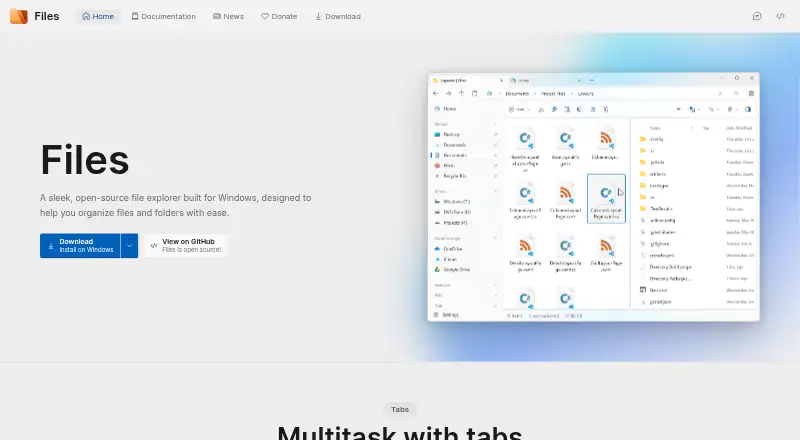
Files is a free, open-source file manager for Windows that organizes files and folders. It provides tabs, dual-pane browsing, colored tags, and a column layout. The app can create and extract zip, WinRar, and 7zip archives, and preview photos, videos, and documents. Cloud-drive integrations include OneDrive, Google Drive, iCloud, Box, Dropbox, Mega, and Nextcloud, provided their clients are installed and running. Git features include branch creation and switching, GitHub remote push and pull, and repository status details. FTP and FTPS connections are supported, but SFTP is not currently available. Stable and preview releases are offered through the Microsoft Store, with preview installable alongside stable. Installation requires Windows Update and Delivery Optimization, and modified Windows versions are not officially supported. The FAQ reports memory leaks that can accumulate usage during extended sessions; disabling background running is suggested as mitigation.
Who it suits
It suits Windows users wanting an open-source manager with tabs, dual panes, archive tools, Git features, and cloud-drive access. Users needing SFTP or long uninterrupted sessions should note the listed limitations.
What it does well
- Free and open source
- Tabs and dual-pane browsing
- Archive creation and extraction
- Many cloud-drive integrations
- Git branch and remote tools
What to know first
- Windows only
- SFTP is unsupported
- Cloud clients must be installed and running
- Memory leaks may accumulate usage
Verdict
Files offers a broad Windows file-management set with multiple views, archives, Git, and cloud integrations. Its free version is useful for everyday organization, but SFTP is absent and extended sessions may expose the documented memory issue.
Facts from Files's own pages
- Archives and previews
- Files can create and extract zip, WinRar, and 7zip archives, and preview photos, videos, and documents. · files.community, 5 Oct 2026
- Archive support
- Yes · files.community, 20 Sept 2026
- Batch rename
- Yes · files.community, 20 Sept 2026
- Cloud drives
- The site lists built-in support for OneDrive, Google Drive, and iCloud; its documentation says cloud integrations require their desktop clients to be installed and running. · files.community, 5 Oct 2026
- Cloud storage access
- Yes · files.community, 20 Sept 2026
- Community
- Files says it is free and open-source software maintained and designed by a collective of hundreds of contributors. · files.community, 5 Oct 2026
- Download
- The download page offers stable and preview versions through the Microsoft Store. · files.community, 4 Oct 2026
- Download options
- The download page lists stable and preview releases and says the preview can be installed alongside the stable release. · files.community, 5 Oct 2026
- Dual-pane view
- Yes · files.community, 20 Sept 2026
- File management
- Files supports tabs, dual pane browsing, colored tags, column view, and archive creation and extraction. · files.community, 4 Oct 2026
- Free plan
- Yes · files.community, 20 Sept 2026
- FTP limitation
- Files supports FTP and FTPS connections, and its documentation says SFTP is not currently supported. · files.community, 5 Oct 2026
- Git
- Files' Git integration supports branch creation and switching, remote push and pull, and Git status details in the interface. · files.community, 5 Oct 2026
- Integration caveat
- Files says third-party integrations are provided as a convenience, are not officially endorsed, and receive no commission or compensation from Files. · files.community, 5 Oct 2026
- Known issue
- The FAQ says memory use can accumulate during extended sessions because of known memory leaks that the team is investigating. · files.community, 4 Oct 2026
- Known performance issue
- The FAQ says memory leaks can cause usage to accumulate during extended sessions and suggests disabling background running as a mitigation. · files.community, 5 Oct 2026
- Organization
- The maker describes Files as a community-driven, open source project. · files.community, 4 Oct 2026
- Organization and views
- Files offers colored file and folder tags and a column layout for navigating the file system. · files.community, 5 Oct 2026
- Supported platforms
- windows · files.community, 20 Sept 2026
- Previews
- Files can preview items using PowerToys Peek, QuickLook, or SeerPro when the respective tool is installed. · files.community, 4 Oct 2026
- Privacy
- The privacy policy says Files collects non-identifiable diagnostic and usage data, uses Sentry for error reporting, and does not share collected information with third parties. · files.community, 5 Oct 2026
- Product
- Files is an open-source file explorer built for Windows to help organize files and folders. · files.community, 5 Oct 2026
- Purchase
- The maker says purchasing Files through the Microsoft Store helps support development, and the install page also describes a free version. · files.community, 4 Oct 2026
- Remote access
- Files supports FTP and FTPS connections, while SFTP is not currently supported. · files.community, 4 Oct 2026
Where Files stands on Freedom251
- File Manager Software#50 of 100