Freedom251 › Inspection Software
FieldSpect
What FieldSpect is
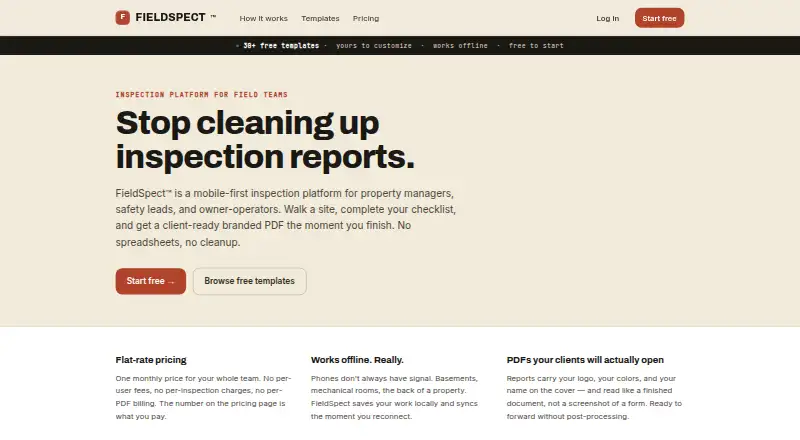
FieldSpect is an inspection platform for field teams, including property managers, safety leads, owner-operators, and restaurant general managers. Its Android, iOS, and web tools support inspections online or offline: the mobile app saves responses, photos, and signatures on the device until it can sync again. Inspections can capture pass, fail, or N/A answers, notes, measurements, multiple-choice responses, photos, and typed signatures. Users can start from more than 30 free templates, adapt them, or create checklists from scratch. Completing an inspection produces a PDF with an executive summary, findings, and details; it can be emailed automatically to a client with an email on file. The Free plan costs nothing and covers one user and 10 inspections per month. Solo Pro is $29 a month, Team is $99 a month, and Business is $199 a month. Paid plans raise user or inspection limits, and Business includes priority support. FieldSpect says its templates aid self-inspection but do not guarantee regulatory compliance.
Who it suits
FieldSpect suits field teams that need to complete and document inspections on mobile or web, including property managers and restaurant general managers. Its plan options cover individual users and teams of up to 25 users.
What it does well
- More than 30 free templates can be customized.
- Offline app saves responses, photos, and signatures.
- Inspection PDFs include summaries, findings, and details.
- Reports can be emailed automatically to clients.
What to know first
- Free plan is limited to 10 inspections monthly.
- Solo Pro supports one user.
- Templates do not guarantee regulatory compliance.
Limits
The Free plan is limited to one user and 10 inspections per month. Solo Pro supports one user, while Team supports up to 10 and Business up to 25; all three paid plans include unlimited inspections.
Plans
| Plan | Billed and limits | Price |
|---|---|---|
| Free | forever · 1 user · 10 inspections / month · PDF reports (FieldSpect footer) · Custom & library templates | Free |
| Business | $199/ month · Up to 25 users · Unlimited inspections · Fully branded PDF reports · Custom & library templates · Priority support | $199 a month |
| Solo Pro | $29/ month · 1 user · Unlimited inspections · Fully branded PDF reports · Custom & library templates | $29 a month |
| Team | $99/ month · Up to 10 users · Unlimited inspections · Fully branded PDF reports · Custom & library templates | $99 a month |
As fieldspect.com lists them, read 30 Sept 2026. The maker's own page has the final word.
Getting started
- Visit the FieldSpect website.
- Choose the Free plan for one user and up to 10 inspections per month, or select a paid plan.
- Use the Android or iOS app for mobile inspections, or access FieldSpect on the web.
- Choose and customize a template, or build a checklist from scratch.
FieldSpect is a mobile-first inspection app for field teams, especially property managers, safety leads, owner-operators, and restaurant general managers. Its offline capture and structured PDF reports make it a sensible choice for recurring site visits, but its modest seat caps and compliance caveat matter.
Overview
More than 30 free templates give teams a base for inspections, and they can customize those templates or build checklists from scratch. That flexibility serves different kinds of sites, but it puts responsibility on each team to define suitable questions and standards. FieldSpect says its templates are self-inspection aids and do not guarantee regulatory compliance.
Inspection records can combine pass, fail, or N/A responses with notes, measurements, multiple-choice answers, photos, and typed signatures. Finishing an inspection produces a PDF with an executive summary, findings, and details. The report can also be emailed automatically to a client whose address is on file, a useful way to shorten the reporting handoff.
Key features
Offline mobile capture
The Android and iOS app stores responses, photos, and signatures locally when offline, then syncs them after the device reconnects. That suits inspections in places with unreliable connectivity; it is not a substitute for teams that need data to sync immediately during a visit.
Reports and workflow
PDF reporting gives managers a consistent inspection record, while photo and signature capture can make individual findings more complete. Automatic client email reduces manual delivery steps when an address is on file. Workflow automation and GPS location capture are also listed as capabilities, though the described workflow does not detail how those functions operate.
Data handling
FieldSpect names Supabase, Stripe, Vercel, PostHog, Sentry, Resend, and Cloudflare as subprocessors used to deliver its service, not as product integrations. It says it has data processing agreements with them and requires processing of personal data only on its instructions and in compliance with applicable law.
Pricing
The Free plan costs nothing, billed forever, for one user and 10 inspections per month. It includes PDF reports and custom and library templates. That is a low-risk way for a solo operator to try a real monthly workflow, but the inspection cap makes it a poor fit for regular high-volume work.
Solo Pro costs $29 a month, billed $29/ month. It keeps the one-user limit while removing the inspection cap and adding fully branded PDF reports, alongside custom and library templates. It fits an individual who needs volume and branded output, but not a second inspector.
Team costs $99 a month, billed $99/ month, and supports up to 10 users with unlimited inspections, fully branded PDFs, and custom and library templates. This is the practical step up for a small crew sharing inspections. Business costs $199 a month, billed $199/ month, and raises the cap to 25 users with the same core allowances plus priority support. The pricing page says questions receive same-day responses, while priority support is included with Business.
Both team plans retain a firm user ceiling, so a larger operation would need a different arrangement. No trial term is given for FieldSpect's paid plans.
Platforms
FieldSpect is available on Android, iOS, and the web. Mobile apps support offline inspection capture; the platform listing does not describe an offline web workflow.
Who it's for
FieldSpect suits teams that need configurable site checklists, evidence capture, and a report they can pass to a client. Solo users can start free and move to Solo Pro when 10 inspections a month is too restrictive. Crews of up to 10 or 25 can choose the corresponding paid tier; organizations needing guaranteed regulatory coverage or more than 25 users should look elsewhere.
Pros and cons
- Pros: Offline capture saves responses, photos, and signatures for later syncing, making it useful at sites with patchy service.
- Pros: More than 30 templates, flexible response types, and PDF reporting cover the core inspection-to-report workflow.
- Pros: A permanent free tier lets one user complete up to 10 inspections monthly without paying.
- Cons: The free tier's 10-inspection monthly cap and one-seat limit constrain ongoing use.
- Cons: Paid plans remain capped at one, 10, or 25 users, which limits fit for larger teams.
- Cons: Templates do not guarantee regulatory compliance, so regulated teams must establish and validate their own standards.
Alternatives
For broader inspection and operational tools, compare the Inspection Software category. SafetyCulture (now Mitti) is worth considering if a larger free team allowance matters: its free plan supports up to 10 seats, with five active inspection templates and 300 AI credits per seat monthly, plus basic analytics, training, tasks, and issue reporting.
HammerTech may suit projects where subcontractors need access through the general contractor managing the project; that access is free, while its main plan uses tailored custom pricing. MaintainX is a better comparison for teams centered on work orders and procedures: its free Basic plan includes unlimited work orders, procedures, and requester users, with two work orders that can have attached procedures.
zInspector is another freemium option with a free plan. TradeBeyond Inspection is a paid option for web, iOS, and Android. Facilitron FIT is a paid option for iOS and Android.
GoAudits may appeal to buyers willing to pay per user for a starter package: its Starter plan is $10 a month with annual billing and includes one company or department, 25 locations or sites, and 10 checklist templates. Hyperlogs is another paid option, with a Small Teams plan offered by quote that includes forms and workflows, mobile apps, basic reporting, email support, and storage.
Verdict
Choose FieldSpect if your solo or small field team needs offline inspections, flexible checklists, and client-ready PDFs without a complicated reporting handoff. Its permanent free allowance and clear team tiers make it approachable, but the user caps and lack of a compliance guarantee are strong reasons to consider another product for larger or tightly regulated operations.
Verdict
FieldSpect combines customizable checklists, offline mobile inspections, and PDF reporting for field teams. Check the plan limits and remember that its templates are not a guarantee of regulatory compliance.
Questions
Is there a free plan?
Yes. The Free plan costs nothing, billed forever, and includes one user and 10 inspections per month.
How much do the paid plans cost?
Solo Pro is $29 a month, Team is $99 a month, and Business is $199 a month.
Which platforms does FieldSpect support?
FieldSpect is available on Android, iOS, and the web.
Can inspections be completed offline?
Yes. The mobile app saves responses, photos, and signatures locally while offline and syncs them when the device reconnects.
Do the templates ensure regulatory compliance?
No. FieldSpect describes them as self-inspection aids and says they do not guarantee regulatory compliance.
Facts from FieldSpect's own pages
- Compliance limitation
- FieldSpect says its templates are self-inspection aids and do not guarantee regulatory compliance. · fieldspect.com, 30 Sept 2026
- Data processing
- FieldSpect says it has data processing agreements with subprocessors and requires them to process personal data only on its instructions and in compliance with applicable law. · fieldspect.com, 30 Sept 2026
- Inspection inputs
- Inspections support pass, fail, or N/A responses, notes, measurements, multiple-choice answers, photos, and typed signatures. · fieldspect.com, 30 Sept 2026
- Integrations and service providers
- FieldSpect lists Supabase, Stripe, Vercel, PostHog, Sentry, Resend, and Cloudflare as subprocessors for service delivery; the page does not describe product integrations. · fieldspect.com, 30 Sept 2026
- Intended users
- FieldSpect describes itself as built for field teams including property managers, safety leads, owner-operators, and restaurant general managers. · fieldspect.com, 30 Sept 2026
- Offline use
- The mobile app saves inspection responses, photos, and signatures locally while offline and syncs when the device reconnects. · fieldspect.com, 30 Sept 2026
- Platforms
- The product has a web dashboard and mobile apps for iOS and Android; the web dashboard runs in a browser without installation. · fieldspect.com, 30 Sept 2026
- Reports
- Completing an inspection generates a PDF with an executive summary, findings, and details, and can automatically email it to a client with an email on file. · fieldspect.com, 30 Sept 2026
- Support
- The pricing page says FieldSpect responds to questions the same day and includes priority support with the Business plan. · fieldspect.com, 30 Sept 2026
- Templates
- It offers more than 30 free inspection templates that users can customize or use to build checklists from scratch. · fieldspect.com, 30 Sept 2026
- What it does
- FieldSpect is a mobile-first inspection platform for property managers, safety leads, owner-operators, and restaurant general managers. · fieldspect.com, 30 Sept 2026
Where FieldSpect stands on Freedom251
- Inspection Software#1 of 25