Freedom251 › 3D File Converter Software
FBX-glTF-conv
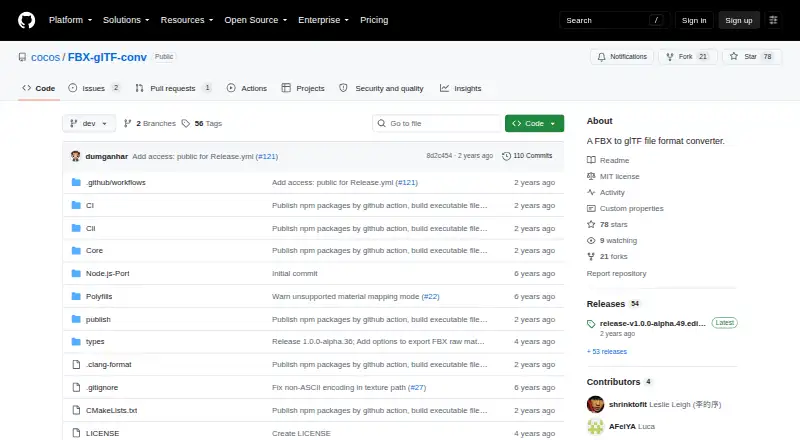
What FBX-glTF-conv is
FBX-glTF-conv is a free command-line utility that converts FBX files to glTF. Users specify an FBX input and an output path ending in .gltf or .glb. The project describes it as a component for Cocos Creator and as an alternative to FBX2glTF for that purpose. Listed conversion support includes meshes, scene hierarchy, skinning, blend shapes, and skeletal node transform and blend shape animations. Materials include Lambert and Phong, while textures can use JPEG or PNG images with options for resolving textures and controlling image paths. The project lists Windows, macOS, and Linux, and reports testing on Windows, macOS 10.13 or later, and Ubuntu 22.04; Ubuntu 20.04 is unsupported. Additive cluster mode, FBX-specific node inherit types, cameras, and lights are marked unfinished. Building requires Windows or macOS, FBX SDK 2019 or higher, vcpkg, and CMake. The software is available under the MIT License, which includes an as-is warranty disclaimer.
Who it suits
It suits developers who need a command-line FBX-to-glTF converter, particularly in a Cocos Creator workflow. Builders should check the unfinished feature list and build requirements.
What it does well
- Accepts .gltf and .glb output paths.
- Supports meshes, skinning, and blend shapes.
- Converts skeletal and blend shape animations.
- MIT licensed and free.
What to know first
- Cameras and lights are unfinished.
- Ubuntu 20.04 is unsupported.
- Building requires FBX SDK 2019 or higher, vcpkg, and CMake.
Limits
The project marks additive cluster mode, FBX-specific node inherit types, cameras, and lights as unfinished. Ubuntu 20.04 is unsupported; building requires Windows or macOS, FBX SDK 2019 or higher, vcpkg, and CMake.
Plans
| Plan | Billed and limits | Price |
|---|---|---|
| Free / MIT licensed | No paid tiers or usage limits stated | Free |
As github.com lists them, read 8 Oct 2026. The maker's own page has the final word.
Getting started
- Open the project repository and use its releases page to find a release.
- Run the executable from the command line with an FBX input path and a .gltf or .glb output path.
- Use a listed environment: Windows, macOS 10.13 or later, or Ubuntu 22.04.
- To build it, use Windows or macOS and install FBX SDK 2019 or higher, vcpkg, and CMake.
- File an issue in the repository for build problems.
FBX-glTF-conv is a free command-line converter for moving FBX assets into glTF or GLB files. It is best suited to developers and technical artists building scripted pipelines, especially around Cocos Creator. Its focused support for meshes, materials, textures, skinning, and animation is useful, but unfinished scene features limit it as a universal interchange tool.
Overview
The program runs as an executable that accepts an FBX input path and a glTF output path. You can choose a .gltf or .glb destination, which makes it a natural fit for repeatable, terminal-driven processing rather than occasional desktop conversion. The project is intended essentially as part of Cocos Creator and was created as an alternative to FBX2glTF for that workflow.
That narrow purpose is important when choosing it. A Cocos-oriented pipeline can use the converter without a paid account, subscription, or stated usage quota. A project that depends on complete FBX scene coverage should look elsewhere: additive cluster mode, FBX-specific node inherit types, cameras, and lights are marked unfinished.
Key features
Meshes, materials, and textures
Mesh conversion covers the central geometry task, while Lambert and Phong materials support the material types named by the project. JPEG and PNG images are supported, with options to resolve textures and control their paths. This combination suits game assets built around standard image textures and conventional shading; it does not promise coverage for material or scene constructs outside that stated scope.
Animation and scene data
The feature set includes skeletal node-transform animation and blend-shape animation, along with skinning, blend shapes (morph targets), and scene hierarchy. That is a meaningful base for characters and deforming assets: skeletal motion and morph-driven facial or shape changes can travel with the model. The unfinished camera, light, inherit-type, and additive-cluster work means cinematic or technically complex FBX scenes may need another converter or follow-up processing.
Command-line workflow
Because input and output are supplied as paths to an executable, the tool is oriented toward build scripts and asset pipelines. It is a good match for teams that already automate conversion and a poor fit for users expecting a graphical batch queue or visual scene inspection.
Pricing
| Plan | Price | Includes |
|---|---|---|
| Free / MIT licensed | free | No paid tiers or usage limits stated |
The free plan is the entire commercial offering described: software under the MIT License, with no paid tier or stated conversion cap. It suits personal, commercial, and pipeline use where the license and command-line model fit. The MIT license includes an as-is warranty disclaimer, so teams remain responsible for evaluating the converter in their own production process.
Platforms
FBX-glTF-conv supports Windows, macOS, and Linux. The project says it has been tested on Windows, macOS 10.13 or later, and Ubuntu 22.04; Ubuntu 20.04 is unsupported. Building is a separate consideration: the requirements include Windows or macOS, FBX SDK 2019 or higher, vcpkg, and CMake. Users who only need a released executable may avoid that build work, while organizations compiling their own version should budget for those dependencies. Build problems are directed to the project's issue tracker, and the releases page lists version 1.0.0-alpha.54.
Who it's for
This is for Cocos Creator developers, technical artists, and pipeline engineers who need deterministic FBX-to-glTF conversion in scripts and whose assets center on meshes, standard materials, textures, skinning, and skeletal or blend-shape animation. It is less appropriate for artists wanting a graphical converter, for Ubuntu 20.04 deployments, or for productions whose FBX files rely heavily on cameras, lights, additive clusters, or FBX-specific node inheritance.
Pros and cons
- Pros: Free MIT-licensed distribution removes subscription and usage-cost concerns.
- Pros: glTF and GLB output, texture-path controls, skinning, morph targets, hierarchy, and two animation categories cover a useful game-asset pipeline.
- Pros: Windows, macOS, and Linux support broadens deployment options.
- Cons: Cameras, lights, additive cluster mode, and FBX-specific inherit types remain unfinished.
- Cons: Building requires the FBX SDK 2019 or newer plus vcpkg and CMake, and Ubuntu 20.04 is unsupported.
Alternatives
Choose HOOPS Exchange instead when you need broad platform coverage and a paid evaluation with full access, 60 days, and technical expert support. CAD Assistant is a free cross-platform option for personal and commercial use, though commercial import components restrict model export and conversion.
Open Asset Import Library (Assimp) suits developers wanting a free, self-hostable library under a modified three-clause BSD license. Convert3D is preferable when an API and defined quotas matter: its free tier allows 10 conversions per month, with paid annual tiers available. ODA File Converter is another free option for CAD-focused workflows. Spin 3D offers a free version for non-commercial use on macOS, web, and Windows. meshio is a free MIT-licensed choice for mesh conversion, with NumPy at its core and optional dependencies for some formats.
Verdict
Choose FBX-glTF-conv if you need a free, scriptable FBX-to-glTF/GLB step for Cocos Creator or a similar asset pipeline and your content fits its supported geometry, texture, skinning, and animation model. Look elsewhere when you need finished camera and light conversion, broader FBX scene fidelity, a graphical interface, or a build environment that cannot meet its SDK and operating-system requirements.
Verdict
FBX-glTF-conv covers meshes, materials, textures, and several animation types in a free command-line tool. Its unfinished FBX features and specific build requirements matter when assessing fit.
Questions
Does FBX-glTF-conv cost anything?
It is listed as free under the MIT License, with no paid tiers or usage limits stated.
What formats can it output?
The output path can end in .gltf or .glb.
Which operating systems does it support?
The project lists Windows, macOS, and Linux. It reports testing on Windows, macOS 10.13 or later, and Ubuntu 22.04; Ubuntu 20.04 is unsupported.
What data can it convert?
Listed support includes meshes, Lambert and Phong materials, JPEG and PNG textures, skinning, scene hierarchy, blend shapes, and skeletal node transform and blend shape animations.
Is it open source?
The repository provides it under the MIT License, which includes an as-is warranty disclaimer.
What is required to build it?
Building requires Windows or macOS, FBX SDK 2019 or higher, vcpkg, and CMake.
Facts from FBX-glTF-conv's own pages
- Animation
- Listed supported features include skeletal node transform animations and blend shape animations. · github.com, 8 Oct 2026
- Build requirements
- Building requires Windows or macOS, FBX SDK 2019 or higher, vcpkg, and CMake. · github.com, 8 Oct 2026
- Command line
- The converter runs as an executable from the command line and accepts an FBX input and glTF output path. · github.com, 8 Oct 2026
- Geometry and materials
- Listed supported features include meshes and Lambert and Phong materials. · github.com, 8 Oct 2026
- Incomplete features
- The README marks additive cluster mode, FBX-specific node inherit types, cameras, and lights as unfinished. · github.com, 8 Oct 2026
- Integration
- The README describes the converter as part of Cocos Creator and says it was created as an alternative to FBX2glTF for that use. · github.com, 8 Oct 2026
- Intended use
- The project says it is essentially used as part of Cocos Creator. · github.com, 8 Oct 2026
- License
- The repository provides the software under the MIT License, which includes an as-is warranty disclaimer. · github.com, 8 Oct 2026
- Operating systems
- The project says it has been tested on Windows, macOS 10.13 or later, and Ubuntu 22.04, and that Ubuntu 20.04 is unsupported. · github.com, 8 Oct 2026
- Other supported data
- The feature list includes skinning, blend shapes (morph targets), and scene hierarchy. · github.com, 8 Oct 2026
- Output formats
- The output path can be a .gltf or .glb file. · github.com, 8 Oct 2026
- Purpose
- FBX-glTF-conv converts FBX files to glTF files. · github.com, 8 Oct 2026
- Release channel
- The repository links to a releases page for the latest release; the page lists version 1.0.0-alpha.54. · github.com, 8 Oct 2026
- Support
- The README directs users to file an issue if they encounter build problems. · github.com, 8 Oct 2026
- Textures
- The converter supports JPEG and PNG images and provides options to resolve textures and control image paths. · github.com, 8 Oct 2026
Where FBX-glTF-conv stands on Freedom251
- 3D File Converter Software#7 of 31