Freedom251 › 3D File Converter Software

Convert3D
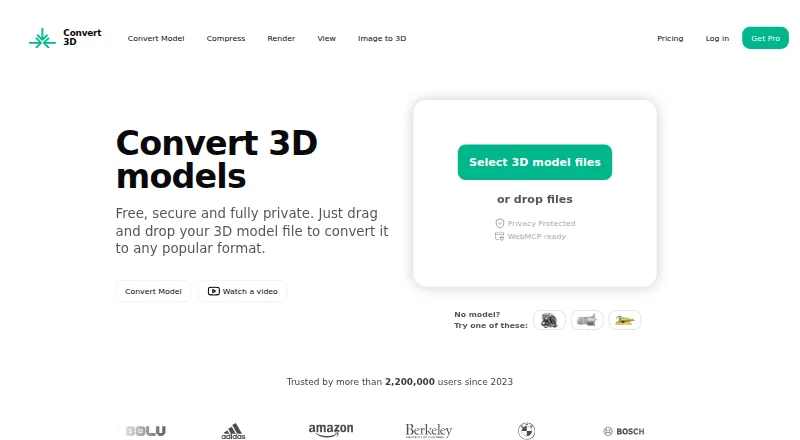
What Convert3D is
Convert3D converts 3D models between formats, including FBX, OBJ, USDZ and STEP; its website lists more than 1,000 possible conversions. The browser converter uses WebAssembly for local processing and says files stay on the user's computer, although its privacy policy notes that some files may be handled on Convert3D or partner servers. API processing takes place server-side. Users can preview a model by rotating, zooming and panning, and the browser viewer can show scene hierarchy, node properties, material details, wireframe view and material maps. A compressor offers low, medium and high presets plus optional geometry, quantization and texture settings, and advertises compression up to 80%. A desktop app is available for Mac, Windows and Linux. Developers can use the REST API for batch conversions in applications, pipelines and automation workflows. The Free API plan costs nothing for 10 conversions; paid plans start at $899 a year for 5,000 conversions. Plans are also listed at $1,799 a year and $4,899 a year, with custom enterprise pricing for more than 100,000 conversions annually.
Who it suits
Convert3D may suit people who need to convert, inspect or compress 3D models across formats. Its API is aimed at applications, pipelines and automation workflows.
What it does well
- Website lists more than 1,000 possible format conversions.
- Browser preview includes rotate, zoom and pan.
- Desktop app supports Mac, Windows and Linux.
- REST API supports batch operations.
- Free API plan includes 10 conversions monthly.
What to know first
- Some website files may be processed on external servers.
- API processing is server-side.
- Paid plans start at $899 a year.
Limits
The Free API plan includes 10 conversions per month. The Starter plan costs $899 a year and includes 5,000 conversions per year.
Plans
| Plan | Billed and limits | Price |
|---|---|---|
| Free API | $0/month · 10 conversions/month · no commitment | Free |
| Growth | $1,799/year · 15,000 conversions/year | $1,799 a year |
| Scale | $4,899/year · 100,000 conversions/year | $4,899 a year |
| Starter | $899/year · 5,000 conversions/year | $899 a year |
| Custom enterprise | Contact sales for custom enterprise plans · For more than 100,000 conversions/year | On request |
As convert3d.org lists them, read 28 Sept 2026. The maker's own page has the final word.
Getting started
- Visit https://convert3d.org/ to use the browser converter.
- Preview a model in 3D and export it in the required format.
- For file system access, use the desktop app on Mac, Windows or Linux.
- For integrations or batch workflows, use the REST API.
- Start with the Free API plan for 10 conversions per month, or choose a paid plan.
Convert3D suits designers and developers who need to move models across many 3D formats, inspect them, or automate conversions. Its range of workflows is a strength, but privacy depends on how a file is processed.
Overview
Convert3D converts 3D models across more than 1,000 possible format conversions, including FBX, OBJ, USDZ, and STEP. That breadth is useful for mixed-format work, and batch conversion extends its appeal beyond occasional file swaps.
The browser converter uses WebAssembly for local processing and says files do not leave the computer. That is a useful option for sensitive work, but it is not a blanket guarantee: some website conversions may be processed on Convert3D or partner servers, and API processing is server-side. The API says models are encrypted in transit and at rest and automatically deleted after processing.
Key features
Preview and inspection
The browser converter previews models in 3D, with controls to rotate, zoom, and pan before export. The viewer also exposes scene hierarchy, node properties, material details, wireframe view, and material maps. These tools help users inspect a model's structure and appearance before committing to a conversion.
Compression
Low, medium, and high presets provide a straightforward starting point, while optional geometry, quantization, and texture settings allow more control. The compressor advertises reductions of up to 80%; that is a maximum claim, not a guarantee for every model.
Desktop and API workflows
The desktop app opens models from the file system on Mac, Windows, and Linux, giving users a non-browser route. Developers can use the REST API to integrate conversion into applications, pipelines, and automation workflows, including batch operations. The API is the clearest fit for recurring or scaled conversions, though it means accepting server-side processing.
Pricing
Convert3D has a free plan and paid API plans priced by annual conversion quota. The free API plan costs nothing, billed $0/month, and includes 10 conversions/month with no commitment. It is suited to prototypes or light evaluation, but its monthly cap is modest.
| Plan | Price and term | Included quota | Best fit |
|---|---|---|---|
| Starter | $899 a year, billed $899/year | 5,000 conversions/year | Growing use beyond the free allowance |
| Growth | $1,799 a year, billed $1,799/year | 15,000 conversions/year | Higher-volume business workflows |
| Scale | $4,899 a year, billed $4,899/year | 100,000 conversions/year | Large recurring workloads |
| Custom enterprise | Custom pricing | More than 100,000 conversions/year | Enterprise-scale usage |
The paid tiers raise the annual quota, making the choice mainly a question of expected throughput. The plans are described in terms of prototypes, growing businesses, and enterprise use, but seat counts and overage terms are not provided. The free plan's 10-conversion monthly cap is the meaningful constraint for ongoing use.
Platforms
Convert3D supports web, Windows, macOS, Linux, and API access. The browser and desktop routes cover individual file work, while API access targets integration and automation.
Who it's for
Convert3D is a strong fit for people handling varied 3D formats who value in-browser preview and inspection, and for developers who need conversion in an application or pipeline. It is less suitable when a workflow requires a clear assurance that every file stays local: only the browser's local-processing route is described that way, and some website processing may use servers.
Pros and cons
- Pros: Broad format coverage, including USDZ and STEP, suits mixed-format workflows.
- Pros: Preview, scene inspection, and configurable compression bring useful review tools alongside conversion.
- Pros: Desktop apps and a batch-capable REST API serve both file-by-file work and automation.
- Cons: Processing location varies by workflow, so privacy-conscious users must distinguish local browser conversion from server-side routes.
- Cons: The free API allowance is only 10 conversions/month, and paid plans require annual billing.
Alternatives
For a wider comparison, see 3D File Converter Software.
- Choose HOOPS Exchange if you want a paid option with a 60-day full-access evaluation and technical expert support.
- Choose CAD Assistant for free personal and commercial use, but note that commercial import components restrict model export and conversion.
- Choose Open Asset Import Library (Assimp) if a free library under a modified three-clause BSD license fits your workflow; its product must include the license text.
- Choose ODA File Converter for a free alternative from a non-profit technology consortium focused on CAD and BIM interoperability.
- Choose Spin 3D if a free version for non-commercial use suits your needs.
- Choose FBX-glTF-conv for a free, MIT-licensed option without stated paid tiers or usage limits.
- Choose FBX2glTF for an open-source option if the FBX SDK 2019.2 restriction is acceptable.
- Choose meshio for free MIT-licensed software if its NumPy core and optional netCDF4 and h5py dependencies fit your environment.
Verdict
Convert3D is a sound choice for users who need broad 3D format conversion with inspection tools, or developers who want a batch-capable API. Its strongest reason to choose it is the combination of format reach and browser, desktop, and automation workflows; look elsewhere if you need a guaranteed local-only path for every conversion or a larger free API quota.
Verdict
Convert3D offers browser, desktop and API paths for working with 3D formats, with preview and compression tools. Its local-processing statement has exceptions, so review the privacy limits if file handling matters.
Questions
How much does Convert3D cost?
The Free API plan costs nothing. Paid plans cost $899 a year, $1,799 a year or $4,899 a year; custom enterprise pricing is available by contacting sales.
What does the free plan include?
The Free API plan includes 10 conversions per month with no commitment.
Which formats does it support?
The website lists more than 1,000 possible format conversions, including FBX, OBJ, USDZ and STEP.
Which platforms are supported?
Convert3D lists web, Windows, macOS, Linux and API. Its desktop app is available for Mac, Windows and Linux.
Can developers use an API?
Yes. The REST API supports batch operations for applications, pipelines and automation workflows. API processing is server-side.
How are files processed?
The browser converter processes models locally using WebAssembly and says files do not leave the computer. The privacy policy says some files may be handled by Convert3D or partner servers, while API processing is server-side.
Facts from Convert3D's own pages
- API
- The developer API is a REST API for integrating 3D model conversion into applications, pipelines, and automation workflows, with batch operations. · convert3d.org, 28 Sept 2026
- API security
- The API page says models are encrypted in transit and at rest and automatically deleted after processing. · convert3d.org, 28 Sept 2026
- Browser conversion
- The online converter processes models locally in the browser using WebAssembly and says files do not leave the user's computer. · convert3d.org, 28 Sept 2026
- Compression
- The compressor offers low, medium, and high presets, with optional geometry, quantization, and texture settings; it advertises compression up to 80%. · convert3d.org, 28 Sept 2026
- Desktop app
- Convert3D offers a desktop app for Mac, Windows, and Linux that opens 3D models from the file system. · convert3d.org, 28 Sept 2026
- Format support
- The website says it supports more than 1,000 possible format conversions, including USDZ and STEP. · convert3d.org, 28 Sept 2026
- Headquarters
- Copenhagen, Denmark and Zurich, Switzerland · convert3d.org, 28 Sept 2026
- Intended users
- The API page describes the service as suited to applications, pipelines, and automation workflows, with plan descriptions for prototypes, growing businesses, and enterprise usage. · convert3d.org, 28 Sept 2026
- Preview
- The converter previews models in 3D so users can rotate, zoom, and pan before exporting. · convert3d.org, 28 Sept 2026
- Privacy limits
- The privacy policy says most website conversion is local, but some files may be processed on Convert3D or partner servers, and API processing is server-side. · convert3d.org, 28 Sept 2026
- Purpose
- Convert3D converts 3D models between a wide range of formats, including FBX and OBJ. · convert3d.org, 28 Sept 2026
- Support
- The maker lists [email protected] for contact and links to a Discord community. · convert3d.org, 28 Sept 2026
- Viewer
- The browser viewer can show scene hierarchy, node properties, material details, wireframe view, and material maps. · convert3d.org, 28 Sept 2026
Where Convert3D stands on Freedom251
- 3D File Converter Software#2 of 31