
FAB Subtitler
What FAB Subtitler is
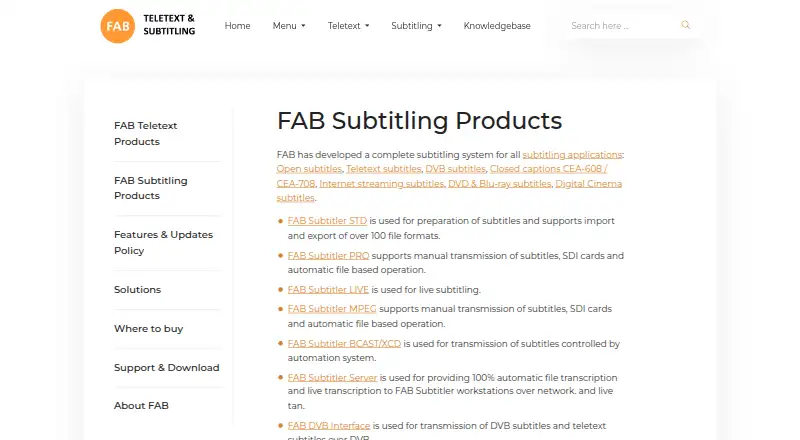
FAB Subtitler is a Windows subtitling system from FAB, the trading name of F.A. Bernhardt GmbH in Bad Tölz, Germany. Its product family covers subtitle work for open captions, teletext, DVB, closed captions, streaming, DVD and Blu-ray, and digital cinema. The STD edition is for preparing subtitles, with import and export support for more than 100 subtitle file formats. It includes a WYSIWYG editor, timecode entry, spell checking, subtitle validation, and AI-assisted subtitle checking and acceptance. PRO adds manual SDI subtitle insertion and decoding, along with watchfolder workflows for conversion, transport-stream insertion, and video-to-MP4 conversion. LIVE is aimed at broadcast subtitling, supporting prepared subtitles, real-time typing, and speech-recognized subtitles. Its listed news-system interfaces include iNEWS, ENPS, Openmedia, Octopus, MOS protocol, and XML import. LIVE also supports TS over IP and HD/SD-SDI live video signals, with speech-recognition options including Dragon NaturallySpeaking, Newton, FAB Subtitler Server, Microsoft, Google, and Speechmatics. Desktop editions require Windows 10/11 or Windows Server 2019 or higher, 16 GB RAM, and a quad-core CPU. A fully functional demo is available, limited to 20 subtitles per file. Pricing is available on request, and buyers are directed to FAB or a regional distributor.
Who it suits
FAB Subtitler suits subtitle teams preparing files across many formats, especially those needing timing, validation, and editing tools on Windows. Broadcast workflows may suit LIVE, while PRO is aimed at users needing SDI insertion or watchfolder-based processing.
What it does well
- STD imports and exports more than 100 subtitle file formats.
- STD includes timecode entry, spell check, and subtitle validation.
- PRO adds manual SDI subtitle insertion and decoding.
- LIVE supports prepared, typed, and speech-recognized subtitles.
- A demo is available with full functionality up to 20 subtitles per file.
What to know first
- Desktop editions require Windows 10/11 or Windows Server 2019 or higher.
- Desktop requirements include 16 GB RAM and a quad-core CPU.
- Pricing is available on request rather than as a listed price.
Limits
The fully functional demo permits up to 20 subtitles per subtitle file. The desktop editions require Windows 10/11 or Windows Server 2019 or higher, 16 GB RAM, and a quad-core CPU.
Getting started
- Visit the FAB Subtitler website.
- Download the Subtitler demo to try files of up to 20 subtitles.
- Choose STD, PRO, or LIVE based on the listed subtitle workflow needs.
- Contact FAB headquarters or a regional distributor to purchase.
- For licensed downloads, create an account with an email address and use the supplied serial number.
Verdict
Choose FAB Subtitler if your subtitle work needs broad format support, detailed editing, or broadcast-focused workflows. Check the edition requirements and contact FAB or a regional distributor for pricing before choosing a license.
Questions
How much does FAB Subtitler cost?
FAB lists pricing on request. Prospective buyers can contact its headquarters or a regional distributor.
Is there a free trial?
Yes. FAB offers a Subtitler demo download, which allows up to 20 subtitles per subtitle file.
Which platforms does FAB Subtitler support?
The listed platform is Windows. Desktop editions require Windows 10/11 or Windows Server 2019 or higher.
What does STD include?
STD prepares subtitles and supports importing and exporting more than 100 subtitle file formats. It includes a WYSIWYG editor, timecode entry, spell checking, validation, and AI subtitle checking and acceptance.
What support comes with a license?
The listed STD and LIVE editions include 12 months of software updates and 12 months of technical support.
Who makes FAB Subtitler?
It is made by F.A. Bernhardt GmbH, which trades as FAB and is registered in Bad Tölz, Germany.
Facts from FAB Subtitler's own pages
- Auto-captioning
- Yes · fab-online.com, 20 Sept 2026
- Company
- The maker identifies itself as F.A. Bernhardt GmbH, trading as FAB, incorporated in Germany and registered at Melkstattweg 27, 83646 Bad Tölz, Germany. · fab-online.com, 7 Oct 2026
- Company and headquarters
- F.A. Bernhardt GmbH, trading as FAB, is registered in Germany and gives its registered address as Melkstattweg 27, 83646 Bad Tölz, Germany. · fab-online.com, 7 Oct 2026
- Demo limit
- The fully functional demo permits a maximum of 20 subtitles per subtitle file. · fab-online.com, 7 Oct 2026
- Editing tools
- STD includes a WYSIWYG editor, subtitle timing and editing functions, spell check, and AI functionality for subtitle checking and acceptance. · fab-online.com, 7 Oct 2026
- Editor tools
- STD includes a WYSIWYG editor, timecode entry, spell check, subtitle validation and AI subtitle check/acceptance functionality. · fab-online.com, 7 Oct 2026
- Hardware and signals
- LIVE supports TS over IP and HD/SD-SDI live video signals. · fab-online.com, 7 Oct 2026
- Headquarters
- Bad Tölz, Germany · fab-online.com, 28 Sept 2026
- Licensed downloads
- Licensed FAB software downloads require a serial number and an account created with an email address; the site also offers a Subtitler demo download. · fab-online.com, 7 Oct 2026
- License support
- The listed STD and LIVE editions include a software license, 12 months of software updates and 12 months of technical support. · fab-online.com, 7 Oct 2026
- Live subtitling
- LIVE supports prepared subtitles, real-time typing and speech-recognized subtitles for broadcast workflows. · fab-online.com, 7 Oct 2026
- News integrations
- LIVE lists iNEWS, ENPS, Openmedia, Octopus, MOS protocol and XML import as supported news-system interfaces. · fab-online.com, 7 Oct 2026
- Output and API
- The edition comparison page says subtitle conversion and insertion can be controlled through XML command files and a RESTful API. · fab-online.com, 7 Oct 2026
- Platform requirements
- The desktop editions require Windows 10/11 or Windows Server 2019 or higher, 16 GB RAM and a quad-core CPU. · fab-online.com, 7 Oct 2026
- Privacy and data
- FAB's privacy statement says it is a data controller for personal data gathered from users and describes processing data to provide services and customer support. · fab-online.com, 7 Oct 2026
- Privacy and security
- FAB says it uses reasonable physical, technical, and administrative safeguards and that hosting includes Hetzner Online AG and Microsoft Azure. · fab-online.com, 7 Oct 2026
- Product suite
- FAB offers a suite covering open, teletext, DVB, closed-caption, streaming, DVD/Blu-ray and digital-cinema subtitling. · fab-online.com, 7 Oct 2026
- PRO edition
- PRO adds manual SDI subtitle insertion and decoding, plus watchfolder-based conversion, transport-stream insertion and video-to-MP4 conversion. · fab-online.com, 7 Oct 2026
- PRO workflows
- PRO supports manual SDI subtitle insertion and watchfolder workflows for subtitle conversion, transport-stream insertion, video conversion, extraction, and transcription using cloud providers. · fab-online.com, 7 Oct 2026
- Purchase
- FAB directs buyers to contact a distributor based on location, with F.A. Bernhardt GmbH serving Germany, Austria, Switzerland, and countries not listed. · fab-online.com, 7 Oct 2026
- Purpose
- FAB describes its product family as a subtitling system for open, teletext, DVB, closed-caption, streaming, DVD, Blu-ray, and digital-cinema applications. · fab-online.com, 7 Oct 2026
- Sales
- FAB directs prospective buyers to contact its headquarters or a regional distributor to purchase products. · fab-online.com, 7 Oct 2026
- Speaker labels
- Yes · fab-online.com, 20 Sept 2026
- Speech recognition integrations
- LIVE lists Dragon NaturallySpeaking, Newton and live transcription services including FAB Subtitler Server, Microsoft, Google and Speechmatics. · fab-online.com, 7 Oct 2026
Where FAB Subtitler stands on Freedom251
- Subtitle tools#24 of 31
- Subtitle Software#26 of 31