Freedom251 › Transcription Software
f4transkript
by f4transkript
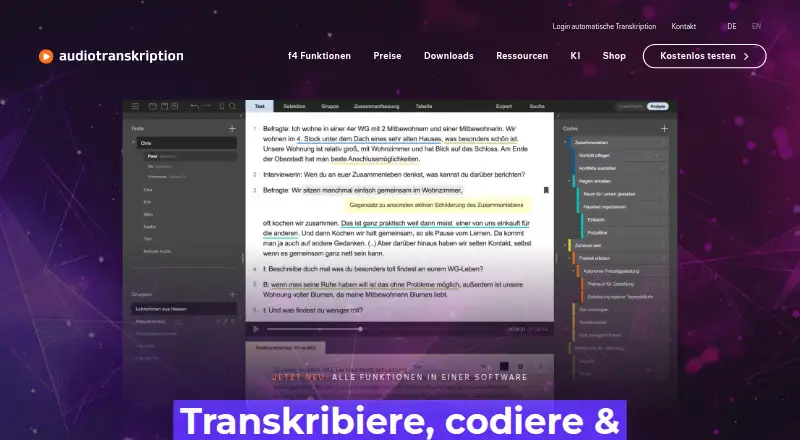
What f4transkript is
f4 brings f4transkript, f4x and f4analyse together in one interface for automatic and manual transcription, correction and qualitative text analysis. Automatic transcription offers speaker differentiation, pause marking, timestamps and custom word lists, with downloads in DOCX, RTF and SRT. Manual workflows include variable playback speed, rewind intervals, timestamps, text blocks and USB foot pedal support. Analysis tools include codes, memos, comments, quote filtering, case and group comparisons, and exports to Word and Excel. The software supports 46 languages and runs on Linux, macOS, web and Windows. Without a license, the demo is limited to 10 texts, 10 codes and five minutes of playback; new accounts also receive 15 minutes of automatic transcription at no charge. The maker says automated transcription runs on its servers in Germany with encrypted transfer and storage, while manual transcription and analysis run locally without data transfer. For mixed-language recordings, only the language selected at upload is recognized, so passages in other languages may be blank or inaccurate. Listed prices include €25.00 per month for a two-hour automatic transcription plan.
Who it suits
f4 suits people doing transcription and qualitative research, including individual users, students, teachers and institutions. It supports both automated transcription and local manual work and analysis.
What it does well
- Supports 46 languages across four listed platforms
- Automatic transcription includes speaker differentiation and timestamps
- Manual workflow supports USB foot pedals
- Analysis includes codes, memos and group comparisons
- New accounts receive 15 minutes of automatic transcription
What to know first
- Unlicensed demo is limited to 10 texts and 10 codes
- Demo playback is limited to five minutes
- Mixed-language recordings may have blank or inaccurate passages
Plans
| Plan | Billed and limits | Price |
|---|---|---|
| Student license (3 months) | 3 months | €25 a month |
| Student license (3 months) | 3 months | €25, paid once |
| Student license (6 months) | 6 months | €33 a month |
| Student license (6 months) | 6 months | €33, paid once |
| f4 (6 months) | 6 months | €149 a month |
| f4 (6 months) | 6 months | €149, paid once |
| f4 (2 years) | 2 years | €299 a month |
| f4 (2 years) | 2 years | €299, paid once |
The first 8 of 25 plans, as audiotranskription.de lists them, read 23 Sept 2026. The maker's own page has the final word. Every plan
Verdict
f4 combines transcription, correction and qualitative analysis tools in one interface, with both automatic and manual workflows. The demo has defined limits, and mixed-language recordings may need attention because only the upload-selected language is recognized.
Facts from f4transkript's own pages
- Analysis tools
- Qualitative analysis includes codes, memos, comments, quote filtering, case and group comparisons, and export to Word and Excel. · audiotranskription.de, 8 Oct 2026
- Company history
- The company history says audiotranskription began in 2004 and its website and first f4transkript release went online in March 2005. · audiotranskription.de, 8 Oct 2026
- Export formats
- DOCX,RTF,SRT · audiotranskription.de, 23 Sept 2026
- Free access
- Without a license, f4 runs as a demo limited to 10 texts, 10 codes, and 5 minutes of playback; new f4 accounts receive 15 minutes of automatic transcription free. · audiotranskription.de, 8 Oct 2026
- Free plan
- No · audiotranskription.de, 23 Sept 2026
- Headquarters
- Marburg, Germany · audiotranskription.de, 4 Oct 2026
- Integrations and export
- The maker lists Word and Excel exports for analysis results, plus transcript downloads in Word, f4transkript RTF, and subtitle SRT formats. · audiotranskription.de, 8 Oct 2026
- Intended users
- The maker presents f4 for transcription and qualitative research work, with individual, student, teaching, institutional, and campus license options. · audiotranskription.de, 8 Oct 2026
- Languages supported
- 46 · audiotranskription.de, 23 Sept 2026
- Manual workflow
- Manual transcription and correction include variable playback speed, rewind interval, timestamps, text blocks, and USB foot pedal support. · audiotranskription.de, 8 Oct 2026
- Notable limitation
- For mixed-language recordings, the service recognizes only the language selected at upload, so other-language passages may be blank or inaccurate. · audiotranskription.de, 8 Oct 2026
- Platforms
- The desktop app is available for Windows 10 or later and macOS 12 or later; Linux is offered as an untested version without official support, and automatic transcription is also available in a browser. · audiotranskription.de, 8 Oct 2026
- Product status
- f4 now combines f4transkript, f4x, and f4analyse in one interface. · audiotranskription.de, 8 Oct 2026
- Purpose
- f4 supports automatic and manual transcription, correction, and qualitative analysis of text. · audiotranskription.de, 8 Oct 2026
- Security
- The maker says automatic transcription runs on its own servers in Germany, uses encrypted transfer and storage, and is GDPR-compliant; manual transcription and analysis run locally without data transfer. · audiotranskription.de, 8 Oct 2026
- Speaker identification
- Yes · audiotranskription.de, 23 Sept 2026
- Support
- The maker provides an online handbook, video tutorials, free training resources, and weekday contact by phone and email. · audiotranskription.de, 8 Oct 2026
- Timestamp support
- Yes · audiotranskription.de, 23 Sept 2026
- Transcription features
- Automatic transcription offers speaker differentiation, pause marking, timestamps, custom word lists, and downloads in DOCX, RTF, and SRT formats. · audiotranskription.de, 8 Oct 2026
Where f4transkript stands on Freedom251
- Transcription Software#6 of 46
- AI transcription tools#19 of 46
- Transcription tools#16 of 28