Freedom251 › Photo Metadata Editors

ExifPurge
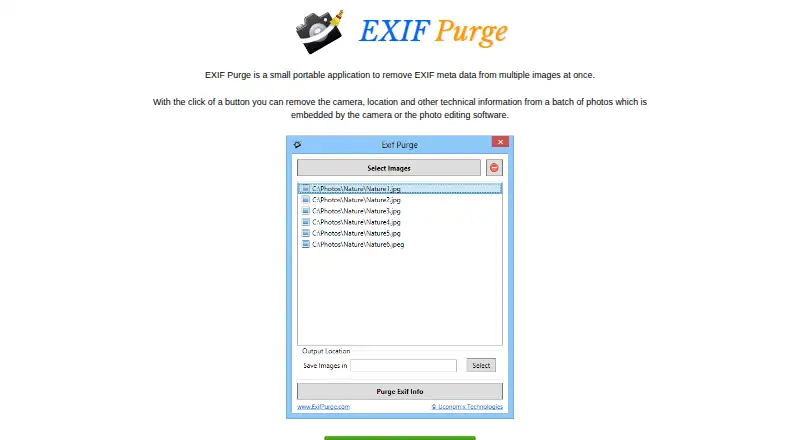
What ExifPurge is
ExifPurge removes EXIF metadata from photos, including camera details, location information and other technical data embedded by cameras or photo-editing software. Its portable desktop application can process multiple images in one click. The maker provides a Windows download; listed platforms also include macOS and an extension. To run the portable application, download the ZIP file, extract it and launch it.
The browser extension supports JPEG, PNG, WebP and animated GIF. It can remove GPS coordinates, dates and times, camera details, software history, IPTC and XMP fields, comments and notes. The listing says it processes images locally without network requests and preserves the original format and pixel data without re-encoding. It keeps the ICC color profile by default, with an option to remove it. Users can download a cleaned copy, copy it to the system clipboard or view a summary of removed metadata. TIFF is not supported by the extension. ExifPurge is free and is a product of Uconomix Technologies LLP.
Who it suits
ExifPurge suits people who want to remove metadata from photos, either in batches with the portable application or through a browser extension. The extension offers local processing and supports several common image formats.
What it does well
- Free plan is available.
- Desktop app can process multiple photos in one click.
- Extension preserves image format and pixel data.
- Extension processes images locally without network requests.
- Cleaned images can be downloaded or copied.
What to know first
- Extension does not support TIFF.
- Product page does not describe support terms.
Limits
The extension supports JPEG, PNG, WebP and animated GIF, but not TIFF. The desktop download provided by the maker is for Windows.
Getting started
- Visit exifpurge.com.
- For the portable application, download the ZIP file, extract it and run the application.
- Use the Chrome extension with JPEG, PNG, WebP or animated GIF images.
- Choose whether to keep the ICC color profile, then download a cleaned copy, copy it to the clipboard or review the removal summary.
Verdict
ExifPurge combines batch metadata removal in a portable application with a format-preserving browser extension. Check the extension’s TIFF limitation and the desktop download details for your platform before choosing how to use it.
Questions
Does ExifPurge cost anything?
ExifPurge is free and has a free plan.
Which platforms are listed?
The listed platforms are extension, macOS and Windows; the maker provides a Windows desktop download.
What image formats does the extension support?
It supports JPEG, PNG, WebP and animated GIF. TIFF is not supported.
What metadata can it remove?
The extension listing names GPS coordinates, date and time, camera details, software history, IPTC and XMP fields, comments and notes.
Does the extension send images over a network?
The listing says images are processed locally and the extension makes zero network requests.
Who makes ExifPurge?
The product page identifies Uconomix Technologies LLP as the maker.
Facts from ExifPurge's own pages
- Batch processing
- The maker says users can remove metadata from a batch of photos with one click. · exifpurge.com, 9 Oct 2026
- Browser extension
- A Chrome Web Store listing describes an ExifPurge extension for removing image metadata locally. · chromewebstore.google.com, 9 Oct 2026
- Color profiles
- The extension keeps the ICC color profile by default and offers a toggle to remove it. · chromewebstore.google.com, 9 Oct 2026
- Download instructions
- The maker instructs users to download a ZIP file, extract the application and run it. · exifpurge.com, 9 Oct 2026
- Extension formats
- The extension listing names JPEG, PNG, WebP, and animated GIF as supported formats. · chromewebstore.google.com, 9 Oct 2026
- Extension limitations
- The listing says TIFF is not supported because browsers cannot reliably decode it. · chromewebstore.google.com, 9 Oct 2026
- Extension privacy
- The listing says the extension processes images locally, makes zero network requests, and uses storage permission for settings. · chromewebstore.google.com, 9 Oct 2026
- Integrations
- The maker's page describes standalone photo processing and does not state any integrations. · exifpurge.com, 9 Oct 2026
- Lossless processing
- The listing says the extension preserves the original image format and pixel data without re-encoding. · chromewebstore.google.com, 9 Oct 2026
- Maker
- The product page identifies EXIF Purge as a product of Uconomix Technologies LLP. · exifpurge.com, 9 Oct 2026
- Metadata removed
- It removes camera, location and other technical information embedded in photos by cameras or photo editing software. · exifpurge.com, 9 Oct 2026
- Metadata types
- The extension listing says it removes GPS coordinates, date and time, camera details, software history, IPTC and XMP fields, comments, and notes. · chromewebstore.google.com, 9 Oct 2026
- Output options
- The extension can download a cleaned copy, copy the image to the system clipboard, and show a summary of removed metadata. · chromewebstore.google.com, 9 Oct 2026
- Platform
- The maker provides a Windows download. · exifpurge.com, 9 Oct 2026
- Portable app
- The maker describes EXIF Purge as a portable application. · exifpurge.com, 9 Oct 2026
- Purpose
- EXIF Purge is a small portable application that removes EXIF metadata from multiple images at once. · exifpurge.com, 9 Oct 2026
- Security and trust
- The maker's product page does not state security certifications, compliance claims or specific file handling practices. · exifpurge.com, 9 Oct 2026
- Support
- The Chrome Web Store listing directs users to the developer's support site for questions, suggestions, or problems. · chromewebstore.google.com, 9 Oct 2026
Where ExifPurge stands on Freedom251
- Photo Metadata Editors#11 of 31