Freedom251 › Church Check-In Software
Excellerate
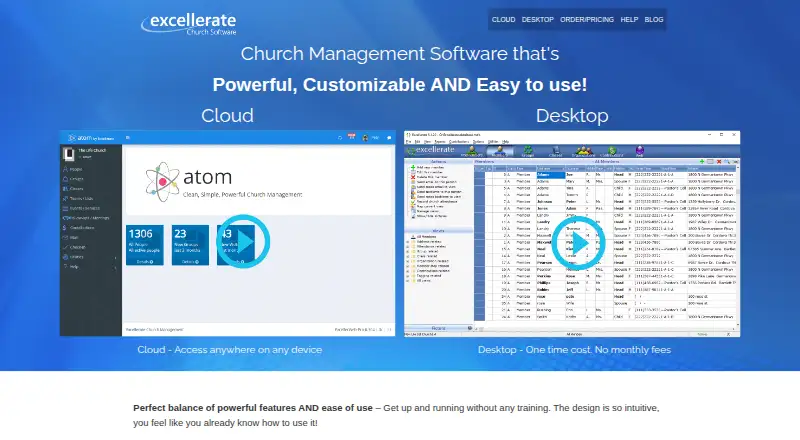
What Excellerate is
Excellerate is church management software for organizing member information, attendance, giving, groups, and visitor follow-up. Member and family records can track profile details, visits, meetings, attendance, and small-group involvement. Visitor tools assign follow-up, record results and feedback, and report on retention and assimilation. Groups and classes include attendance tracking, online leader reporting, and growth analysis.
Contribution tools cover tithe and pledge tracking, check scanning, imports from online giving services, statements, and reporting. Check-in supports barcode, touchscreen, and attendant methods for child pickup, events, youth, and volunteers. ServePoint adds online volunteer scheduling, reminders, conflict notifications, and resource sharing. Users can customize fields, tabs, picklists, views, and reports; the support team also offers report creation.
Excellerate has desktop products and Atom cloud access. Atom supports simultaneous users on computers, tablets, and phones, with automatic backups. The desktop church management and check-in products are Windows-only and can operate without internet access; check-in can also work at remote locations without a network. Churches with fewer than 50 members can get the software for free. Listed plans include $145, paid once for desktop church management for 100 members and $50 a month for cloud management for 100 members.
Who it suits
Excellerate suits churches that need member records, attendance, giving, group management, visitor follow-up, or child check-in. Desktop users need Windows computers; Atom supports PCs, Macs, tablets, phones, and Linux devices.
What it does well
- Tracks member, family, attendance, and giving information
- Supports child, event, youth, and volunteer check-in
- Includes volunteer scheduling and reminders
- Atom provides automatic data backups
- Desktop check-in can work without internet
What to know first
- Desktop church management and check-in are Windows-only
- Desktop plan is limited to 100 members
- Free eligibility is limited to churches with fewer than 50 members
Limits
The listed Cloud Church Management and Desktop Church Management plans each cover 100 members. The Basic desktop support plan includes no upgrades; the Desktop support and upgrades plan includes support and all upgrades.
Plans
| Plan | Billed and limits | Price |
|---|---|---|
| Desktop check-in add-on | one-time add-on · Windows desktop check-in module | $145, paid once |
| Desktop solution (100 members) | one-time software payment · Windows installation · 100-member level | $145, paid once |
| Desktop Church Management (100 members) | 100 members · Windows computers | $145, paid once |
| Multiple-computer desktop option | one-time option · multiple computers on church network | $245, paid once |
| TrustRadius Basic cloud plan | monthly · cloud deployment | $49 a month |
| Basic desktop support | $49 quarterly · Basic support · No upgrades | $49 a year |
| Cloud solution (100 members) | monthly · cloud church management · check-in included · accessible on any device | $50 a month |
| Cloud Church Management (100 members) | monthly · 100 members · Check-In and support included | $50 a month |
The first 8 of 9 plans, as excellerate.com lists them, read 15 Oct 2026. The maker's own page has the final word. Every plan
Getting started
- Visit https://www.excellerate.com/.
- Choose between desktop church management and Atom cloud access.
- Select a plan, or check free eligibility if your church has fewer than 50 members.
- For desktop use, install on a Windows computer.
- For Atom, access it from a computer, tablet, or phone.
Verdict
Excellerate covers church records, contributions, groups, visitor follow-up, and check-in, with desktop and Atom cloud options. The main choice is between Windows-only desktop products and cloud access, with listed plans for up to 100 members.
Questions
Does Excellerate have a free plan?
Yes. A maker article says churches with fewer than 50 members can get the software for free.
What do the listed plans cost?
Basic desktop support is $49 a year; Cloud Church Management (100 members) is $50 a month; Desktop support and upgrades is $89 a year; Desktop Church Management (100 members) is $145, paid once.
Which platforms can I use?
The listed platforms are Android, iOS, Linux, macOS, web, and Windows. The maker says Excellerate Cloud works on PCs, Macs, iPads, iPhones, Android phones and tablets, and Linux devices; desktop church management and check-in are Windows-only.
Can the desktop products work without internet?
The desktop version does not require internet access. Check-in can also operate without internet and at remote locations without a network.
What integrations are listed for contribution imports?
The maker lists PushPay, Tithely, Planning Center, Clover, PayPal, Stripe, and Givelify-SK for Atom.
Is there a free trial or refund policy?
There is no free trial. The maker offers up to 90 days to return the software for a full refund if the customer is not satisfied.
Facts from Excellerate's own pages
- API and SDKs
- The opened manual documents file-based web integration and SQL customization but does not describe a public REST API or SDK. · excellerate.com, 15 Oct 2026
- Backup
- The desktop utility makes one-time backups to a chosen drive or Dropbox folder, so administrators are instructed to run backups periodically. · excellerate.com, 15 Oct 2026
- Check-in
- Check-in supports barcode express, touchscreen and attendant modes plus child pickup security, room assignment, labels and offline operation. · excellerate.com, 15 Oct 2026
- Check-in offline use
- The check-in system can operate without internet access and at remote locations without a network. · excellerate.com, 8 Oct 2026
- Classes
- Class features support signups, multi-session classes, attendance and reports showing people who have not taken a class. · excellerate.com, 15 Oct 2026
- Cloud access and backups
- Atom supports access from computers, tablets, and phones, simultaneous users, and automatic data backups. · excellerate.com, 8 Oct 2026
- Company founded
- Independent company data lists Micro System Design's Excellerate business as founded in 1989. · ecfa.org, 15 Oct 2026
- Company headquarters
- Company-directory data places Micro System Design in Cordova, Tennessee. · cbinsights.com, 15 Oct 2026
- Company size
- A 2017 industry directory listed a two-person team for Micro System Design. · ecfa.org, 15 Oct 2026
- Contributions
- The contribution module tracks tithes, pledges, funds, check scans, online-giving imports, statements and unlimited contribution reports. · excellerate.com, 15 Oct 2026
- Customization
- Administrators can add fields, tabs, views, queries, picklists and reports, and can rename modules to fit church terminology. · excellerate.com, 15 Oct 2026
- Customization and reports
- Users can customize fields, tabs, picklists, views, and reports, and the support team offers to create reports. · excellerate.com, 8 Oct 2026
- Data formats
- The desktop product uses Microsoft Access MDB databases, CFG files, QR report styles and a Pictures directory. · excellerate.com, 15 Oct 2026
- Deployment
- The vendor offers a cloud edition with simultaneous multi-user access and a locally installed desktop edition. · excellerate.com, 15 Oct 2026
- Desktop requirements
- The order page describes the desktop church management and check-in products as Windows-only, and the desktop version does not require internet access. · excellerate.com, 8 Oct 2026
- Free eligibility
- A maker article says churches with fewer than 50 members can get the software for free. · excellerate.com, 8 Oct 2026
- Giving
- Contribution tools include tithe and pledge tracking, check scanning, imports from online giving services, statements, and reporting. · excellerate.com, 8 Oct 2026
- Groups and classes
- It supports small groups, classes, attendance, online leader reporting, and group growth analysis. · excellerate.com, 8 Oct 2026
- Integrations
- The maker lists contribution imports for services including PushPay, Tithely, Planning Center, Clover, PayPal, Stripe, and Givelify-SK for Atom. · excellerate.com, 8 Oct 2026
- License
- The manual grants a non-exclusive proprietary license; single-user licenses cover one machine and multi-user licenses cover copies within the purchasing organization. · excellerate.com, 15 Oct 2026
- Limit: advanced needs
- The Lead Pastor review says large churches, mobile-dependent teams and organizations needing complex analytics or extensive integrations may find the product restrictive. · theleadpastor.com, 15 Oct 2026
- Limit: desktop access
- A reviewer noted the desktop edition was not accessible from home, while another wished it were web-based. · capterra.ca, 15 Oct 2026
- Limit: donation entry
- A Capterra reviewer says entering donation batches takes more mouse work and time than desired. · capterra.ca, 15 Oct 2026
- Limit: setup
- A reviewer reported that check-in setup was time-consuming and required several support calls. · capterra.ca, 15 Oct 2026
Where Excellerate stands on Freedom251
- Church Check-In Software#5 of 42
- Church Management Software#6 of 38
- Church Scheduling Software#7 of 43